/ De-Esser / DeEsser
Waves

DeEsser

5.0 (3 Reviews)
$27.99 $99.00

71% off until Dec 07

Waves DeEsser
Waves DeEsser
Waves DeEsser
Waves DeEsser gallery thumbnail
Buy Now
Product information

DeEsser

Remove or Reduce Harsh Vocal “S” Sounds Easily

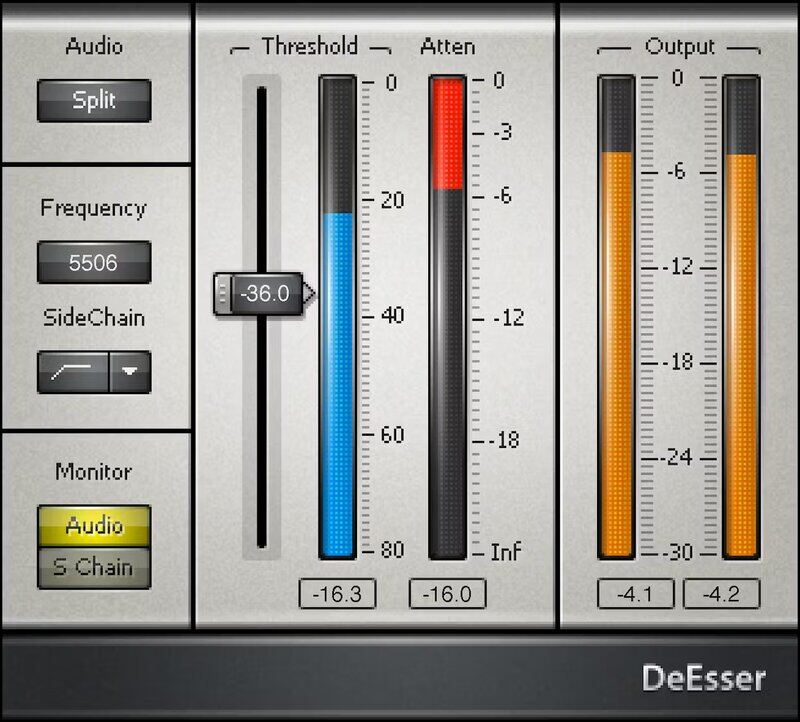
Inspired by the vintage gear used for precision de-essing and high-frequency limiting, DeEsser tames “ess” and “shh” sounds. As recordings boost high frequencies for greater intelligibility with narration, audiobooks, vocals, and podcasts, de-essing is now more important than ever.

However, de-essing isn’t only about voice. DeEsser’s gentle de-essing action can reduce amp sim harshness, tame cymbals in drum loops, sweeten the sound of digital synthesizers, and more.

Features

  • Preview what’s removed, to home in on ess and shh sounds
  • Fast, efficient user interface simplifies de-essing
  • Vary the range from 2kHz to 16 kHz to suppress high frequencies
  • Presets for male and female voice, as well as full mixes
  • Wideband or split modes focus the de-essing as needed
  • Choose bandpass or highpass filter for the sidechain

System Requirements

Mac

  • macOS Monterey 12, Ventura 13, Sonoma 14, Sequoia 15
  • VST / AU / AAX

PC

  • Windows 10+
  • VST / AAX
Installation Instructions

1. Head to https://www.waves.com/create-account

2. Enter your email and choose a password to create an account (if you already have a Waves account, choose Log in, enter your details and head to Step 5) > click 'Submit'

3. Open your email inbox > click the activation link in the email from Waves

4. Click 'Log in here' > Log in to your Waves account

5. Click 'Register New Products'

6. Enter the Serial Number found in your Plugin Boutique user account > click 'Submit'

7. Click download in your Plugin Boutique user account or head to https://www.waves.com/downloads/central > download the Waves Central app for your operating system

8. Install Waves Central > Open Waves Central

9. Click 'Log in' > enter your log in details

10. Click the 'Install Products' tab

11. Tick the blue dot on all products you wish to install or click the top dot to install all products > click 'Install & Activate'

12. Click 'OK'

13. Open your DAW > open the Waves plugin

Your Waves plugins are installed and ready to use, enjoy!

Plugin Boutique Rewards

Discover the most rewarding loyalty programme among all plugin retailers.

  • Free Loopmasters Samplepacks
  • Discounts on products and courses
  • Extra Virtual Cash claimed immediately at checkout
Find out more

Follow us:

X (Twitter) Facebook YouTube Instagram
Logo Logo

Plugin Boutique Limited, Part of the Beatport Group LLC.

Copyright © 2011-2025 Plugin Boutique. All rights reserved