


 Log In

Free gifts available with your purchase
Meet Your Master
Instant Dynamic Control
Must-have dynamics effect. Enhance attack, control mix presence, fix problem recordings — the secret spice in your mix.
The Magic Wand of Dynamics Processors
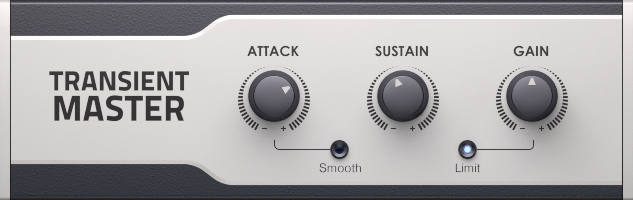
Based on a studio favorite, TRANSIENT MASTER is a must-have dynamics effect — uniquely powerful, deceptively simple and extremely useful. It's the go-to tool for positioning drums and percussion, letting you mix from front to back and dial-in just the right amount of space.
TRANSIENT MASTER is also a mix-fix for problematic recordings and with only three knobs — Attack, Sustain and Gain — it’s quick and easy to use. Shape your sound, and make TRANSIENT MASTER the secret spice in your mix.
TRANSIENT MASTER runs as a stand-alone plug-in within your host software.
For Drums and Percussion
TRANSIENT MASTER can make radical changes to a sound, or just add subtleties. Fine-tune both Attack and Sustain to get exactly the right sound for your beats.
Raise the Attack for assertive kicks and crisp snares, or apply TRANSIENT MASTER to the whole drum group for added punch and definition. Reduce Attack to calm things down — on a hissing hi-hat, for example. The sound becomes less aggressive, and blends further back into the overall mix.
'Sustain' controls room sound and space. Make snares ring out or add depth to the whole drum group by raising Sustain. Reduce Sustain to tighten things up or kill long reverb tails.
For Guitars and Other Instruments
TRANSIENT MASTER is great on any instrument with intrinsic attack. If a guitar track has too much pick sound, apply TRANSIENT MASTER and reduce the Attack. To liven things up, raise the Attack — the additional bite at the onset of each note adds presence.
Use 'Sustain' to correct room sound on recordings. For a guitar track with muddy reverb, apply TRANSIENT MASTER and lower the Sustain to choke the reverb. Add subtle Attack, and your guitar is now crisp, lively, and sitting at the front of your mix.
TRANSIENT MASTER can even put life back into pre-processed, over-compressed tracks. When nothing else works, TRANSIENT MASTER can provide an instant mix-fix at the turn of a dial.
For Mixing
TRANSIENT MASTER is indispensible for mixing drums, guitars, pianos, plucked strings — anything with intrinsic attack. It gives you another axis to work on. As well as panning left and right, you can position things quite precisely at the front or back of a mix without juggling volume levels.
Generally, more Attack and less Sustain brings a sound to the front; less Attack and more Sustain blends a sound into the background. Even before EQ, you can effectively 'stack' sounds according to the priorities of a particular mix.
How It Works
Transients are non-tonal material at the onset of a sound. The Attack control emphasizes or de-emphasizes transients, making a sound more or less lively without affecting the overall level. The Sustain control cuts or lengthens the sustain part of a sound.
TRANSIENT MASTER effectively re-shapes the envelope, affecting the sound at its source. Engineers agree that this 're-shaping' delivers particularly natural and musical results — and it's quick and easy to get there, thanks to the simple, three-knob design. Try TRANSIENT MASTER, and you'll wonder how you ever managed without it.
Features
- Bring sounds from the back of the mix to the front
- Enhance attack on drums and percussion
- Fix muddy recordings, or reduce reverb
System Requirements
- macOS 11, 12 or 13 (latest update)
- Windows 10 or 11 (64-bit, latest Service Pack)
- Intel Core i5 or equivalent AMD CPU, 4 GB RAM (6 GB recommended)
- Apple Silicon Mac (native mode or using Rosetta 2)
- An Internet connection and a graphics card that supports OpenGL 2.1 or higher are required to download and activate this product. Once installed and activated, the product can be used offline.
- Windows (64-bit only): VST, VST3, AAX
- Mac OS X (64-bit only): VST, VST3, AU, AAX


