


 Log In

Free gifts available with your purchase

All Gain. No Pain.
Whether you’re mixing live sound, smoothing vocals or balancing solo instruments, Outlaw is the gain-riding plugin you’ve been looking for. Outlaw listens to the incoming audio and compensates for volume changes, mimicking the mixing desk fader movement of a real-life audio engineer. Forget about drawing complex volume automation and let Outlaw do the hard work for you, with smooth gain levelling and a wealth of features.
Mix, Target, Gate & Gain
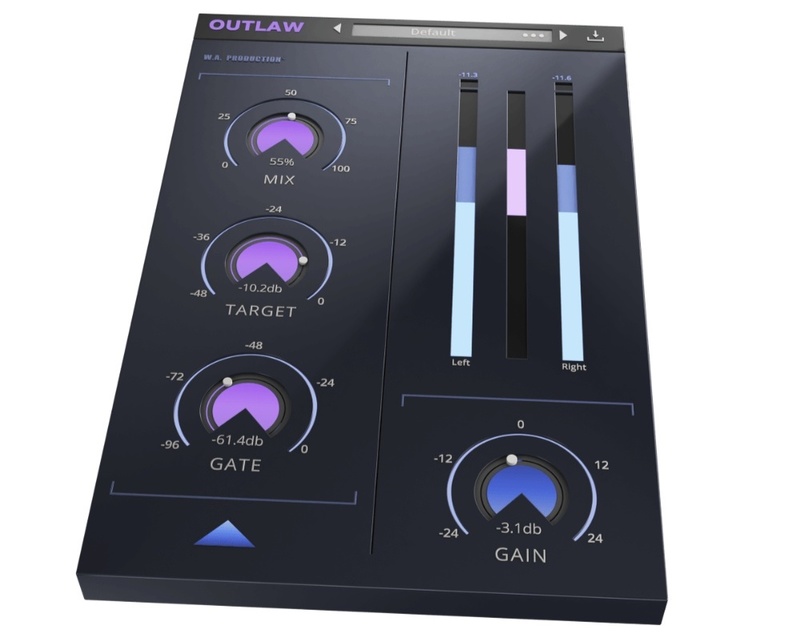
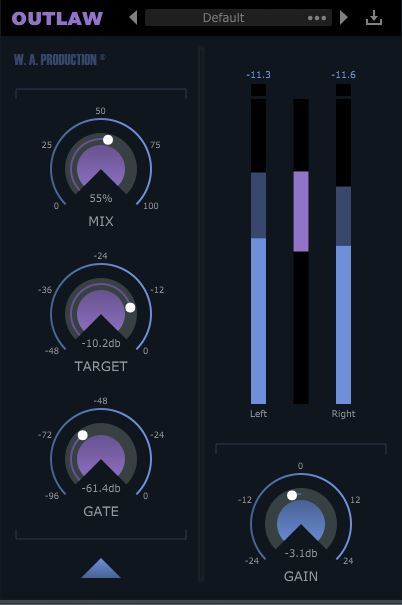
These 4 main dials give you flexible control over the fundamental parameters of Outlaw, meaning that it’s easy to make broad-stroke adjustments to the performance of the plugin. Adjust the intensity of the effect with the MIX dial and set the RMS target level with the TARGET dial. Use the GATE control to set a relative level so that the gain-rider ignores softer sounds. The master output is controlled by the GAIN dial, very useful for setting accurate levels for precise A/B signal comparison.
Advanced Settings
Fine-tune the gain algorithm with advanced settings, accessible from a secondary panel. Outlaw can perform in band-pass mode with high-pass and low-pass filters and 4 different slope settings. For example, this means you can perform effective gain-riding on audio with a low rumble, high-hat bleed or other problematic frequency information.
The Attack and Release options let you mould the transients and sustains of the processed audio to create a smoother signal. The Direction parameter can be set to control the attack and release direction, operating upwards, downwards or in both directions. Maximum values can be set to adjust the intensity of the gain-riding. A variety of RMS options determine how quickly Outlaw reacts to the incoming signal another way to help smooth or sharpen the response.
Visual Feedback
See exactly what Outlaw is doing to the signal at a glance, with the large visual feedback display. This displays Peak and RMS volume for both left and right channels, and the amount of gain-riding in the centre.
Made for Everyone
Developed in the JUCE framework, this is our most stable plugin to date running happily in all plugin formats for Mac and PC with support for retina and high definition screens. For the first time, AAX / ProTools format is included so all producers using any system can enjoy this versatile plugin. Outlaw is the kind of toolbox plugin that you’ll reach for every time you need to create balanced dynamics with a “human touch”. Make it the first plugin on your channel for live guitars, vocals, bass and drums, or anything that needs the smooth touch of a sympathetic virtual engineer. W. A. Production are real-life producers making creative plugins to help you achieve studio-quality processing quickly and easily. Enjoy!
Features
- Mix: mixes is the gain riding.
- Target: sets the RMS target of the gain-rider.
- Gate: allows the user to set a gate-level that is relative to the TARGET level, to have the gain-rider ignore softer sounds.
- HPF/LPF/Slope: Let you filter away the highs and lows in the detection signal with variable slopes so you can, for example, ignore the low rumble in a speech or vocal recording, or ignore the high attack and finger noises of a bass recording.
- Attack/Release/Direction: Let you apply additional attack and release to the gain-riding so you can let through the signals peaks or smooth out the signals tails. With the DIRECTION control, you can set the direction of the ATTACK and RELEASE which is helpful depending on if the general gain produced is upwards, downwards or goes in two directions.
- Max Up/Max Down/Instant/Zero/RMS: The MAX UP and MAX DOWN let you set the maximum gain that is applied up and down, which gives you more control over how extreme the gain-riding is allowed to be. Low values sound subtle. High values sound erratic. The RMS control lets you pick between slow, medium or fast RMS-detection, which determines how quickly the plugin reacts to the incoming signal. The INSTANT option is very fast and ZERO has 0ms RMS time.
- Resizable user interface.
System Requirements
- VST Windows 8 or later (32 / 64-bit)
- VST / AU macOS 10.13 and later (64-bit only) (Apple Silicon Supported)
Please Note: AAX format requires Pro Tools 11 or higher.
Important note for Mac Apple Silicon users: Before purchasing, please review the current compatibility status of this plugin on your system here.
Important note: When accessing this software via a Rent to Own plan or the Beatport Studio membership, it's installed and run through the Beatport Access portal. An internet connection is required every 30 days to validate your license.
Austin Leeds
DJ / Producer
"Outlaw is an awesome new plug in! It is great to use on vocals and other live instrument tracks to help balance and give dynamics to your mixes."
The Samplecast
Weekly podcast & YouTube show for software reviews.
"One of the smoothest gain-riders I've ever heard."
Evix
DJ / Producer
"Outlaw makes it so much easier to maintain the levels of vocals and instruments in my tracks. Saves me the time and effort of fixing them manually. Awesome plugin!"
Reviews Summary
While it aims to provide a helpful overview, it may not capture every perspective or detail. We encourage you to read individual reviews to make an informed decision.
Overall, customers praise the plugin for its simplicity, straightforward workflow, and great value for money. It is widely appreciated for vocal leveling and gain riding, making it especially useful for beginners. While the majority of users are very satisfied with its ease of use and performance, a few consider it basic or merely adequate rather than an essential professional tool.


