Buy KorgCorrosion, get a free gift with purchase:
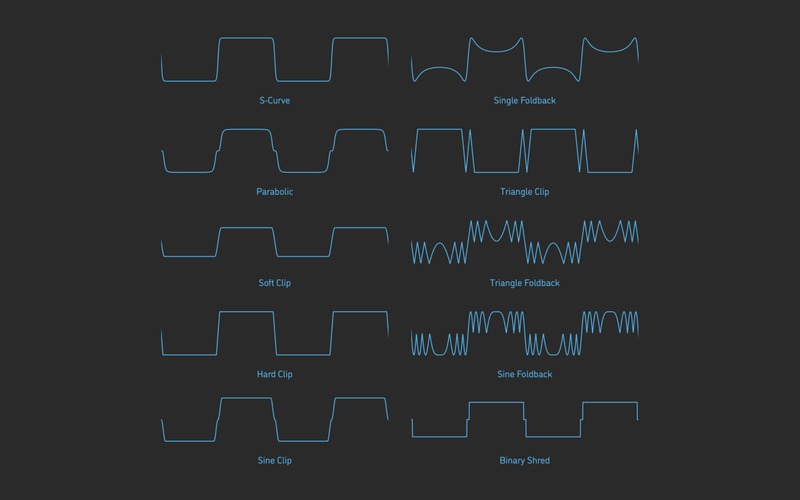
Corrosion is a multi-algorithm distortion plugin for KORG prologue, minilogue xd and NTS-1. It features a total of 10 different distortion types such as saturation, clipping, wave folding, waveshaping, and more. Each of these algorithms affects the input signal in its own unique way – dramatically enriching its spectrum and emphasizing the smallest fluctuations in its waveform. This plugin is built using 2x oversampling to reduce aliasing, for a cleaner high-frequency response. It also includes self-levelling output gain and an input gate envelope for eliminating static analog noise.
This plugin is part of the Sinveibes KorgFX Collection.
Features
- Studio-grade DSP algorithms, calibrated specifically for KORG’s hardware platform.
- Individually chosen mapping for every plugin parameter, providing a very natural feel.
- Built-in lag filters for noise-free, ultra-smooth parameter adjustment.
- Optimized for maximum performance and stability on each individual device type.
System Requirements
- Korg Prologue
- Korg Minilogue XD
- Korg Nu:Tekt NTS-1
Important Note: This product is a plugin for Korg Prologue, Korg Minilogue XD and Korg Nu:Tekt NTS-1. It is only compatible with these hardware synthesizers.
Before You Start ⚠️
In order for the effect plugins to function correctly, you must make sure that your Korg synthesizer has the latest available firmware update and that after installing it you also perform the panel update and voice update procedures.
If you install the firmware update but do not complete the panel and the voice updates, this can negatively affect other aspects of your instrument’s operation, not just compatibility with third-party plugins. When you power your synthesizer on, the main screen will warn you if such additional updates are required. Please refer to your Korg product's user manual for how to check the firmware version installed on your synthesizer - and visit www.korg.com to download the latest version. The download package will also contain the instructions for doing the panel and voice updates.
Plugin Installation
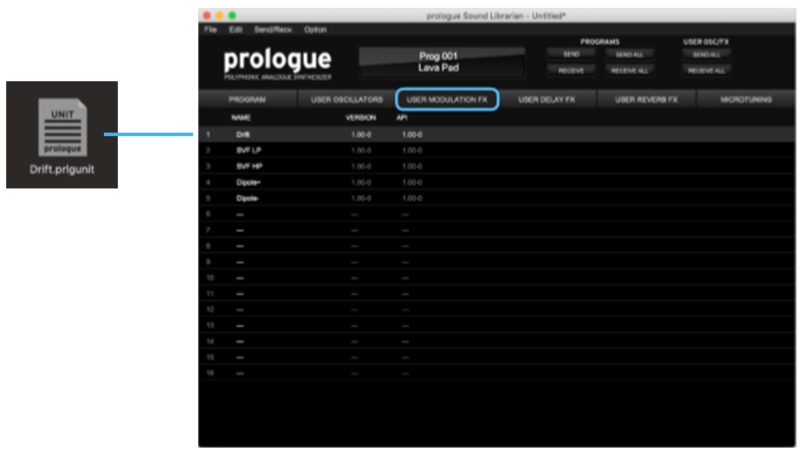
1. Download the .zip file from within your Plugin Boutique User Account > Double-click it to extract the contents.
2. Connect your Korg synthesizer to your computer via MIDI or USB-MIDI and launch the Librarian app.
3. Switch to the tab according to the target plugin group:
- USER MODULATION FX
- USER DELAY FX
- USER REVERB FX
4. Drag and drop the plugin file onto the slot where you would like to install it.

5. Press the SEND ALL button in the USER OSC/FX toolbar section.
Your Korg FX Plugin is now installed and ready to use within your Korg Synthesizer.