


 Log In

Free gifts available with your purchase
LVL-01 – Revision B
Note: Owners of LVL-01 who purchased before July 17th 2023 can obtain LVL-01B for free. Please email support@pluginboutique.com with your proof of purchase to redeem.
The LVL01- Revision B is made by reconfiguring the physical hardware, drawing inspiration from the STA-Level with its notable GE-6386 Tubes.
What Does it Do?
Designed for more compression and less distortion, this plugin is perfect for your Drums, Loops, Breakbeats, Bass, Guitars, and Synths.
Its machine learning algorithms are able to provide a more accurate emulation than circuit model technology, resulting in a more “analog” sound.
Punchy, Thick, and Crunchy!
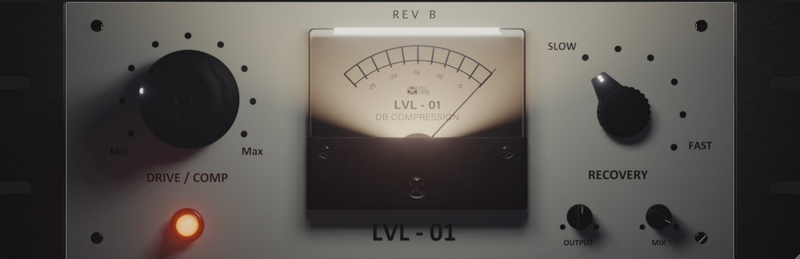
The plugin offers 6 recovery times, a Drive/ Compressor control, and a fully scalable GUI.
Features
- Actual Unique Custom Compressor Sampled via Machine Learning.
- 6 Recovery times from Slow to Fast.
- Drive/ Compression Characteristics - Vari-Mu Style (6386 tubes)
- Output Gain Trim Control.
- Mix control for wet/ dry signal mix.
- Fully resizable GUI interface.
- Comes with a set of professional presets.
- Auto-Gain Compensation built in.
System Requirements
Mac
- macOS 10.13 or later (Intel / Native M1 supported) (64-bit only)
- VST3, AU, or AAX
- Intel i3 / AMD Ryzen or equivalent
- 2 GB RAM / 300 MB HD Required
- Screen resolution - 1024 × 768
Note: M1 Mac users running Logic Pro (10.7.2 and above) or Ableton (11.1) please use the 'M1' installer. For all other DAWs please use the regular 'Mac' installer.
Windows
- Windows 10 or later (64-bit only)
- VST3 or AAX
- Intel i3 / AMD Ryzen or equivalent
- 2 GB RAM / 300 MB HD
- Screen resolution - 1024 × 768













