/ Compressor / Abbey Road RS124 Compressor
Waves

Abbey Road RS124 Compressor

5.0 (2 Reviews)
$29.99 $149.00

79% off until Dec 07

Waves Abbey Road RS124 Compressor
Waves Abbey Road RS124 Compressor gallery thumbnail
Buy Now
Product information

Abbey Road RS124 Compressor
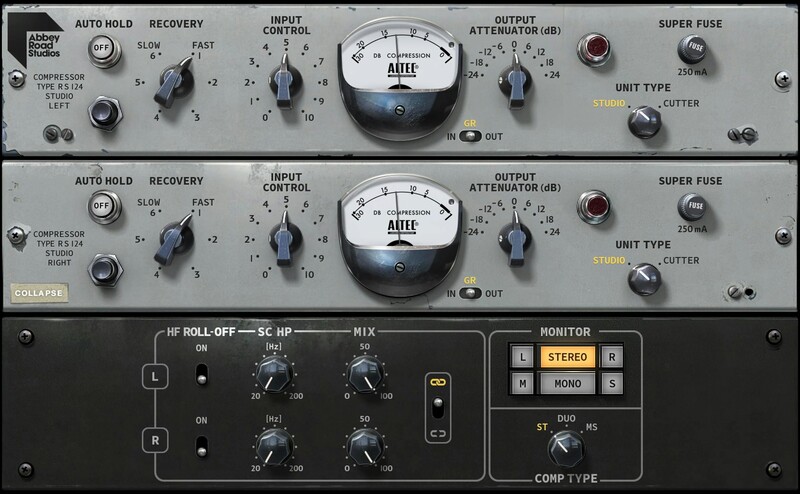
The Holy Grail of Vintage Smooth Compressors

You've heard the original units on almost everything the Beatles recorded at Abbey Road. You've heard it, most famously, on Paul McCartney’s immortal bass lines. There’s a reason why Abbey Road considered these heavily modified Altec compressors their “secret weapon.”

More recently, the RS124 sound has been a favorite of Grammy-winning mix engineer Tony Maserati, taking advantage of its unique compression tone on Beyoncé's and Alicia Keys' vocals.

Rescued from the Abbey road archives, several original RS124 units were restored to fully operational status in 2000. And now, thanks to Waves’ meticulous modeling, the RS124’s legendary sound is yours.

Features

  • Unique compression for vocals, beats, bass, synths and mix buses
  • Designed in close collaboration with Abbey Road Studios
  • Two RS124 versions with different tube flavors: Studio and Cutter
  • Super Fuse mode adds explosive, aggressive compression sound
  • Mono, stereo, left, right, mid, and sides processing and monitoring
  • Optional Auto Hold feature reduces compression artifacts
  • Sidechain highpass filter can beef up compressed bass or kick
  • Dry/mix controls for parallel, “New York style” compression
  • Optional high-frequency roll-off for softer tones
  • Presets by Beatles remixer Guy Massey and many more artists

System Requirements

Mac

  • macOS Monterey 12, Ventura 13, Sonoma 14, Sequoia 15
  • VST / AU / AAX

PC

  • Windows 10+
  • VST / AAX
Installation Instructions

1. Head to https://www.waves.com/create-account

2. Enter your email and choose a password to create an account (if you already have a Waves account, choose Log in, enter your details and head to Step 5) > click 'Submit'

3. Open your email inbox > click the activation link in the email from Waves

4. Click 'Log in here' > Log in to your Waves account

5. Click 'Register New Products'

6. Enter the Serial Number found in your Plugin Boutique user account > click 'Submit'

7. Click download in your Plugin Boutique user account or head to https://www.waves.com/downloads/central > download the Waves Central app for your operating system

8. Install Waves Central > Open Waves Central

9. Click 'Log in' > enter your log in details

10. Click the 'Install Products' tab

11. Tick the blue dot on all products you wish to install or click the top dot to install all products > click 'Install & Activate'

12. Click 'OK'

13. Open your DAW > open the Waves plugin

Your Waves plugins are installed and ready to use, enjoy!

Plugin Boutique Rewards

Discover the most rewarding loyalty programme among all plugin retailers.

  • Free Loopmasters Samplepacks
  • Discounts on products and courses
  • Extra Virtual Cash claimed immediately at checkout
Find out more

Follow us:

X (Twitter) Facebook YouTube Instagram
Logo Logo

Plugin Boutique Limited, Part of the Beatport Group LLC.

Copyright © 2011-2025 Plugin Boutique. All rights reserved










