/ Compressor / V-Comp
Waves

V-Comp

4.0 (1 Reviews)
$27.99 $149.00

81% off until Dec 07

Waves V-Comp
Waves V-Comp
Waves V-Comp
Waves V-Comp gallery thumbnail
Buy Now
Product information

V-Comp

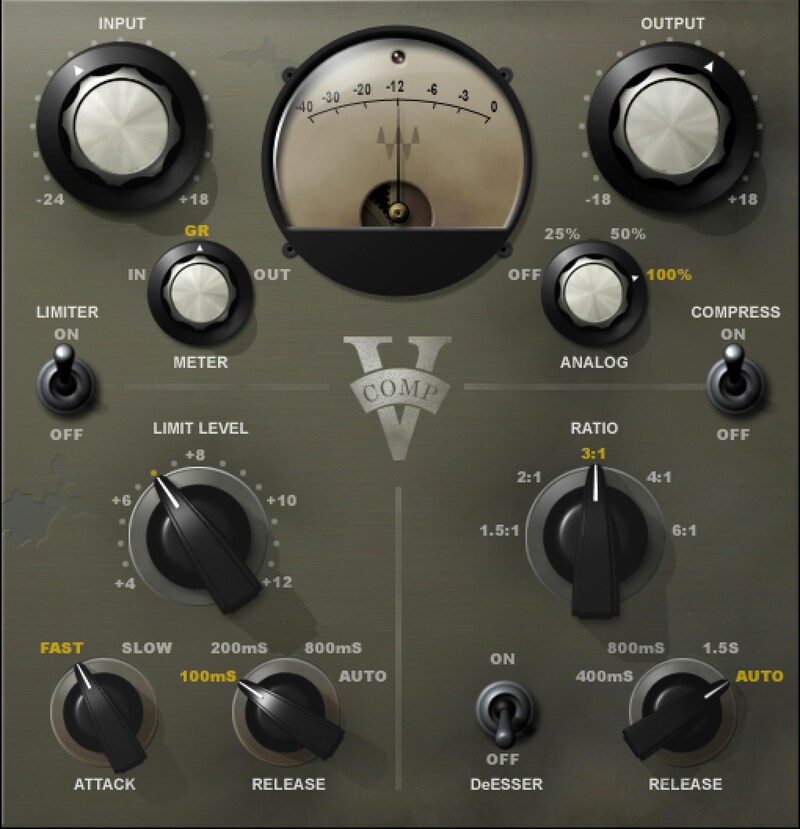
The Unique Analog Sound of Neve-Style Diode-Bridge Compression

Introduced in 1969, the 2254 compressor had an unmistakably fat, textured sound. No opto, no FET, no VCA: The V-Comp models the 2254’s diode-bridge gain technology and triple-transformer design, at the component level, to deliver the richest bus compressor/limiter sound used in the 60s and 70s.

In addition to classic compression, even with dynamics turned off, V-Comp adds the inimitable personality of analog processing—and coats your digital audio with a veneer of yesterday’s mojo.

Features

  • Compressor and limiter, faithful to the 2254 bus processor
  • Models the thick, rich, textured sound of three audio transformers
  • Four analog characters, even with compression off
  • Switchable option to turn the compressor into a de-esser
  • Straightforward operation makes it easy to dial in the right sound
  • 37 presets from world-class mixing engineers

System Requirements

Mac

  • macOS Monterey 12, Ventura 13, Sonoma 14, Sequoia 15
  • VST / AU / AAX

PC

  • Windows 10+
  • VST / AAX
Installation Instructions

1. Head to https://www.waves.com/create-account

2. Enter your email and choose a password to create an account (if you already have a Waves account, choose Log in, enter your details and head to Step 5) > click 'Submit'

3. Open your email inbox > click the activation link in the email from Waves

4. Click 'Log in here' > Log in to your Waves account

5. Click 'Register New Products'

6. Enter the Serial Number found in your Plugin Boutique user account > click 'Submit'

7. Click download in your Plugin Boutique user account or head to https://www.waves.com/downloads/central > download the Waves Central app for your operating system

8. Install Waves Central > Open Waves Central

9. Click 'Log in' > enter your log in details

10. Click the 'Install Products' tab

11. Tick the blue dot on all products you wish to install or click the top dot to install all products > click 'Install & Activate'

12. Click 'OK'

13. Open your DAW > open the Waves plugin

Your Waves plugins are installed and ready to use, enjoy!

Plugin Boutique Rewards

Discover the most rewarding loyalty programme among all plugin retailers.

  • Free Loopmasters Samplepacks
  • Discounts on products and courses
  • Extra Virtual Cash claimed immediately at checkout
Find out more

Follow us:

X (Twitter) Facebook YouTube Instagram
Logo Logo

Plugin Boutique Limited, Part of the Beatport Group LLC.

Copyright © 2011-2025 Plugin Boutique. All rights reserved