/ Compressor / CLA-3A Compressor / Limiter
Waves

CLA-3A Compressor / Limiter

4.0 (1 Reviews)
$29.99 $149.00

79% off until Dec 07

Waves CLA-3A Compressor / Limiter
Waves CLA-3A Compressor / Limiter gallery thumbnail
Buy Now
Product information

CLA-3A Compressor / Limiter
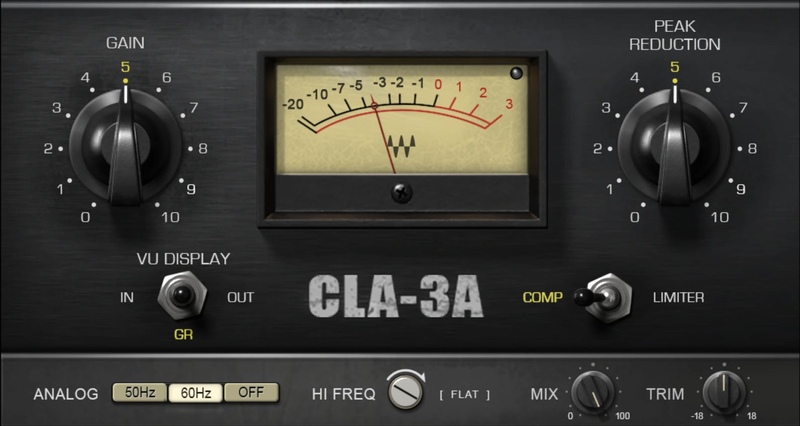
Bring Instruments Up Front with Tight, Transparent Compression

The CLA-3A combines solid-state circuitry’s fast attack with the gentle release of optical-based compression. A favorite on guitar, bass, and drums, the CLA-3A models the tight, punchy compression effect that played an important role in high-end studios of the 1970s.

Without the coloration of tubes, and only a slight hint of harmonic distortion, the CLA-3A handles high-level transients and pushes out punch—especially with midrange instruments.

Features

  • Transparent sound quality, even with significant compression
  • Solid-state design responds superbly to transients
  • Choose Limiter mode to increase instrument sustain
  • Perfect for bass, overhead drum mics, keyboards, guitar
  • Modeled from studio legend Chris Lord-Alge’s personal favorite unit
  • Includes custom presets by Chris Lord-Alge
  • Mix control for easy parallel compression
  • For extra authenticity, optionally add subtle hiss and hum
  • Trim control for quick level adjustment
  • Zero latency for mixing both in the studio and live

System Requirements

Mac

  • macOS Monterey 12, Ventura 13, Sonoma 14, Sequoia 15
  • VST / AU / AAX

PC

  • Windows 10+
  • VST / AAX
Installation Instructions

1. Head to https://www.waves.com/create-account

2. Enter your email and choose a password to create an account (if you already have a Waves account, choose Log in, enter your details and head to Step 5) > click 'Submit'

3. Open your email inbox > click the activation link in the email from Waves

4. Click 'Log in here' > Log in to your Waves account

5. Click 'Register New Products'

6. Enter the Serial Number found in your Plugin Boutique user account > click 'Submit'

7. Click download in your Plugin Boutique user account or head to https://www.waves.com/downloads/central > download the Waves Central app for your operating system

8. Install Waves Central > Open Waves Central

9. Click 'Log in' > enter your log in details

10. Click the 'Install Products' tab

11. Tick the blue dot on all products you wish to install or click the top dot to install all products > click 'Install & Activate'

12. Click 'OK'

13. Open your DAW > open the Waves plugin

Your Waves plugins are installed and ready to use, enjoy!

Plugin Boutique Rewards

Discover the most rewarding loyalty programme among all plugin retailers.

  • Free Loopmasters Samplepacks
  • Discounts on products and courses
  • Extra Virtual Cash claimed immediately at checkout
Find out more

Follow us:

X (Twitter) Facebook YouTube Instagram
Logo Logo

Plugin Boutique Limited, Part of the Beatport Group LLC.

Copyright © 2011-2025 Plugin Boutique. All rights reserved










