/ Compressor / C6 Multiband Compressor
Waves

C6 Multiband Compressor

4.4 (8 Reviews)
$29.99 $149.00

79% off until Dec 07

Waves C6 Multiband Compressor
Waves C6 Multiband Compressor gallery thumbnail
Buy Now
Product information

C6 Multiband Compressor
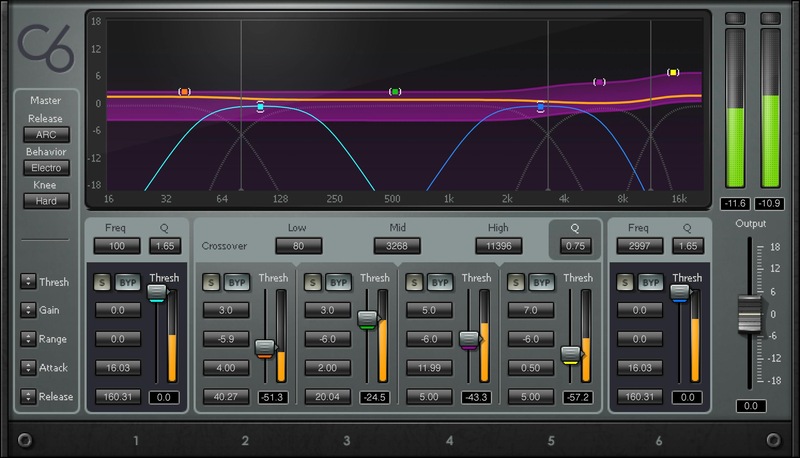
Sculpt Dynamics with Pinpoint Precision and Versatility

C6 is ideal for serious audio surgery on individual tracks and masters. Its extreme flexibility comes from 4 configurable frequency bands—and 2 additional “floating” frequency bands—that let you apply per-band compression, expansion, upward expansion, limiting, and dynamic EQ.

This refined blend of dynamics processing and EQ is optimized to shape (or repair) any audio with a wide frequency range—masters, drums, synthesizers, heavy guitar, piano, and more.

Features

  • 4 different types of powerful dynamics processing
  • 6 frequency bands provide tightly focused dynamics and EQ
  • 4 crossover frequency bands, 2 floating bands
  • Internal/external sidechain per band
  • 3 release options—smooth, fast, and automatic control
  • Analog circuitry modeling gives a warm sonic character
  • Sidechain input locks dynamics processing to other tracks
  • Customize crossover frequencies and slopes—from gentle to steep
  • Over 50 presets by top mixing engineers
  • Individual solo and bypass buttons for each band, with variable knee

System Requirements

Mac

  • macOS Monterey 12, Ventura 13, Sonoma 14, Sequoia 15
  • VST / AU / AAX

PC

  • Windows 10+
  • VST / AAX
Installation Instructions

1. Head to https://www.waves.com/create-account

2. Enter your email and choose a password to create an account (if you already have a Waves account, choose Log in, enter your details and head to Step 5) > click 'Submit'

3. Open your email inbox > click the activation link in the email from Waves

4. Click 'Log in here' > Log in to your Waves account

5. Click 'Register New Products'

6. Enter the Serial Number found in your Plugin Boutique user account > click 'Submit'

7. Click download in your Plugin Boutique user account or head to https://www.waves.com/downloads/central > download the Waves Central app for your operating system

8. Install Waves Central > Open Waves Central

9. Click 'Log in' > enter your log in details

10. Click the 'Install Products' tab

11. Tick the blue dot on all products you wish to install or click the top dot to install all products > click 'Install & Activate'

12. Click 'OK'

13. Open your DAW > open the Waves plugin

Your Waves plugins are installed and ready to use, enjoy!

Plugin Boutique Rewards

Discover the most rewarding loyalty programme among all plugin retailers.

  • Free Loopmasters Samplepacks
  • Discounts on products and courses
  • Extra Virtual Cash claimed immediately at checkout
Find out more

Follow us:

X (Twitter) Facebook YouTube Instagram
Logo Logo

Plugin Boutique Limited, Part of the Beatport Group LLC.

Copyright © 2011-2025 Plugin Boutique. All rights reserved










