Buy PSP DRC, get a free gift with purchase:
Dynamic Range Controller
PSP Audioware are thrilled to bring you PSP DRC - powerful new dynamic processor plug- in inspired by the legendary DBX 118. With a fresh perspective on the classic concept, PSP DRC offers advanced processing capabilities that are seldom found in contemporary hardware or software, making it an essential tool for modern music production.
While the PSP DRC draws inspiration from the DBX 118, it is not a direct emulation of the original hardware. Instead, it reimagines and expands upon the original concept, incorporating addiponal features to enhance its utility in various audio processing scenarios. This unique approach allows users to harness both compression and expansion across the entire dynamic range of the signal. Additionally, the processor can isolate and handle signals above or below the threshold, providing a more refined level of control.
PSP DRC also introduces a complementary compressor-expander pair function, which can be achieved by setting the Ratio to 2:1 in the compressor and down to 1:2 in the expander. The inclusion of advanced side chain features and external side chain support further elevates PSP DRC’s capabilities, transforming it into a comprehensive compander system.
System Requirements
PC
- Windows 7 – Windows 11
- VST, VST 3 and AAX
- 64-bit compatible application
- The latest iLok License Manager application installed
Mac
- macOS 10.15 – macOS 15 (Apple Silicon Supported)
- VST, VST 3, AAX and AU
- 64-bit compatible application
- The latest iLok License Manager application installed

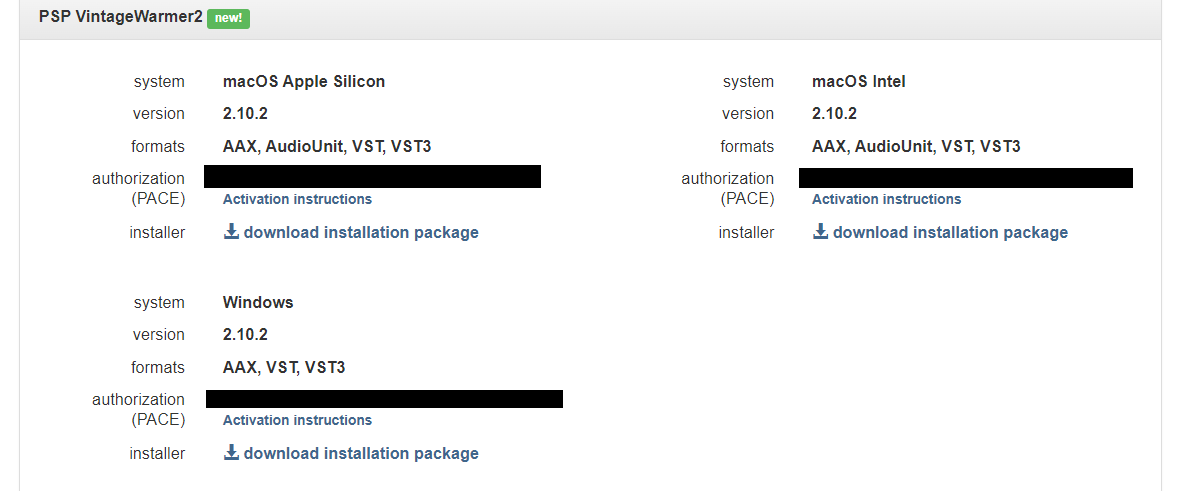
Please Note: PSP VintageWarmer2 is used as an example.
Activation
1. Visit the PSP Registration Centre and create/log into your PSPaudioware account.

2. Select the Manual Product Activation link and copy and paste/manually enter the serial number that is provided with your User Account. > click 'Activate!.'

3. Your PSP product will now show up in your PSP customer account. Your 30-digit iLok activation code will also be listed under authorization (PACE). Download the relevant installer.

iLok Registration
1. Go to the iLok website and create a new account if you are not currently registered and do not have the iLok Licence Manager installed on your computer.

2. Download and install the iLok License Manager.
3. Open your iLok license manager application > click 'Sign In'.

4. Enter your iLok registered User ID and password > click ‘Sign In'.

5. Once you are signed in, click the ‘Redeem’ icon which is located at the top-right corner of the iLok Licence Manager’s interface.

6. Copy and paste/manually enter the 30-digit code from your PSP Audioware account into the available Activation Code boxes, and then click ‘Next'.

7. Select your activation destination > Click 'Activate'.

8. Click 'Ok'.

Installation
Mac
1. Open the recently downloaded .dmg file to begin the installation.
2. Click 'Continue'.

3. Click 'Continue'.

4. Click 'Continue'.

5. Click 'Agree'.

6. Click 'Continue'.

7. Click 'Install'.

8. Click 'Close'.

9. Open your DAW > Open your newly installed software.
Your software is now activated and ready to use.

PC
1. Open the recently downloaded .exe file to begin the installation.
2. Click 'Next >'.

3. Select 'I Accept the Agreement' > Click 'Next'.

4. Click 'Next >'.

5. Click 'Next'.

6. Click 'Next'.

7. Click 'Next' to begin the installation.

8. Click 'Finish'.

9. Open your DAW > Open your newly installed software.
Your software is now activated and ready to use.