/ Compressor / PSP MicroWarmer
PSP Audioware

PSP MicroWarmer

4.7 (6 Reviews)
$25.00 $49.00

48% off until Dec 07

Main Image
Main Image
Buy Now
Product information

PSP MicroWarmer is a high-quality digital simulation of an analog-style single band limiter/tape emulator. This plug-in combines rich, warm analog-like processing with a straightforward user interface, and comes with a comprehensive library of presets. The plug-in processor is a simplified version of the VintageWarmer and it is designed to be an individual track solution or of use whenever you don’t need a full frequency control and the multi-band mode of PSP VintageWarmer. The processing engine of the PSP MicroWarmer has no sound quality compromises compared to the Single Band mode of the PSP VintageWarmer and can be used to limit the level or to add a unique density and character to individual tracks with the same excellent results.

In addition, this version has the lowest possible latency of all Warmers. Careful attention has been paid to PSP MicroWarmer's overload characteristics with the result being that this processor is capable of generating saturation effects typical of analog tape recorders. PSP MicroWarmer incorporates professional VU and PPM metering together with accurate overload indicators, thereby assuring professional results. This plug-in also provides 64-bit floating point processing for accurate mathematical precision. All of this makes PSP MicroWarmer an essential tool for mixing engineers.

Applications

  • Optimizing the ‘density’ and average signal levels of individual tracks or groups 
  • Shaping the dynamics of recordings 
  • Adding warmth to individual tracks 
  • Adding analog tape-style compression to individual tracks 

Features

  • High quality signal processing algorithms 
  • Single-band signal processing 
  • 64-bit, double precision floating point processing 
  • Shelf filters for bass and treble frequencies with constant corner frequencies optimized for track processing 
  • Accurately calibrated VU and PPM meters with the overload indicators 
  • Up to 192kHz sample rates supported 
  • Library of presets 
  • Lowest possible latency for a given “Warmer Family” algorithm 
System Requirements

PC

  • Windows 7 – Windows 11
  • VST, VST 3 and AAX
  • The latest iLok License Manager application installed 

Mac

  • macOS 10.12 – macOS 13 Ventura (Apple Silicon Supported)
  • VST, VST 3, AAX and AU
  • The latest iLok License Manager application installed 

Installation Instructions

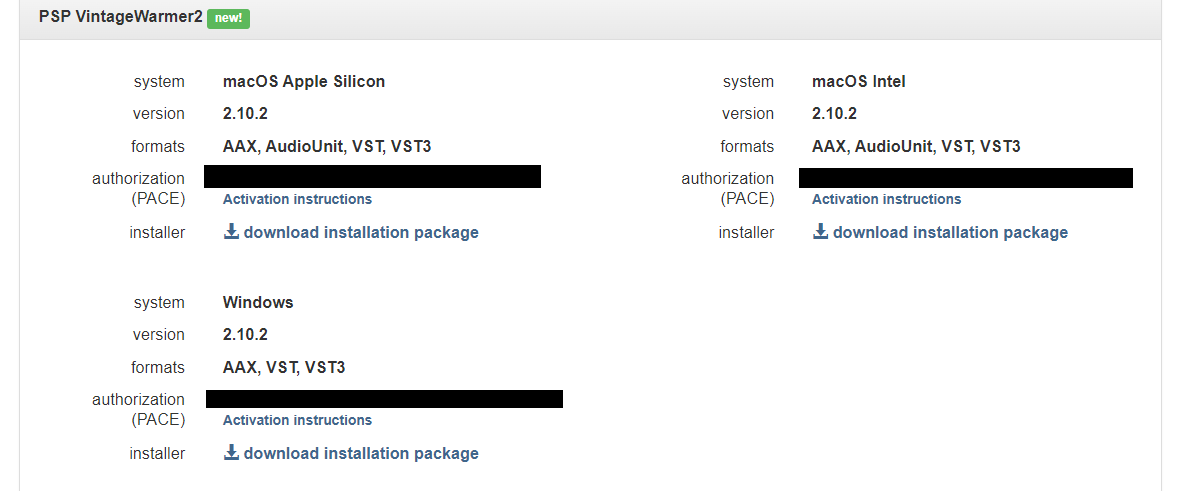
Please Note: PSP VintageWarmer2 is used as an example.

Activation

1. Visit the PSP Registration Centre and create/log into your PSPaudioware account.

2. Select the Manual Product Activation link and copy and paste/manually enter the serial number that is provided with your User Account. > click 'Activate!.'

3. Your PSP product will now show up in your PSP customer account. Your 30-digit iLok activation code will also be listed under authorization (PACE). Download the relevant installer.

iLok Registration

1. Go to the iLok website and create a new account if you are not currently registered and do not have the iLok Licence Manager installed on your computer.

2. Download and install the iLok License Manager.

3. Open your iLok license manager application > click 'Sign In'.

4. Enter your iLok registered User ID and password > click ‘Sign In'.

5. Once you are signed in, click the ‘Redeem’ icon which is located at the top-right corner of the iLok Licence Manager’s interface.

6. Copy and paste/manually enter the 30-digit code from your PSP Audioware account into the available Activation Code boxes, and then click ‘Next'.

7. Select your activation destination > Click 'Activate'.

8. Click 'Ok'.

Installation

Mac

1. Open the recently downloaded .dmg file to begin the installation.

2. Click 'Continue'.

3. Click 'Continue'.

4. Click 'Continue'.

5. Click 'Agree'.

6. Click 'Continue'.

7. Click 'Install'.

8. Click 'Close'.

9. Open your DAW > Open your newly installed software.

Your software is now activated and ready to use.

PC

1. Open the recently downloaded .exe file to begin the installation.

2. Click 'Next >'.

3. Select 'I Accept the Agreement' > Click 'Next'.

4. Click 'Next >'.

5. Click 'Next'.

6. Click 'Next'.

7. Click 'Next' to begin the installation.

8. Click 'Finish'.

9. Open your DAW > Open your newly installed software.

Your software is now activated and ready to use.

Plugin Boutique Rewards

Discover the most rewarding loyalty programme among all plugin retailers.

  • Free Loopmasters Samplepacks
  • Discounts on products and courses
  • Extra Virtual Cash claimed immediately at checkout
Find out more

Follow us:

X (Twitter) Facebook YouTube Instagram
Logo Logo

Plugin Boutique Limited, Part of the Beatport Group LLC.

Copyright © 2011-2025 Plugin Boutique. All rights reserved