


 Log In

Free gifts available with your purchase
More control, more versatility, more definition—the Drawmer 1973 plug-in lets you micro-manage the dynamics of your sound with ultimate precision. And you can do it with the unmistakable analog feel of a modern Drawmer classic.
Make your mixes wider and louder, shoehorn a piano into a dense mix, or curb the temper of an unruly bass guitar. The Drawmer 1973 Multi-Band Compressor lets you dive into the details—analog-style.
The Drawmer Sound and Softube Science Solution
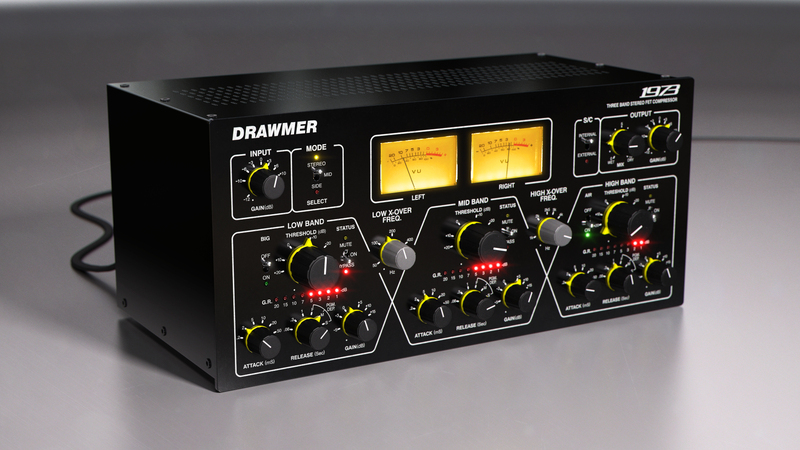
Carefully modelled on the original Drawmer 1973 hardware in collaboration with the Drawmer research and development team, and approved by Ivor Drawmer himself, the Drawmer 1973 plug-in brings the award-winning three-band compressor bang up to date.
Micro-Manage Your Dynamics
Mastering with the Drawmer 1973 gives you independent control over three frequency bands, often a miracle-cure for problem mixes. Pull out individual instruments, brighten the mix, or tighten the lows—or of course do it all! But the Drawmer 1973 is equally useful on single sound sources in a mix. Take away the boomy character of an acoustic guitar in a perfectly natural sounding manner. Control the low frequency dynamics of a bass but leave its top end alive and kicking. Or remove sharp consonant sounds from a vocal track without eliminating detail and clarity.
The Original Drawmer Hardware and Then Some!
Staying faithful to the look and sound of the original Drawmer 1973, we've added some extra up-to-date features to the plug-in, including Mid-Side processing and sidechain, giving even more versatile compression and dynamic control. So the Drawmer 1973 plug-in lets you play with the mid portion of a sound without affecting the rest of that frequency, or link the gain reduction to an external sound source.
The Drawmer 1973 has a great looking GUI echoing the look of the hardware original, is CPU friendly, and comes with useful presets to kick-start the creativity, but with enough control to add your own unique touches to any mix.
Ultra-versatile, sleek-looking, and with the sound quality of an analog classic. Designed by experts for experts: an indispensable tool for the modern studio.
Features:
- Three band FET compressor
- Gives you precise control of the sound source's dynamics
- Additional Mid-Side mode and sidechaining, not available on the original hardware
- Plug-in model approved by Drawmer
- Each and every component carefully modeled
- Presets from the Drawmer S73 are included, and more added
System Requirements
- macOS Big Sur 11, Monterey 12, Ventura 13
- Windows 10 (64-bit), Windows 11
- Softube account
- iLok account
- Computer with AU, VST, VST3, and/or AAX-compatible DAW host software
- Internet access (for downloading installers and managing licenses)
Supported CPU Families
- Apple macOS computers with Intel Core i3/i5/i7 or Apple silicon (M1 or newer) CPU. Apple silicon is supported natively.
- Windows computers with quad-core Intel Core i3/i5/i7 or AMD quad-core processors with SSE 4.2 support.
- Other Intel processors (Celeron, Pentium, and Xeon) are compatible if they support SSE 4.2 instructions.
Supported Host Software (DAW)
Any 64-bit VST, VST3, AU, or AAX (Pro Tools 11.0.2 or higher) compatible host application should work. However, due to plug-in host differences between DAWs—and our rigorous standards—Softube only officially test their plug-ins and instruments in the most recent versions of Pro Tools, Logic Pro, Cubase, Ableton Live, Studio One, and Reaper. Softube plug-ins are not tested regularly in non-listed systems. They will likely work if the system requirements are met. However, the manufacturer cannot guarantee a solution for issues in unsupported systems.
Softube strongly recommend using VST3, as some of their plug-ins have features that are not present in the older VST format. Supported sample rates: 44.1, 48, 88.2, 96, 176.4, and 192 kHz, in both mono and stereo. The most recent maintenance release of your DAW application is recommended. AAX DSP is not currently in active development. TDM/VENUE/RTAS are no longer supported. See Legacy Installers.
Important Note: Make sure that you always use the latest iLok License Manager. It is not included in the Softube installer but can be downloaded from www.ilok.com
Maor Appelbaum
Mastering Engineer (Faith No More, Yes, William Shatner, Walter Trout, Eric Gales, Rob Halford and Sepultura).
"Easy on the eyes and easy on the ears—good for adding color to troubled mixes. Has the well known Drawmer tone and workflow to it with the flexibility of what a plug-in can offer."
Kieron Clough
Product Manager, Drawmer.
"Softube nailed the 1973. When I first tried it, the first thing I thought was—that's a 1973. Ivor thinks it's great too! He's got absolutely no issues at all."
BT a.k.a Brian Transeau
The multi-talented BT has worked with the likes of Paul van Dyk, Peter Gabriel, Tori Amos, Depeche Mode, NSYNC, Sting, The Roots, Guru, Madonna, Britney Spears and Tiësto.
"It's absolutely glorious. My favorite new compressor."


