Log In

Free gifts available with your purchase
Broadcast Legend Comeback
Dream of Every Producer
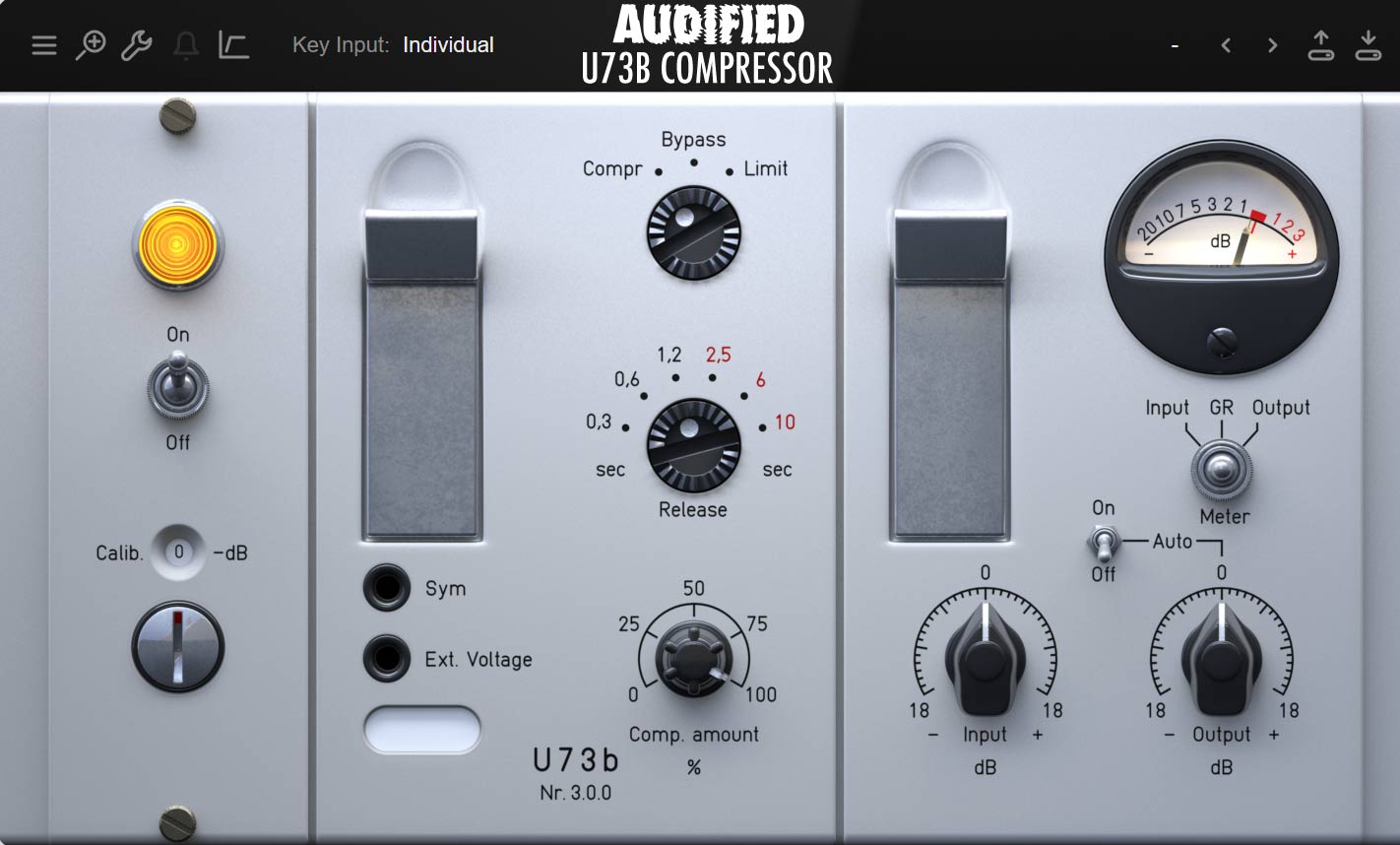
The original u73b Compressor was and still is used in many recording studios around the globe. The motivation to bring this legendary unit into the modern world is to provide this exceptional unit to a new generation of producers and audio engineers. Audified's plugin recreation captures the magic and analog character perfectly. u73b is a fantastic producer's compressor, providing inspiring sound and intuitive workflow.
Features
- Precise emulation of the legendary German broadcast compressor / limiter U73b
- Modelled tube circuit for authentic analog character and sound
- Optional automatic output level control
- Additional hi-pass filter to switch between vintage and modern sound
- External sidechain capabilities
- Three program-dependent and three fixed return times to choose from
Controls
- Compressor / Limiter Switch – Switches between Compressor, Bypass and Limiter modes. The compressor mode has a lower threshold setting and a very gentle ratio. The limiter mode provides a higher threshold setting with a higher ratio.
- Release Time - The first three positions offer fixed release time, and the other three provide adjustable release time options.
- IN - Adjust input gain before the compressor/limiter circuit
- OUT - Adjust output gain after the compressor/limiter circuit.
- Key Input - Selects the signal source used for controlling the gain reduction
- HPF - Switches between the vintage and modern sound without low frequencies bypass.
System Requirements
Mac
- macOS 10.11 - macOS 12 Monterey (Intel / M1 Apple Silicon supported) (64-bit only)
- AAX, AU, VST3
Windows
- Windows 7 - Windows 11 (32 / 64-bit)
- AAX, VST3
Awards

Dave Pensado
Grammy Award-winning mix engineer who's worked with The Pussycat Dolls, Will.i.am and many more.
"I use U73b Compressor on most of my mixes. Magic."
Craig Anderton - Guitar Player
Musician, Author, Lecturer who is known for such books as 'Electronic Projects for Musicians' & 'Home Recording for Musicians.'
"Definitely not your typical compressor."
Bjorn Thorsrud
Music Producer, Programmer and Audio Engineer who has worked with Billy Corgan, The Dandy Warhols, Marianne Faithfull, The Frogs, Monster Magnet, The Smashing Pumpkins and many more.
"The most musical compressor I've ever heard."