


 Log In

Free gifts available with your purchase
Musically Fine-tuned, Meticulously Re-created.
A highly versatile mojo machine, capable of replacing multiple plug-ins in a chain – EQ, distortion, transient designer, you name it – the Germanium Compressor is so much more than gain reduction. Engineered with an ear for music before mathematics, this is a trusty companion for producers, recording engineers, and creative musicians of all kinds.
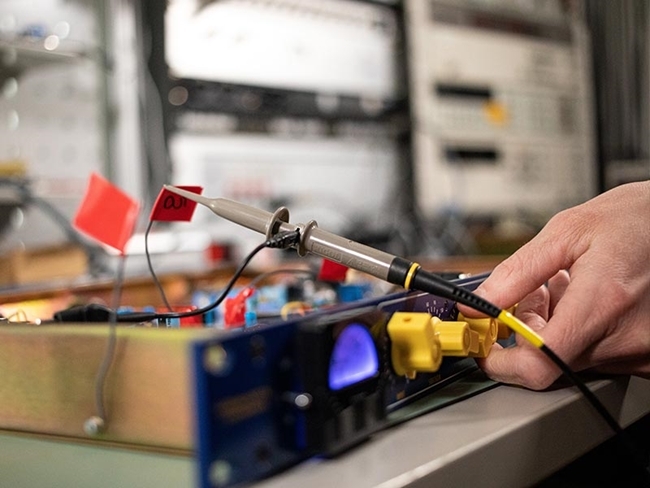
This is a meticulous model of the Chandler Limited® hardware, tested in Softube's lab to ensure it performs like the hardware does, for the same excellent sound quality and inspiring vibe.
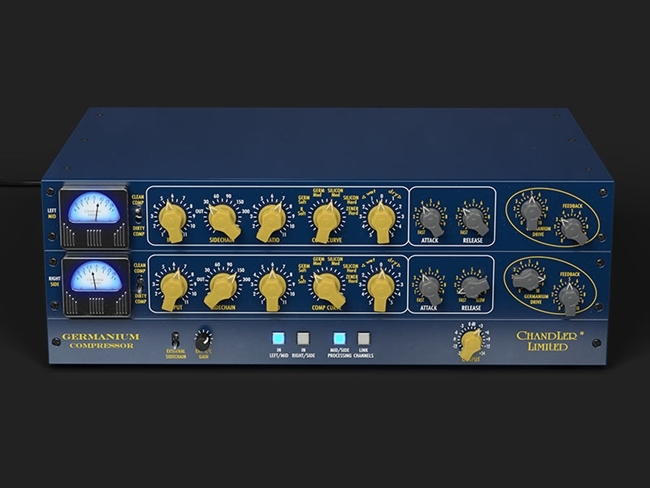
Everything in the Germanium Compressor is designed with an ear for music first. Ratios, knee settings, and more are all fine-tuned for use in the real world. The FET gain reduction unit allows for delicious distortion and colour. Control the harmonics with a choice of clean or dirty compression and multiple different diode combinations allow for a ton of styles and options.
Unique Character
The Germanium Compressor’s unique character comes from a blend of several innovative approaches. The ratio settings are tuned by ear rather than arithmetic. The dial takes you from less to more rather than fixing on especially precise numerical values. And what does it matter as long as it sounds fantastic? Knee settings are similarly artistic, named as they are after the different combinations of diodes which achieve each colour of the curve.
Clean or Dirrrty?
With a FET gain reduction element, the Germanium is capable of fast and heavily-saturating compression. So there’s a choice of clean or dirty compression, toggling between modes which compensate to varying degrees for the harmonic excitement naturally brought about by the unit. It’s never transparent, but you have a lot of control over Total Harmonic Distortion (THD) in this compressor.
And every track this thing touches will benefit from the drive and feedback on output – this is the real secret sauce. A gain circuit which can gently caress a signal as easily as it can sizzle and sear it into submission.

Punchy, Creamy... Pick Your Flavour
You also have control over the speed of operation – the attack and release times can be combined to extremely musical effect. Ease off on the attack and the Germanium Compressor becomes a punchy powerhouse for drums. Slow down the release and creamy, smooth tones can be introduced to vocals or bass. Acoustic guitar can be brightened and tightened, or rock axe heated and seated in a dense mix.
Added Fun and Features
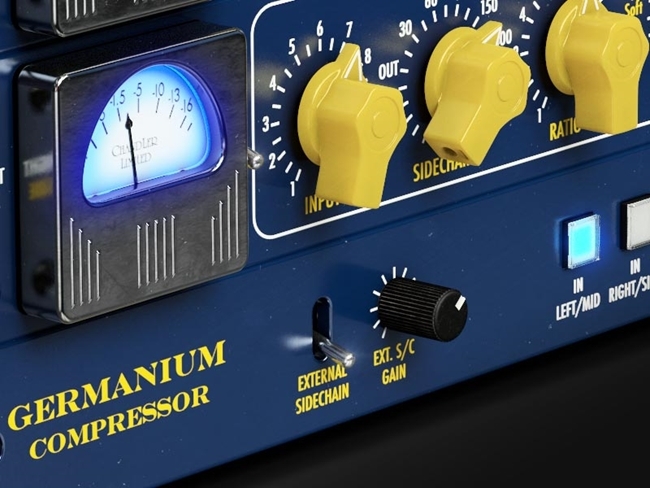
Using the Germanium in software means you can take advantage of features that are exclusive to the plug-in version: Mid/Side Processing and External Sidechain allow you to make better-sounding mixes than ever before.
All the character, the musicality, the fun of the original hardware Germanium Compressor from Chandler Limited® is right here. Whatever flavour of music you’re making, add this sound to the recipe.
Features
- A meticulous model of the Chandler Limited® Germanium Compressor that performs just like the hardware.
- Far from just a compressor, it’s a mojo, colour and character machine that almost feels like a musical instrument.
- Capable of replacing many other plug-ins used in a chain, like distortion, EQ/filter, compression, and transient designer.
- Perfect for tone shaping, sound tweaking and sound designing when tracking, producing, mixing and, in some cases, even mastering.
- Clean Comp / Dirty Comp settings with the ability to control the Total Harmonic Distortion (THD).
- Comp Curve with its unique combination of diodes.
- Attack and Release work in a musical and inspiring way, making an average drum kit go from dull and flat sounding to tight and crisp or to fat with long decay.
- Gain / Germanium Drive and Feedback give you the ability to feedback signal to the input and control the gain the distortion and tone-shaping capabilities.
- Unique tones not found in any other compressor – not only in plug-in format, but in general.
- Software-exclusive features: External Sidechain / External sidechain Gain / Mid/Side Processing / In/Out: Left/Mid | Right/Side / Output Gain.
- Console 1-ready: can be used within the Console 1 mixing ecosystem.
System Requirements
- macOS Big Sur 11, Monterey 12, Ventura 13
- Windows 10 (64-bit), Windows 11
- Softube account
- iLok account
- Computer with AU, VST, VST3, and/or AAX-compatible DAW host software
- Internet access (for downloading installers and managing licenses)
Supported CPU Families
- Apple macOS computers with Intel Core i3/i5/i7 or Apple silicon (M1 or newer) CPU. Apple silicon is supported natively.
- Windows computers with quad-core Intel Core i3/i5/i7 or AMD quad-core processors with SSE 4.2 support.
- Other Intel processors (Celeron, Pentium, and Xeon) are compatible if they support SSE 4.2 instructions.
Supported Host Software (DAW)
Any 64-bit VST, VST3, AU, or AAX (Pro Tools 11.0.2 or higher) compatible host application should work. However, due to plug-in host differences between DAWs—and our rigorous standards—Softube only officially test their plug-ins and instruments in the most recent versions of Pro Tools, Logic Pro, Cubase, Ableton Live, Studio One, and Reaper. Softube plug-ins are not tested regularly in non-listed systems. They will likely work if the system requirements are met. However, the manufacturer cannot guarantee a solution for issues in unsupported systems.
Softube strongly recommend using VST3, as some of their plug-ins have features that are not present in the older VST format. Supported sample rates: 44.1, 48, 88.2, 96, 176.4, and 192 kHz, in both mono and stereo. The most recent maintenance release of your DAW application is recommended. AAX DSP is not currently in active development. TDM/VENUE/RTAS are no longer supported. See Legacy Installers.
Important Note: Make sure that you always use the latest iLok License Manager. It is not included in the Softube installer but can be downloaded from www.ilok.com
Reviews Summary
While it aims to provide a helpful overview, it may not capture every perspective or detail. We encourage you to read individual reviews to make an informed decision.
Reviewers widely praise the Softube Germanium Compressor for its exceptional, unique tone, noting that it imparts warmth, punch, color, and smooth saturation across various instruments and master mixes. While considered a bit expensive and having a steeper learning curve that can make it tricky to dial in, users agree it delivers high-end results once mastered.


