/ Limiter / L1 Ultramaximizer
Waves

L1 Ultramaximizer

4.8 (5 Reviews)
$24.99 $99.00

74% off until Dec 07

Waves L1 Ultramaximizer
Waves L1 Ultramaximizer gallery thumbnail
Buy Now
Product information

L1 Ultramaximizer

Maximize Mastering Levels with the Classic Look-Ahead Peak Limiter

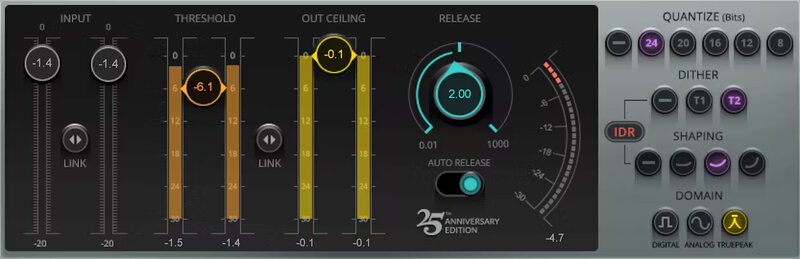
Waves’ first-ever limiter, L1 quickly became a favorite among audio engineers, whether to control peaks, change the dynamics and character of musical instruments, or make louder masters that explode out of the speakers.

Transparent and punchy, L1 offers true peak limiting that eliminates inter-sample clipping. It maximizes both the level of the digital signal and the resolution of the final file. It offers superb re-quantization for all bit depths. Its look-ahead peak limiter enables you to increase sound file resolution and production master levels with precise control and dithering options.

L1’s limiter section is capable of a very fast, overshoot-free response. Because a typical music signal contains many high-intensity, short-duration peaks, simple normalization of the file may result in a low average signal level. L1 can significantly increase the average signal level of an audio file without introducing audible side effects.

Features

  • True Peak limiting accommodates streaming services’ needs
  • Fast, overshoot-free response to minimize distortion
  • Look-ahead for instantaneous attack time
  • Auto-release optimizes response to changes in dynamics
  • IDR dithering for increased digital resolution
  • Multiple dithering and noise-shaping options
  • Low-latency processing for live sound mixing
  • Single-band limiting for traditional dynamics effect

System Requirements

Mac

  • macOS Monterey 12, Ventura 13, Sonoma 14, Sequoia 15
  • VST / AU / AAX

PC

  • Windows 10+
  • VST / AAX
Installation Instructions

1. Head to https://www.waves.com/create-account

2. Enter your email and choose a password to create an account (if you already have a Waves account, choose Log in, enter your details and head to Step 5) > click 'Submit'

3. Open your email inbox > click the activation link in the email from Waves

4. Click 'Log in here' > Log in to your Waves account

5. Click 'Register New Products'

6. Enter the Serial Number found in your Plugin Boutique user account > click 'Submit'

7. Click download in your Plugin Boutique user account or head to https://www.waves.com/downloads/central > download the Waves Central app for your operating system

8. Install Waves Central > Open Waves Central

9. Click 'Log in' > enter your log in details

10. Click the 'Install Products' tab

11. Tick the blue dot on all products you wish to install or click the top dot to install all products > click 'Install & Activate'

12. Click 'OK'

13. Open your DAW > open the Waves plugin

Your Waves plugins are installed and ready to use, enjoy!

Plugin Boutique Rewards

Discover the most rewarding loyalty programme among all plugin retailers.

  • Free Loopmasters Samplepacks
  • Discounts on products and courses
  • Extra Virtual Cash claimed immediately at checkout
Find out more

Follow us:

X (Twitter) Facebook YouTube Instagram
Logo Logo

Plugin Boutique Limited, Part of the Beatport Group LLC.

Copyright © 2011-2025 Plugin Boutique. All rights reserved