Log In
Free gifts available with your purchase
Note: Mixbus 12 Pro is also available here.
The Analog Console Inspired DAW
For half a century, Harrison Audio has been instrumental in shaping the sound of some of the most iconic records in history. Harrison analog mixing consoles have been at the heart of legendary recording studios worldwide, contributing to timeless albums by artists such as Michael Jackson, Queen, ABBA, Led Zeppelin, Genesis, Steely Dan, and many more.
Meet Mixbus, a Digital Audio Workstation that channels Harrison’s 50-year legacy into a powerful music production suite. Experience our signature analog console-inspired sound and workflow, now enhanced with a suite of powerful new tools designed to supercharge your creativity.
Crafted by musicians, for musicians...
Mixbus is packed with studio-grade multitrack recording and editing tools, intuitive arrangement features, and high-quality virtual instruments. Leveraging our decades of expertise in analog console design, Mixbus also includes our unique knob-per-function mixer, providing direct control over Harrison's signature signal processing on every track. Additionally, the “Mixbus” feature allows for easy grouping and processing of your tracks, enabling you to mix in-context and achieve a cohesive sound, just as you would on a traditional analog recording console.
What’s new in Mixbus 12?

New DeEsser & DeNoiser
Mixbus 12 introduces a built-in DeEsser and DeNoiser on every channel strip, expanding its powerful mixing toolkit. Drawing on Harrison’s decades of experience designing some of the world’s largest motion picture consoles, these processors deliver post-production–grade noise control directly within your mix. With the DeEsser and DeNoiser available on every channel, you can effortlessly tame sibilance and reduce unwanted noise across any source in your session.

Stay Up to Date with Harrison
Be the first to discover what’s new from Harrison. Get the latest on software updates, product launches, and exclusive Mixbus project demo sessions, delivered straight to you upon starting Mixbus 12.

Expanded Cue Performance & MIDI Tools
Take your performance further with expanded cue clips in Mixbus 12. Launch audio or MIDI clips with a single button press, or trigger them automatically from the timeline. Now, with up to 16 cue rows, you have greater flexibility to build more complex and dynamic creations. You can now also record both MIDI and audio clips directly into cue slots for a faster, more intuitive workflow. Mixbus 12 also introduces a wide range of new MIDI piano roll features, making in-the-box music production more powerful than ever.

Get There Faster
Mixbus 12 introduces further streamlined workflow improvements to keep you moving. Save your favourite processing chains as templates, so you can quickly apply your signature sound to any track. A new, darker GUI colour scheme reduces fatigue and helps you stay in the creative zone for longer. Navigate your sessions with ease using the new vertical and horizontal scroll tools, while the Focus Channel’s collapsible view keeps your attention exactly where it needs to be.
Features
- Fully-featured music production suite, inspired by Harrison's legendary analog console sound & workflow.
- Ultra-intuitive Transport Toolbar, featuring dedicated Cue, Record, Edit & Mix pages for a streamlined production workflow.
- Dedicated knob-per-function mixer, featuring Harrison's signature 32C EQ, and the optional SSL 9KJ Channel Strip available in Mixbus Pro.
- Dolby Atmos immersive mixing tools available in the Mixbus Pro. Craft 3D immersive masterpieces, ready for uploading to streaming services.
- Dedicated Focus Channel strip, designed to make mix adjustments quick and easy on any screen size.
- Studio-grade multitrack recording and smart editing tools, intuitive arrangement features, and high-quality virtual instruments.
- Advanced audio features, including a dedicated record window for monitoring input levels before creating tracks, and per-region FX processing.
- Dedicated MIDI "Piano Roll" editor window.
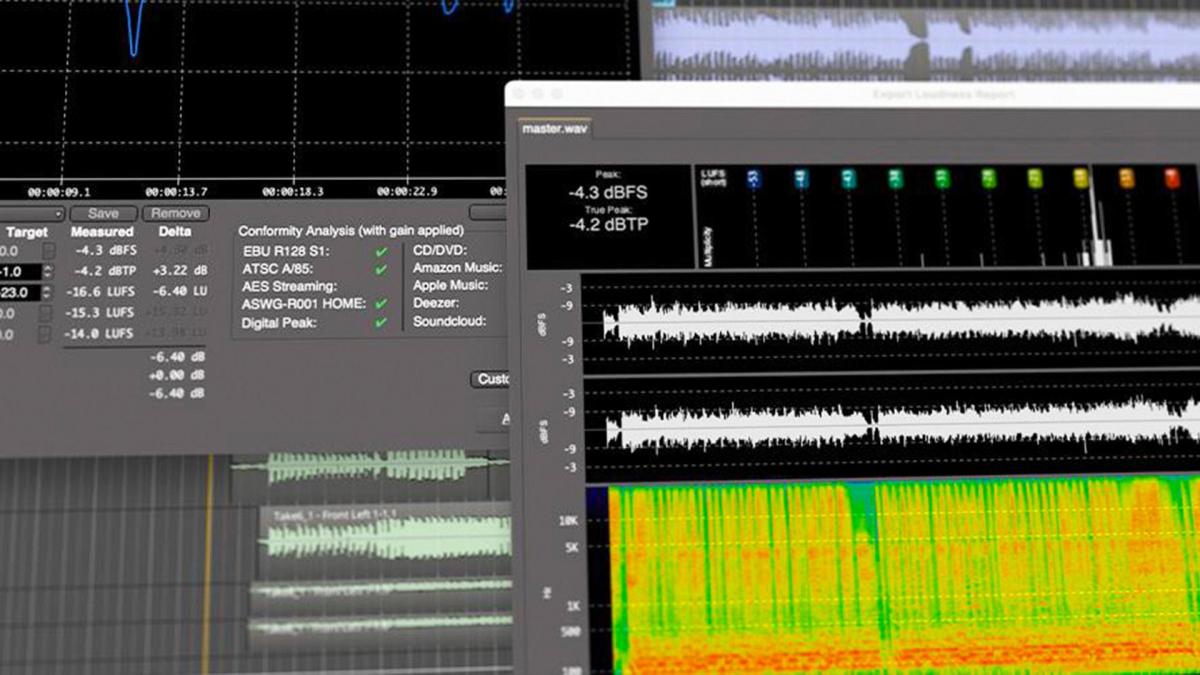
- Advanced audio tools such as Polarity Optimization, Mixer Scenes, VCA Faders, Loudness Analysis, and more.
Different to other DAWs

A streamlined, inspiring workflow
As musicians and producers, Harrison understand the need to have no barriers in the way of creativity. Mixbus not only features our signature console-inspired sound and knob-per-function workflow, but also dedicated Cue, Record, Edit, and Mix pages that both streamline and structure every stage of the music-making process.

Focus on your Mix
The newly introduced Focus Channel strip grants you easy access to the signature Harrison processing tools, including the legendary 32C EQ, Compressor, Gate, and Mixbus Sends on every track. This feature is designed to make your mixing workflow easier to comprehend, regardless of your level of experience or screen size.
Signature Console Sound

The legendary Harrison sound
At Harrison, their roots are in analog circuit design, believing that the analog sound is the secret sauce to producing great records that stand the test of time.That’s why Mixbus is equipped with the iconic 4-band Harrison 32C Console EQ, complete with HP/LF filters, alongside fantastic-sounding compressors and limiters.
Mixbus also faithfully reproduces Harrison's tape saturation, bus compression, and tone control features across every bus, ensuring that productions retain the warmth, depth, and richness of Harrison's sound.
Professional Tools

Everything you need, when you need it
Designed to be ultra-intuitive, the Transport Toolbar features only the tools you need to make music without distractions. The new Locator Bar makes it even easier to navigate between markers, song structures, or individual compositions, ensuring you always stay on top of your session.

Become A Master of MIDI
Master of MIDI with our dedicated MIDI “Piano Roll” window. Sequence drum grooves, quantize MIDI performances, and add emotion to virtual instruments with our intuitive MIDI editor. – A range of improved MIDI enhancements, including a refined Piano Roll building and new Clip Editor capabilities can be found in Mixbus.
Advanced Audio Tools
Take advantage of advanced audio features, including our dedicated Record Window that displays input level meters directly from your audio interface, giving you complete visibility of your input sources, even before creating any tracks. Mixbus also features advanced smart-audio-editing capabilities and per-region FX processing for applying plug-in effects directly to any audio.
macOS
- Intel: macOS 12 Monterey or newer, including Sequoia
- Apple Silicon (M1/M2/M3/M4), a 'native' ARM build is provided. Requires MacOS 12 (Monterey) or newer, including Sequoia.
- Any CoreAudio-compliant audio device is supported. Multiple devices can be combined into one virtual device using MacOS "Aggregate" devices (Applications->Utilities->Audio MIDI Setup)
- Supported plugin formats on Mac: AudioUnit, VST, VST3, and LV2.
Windows
- 64 Bit Windows 7 or newer
- ASIO audio devices are preferred for high performance. But Mixbus can also use built-in soundcards (choose the MME driver).
- Supported plugin formats on Windows: VST, VST3, and LV2.
Linux
- 64 Bit system with kernel version 2.6 or higher. A realtime-audio focused distribution such as AVLinux, UbuntuStudio, or CCRMA is recommended.
- ALSA or JACK-supported audio device.
- Supported plugins on linux: VST, VST3, and LV2.