Log In

Free gifts available with your purchase
Detail | Clarity | Density | Loudness
Conceptually similar to what HDR does for photography, INTENSITY 2 brings out a sound's inherent detail, increases perceived loudness, and adds clarity and bite - and is operated using essentially a single control. Between three proprietary algorithms, mid/side processing, an optional soft-knee saturating limiter, 16-channel support, and a super-fast and inspiring workflow, INTENSITY 2 is a must-have for mixing, mastering, and sound design.
New in Version 2
- New CRYSTAL and BRONZE algorithms: based on Zynaptiq's custom engineered minimum phase filter bank, CRYSTAL and BRONZE bring a sound with more bite and stronger transients to the table. Optionally running in 64-bit precision, both feature significantly reduced CPU load and near-zero latency (3 samples). The v1 algorithm is of course still included, and has been renamed to SMOOTH.
- Support for up to 16 channels for immersive workflows.
- M/S Processing: Stereo instances can now process either the stereo signal, just the Midchannel, or just the Side channel. Using INTENSITY on the Side channel produces a lovely, huge stereo image.
- More BIAS CURVE PRESETS: INTENSITY 2 now sports a total of 22 BIAS CURVE PRESETS, up from 10.
- Redesigned, scalable UI: the UI is now fully vectorized, provides up to 200% of zoom, features a new help text system, and has generally been streamlined.
- Previous/Next/Load/Save Preset can now be controlled via MIDI for improved accessibility.
- Version 2 comes with dual activations, like all Zynaptiq's latest releases.
INTENSITY is a new kind of audio processor for mixing, mastering and sound design. Built on techniques typically found in facial recognition algorithms, INTENSITY brings out a sound’s inherent detail, increases its perceived loudness and density, and adds insane amounts of clarity. The unique algorithm carves out important signal features – making sounds sound more like themselves – and is operated with essentially one control. Between the proprietary algorithm and an optional soft-knee saturating limiter in the plugin’s output stage, INTENSITY also excels at attaining maximum loudness and creating a beautifully aggressive tone.
The key INTENSITY features at a glance:
- Mastering-grade processing for more detail, clarity, density and loudness.
- Intuitive and fast workflow using a streamlined set of controls.
- Proprietary INTENSITY circuit with optional frequency-dependent BIAS function.
- Additional precision soft-knee saturating limiter at the output stage.
Think "Compressor"
So what IS this thing, then? You can think of INTENSITY like an infinite-band compressor operating in relative terms – whose time constants are zero, and which is controlled by an artificial intelligence at audio rate – making it possible to adjust the process with essentially just one knob.
Or Actually, do NOT Think "Compressor"
Well, except that this description would be completely inaccurate, as INTENSITY is absolutely NOT a compressor, and works in a completely different way. There's no RMS detector, no threshold, no ratio, no attack or release time. It doesn't pump or modulate in any other way. It doesn't overshoot and it works regardless of absolute levels and input type.
That said, the compressor analogy does serve to give you an idea of when to use it and what for.
Across the Board
INTENSITY is equally suited for processing individual tracks like speech, SFX, instruments – including guitars, bass and piano – as well as full mixes, multi-channel film stems, drum busses, and other complex content. This makes INTENSITY an indispensable tool for music producers, mastering engineers, sound designers, video producers, broad/podcasters, forensics professionals, audiophiles, or virtually anyone to quickly and easily add clarity, definition, and perceived loudness to their audio projects.
Fast, Faster, INTENSITY
This plugin is probably the fastest way to get great sound. No kidding. The actual, real-world usage story goes pretty much exactly like this:
- Insert plugin
- Adjust INTENSITY amount
- Enjoy the result.
In some cases, you may additionally:
- Adjust BIAS Amount and/or Curve
- Switch LEVEL COMPENSATION off
- Activate the saturation.
...that is literally it.
TL;DR – Summarize that in Plain English, Please.
It's a high-tech thing that makes everything sound way more awesome.
Which is why the Zynaptiq team call it The AWESOME!-Knob in their offices.
Put it on everything, all of the time.
Be careful, it's highly addictive.
Plain enough? :-)
INTENSITY
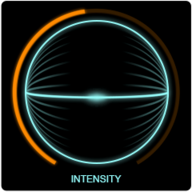
At the heart of the plugin lies its namesake, the INTENSITY circuit. A combination of advanced neural network based analysis and proprietary input and output transforms is used to separate the signal into broad strokes and detail features. By boosting the details while leaving the broad strokes in place, the sound's unique characteristics are amplified, masking effects mitigated, details carved out, the density and perceived loudness increased. Sounds high tech? That's because it IS.
BIAS
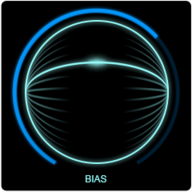
In most cases, the INTENSITY trackball is all you'll need to use to get a great sound. But the processing amount can be controlled frequency dependently, too, using the BIAS function.
Preset BIAS Curves
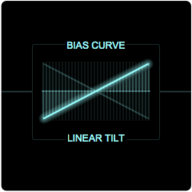
INTENSITY features ten preset bias curves, including two equal loudness curves, a presence boost curve, linear tilt curves, and more. Curves are selected using Zynaptiq's proprietary Visual Menu widget, which allows you to preview a setting simply by hovering your mouse over it.
Custom BIAS Curve
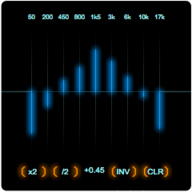
Or simply create your own. Supported by multiple macro functions, finding just the right curve is a snap.
SATURATE
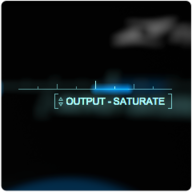
On top of the high-tech INTENSITY circuit, there's also a slightly more traditional, but nonetheless state-of-the-art soft-knee saturating limiter that can optionally be switched into the output stage. From subtle glue to in-your-face-ness to Yeah-I-Just-Got-Three-dB-of-Loudness-For-Free in mastering to straight-up overdrive, the SATURATE circuit delivers a beautifully warm, meaty tone...and can drive the loudness into La-La-Land.
System Requirements
- INTENSITY 2 supports channel counts from mono to 16 for immersive workflows, and all common sampling rates from 44.1kHz to 192kHz, depending on available CPU resources. Stereo instances provide additional mid-only and side-only processing options.
- INTENSITY 2 runs as 64-bit AAX Native, AU, and VST 3.
- The plug-in supports macOS 10.15.x or newer, on Intel & Apple Silicon processors, and Windows 10 or newer.
- INTENSITY 2 uses PACE copy protection, requiring a free ilok.com account, and can be activated to the hard drive of your computer or an iLok 2 or newer USB dongle. INTENSITY 2 is single user/seat licensed, but allows dual activations for convenience.