


 Log In

Free gifts available with your purchase
Product information
Key Detector
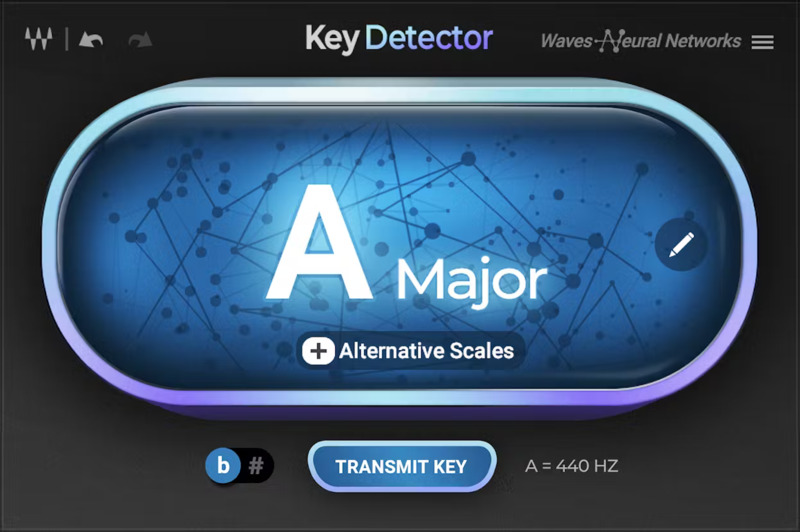
Finding Your Key Has Never Been Easier
Key Detector is a time-saving tool for all music makers. Replace manual work with AI-powered key detection, for any sample, track or full mix.
Using Waves’ Neural Networks engine, Key Detector will provide you with a root note, a scale (major or minor), and two likely alternatives.
Key Detector is also the perfect companion to Waves’ vocal tuning and harmonizing plugins: Waves Tune Real-Time, Waves Tune, Waves Harmony, and OVox. Just click the “Transmit” button, and the detected key will be sent to all active instances of these plugins. Related plugins need to be updated to the latest v14 release for this feature to work.
Features
- Can analyze complex audio files: full mixes, multi-instrument samples
- Saves time and manual work: intuitive and easy
- Detects and indicates key even when the pitch is off-tune
- Transmits the key to Waves Tune Real-Time, Waves Tune, OVox, Waves Harmony (v14)
- Precise key detection powered by Waves Neural Networks
System Requirements
Mac
- macOS Monterey 12, Ventura 13, Sonoma 14, Sequoia 15
- VST / AU / AAX
PC
- Windows 10+
- VST / AAX
Installation Instructions












Customer Reviews
(1)


