


 Log In

Free gifts available with your purchase
SuperRack Performer
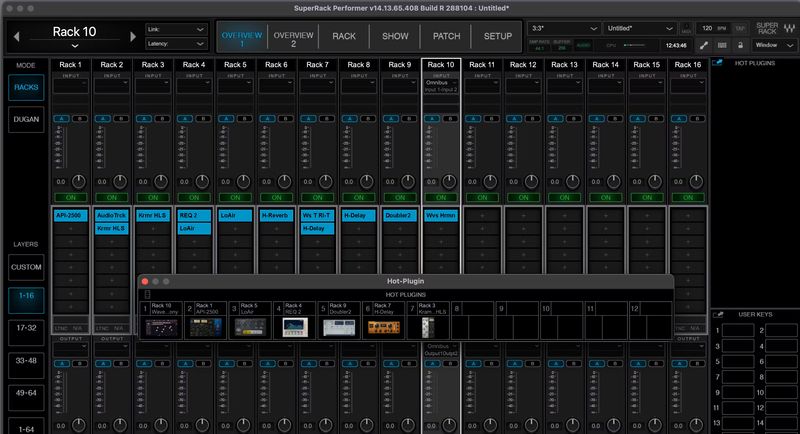
Add Waves + any VST3 plugins to live setups of any size, any budget: All you need is a laptop.
Get the exact live sound you want: All you need are Waves or ANY VST3 plugins running on a Mac or PC connected to the mixer (Core Audio / ASIO)—no extra hardware required.
Insert your plugins of choice for the perfect vocal tuning & FX, tight and punchy drums, instant feedback elimination, even your favorite analog-modeled chain on the mix bus—and much more.
You’ll no longer be held back by problematic gear and venues. Use your Waves plugins to solve room problems, make the show sound as polished as studio recordings, and empower your performers to sound great anywhere.
Musicians: Take full control of your show – don’t compromise on your live setup, and give fans your studio sound on stage by using the exact plugin chains from your recordings.
Features
- New! ProLink Console Remote Integration Protocol now available for DiGiCo, LAWO consoles
- Native Waves plugin host for live performances
- Runs ANY VST3 plugin on mac & PC
- Get top tier-sound at any show, of any size or budget
- Musicians: get your exact studio sound on stage
- Solve room problems with Waves’ specialized plugins
- USB sync with digital consoles; no additional cabling
- Run up to 64 stereo plugin racks
- App optimized & streamlined for live show use
- Stable & reliable for live shows with minimal latency
- Recall snapshots remotely using the Waves mRecall app
- Control multiple plugins at the same time
- Compatible with Dugan Speech – automatic real-time gain control for up to 64 mics
System Requirements
Mac
- macOS Monterey 12, Ventura 13, Sonoma 14, Sequoia 15
- VST / AU / AAX
PC
- Windows 10+
- VST / AAX














