Log In

The HOFA 4U+ BlindTest allows you to objectively compare equipment (e.g. plugins) inside your DAW. Only if you compare objectively, will you get the best sounding result.
We often get distracted by appearance or names: we think we hear differences that do not exist – simply because of the connection between visual and auditory perceptions. Therefore, we unconsciously often compare the expectations we have of a product, rather than the actual sound character.
In order to avoid this problem, we have developed a reliable blind test so you can concentrate on what is important: the sound!
Simply insert 4U+ BlindTest as the last plugin on every track that you want to compare. The track that is SOLO’d in 4U+ BlindTest will play. All other tracks are muted.
The Shuffle Button
Click on “Shuffle” to anonymise the tracks and put them in random order. Now you can switch between the signals to compare them objectively. Assign a rating from 0 to 5 and write down comments about your aural impression. The names of the tracks can then be revealed again.
You can use the shuffle mode multiple times. This way you an average, creating your personal sound study. The comments can be displayed together so you can compare whether your aural impressions were the same every time.
To make sure that the results are really objective…
… there is a peak level display and a gain control for every track, so you can make sure the volume differences do not influence your decisions.
… the GUI is freely scalable, so that you can use it to hide anything on your screen that may influence your decisions like your DAW’s mix window.
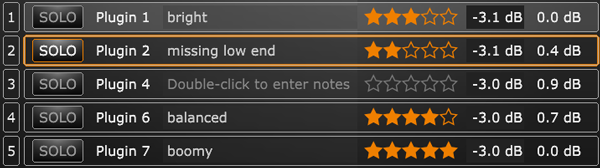
You might not want to compare all tracks at once. Simply drag unused tracks to the “INACTIVE” section. This can be used to sort out tracks during a test run.
Features
- Objectively compare your equipment (e.g. plugins) in your DAW
- Shuffle mode that anonymises the tracks
- Loudness compensation
- Rating system and comment field
- Compare up to 3 tracks
Note: The freeware is identical to the full version, except for the number of possible tracks.
System Requirements
- HOFA Plugins work with Windows 7/8/10, Vista and WinXP, as well as Intel-Mac from OS X 10.6.
- Audio Unit, VST, VST3, RTAS and AAX, 32 and 64 Bit.
HOFA Plugins are tested constantly on the following DAWs:
- Steinberg Cubase/Nuendo/Wavelab, MOTU Digital Performer, Ableton Live, Apple Logic, Magix Samplitude/Sequoia, Avid Pro Tools, Cakewalk Sonar, Presonus Studio One, Cockos Reaper, FL Studio