


 Log In

Free gifts available with your purchase

Humanised Chords
W.A Production believes that creative expression should be simple, intuitive, and inspiring. When you're making music, you need the right chords to set the tone, and Instachord 2 delivers exactly what you called for... and fast!
The team at W.A Production were so blown away with the reception to the original Instachord that they couldn’t resist developing that concept into a fully-fledged chord creator and mini-sequencer. Simple enough to be used by anyone, but with the power to make professional music, this dynamic MIDI processing plugin is the chord creation and sequencer tool that will take your music to the next level.
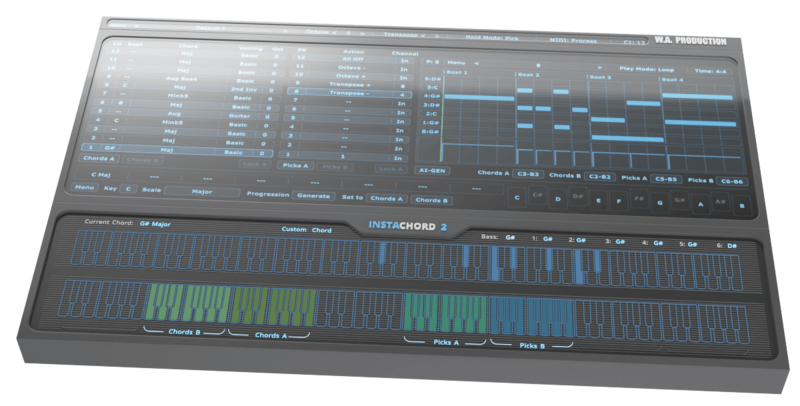
Whether you're a songwriter or producer, this ideas engine will help you speed up your workflow and creation process. Find the best progression and apply a single pattern to play all of them. Easily master some of the hardest chords, in any musical key and combination of notes and different voicings. Use this plugin to generate chord shapes, learn tricky harmonics and share your creations.
Pattern Editor
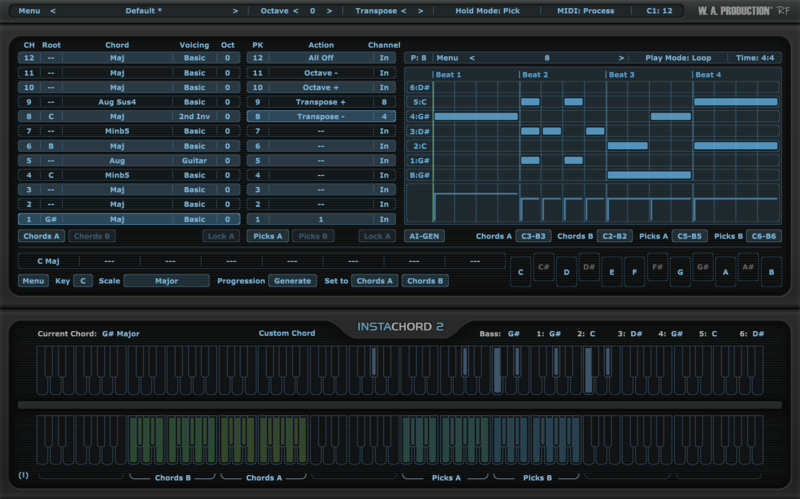
After releasing Instachord, an oft-requested update was to gain more control over strums and chord playback. W.A Production took that note and ran with it, creating a brand new interface window, the Pattern Editor. Here you’ll create your own patterns and sequences, dragging notes around in the same way as your DAW. Produce soaring synth arpeggios, pounding piano chords, or delicate guitar riffs. You get full management over time signature, play mode, and velocity with creative editing controls for strum programming.
AI Generation
Adapted from the popular InstaComposer plugin, this generative button will take the existing scale and spawn brand-new riffs based on complex algorithms and a touch of randomisation. Always musical and inspirational, these new ideas can be tweaked in the same way as your own patterns so that they fit perfectly into your song.
Hold Modes
Compared to the original Instachord, this new version has many more playback options for fretting and picking notes. 5 in total, covering different behaviour for holding notes and toggling chords. Whatever the instrument you’re playing, there will be an authentic playback mode to suit.
Custom Chords
Edit existing chords or create your own by selecting intervals between notes to make custom chords. Alternatively, play in notes with your MIDI keyboard to help Instachord 2 learn your favourite chord shapes.
MIDI Drag & Drop
Thanks to the latest update, you can now also Drag and Drop MIDI from the pattern editor right to your DAW.
So Many Chords
With over 60 chord shapes to choose from, you can explore inversions, voicings, augmentations, and extensions like never before, making your music sound more interesting and compelling. Choose your own chords from the extensive selection, or hit the Generator button to ask Instachord 2 for inspiration. Set up to 24 different chords and switch between them using the chord keys. Transpose the current chords to any other key you desire with a couple of clicks.
Playing Chords & Picks
There are more ways to play chords and picks than ever before, now all fully customizable in the Pattern Editor. For example, a key can be assigned to strum the top 3 notes of the chord and another to play a riff on the other 3 notes. You can also play individual notes of the chord separately. So it's possible to manually arpeggiate or strum chords.
Action Stations
Newly integrated into the main playback keys, action keys can be set to transpose by octave or semitone, providing an easy way to move chords away whilst playing live.
Flexibility
Instachord 2 is highly customisable and users can change many aspects to match their needs. Select your own UI size, type of playback, key configuration, and position. You can even lock the Chord and Action keys so that they don’t change whilst you experiment with more presets and settings.
Factory Presets
Although Instachord 2 allows you to program chords and riffs with simplicity, it’s even easier to use the preset system to take care of things. You'll never be stuck for ideas with loads of carefully designed presets for both chord sequences and patterns. Suitable for keys, guitars, synths, and many other types of instruments, these presets make ideal jumping-off points for your next song.
W. A. Production are real-life producers making creative plugins to help you achieve studio quality processing quickly and easily. Enjoy!
Features
- Inspiring Chord, Strum & Pattern MIDI Processor
- Connects to any Sequencer
- Advanced Pattern Editor
- AI Chord Sequence & Pattern Generation
- Playback Modes
- Edit & Create Custom Chords
- MIDI Drag & Drop Feature
- 60+ Chord Shapes & Multiple Voicings
- Resizable interface
- Factory Presets
- PDF Manual & Tutorial Video
Important: All InstaChord 1 Presets ARE compatible with InstaChord 2
System Requirements
Mac
- macOS 10.13 and later (64-bit only)
- VST, VST3, AU and AAX
Important Notes for Mac Apple Silicon users:
- There may be some issues with InstaChord 2 on M1/M2 Macs which W.A. Production are working on.
- Before purchasing, please review the current compatibility status of this plugin on your system here.
Windows
- Windows 8 and later (32 / 64-bit)
- VST, VST3 and AAX
DAW Compatibility
InstaChord 2 can be used on any software that supports VST/VST3 plug-ins with MIDI routing or AU/AAX MIDI effect type. But to make sure it's compatible with yours, please try out the Demo Version before you buy (only major chords are allowed in the trial version).
Windows
- FL Studio 12
- Cubase 9.5
- Studio One 3
- Ableton Live 9/10
- Pro Tools 11+
- Maschine 2 - No MIDI routing
- Reason - Not compatible
Mac
- Cubase 9.5
- Studio One 3
- Ableton Live 9/10
- Logic Pro X
- Pro Tools 11+
- Maschine 2 - No MIDI routing
- Reason - Not compatible

NENE
Tech & Bass House Production Duo
"InstaChord 2 is the ultimate writer's block cure. Anytime we are feeling stuck or unmotivated, we just throw on InstaChord 2 and start playing around with different chords until inspiration strikes. It's a critical part of our process now."

The SampleCast
YouTube and podcast show
"This isn’t just an upgrade, it’s a full overhaul. The new features slot right into my workflow."
Reviews Summary
While it aims to provide a helpful overview, it may not capture every perspective or detail. We encourage you to read individual reviews to make an informed decision.
InstaChord 2 is highly praised as a creative and limitless tool that makes writing chord progressions easier without needing extensive music theory knowledge, making it great for overcoming writer's block. While some users note a learning curve for beginners and others prefer recording their own MIDI, it is widely considered fun and useful. Some feature suggestions include adding audio-to-MIDI capabilities.


