


 Log In

Save $148.00 compared to buying products individually
Free gifts available with your purchase


Introducing the Motion Bundle: a dynamic combination of Motion: Harmonic, Motion: Dimension and Motion: Fractal, designed for producers seeking to push the boundaries of sound design.
This exclusive package offers essential tools for shaping, modulating, and transforming audio. Whether you're sculpting intricate textures with Harmonic's distortion and bitcrushing, crafting expansive soundscapes with Dimension's sophisticated delays and reverbs, or generating complex granular atmospheres & rhythms with Fractal, the Motion Bundle equips you with everything needed to bring depth, movement, and expression to your sonic creations.
Motion: Fractal
Motion: Fractal unleashes endless motion, texture, and modern sonic transformation through dual granular engines, a reactive trance gate, and stutter-repeat effects.
Whether you're crafting fractured beats, shimmering ambience, or glitched-out sequences, Fractal makes it musical, immediate, and deeply customisable.
What can Motion: Fractal do?
- Enhance static sounds with mesmerising granular textures.
- Sculpt hypnotic, pulsating rhythms with an intuitive trance gate.
- Trigger engaging, glitchy repetitions with flexible stutter repeats.
- Control parameters with your cursor for mind-bending sound design.
- Discover endless possibilities with flexible effects routing.
- Bring modulation to life through an immersive, reactive 3D visualisation.
Creative Flow, Visually Driven
At the heart of the Motion experience is the intuitive hexagon controller, an evolution of the XY-pad, where you can assign and morph between granular parameters, gated rhythms, and loop behaviours in real-time. No menu diving. No friction. Just expressive control at your fingertips.
All effect modules, including the dual-granular engines, trance gate, and beat repeater can be fully rearranged, allowing you to explore countless sonic combinations and signal flows.
Glitch, Groove, Grains
Twist, stretch, and scatter any audio in time with twin granular engines that respond to your audio. Sync each grain to your track or drift off-grid into experimental chaos. From stuttered fragments to slow-motion time-stretching, every sound you feed into Fractal is reborn with rich texture and pulsing energy.
Layer unpredictable grains, precisely control pitch and tempo-sync patterns, or freeze audio to sculpt drones and granular pads that evolve endlessly. Enhance these evolving textures further using the dedicated Space module. Streamlined controls allow you to effortlessly create lush reverbs—ideal for adding cohesion to your granular soundscapes.
Pulse, Stutter, Subtract
Inject rhythm into your sounds with Fractal's trance gate and beat-repeat engines. Customise intricate patterns via a 32-step trance gate sequencer, sync rates seamlessly to your project's tempo, and shape dropouts smoothly or sharply with precise envelope controls for hypnotic grooves.
And with Fractal’s Repeater, craft complex, dynamic stutters using adjustable repetition counts, interval triggers, and sync or free timing - perfect for creating glitchy rhythmic textures and pulsating patterns.
Watch Motion: Fractal in Action
Features
- FX Page
- 5 effect sections: Grains Layer 1, Grains Layer 2, Gate, Repeat, Space
- Routing section to re-route the plugin's signal chain
- Cursor, Path and Timeline Page
- Reactive 3D Visualiser
- 6 Macro Sliders
- Per Slider Parameter Mapping
- Per Slider Parameter Min/Max Values
- Audio Reactive Envelope
- Magnetic Cursor control
- Input/Output Gain controls
- Global Dry/Wet mix control
- Safety Limiter toggle
- Global Bypass
- Step-by-step interactive tutorial
- 250 Presets
- 159 Dual Presets
- 66 FX & Mapping Presets
- 25 Path & Cursor Presets
Grain Layers 1 & 2
- Global adjustable buffer for capturing audio
- Five different playhead modes for generating grains
- Manual
- Scan
- Offset (Sync)
- Offset (ms)
- Offset (%)
- Syncable grain Density & Size controls
- Direction, Width & Shape controls for adjusting grain characteristics
- Chaos control for adding randomness into the grains
- Pitch & Spread controls for adjusting the pitching & pitch distribution of the grains
- Hi-Lo Frequency Range slider
- Dry & Wet level controls
- Visual graph displaying the audio buffer and the number, position and pitch of the grains
Gate
- Adjustable steps & step numbers for up to 32 steps in the sequence
- Rate & Mix controls for adjusting the speed & balance of the Gate
- Attack & Release controls
Repeat
- Amount, Trigger, Rate and Offset controls for adjusting the timing & number of repeats
- Hi-Lo Frequency Range slider
- Volume & Duck controls
Space
- Lush, atmospheric hall reverb
- Length & Mix controls
Routing Section
-
Rearrangeable effect slots for customising the signal chain
Cursor & Hexagon
- Attract & Repel modes
- Magnet Range & Strength controls
- Magnet On/Off Mouse settings
- Slider Hold & Release controls
Paths
- Record Cursor Mode
- Line & Circle Draw modes
- Path Drawing Tools:
- Select Point/Curve Line
- Add Point
- Remove Point
- Scale/Move Path
Timeline
- Forward, Reverse, Pendulum Playback Direction
- Loop Path toggle
- Timeline Speed graph
- Fixed/Free Timeline Duration
- Timeline/Recorded Cursor Speed
- On, Off, Sync Retrigger modes
- DAW Sync or Free Timeline Duration
- Time, Multiplier and Offset controls
Motion: Dimension
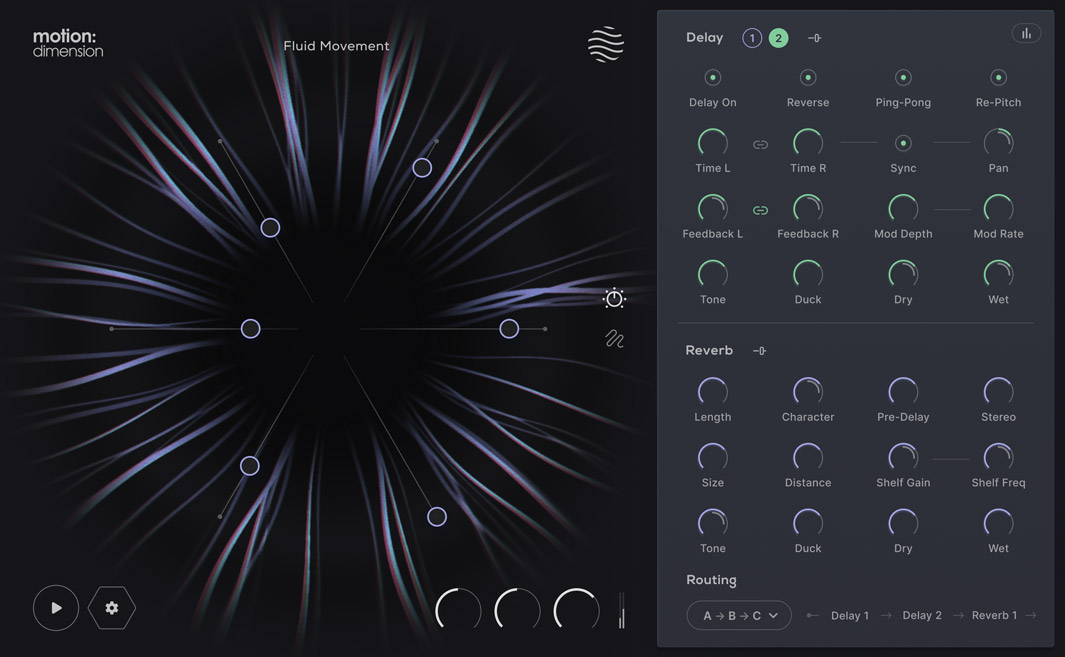
Motion: Dimension unveils a new realm of sonic exploration, focusing on an intricate blend of dual delays and adaptable reverbs to immerse you in a dynamic and responsive sound design journey.
Seamlessly integrate complex delay lines with lush reverberations, all controllable through the intuitive hexagon controller. From subtle echoes to sweeping sonic landscapes, Dimension places comprehensive sonic manipulation at your fingertips.
What can Motion: Dimension do?
- Craft intricate rhythmic patterns with dual delays.
- Blend smoothly between plate and hall reverbs for evolving spaces.
- Reverse delays for mind-bending sound design.
- Enhance atmospheres with mesmerising textures.
- Give mono sounds creative spatial complexity.
- Experiment with series and parallel effects routing.
- Visualise your sound with a 3D reactive object.
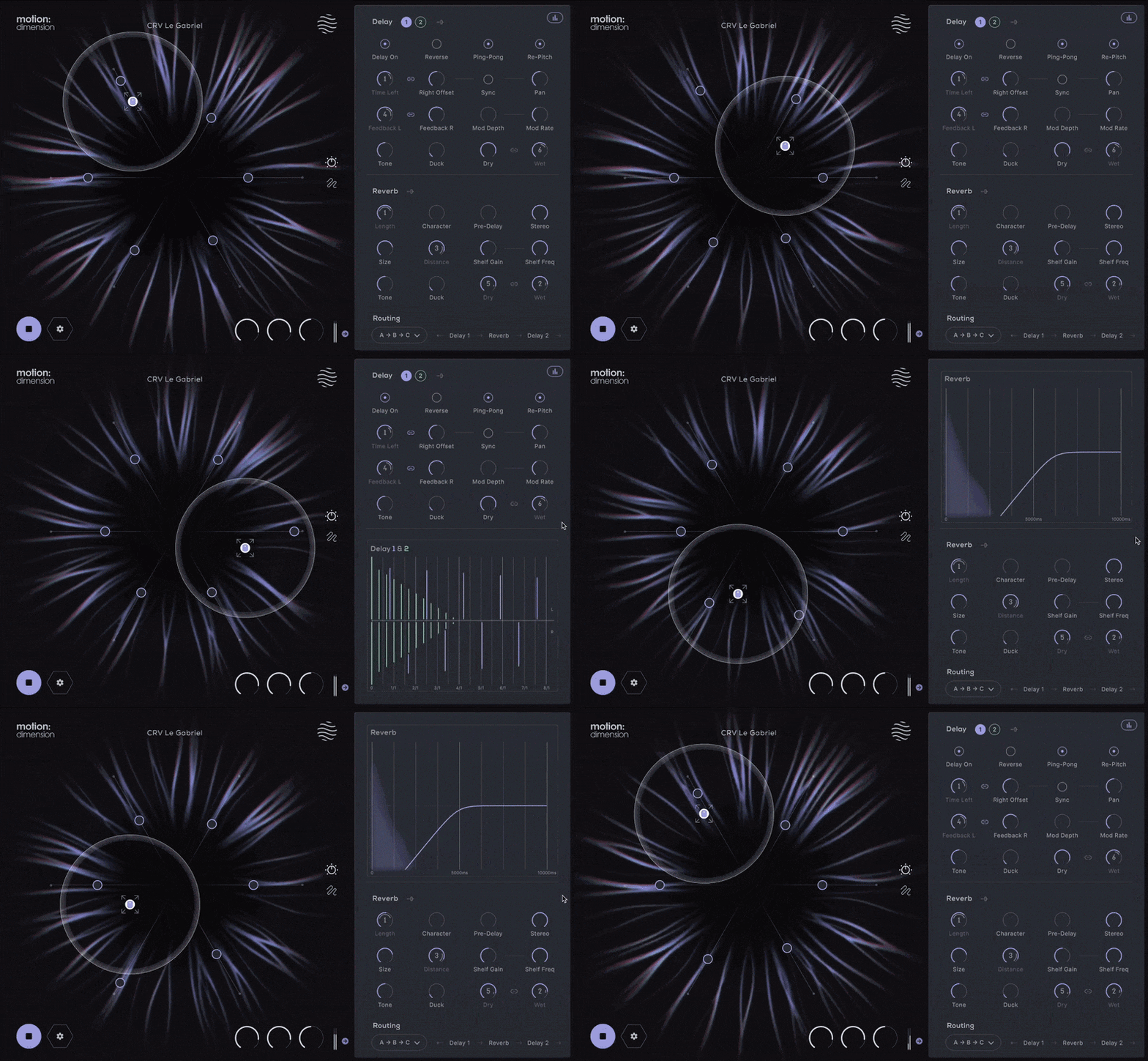
The Hexagon offers six macro sliders that can be assigned to control any of the onboard effect parameters.
Motion: Dimension employs the Hexagon controller for intuitive and animated effect modulation. Drag and drop parameters onto the six macro sliders, each assignable for detailed sound shaping. The magnetic cursor creates an interactive experience, making modulation a part of your production.
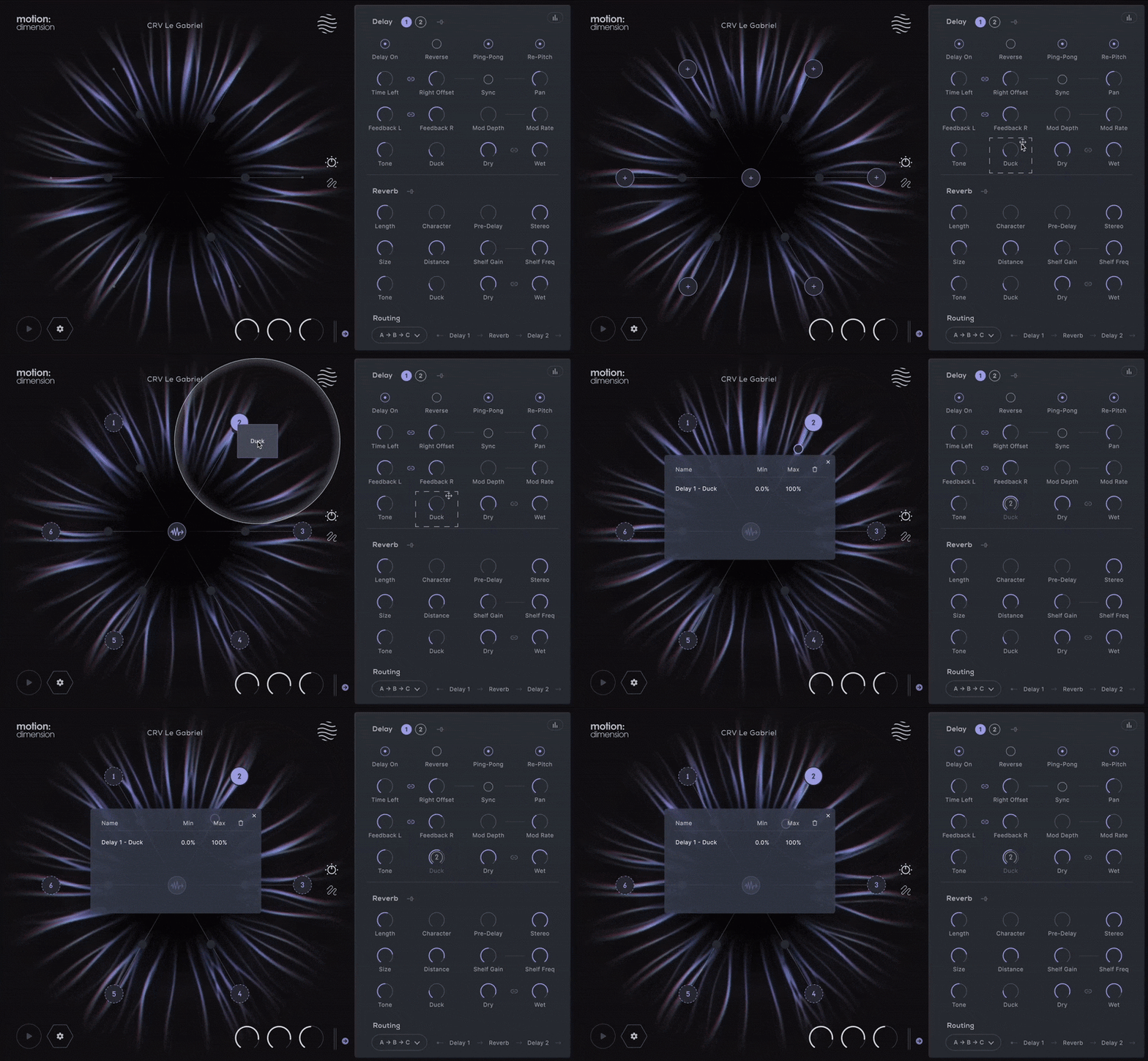
The Hexagon: Reactive Animation
Improving upon the concept of the traditional XY pad, the hexagon provides new automation possibilities, allowing six macro sliders to be pushed and pulled together by a magnetic field surrounding your mouse cursor.
Cursor movements can be played live, recorded or pre-programmed; and then controlled with extensive timing and playback options.
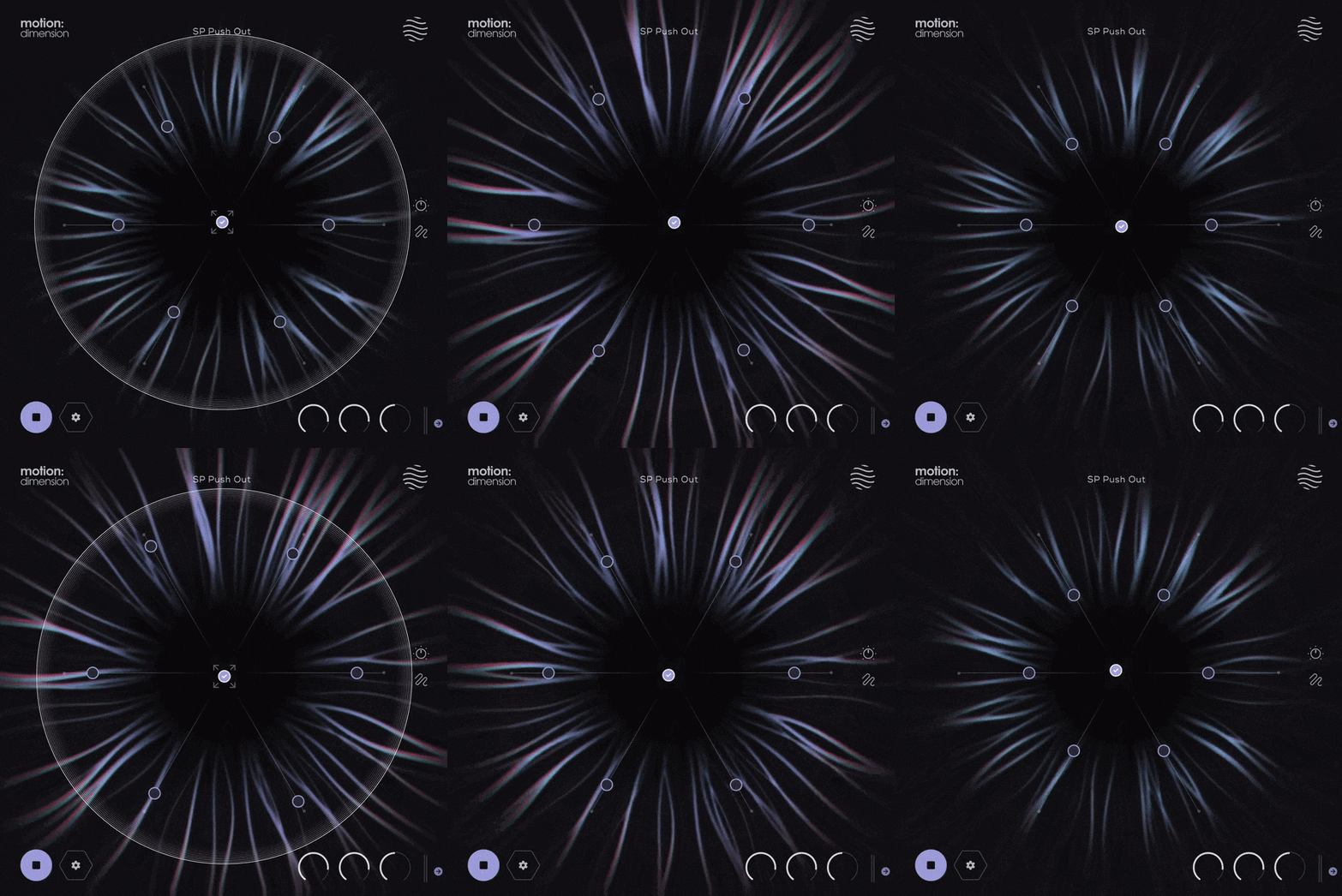
Perform Your Effect
Customise your cursor’s magnetic field controlling how you interact with the sliders.
Design intricate paths around the Hexagon by plotting points or recording your mouse movements freely.
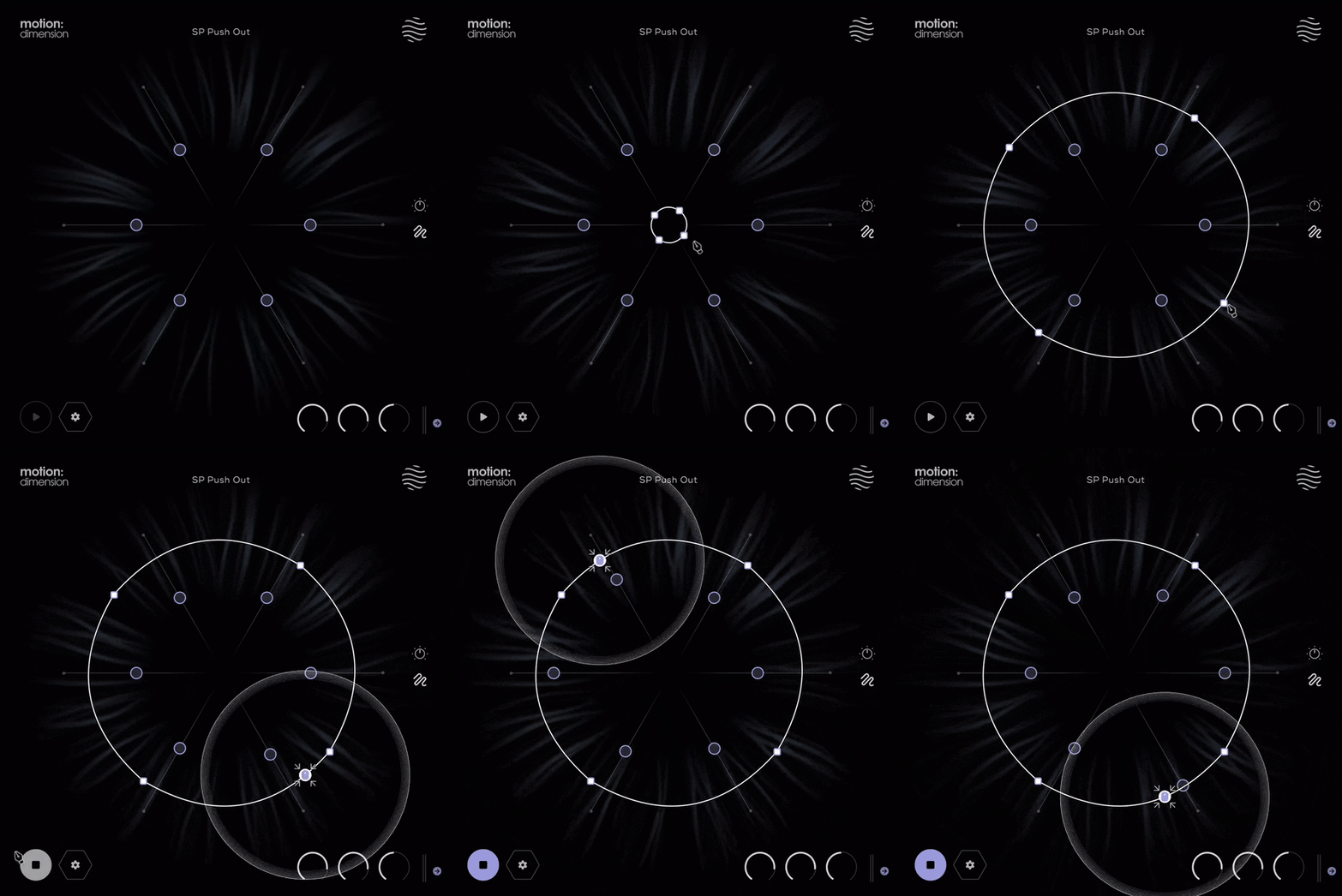
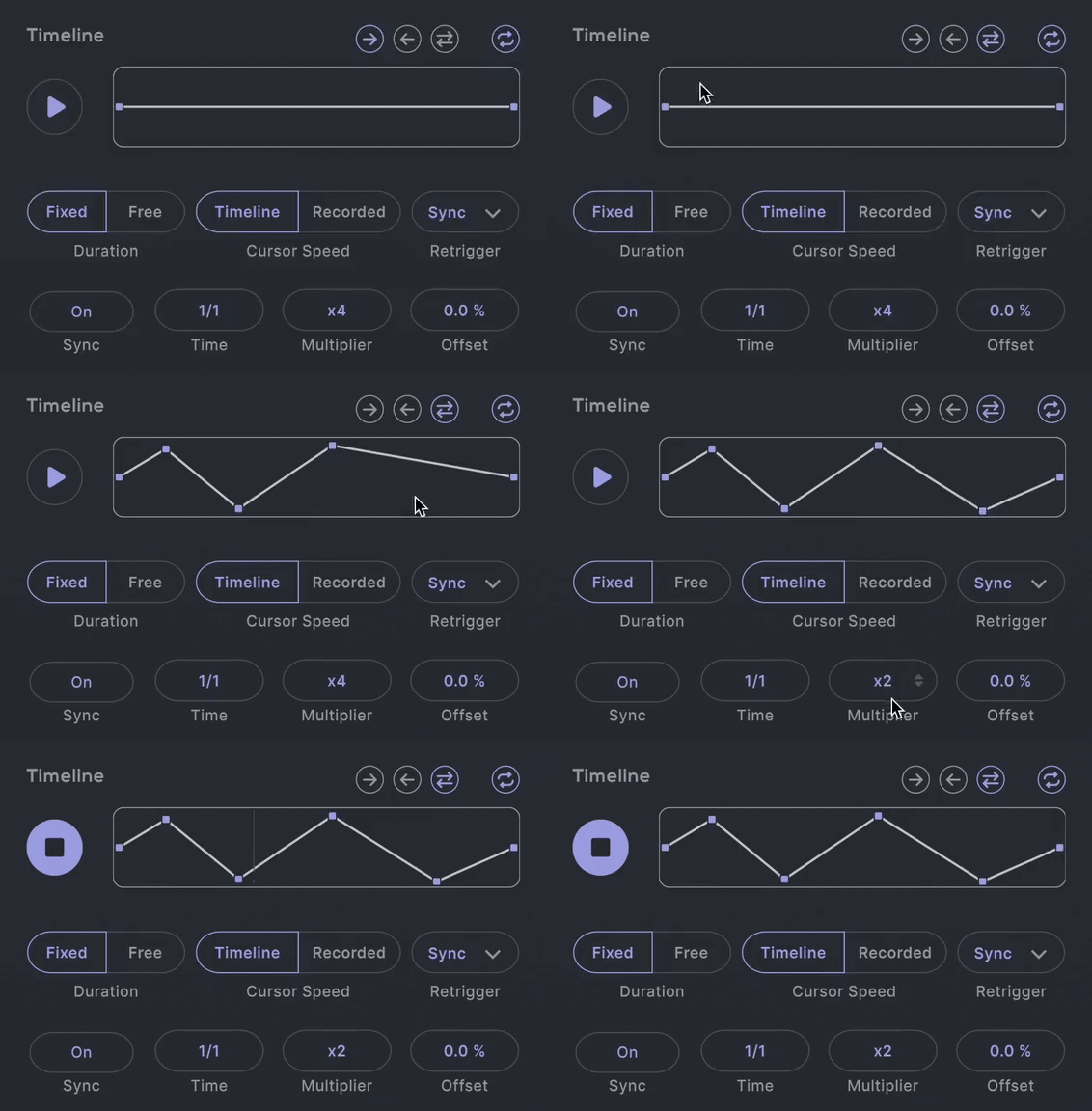
Take control of your modulation with detailed timing and trimming adjustments to generate endless sonic landscapes. Whether adding subtle echoes to a guitar, designing atmospheric pads, or creating rhythmic complexity in electronic music, Dimension's timeline is your gateway to dynamic auditory realms.
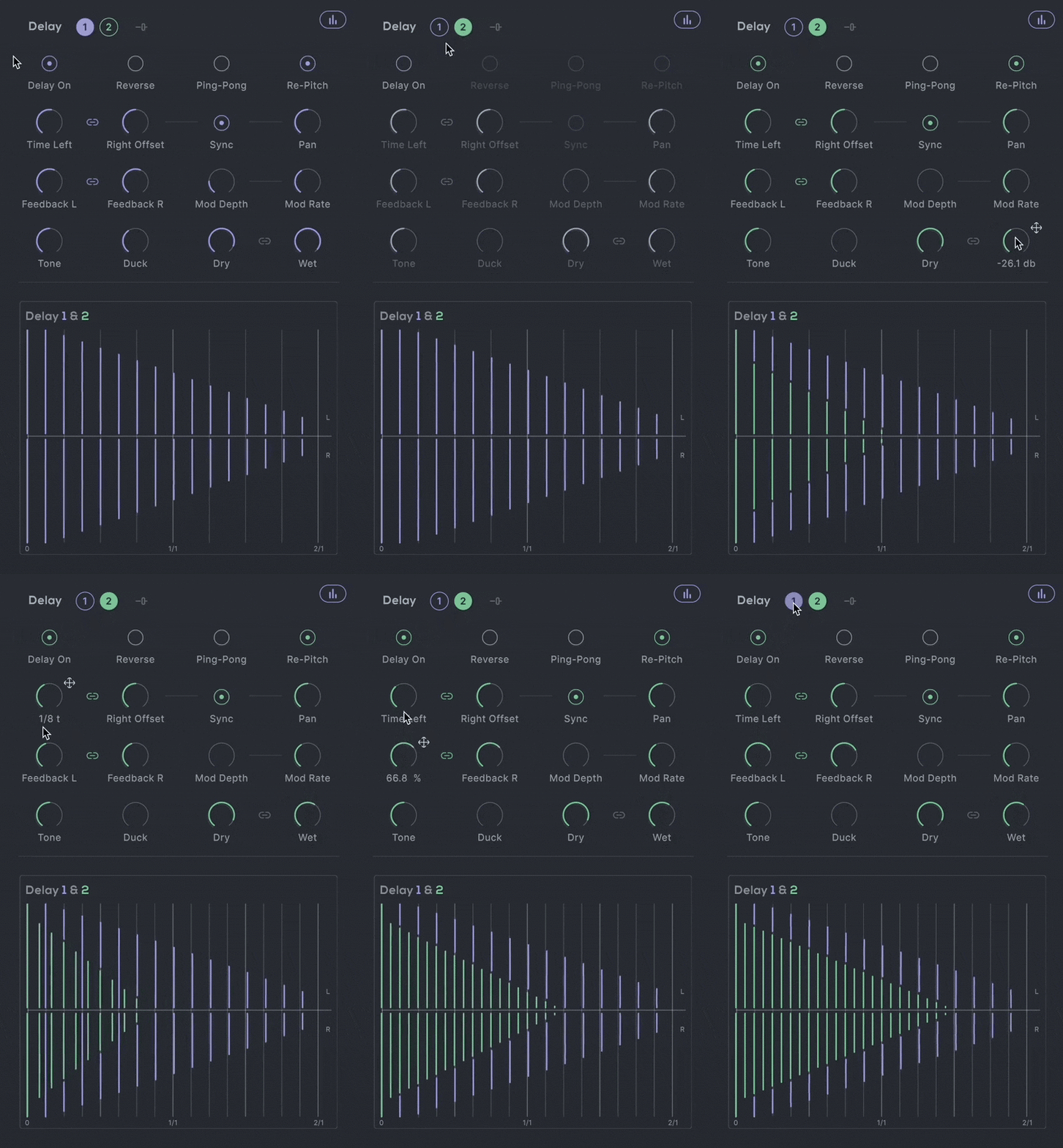
Dynamic Dual Delays
Each delay in Dimension offers comprehensive control over your sound:
- L+R Delay Time & Feedback: Independent timing for intricate stereo effects.
- Ping-Pong & Reverse Delay: Toggle for rhythmic variety and reverse effects for textural intrigue.
- Repitch, Mod Depth & Rate: Pitch adjustments that react to your delay time changes, perfect for creative effects.
- Tone, Duck, and Filtering: Fine-tune the echo's character and frequencies.
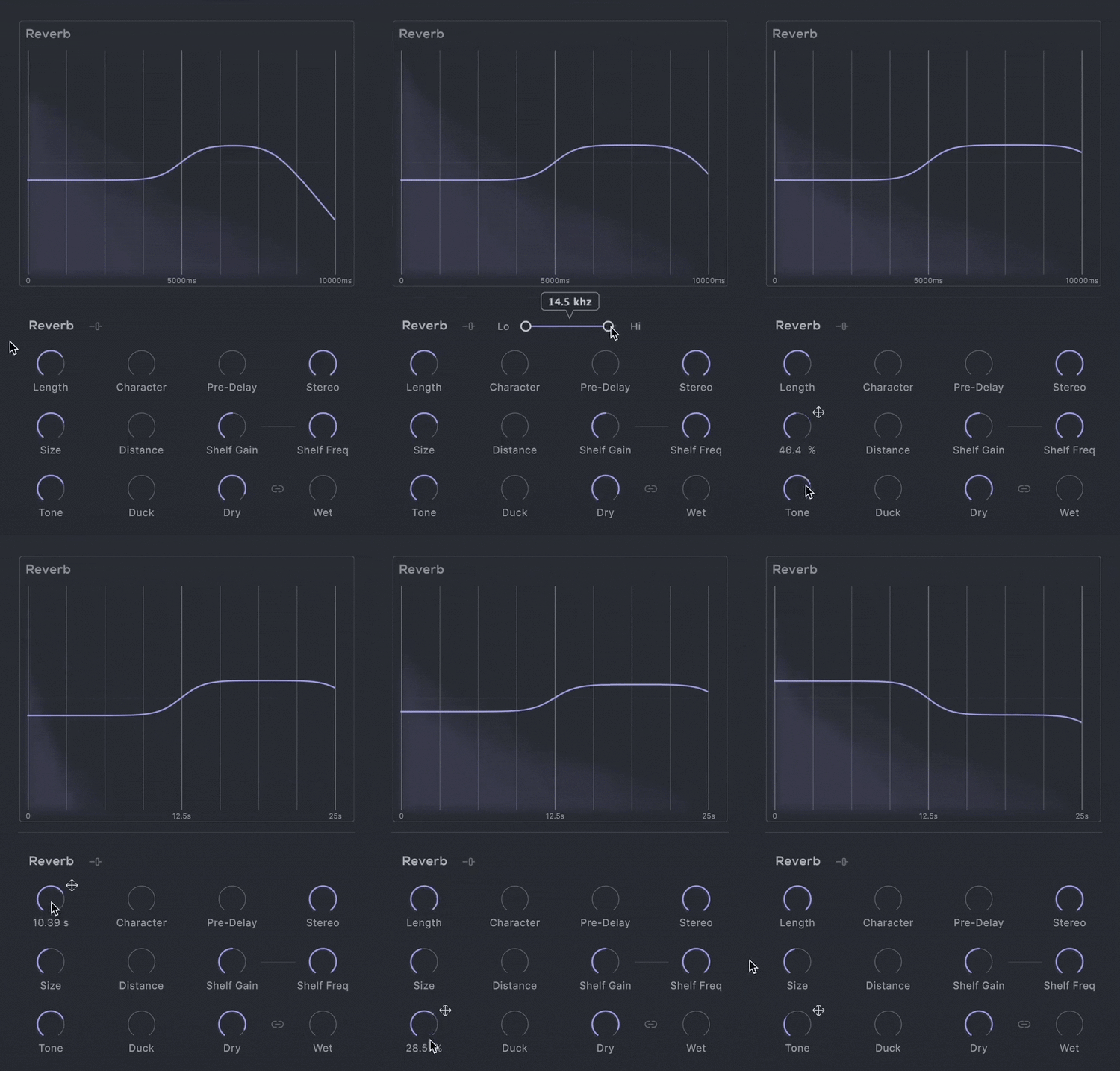
Reverb That Breathes
Dimension’s reverb capabilities allow for a seamless blend between plate and hall characteristics:
- Character: Smoothly navigate between reverb types, from tight, reflective plates to vast, open halls.
- Length, Size and Distance: Control the scale of your space and the balance between early and late reflections for precise spatial imaging.
- Advanced Tone Shaping: Includes Shelf Frequency, Shelf Gain, and Hi-/Lo-Cut filters to perfectly integrate the reverb into your tracks.
Routing Redefined
Dimension’s new routing options allow any combination of series and parallel processing between the two delays and the reverb unit, offering unprecedented flexibility in building your sound, and allowing for complex, layered effects configurations.

Features
- FX Page
- 3 effect sections: Delay 1, Delay 2, Reverb
- Routing section to re-route the plugin's signal chain
- Cursor, Path and Timeline Page
- Reactive 3D Visualiser
- 6 Macro Sliders
- Per Slider Parameter Mapping
- Per Slider Parameter Min/Max Values
- Audio Reactive Envelope
- Magnetic Cursor control
- Input/Output Gain controls
- Global Dry/Wet mix control
- Safety Limiter toggle
- Input Thru toggle
- Global Bypass
- 250 Presets
- 127 Dual Presets
- 99 FX & Mapping Presets
- 24 Path & Cursor Presets
Delay 1 & 2
- Four delay modes
- Reverse mode
- Ping-Pong mode
- Normal mode
- Re-Pitch mode
- Delay Time, Feedback, Pan, Tone & Duck controls
- Sync to DAW toggle
- Delay Modulation Depth & Rate controls
- Hi-Lo Frequency Range slider
- Linkable Dry & Wet level controls
- Visual graph displaying the Time, Feedback & volume of both delays
Reverb
- Two reverb types
- Plate
- Hall
- Length, Character, Pre-Delay, Size & Distance controls
- Stereo width and Duck controls
- Shelf Gain / Frequency and Tone controls
- Hi-Lo Frequency Range slider
- Linkable Dry & Wet level controls
- Visual graph displaying the reverb length, size, pre-delay, shelf & tone
Routing Section
- Four different routing options
- All in Series
- Series into Parallel
- Parallel into Series
- All in Parallel
- Rearrangeable effect slots
Cursor & Hexagon
- Attract & Repel modes
- Magnet Range & Strength controls
- Magnet On/Off Mouse settings
- Slider Hold & Release controls
Paths
- Record Cursor Mode
- Line & Circle Draw modes
- Path Drawing Tools:
- Select Point/Curve Line
- Add Point
- Remove Point
- Scale/Move Path
Timeline
- Forward, Reverse, Pendulum Playback Direction
- Loop Path toggle
- Timeline Speed graph
- Fixed/Free Timeline Duration
- Timeline/Recorded Cursor Speed
- On, Off, Sync Retrigger modes
- DAW Sync or Free Timeline Duration
- Time, Multiplier and Offset controls
Learn more about Motion: Dimension.
Motion: Harmonic

Motion: Harmonic opens up new frontiers in distortion, filtering and bitcrushing, placing you at the centre of a dynamic and responsive sound-shaping experience.
Transforming your audio signal is now an animated, and creative experience with the innovative and reactive Hexagon controller.
From subtle warming and shaping to intense modulated signal destruction, Motion: Harmonic puts everything you need at your fingertips. Comprehensive parameters for distortion, bitcrushing and filtering take these effects into new creative territory giving you new ways to play with sound.
What can Motion: Harmonic do?
- Transform loops into evolving phrases.
- Design expressive filter sweeps.
- Distort drum hits with unique character.
- Enhance harmonics of 808's, kicks, and basses.
- Create morphing textures and atmospheres.
- Energise guitar and synth melodies.
- Add movement and rhythm to pads.
- Experiment with sound design using your mouse.
- Visualise audio with a 3D reactive object.
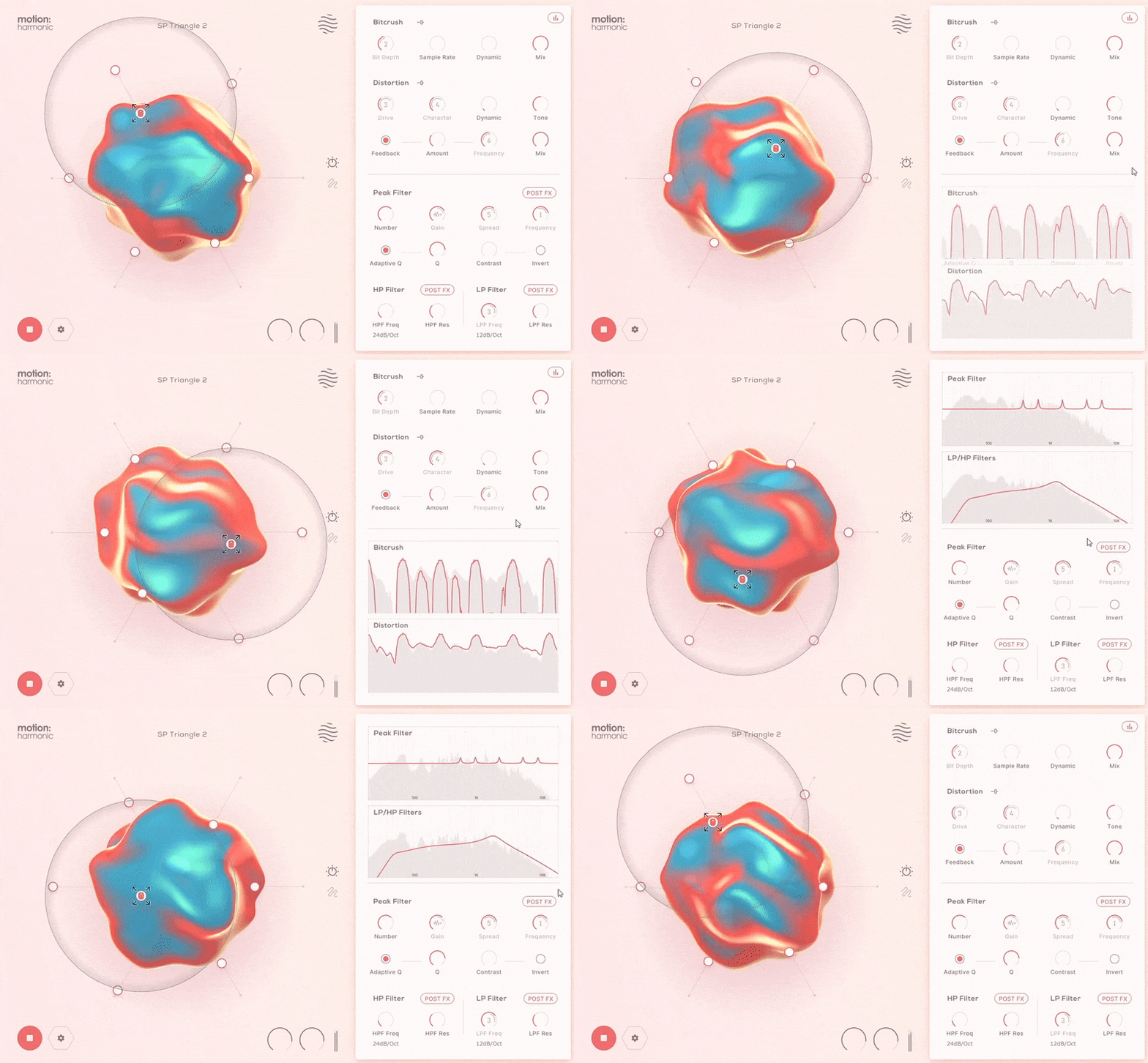
The Hexagon offers six macro sliders that can be assigned to control any of the onboard effect parameters.
Motion: Harmonic employs the Hexagon controller for intuitive and animated effect modulation. Drag and drop parameters onto the six macro sliders, each assignable for detailed sound shaping. The magnetic cursor creates an interactive experience, making modulation a part of your production.
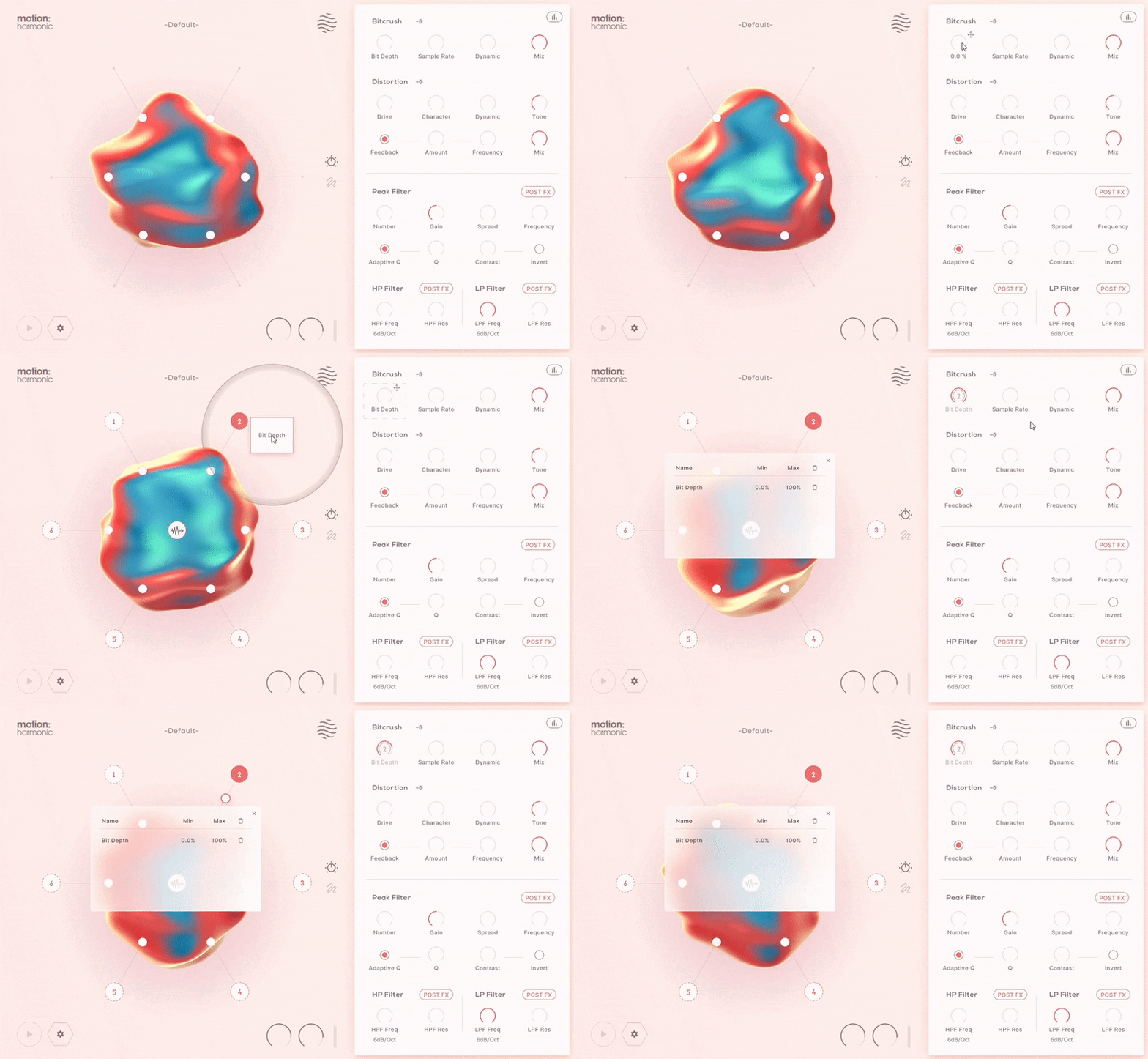
The Hexagon: Reactive Animation
Improving upon the concept of the traditional XY pad, the hexagon provides new automation possibilities, allowing six macro sliders to be pushed and pulled together by a magnetic field surrounding your mouse cursor.
Cursor movements can be played live, recorded or pre-programmed; and then controlled with extensive timing and playback options.
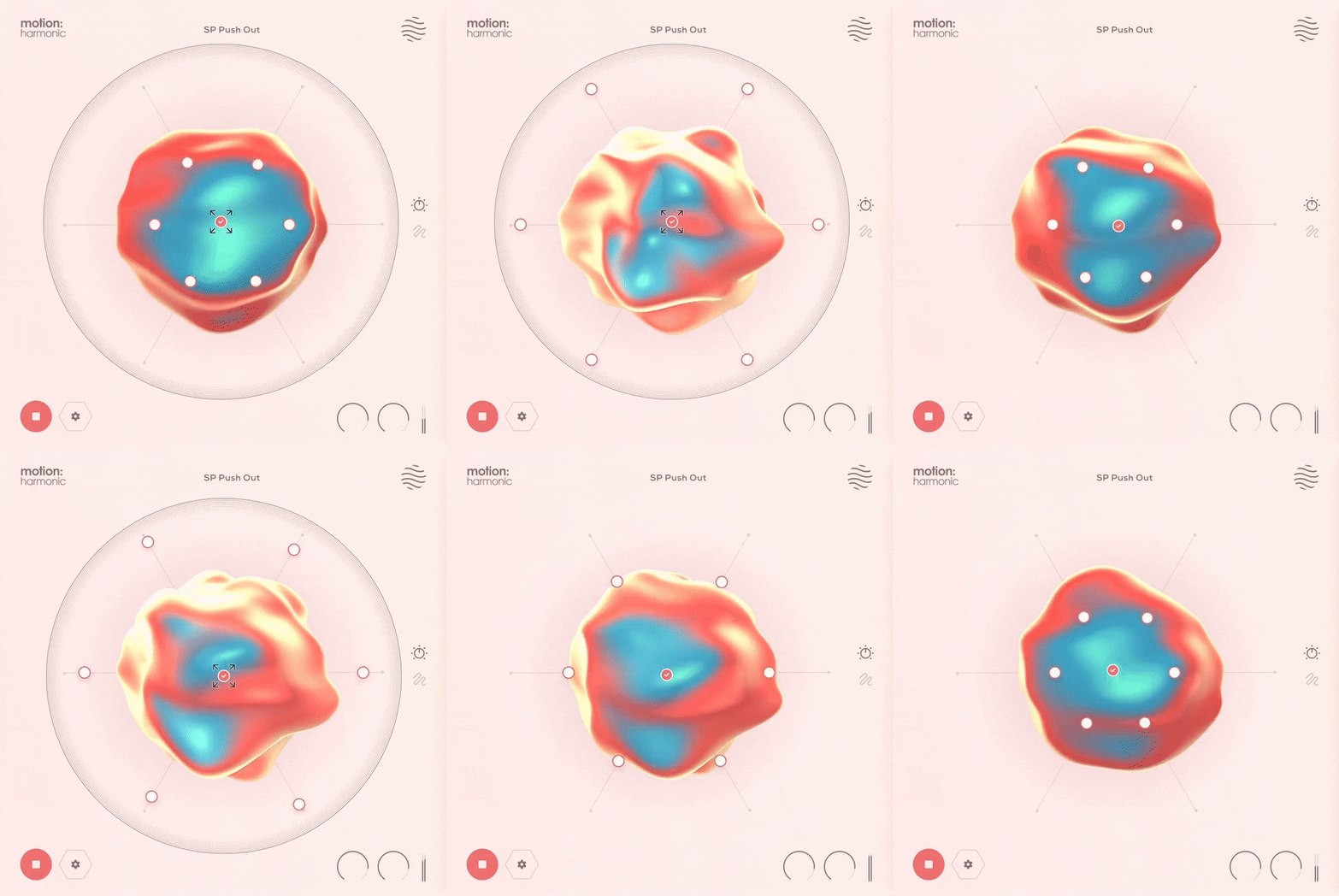
Perform Your Distortion
Customise your cursor’s magnetic field controlling how you interact with the sliders.
Design your desired path around the hexagon by plotting points or record your mouse movements freely.
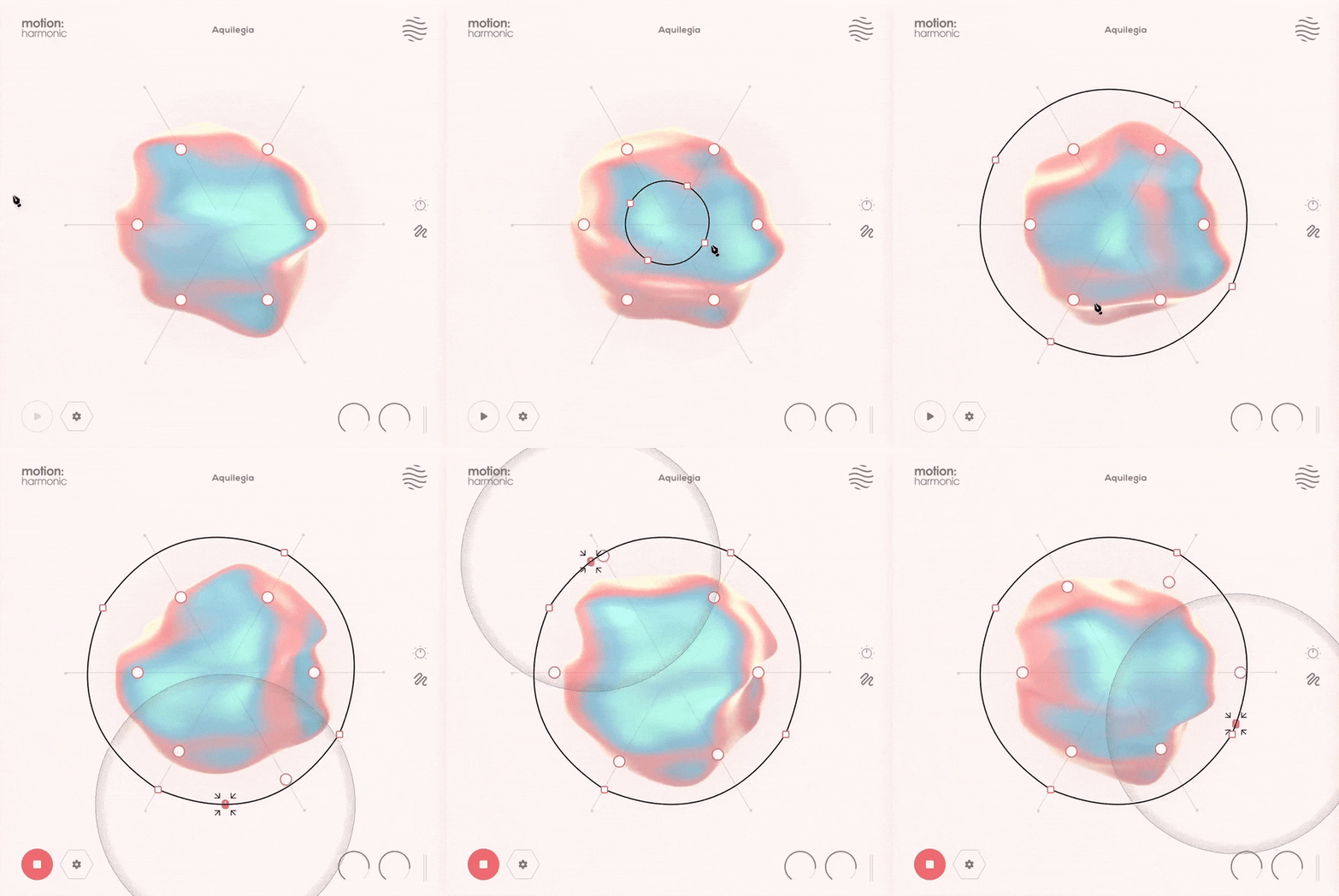
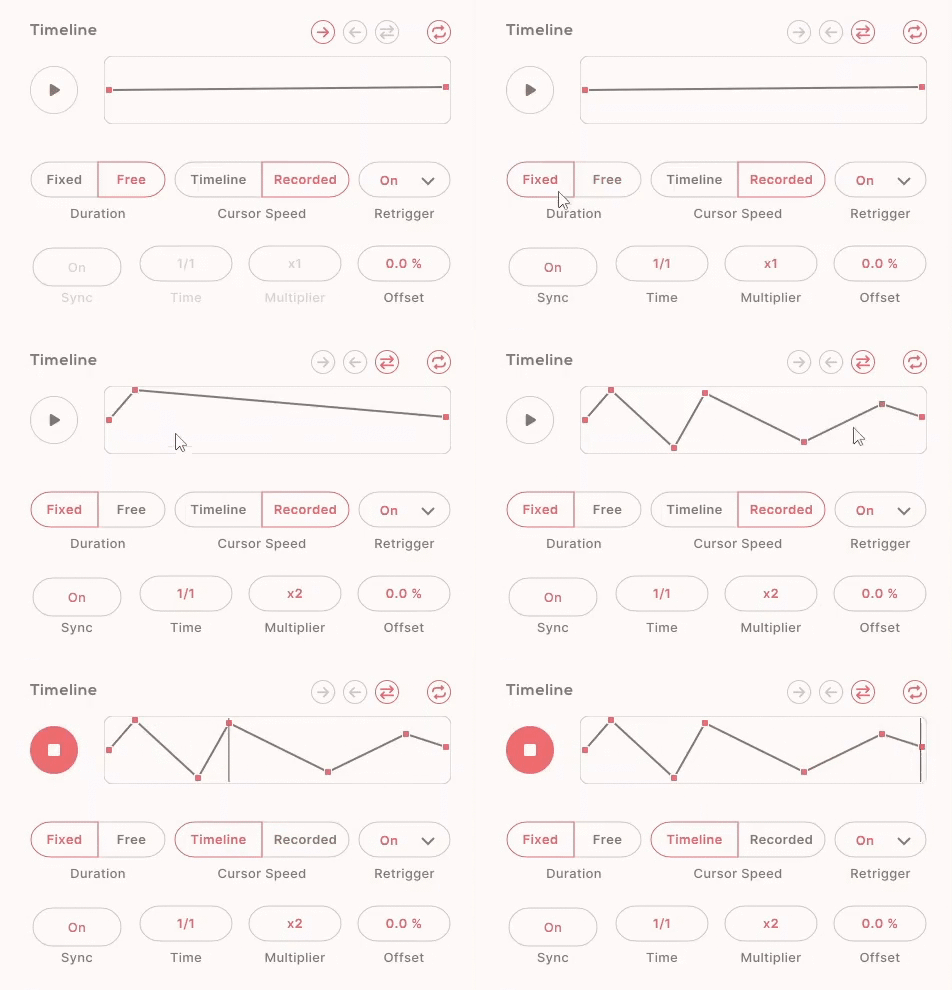
Take control of the modulation and trim and warp your path’s timing freely to generate endless ideas. You might, for example, choose to record a slow, careful movement with your mouse and then speed it up. Or you may carefully design a complex point-by-point and set it to play very slowly, transforming a static loop into a continually evolving pattern.
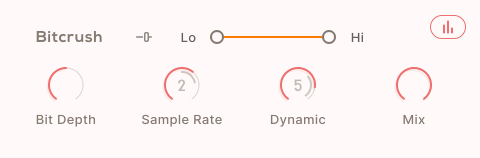
Bitcrusher: Flavoursome Degradation
Experience the contemporary, digital degradation that only a bitcrusher can provide.
- Bit Depth and Sample Rate: Lower fidelity to emulate the gritty sound of early digital systems.
- Dynamic Control: Focus the bitcrushing effect on transients for enhanced dynamics.
- Frequency Range Sliders (Lo and Hi): Isolate the effect to specific frequency bands, leaving the rest of the spectrum untouched.
- Mix: Tame the destructive effects and blending the original signal back in.
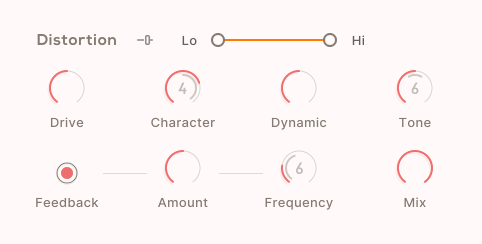
Distortion: Heat with Feedback
Unleash powerful, controllable distortion with a unique feedback loop for extra depth.
- Drive and Tone Controls: Dial in your desired distortion flavor, from smooth to intense.
- Character Dial: Smoothly transition between tape, tube, and fuzz sounds.
- Dynamic Response: Adjust how the distortion reacts to signal transients.
- Feedback Control: Add a resonant feedback loop, with adjustable frequency for different tonal effects.
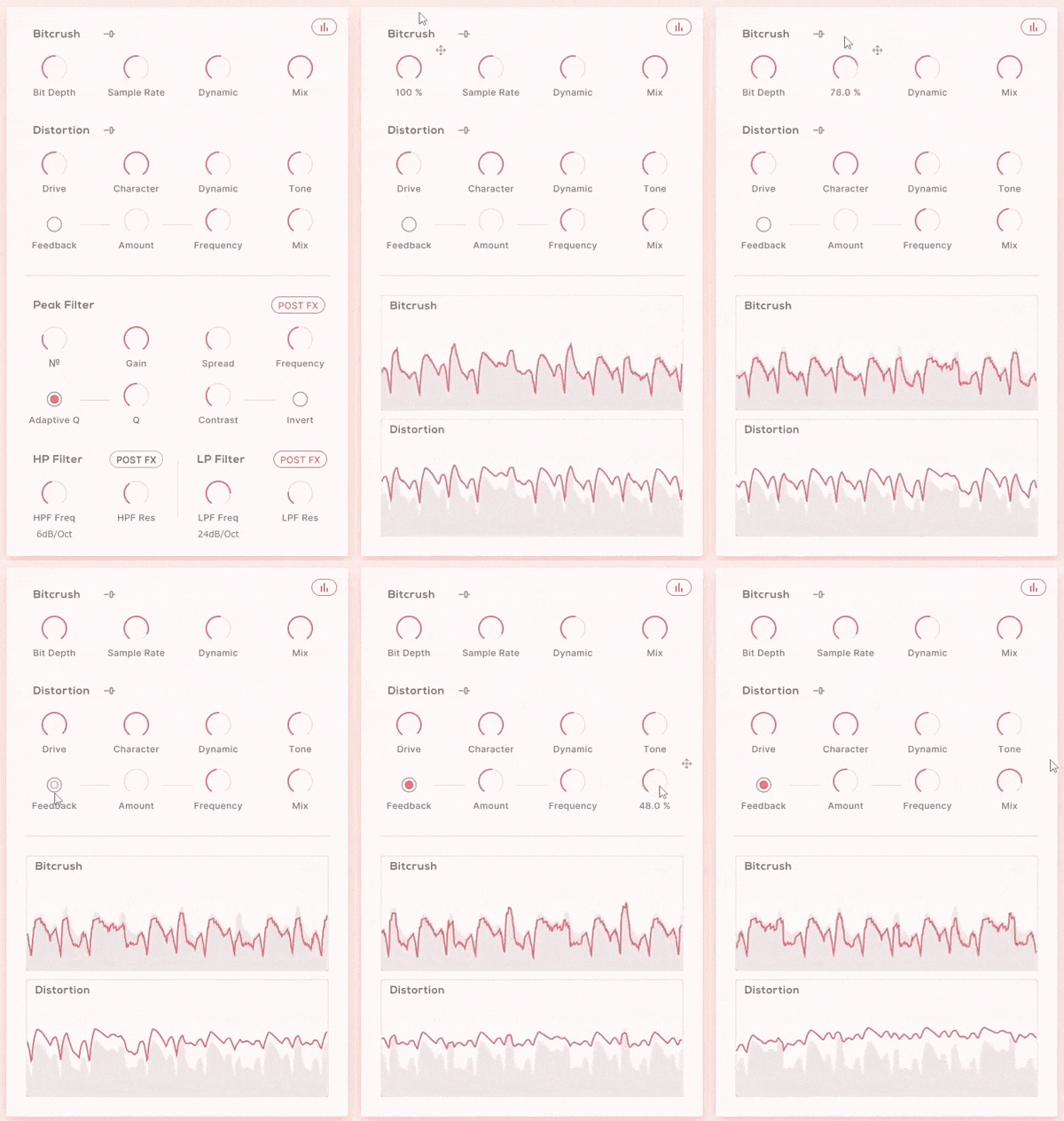
Toggle the distortion and bitcrushing visualisers to reveal your settings' real-time effects on the wet signal and compare the output to your dry signal.
Filtering: Highlight and Sculpt
When modulated by Motion: Harmonic’s Hexagon controller, these high-pass and low-pass filters, with frequency, slope and resonance controls, can provide anything from distortion-calming and slow, undulating effects to rhythmic sweeps and chops. The filter effects can be placed before or after the Bitcrushing and Distortion modules.
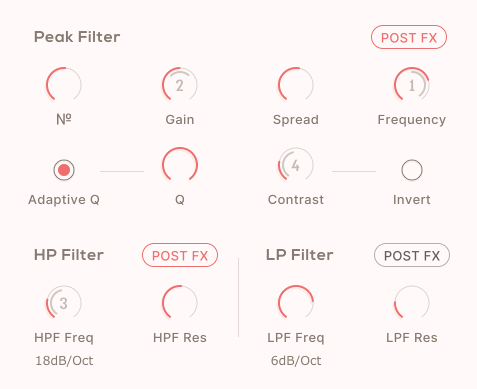
- High-Pass & Low-Pass Filters: Adjust frequency, slope, and resonance to shape your sound.
- Filter Placement: Choose to apply filters before or after bitcrushing and distortion for varied effects.
- Peak Filter: Create peaks or notches for modern audio effects like spectral resonance or phaser sounds.
- Peak Control: Adjust the number and frequency of peaks, and morph their position and shape seamlessly.
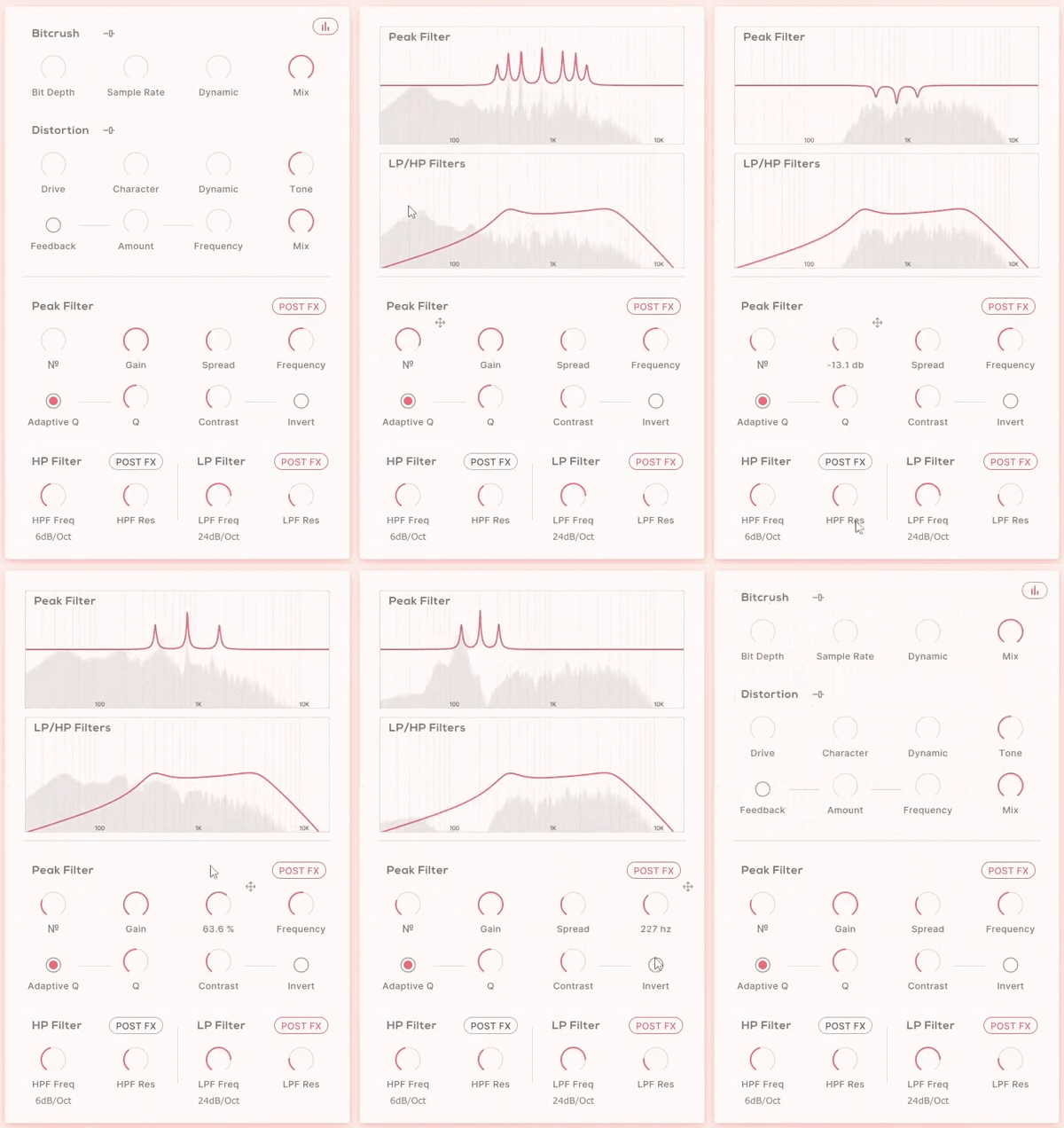
Features
- FX Page (4 effect sections: Bitcrush, Distortion, Peak Filter, LP/HP Filter)
- Cursor, Path and Timeline Page
- Reactive 3D Visualiser
- 6 Macro Sliders
- Per Slider Parameter Mapping
- Per Slider Parameter Min/Max Values
- Audio Reactive Envelope
- Magnetic Cursor control
- Input/Output Gain controls
- Safety Limiter toggle
- Global Bypass
- 250 Presets
- 134 Dual Presets
- 85 FX & Mapping Presets
- 31 Path & Cursor Presets
Bitcrush
- Bit Depth and Sample Rate reduction controls
- Dynamic control
- Hi-Lo Frequency Range slider
- Dry/Wet Mix
Distortion
- Drive and Character controls
- Dynamic and Tone controls
- Feedback Amount, Frequency, On/Off toggle
- Hi-Lo Frequency Range slider
- Dry/Wet Mix
Peak Filter
- Peak Number, Gain, Spread and Frequency controls
- Q with Adaptive Q toggle
- Peak Contrast contrast and Invert toggle
HP/LP Filter
- Filter Frequency and Resonance controls
- Filter Slope dB/oct controls
Cursor & Hexagon
- Attract & Repel modes
- Magnet Range & Strength controls
- Magnet On/Off Mouse settings
- Slider Hold & Release controls
Paths
- Record Cursor Mode
- Line & Circle Draw modes
- Path Drawing Tools:
- Select Point/Curve Line
- Add Point
- Remove Point
- Scale/Move Path
Timeline
- Forward, Reverse, Pendulum Playback Direction
- Loop Path toggle
- Timeline Speed graph
- Fixed/Free Timeline Duration
- Timeline/Recorded Cursor Speed
- On, Off, Sync Retrigger modes
- DAW Sync or Free Timeline Duration
- Time, Multiplier and Offset controls
Learn more about Motion: Harmonic.
System Requirements
macOS
- macOS 10.15 or higher (Intel / Native Apple Silicon supported).
- Plugin Formats: VST, VST3, AU, AAX, Standalone
- DAW's Supported: Ableton Live, Pro Tools, Logic Pro, FL Studio, Cubase, Nuendo, Reaper, Reason + more.
- Compatibility: 64-bit compatible only.
Windows
- Windows 7 or higher
- Plugin formats: VST, VST3, AAX, Standalone
- DAWs supported: Ableton Live, Pro Tools, FL Studio, Cubase, Nuendo, Reaper, Reason + more.
- Compatibility: 64-bit compatible only.
Note: When accessing this software via a Rent to Own plan or the Beatport Studio membership, it is installed and activated through the Beatport Access portal. An internet connection is required every 3 days to validate your license.

Klax
DnB production trio: Warner Bros, Critical, Shogun Audio and many more.
"Motion: Harmonic has quickly become our go-to for adding movement and grit to any sound. From subtle tonal variations to outright gnarliness, Motion: Harmonic does it all."

Evil Nine
UK electronic duo.
"Motion Harmonic is great for adding movement to stagnant synths and samples, sounds incredible and its interface is a lot of fun."

Martijn Van Sonderen
Member of electronic music trio Noisia and Zonderling.
"Motion: Dimension offers an interesting way of controlling movement that leads to sounds you wouldn't otherwise come up with."


