


 Log In

Free gifts available with your purchase
The iZotope Elements Suite combines four powerful, award-winning audio technologies in one package: RX Elements, Nectar Elements, Ozone Elements, and Neutron Elements.
The Elements Suite has everything you need to bring audio projects to life. Repair and edit audio quickly with Repair Assistant and essential repair tools like De-clip, De-hum, De-click and De-reverb in RX Elements. Place vocals in your mix with professional polish and clarity using Nectar Elements.
Wield futuristic mixing technologies like the new Assistant View with Neutron Elements. And when you’re ready to master, achieve a full, rich, and loud final master with new assistive audio technologies like Master Assistant in Ozone Elements.
Ozone Elements 12

Go beyond the limits of mastering with Ozone 12. Unlock the impossible with Master Assistant; intelligent tech that guides, not decides, so you're always in control.
What is Ozone?
Built on two decades of award-winning innovation at the cutting edge of mastering tech, this complete suite helps bring tracks to life - whether it's your first or the latest in a long line of hits.
Way back in 2017, Ozone's Al-powered Master Assistant sparked the shift to faster, smarter, more accessible mastering. Using the analysis of thousands of pro tracks, Master Assistant was the first to create custom presets that match target sounds in seconds. And it's just that, your creative co-pilot, your trusty guide. There to save you precious time, to support your creativity, to take the mystery out of mastering.
Doing the impossible is an Ozone tradition. Best-in-class neural nets unlock new ways to master faster and smarter than ever, with uncharted levels of control and creativity. Need a little magic to fix a squashed mix? Some surgical control over stems? Ozone is the answer.
Whether you're starting your journey or perfecting your craft, there's an Ozone just for you. Take your first steps with Elements, finesse your sound with Standard, or complete your suite with Advanced.
What's New?
Custom Assistant flow | Personalized Al power
Call the shots with the new 'Custom' Master Assistant flow. Looking for full transparency? A more aggressive edge? Pick from dozens of genre targets, toggle modules, and set loudness levels to create a module chain that's truly yours. Save time and finalize your track with confidence - all without ever losing creative control.
Features
- New! Call the shots | The Custom Assistant flow creates a mastering chain to match your creative touch. Direct Master Assistant to target the right genre or reference, use specific modules, hit loudness levels, and more.
- New! Louder, clearer limiting | The IRC 5 Maximizer mode is Ozone's most advanced limiting algorithm yet, maximizing your track's power and clarity without the usual tradeoffs.
- Improved! New Ozone, new feel | Ozone is even more polished and intuitive, with a new design and refreshed color palette that invite you to step in and take control.
- Improved! Stabilizer module | With 25 new genre targets introduced in Ozone 12, sculpt a balanced sound with an intelligent and adaptive mastering EQ.
- Assistant View | Your Ozone preset, all in one place. The Assistant View makes it simple to pick targets and fine-tune your signal chain from Master Assistant.
- Transient/Sustain | Separately fine-tune Transient and Sustain content with ease, Apply to any Ozone module and achieve greater control, clarity, punch, and depth.
- Assistive Vocal Balance | Never worry about vocal levels again. Master Assistant can place the vocals in the mix, with a helpful guide from the Vocal Checker.
- Ozone fan-favorites | Ozone 12 packs powerful tools from past versions, including Imager, Spectral Shaper, Match EQ, Vintage Compressor / EQ / Tape, and more.
- Efficient performance | Ozone is compatible with Apple silicon native chips for faster processing.
Learn more about Ozone 12 Elements

Neutron 5 Elements

Modern. Intelligent.
Featuring the updated Assistant in Neutron 5’s Assistant View, Elements is everything you need to quickly elevate your tracks.
Features
- Improved Assistant View
- Integrates with Audiolens
- Improved Mix Assistant processing
- Metering with Tonal Balance curve
Learn more about Neutron 5 Elements.

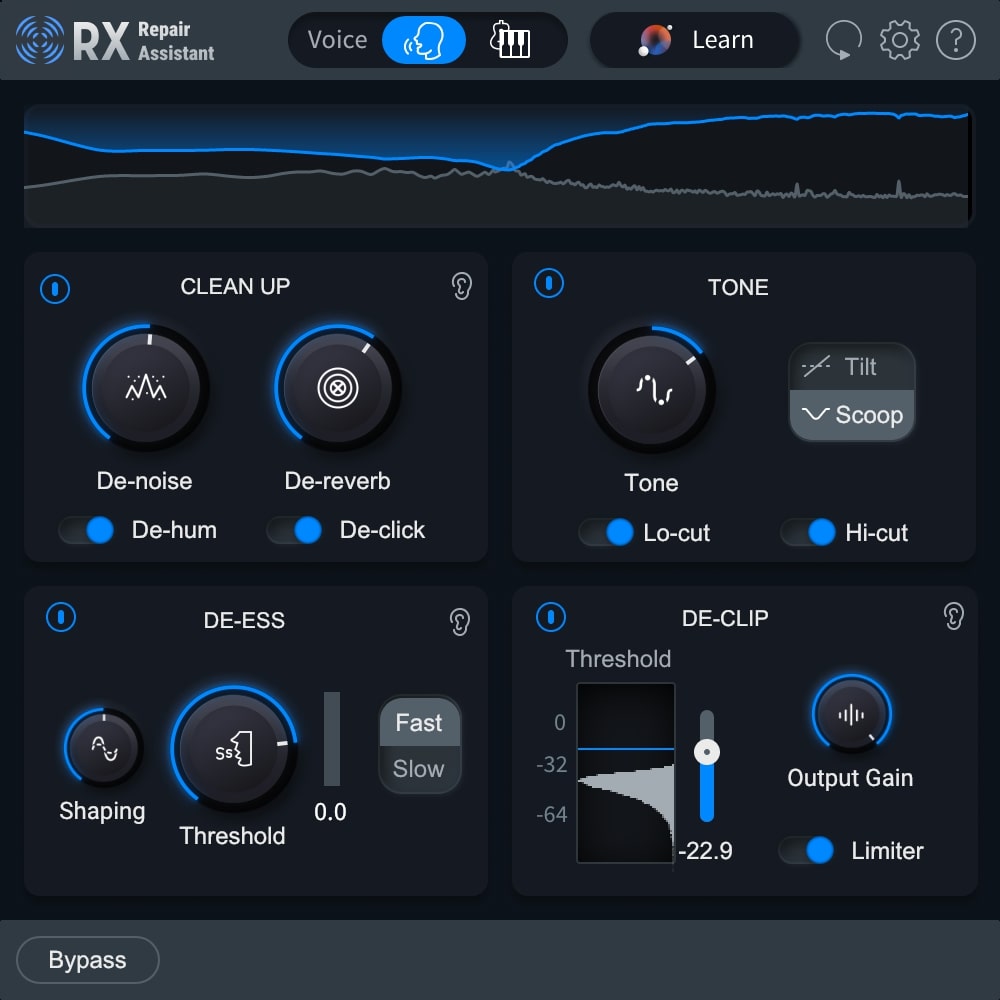
The Smart Solution for Clear Audio
RX Elements is a budget-friendly noise reduction and audio repair toolkit for content creators who need the basics. It includes the brand-new Repair Assistant plugin, as well as five essential real-time noise reduction plugins to fix clipping, hum, clicks, and other unwanted background noise like amp hiss, air conditioning, and even reverb. Repair Assistant uses the digital signal processing of RX to analyze your audio and provide solutions that quickly correct the most common issues. Get the same tools the pros use at an unbelievable price.
Quickly and Reliably Deliver Clean Sound
Things break. So does audio. Recorded sound is rarely perfect - in fact, it's often in really bad shape. That's why you need RX, the award-winning audio repair suite that helps restore, clean up, and improve recordings in post-production, music, and content creation.
Built on decades of iZotope research, RX 11 is the most intuitive and intelligent version iZotope has ever made. From analyzing audio capture and production issues to providing processing solutions, RX speeds up your editing workflow, salvages poor audio takes that were once unfixable, and delivers reliably clear sound quality.
Whether you are editing a podcast, recording a full band, or working on a blockbuster movie, RX 11 enables you to captivate audiences by bringing out the best in recorded audio.
Learn more about RX 11 Elements.
Nectar 4 Elements
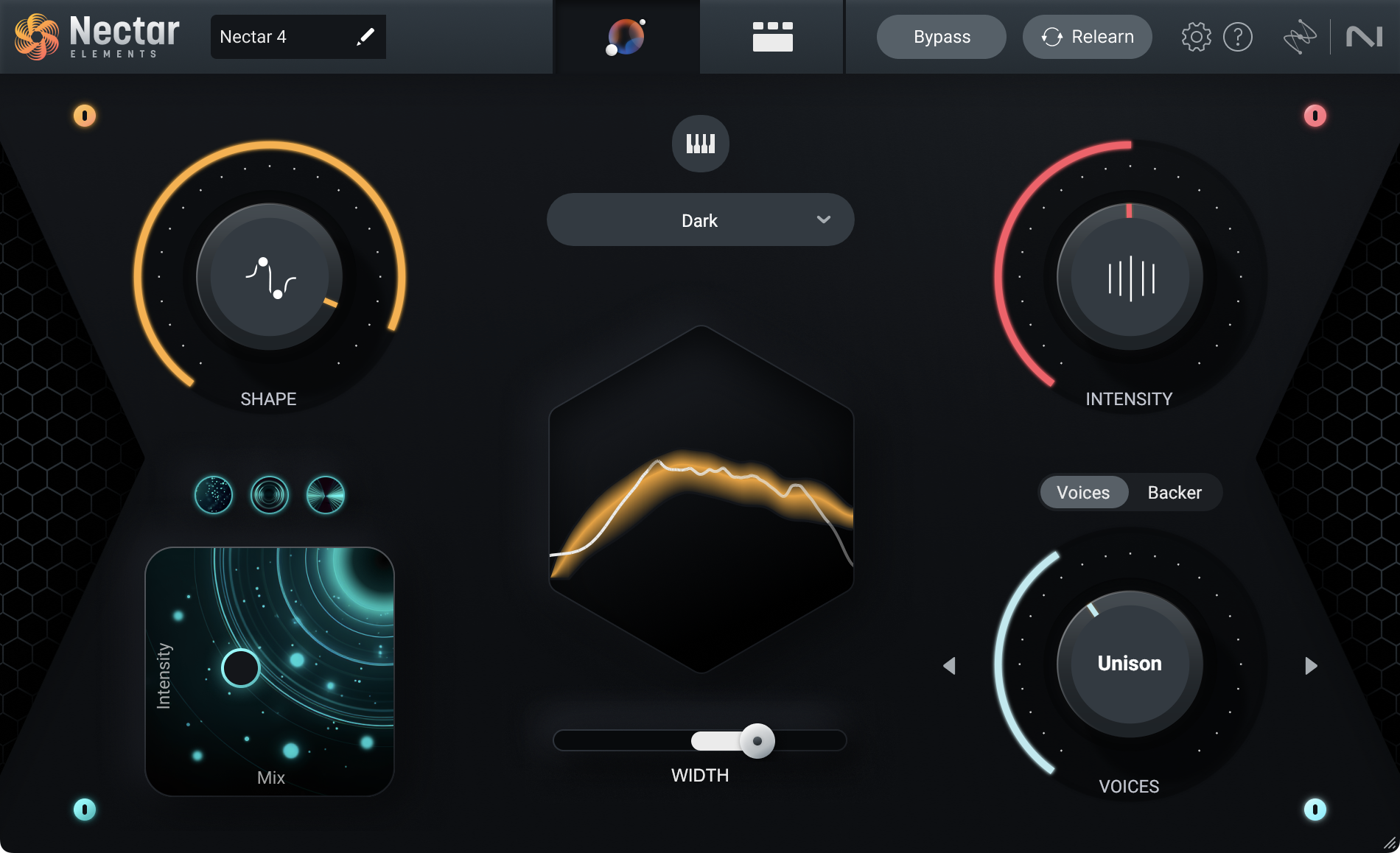
Let Your Vocals Shine
Polish your vocals effortlessly with Nectar 4 Elements, featuring new Audiolens referencing and the improved Vocal Assistant. Nectar Elements analyzes and adapts to your vocal sound, taking the guesswork out of mixing and giving you the power to make your vocals stand out in just a few clicks. With six under-the-hood audio processors and intuitive controls, Nectar Elements intelligently combines compression, de-essing, tonal and subtractive EQ, pitch correction, and reverb into one easy-to-understand interface.
What’s New In iZotope Nectar 4 Elements?
Reference Any Voice
Audiolens is compatible with Nectar 4, allowing you to tone-match any vocal sound. Separate the vocal from your reference with Audiolens and gain valuable information to create a starting point for your mix.
In Sweet Harmony
Instant, easy vocal layers: Voices give you the ability to create layers for your vocal production without needing to learn voice-leading and harmonic motion..
Who’s Backing You Today?
With the AI powered Backer module, you can now create artificial background singers that sit behind your main vocal. Finish up a demo with different flavors of vocalists, creatively destroy ad-lib tracks, or create something new altogether.
Help Is Here
Vocal Assistant now provides a broad interface for making simple and helpful decisions for your vocal production without getting lost in the details of vocal mixing.
Learn more about Nectar 4 Elements.
(Minimum Supported OS versions)
Mac:
- macOS Ventura (13.7), macOS Sonoma (14.7), macOS Sequoia (15.4) Compatible with Intel or Apple silicon M-series Macs (native & Rosetta)
Win:
- Windows 10 (22H2), Windows 11 (24H2)
Plugin Formats
- AAX, AU, VST3. All plugins are 64-bit only. Note: VST2 format is no longer supported.
Plugin Hosts
- Logic 11, Pro Tools 2025, Ableton Live 12, Studio One 7, FL Studio 25, Cubase 14, Nuendo 14, REAPER 7, Audition CC 2025, Premiere CC 2025


