


 Log In

Buy Mix & Master Bundle Advanced Crossgrade from Ozone Advanced or Nectar Advanced, get a free gift with purchase:
Note: This is a listing for Mix & Master Bundle Advanced Crossgrade from Ozone Advanced or Nectar Advanced. Other purchase options are also available.
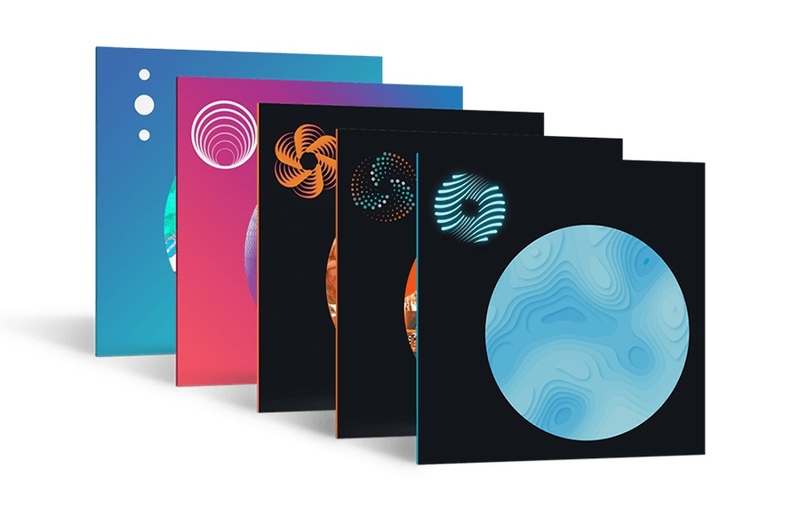
Your Advanced Toolset for Mixing and Mastering
iZotope's Mix & Master Bundle Advanced streamlines your mixing and mastering into one, fluid, interconnected workflow using the most advanced tools that talk to each other. Save time using AI-powered plug-ins to easily achieve an exciting starting point for your reverb, level balance, instruments, and vocals, and get a professional, polished sound for the final product. Efficiently tackle any track with the tools needed to clean up low end, sculpt your audio, smooth out harsh frequencies, intuitively design unique spaces for reverb, and more.
Ozone 12 Advanced

Go beyond the limits of mastering with Ozone 12. Unlock the impossible with this complete suite of 20 pro modules, including 3 brand-new, best-in-class additions. Plus, make Master Assistant your own with a new customizable flow. With intelligent tech that guides, not decides, you're always in control.
What is Ozone?
Built on two decades of award-winning innovation at the cutting edge of mastering tech, this complete suite helps bring tracks to life - whether it's your first or the latest in a long line of hits.
Way back in 2017, Ozone's Al-powered Master Assistant sparked the shift to faster, smarter, more accessible mastering. Using the analysis of thousands of pro tracks, Master Assistant was the first to create custom presets that match target sounds in seconds. And it's just that, your creative co-pilot, your trusty guide. There to save you precious time, to support your creativity, to take the mystery out of mastering.
Doing the impossible is an Ozone tradition. Best-in-class neural nets unlock new ways to master faster and smarter than ever, with uncharted levels of control and creativity. Need a little magic to fix a squashed mix? Some surgical control over stems? Ozone is the answer.
Whether you're starting your journey or perfecting your craft, there's an Ozone just for you. Take your first steps with Elements, finesse your sound with Standard, or complete your suite with Advanced.
What's New?
Bass Control | Feel the energy anywhere
Lock in your low end in any listening environment. Whether you're fixing a weak mix, tightening a kick, or adding subtle weight, Bass Control lets you easily balance low end energy while enhancing clarity, punch, and impact. No more guesswork and crossed fingers. Make sure your masters hit hard in the car, the club, and the charts.
Unlimiter | Restore, regain, revive
Bring musicality back to your master. Unlimiter is like an "undo" button for overly compressed audio, using cutting-edge machine learning to bring back lost transients and revive tracks transparently. Just set the threshold (or click the Learn button) and turn up the missing peaks to restore punch and open up tracks for easier, cleaner mastering.
Stem EQ | Unfixable no more
Thin vocals? Overpowered drums? Impossible to fix without the mix file, right? Not anymore. Unlock unprecedented control over your master with Stem EQ. Avoid tedious mix edits by separately EQing the vocals, bass, drums, and instruments in your stereo bounce. With a simple, feels-like-magic workflow, Stem EQ is everything you need to have the final say over your final balance.
Custom Assistant flow | Personalized Al power
Call the shots with the new 'Custom' Master Assistant flow. Looking for full transparency? A more aggressive edge? Pick from dozens of genre targets, toggle modules, and set loudness levels to create a module chain that's truly yours. Save time and finalize your track with confidence - all without ever losing creative control.
IRC 5 Maximizer mode | Loudness, uncompromised
Push your masters harder than ever without the usual tradeoffs. Achieve outstanding loudness and stunning clarity with the new IRC 5 limiting mode - the most advanced algorithm yet for Ozone's fan-favorite Maximizer. Effortlessly craft clean, open masters, even at high LUFS. No pumping. No distortion. Just pure pro polish.
Features
- New! Full mastering suite | Ozone 12 now includes 21 plugins, a mothership and 20 component plugins. Use the components as individual plugins or combine them in the mothership plugin chain for all-in-one ease.
- New! Lock in your low end | Bass Control makes it easier than ever to add drive, punch, and balance to your low end, regardless of your listening environment.
- New! Restore your dynamics | Unlimiter acts as an "undo" button for overly compressed audio, reintroducing lost dynamics with industry-first machine learning tech.
- New! Redefine your mix | Stem EQ prevents tedious mix fixes by giving you the control to separately EQ vocals, bass, drums, and instruments in your masters.
- New! Call the shots | The Custom Assistant flow creates a mastering chain to match your creative touch. Direct Master Assistant to target the right genre or reference, use specific modules, hit loudness levels, and more.
- New! Louder, clearer limiting | The IRC 5 Maximizer mode is Ozone's most advanced limiting algorithm yet, maximizing your track's power and clarity without the usual tradeoffs.
- Improved! Cleaner stem splitting | Stem Focus modes introduced in Ozone 11 are now powered with new neural nets to offer better separation with fewer artifacts.
- Improved! New Ozone, new feel | Ozone is even more polished and intuitive, with a new design and refreshed color palette that invite you to step in and take control.
- Improved! Stabilizer module | With 25 new genre targets introduced in Ozone 12, sculpt a balanced sound with an intelligent and adaptive mastering EQ.
- Assistant View | Your Ozone preset, all in one place. The Assistant View makes it simple to pick targets and fine-tune your signal chain from Master Assistant.
- Clarity module | Effortlessly achieve a smoother master and pull the blanket off dull mixes with psychoacoustic clarity processing that never sounds harsh.
- Impact module | Enhance the rhythm and feel of your tracks by intuitively controlling microdynamics with musical envelope times.
- Transient/Sustain | Separately fine-tune Transient and Sustain content with ease, Apply to any Ozone module and achieve greater control, clarity, punch, and depth.
- Assistive Vocal Balance | Never worry about vocal levels again. Master Assistant can place the vocals in the mix, with a helpful guide from the Vocal Checker.
- Ozone fan-favorites | Ozone 12 packs powerful tools from past versions, including Imager, Spectral Shaper, Match EQ, Vintage Compressor / EQ / Tape, and more.
- Tonal Balance Control 2 plugin | Meter while you mix to shape balanced levels based on tens-of-thousands of professional mixes.
- Efficient performance | Ozone is compatible with Apple silicon native chips for faster processing.
Learn more about Ozone 12 Advanced.
Nectar 4 Advanced
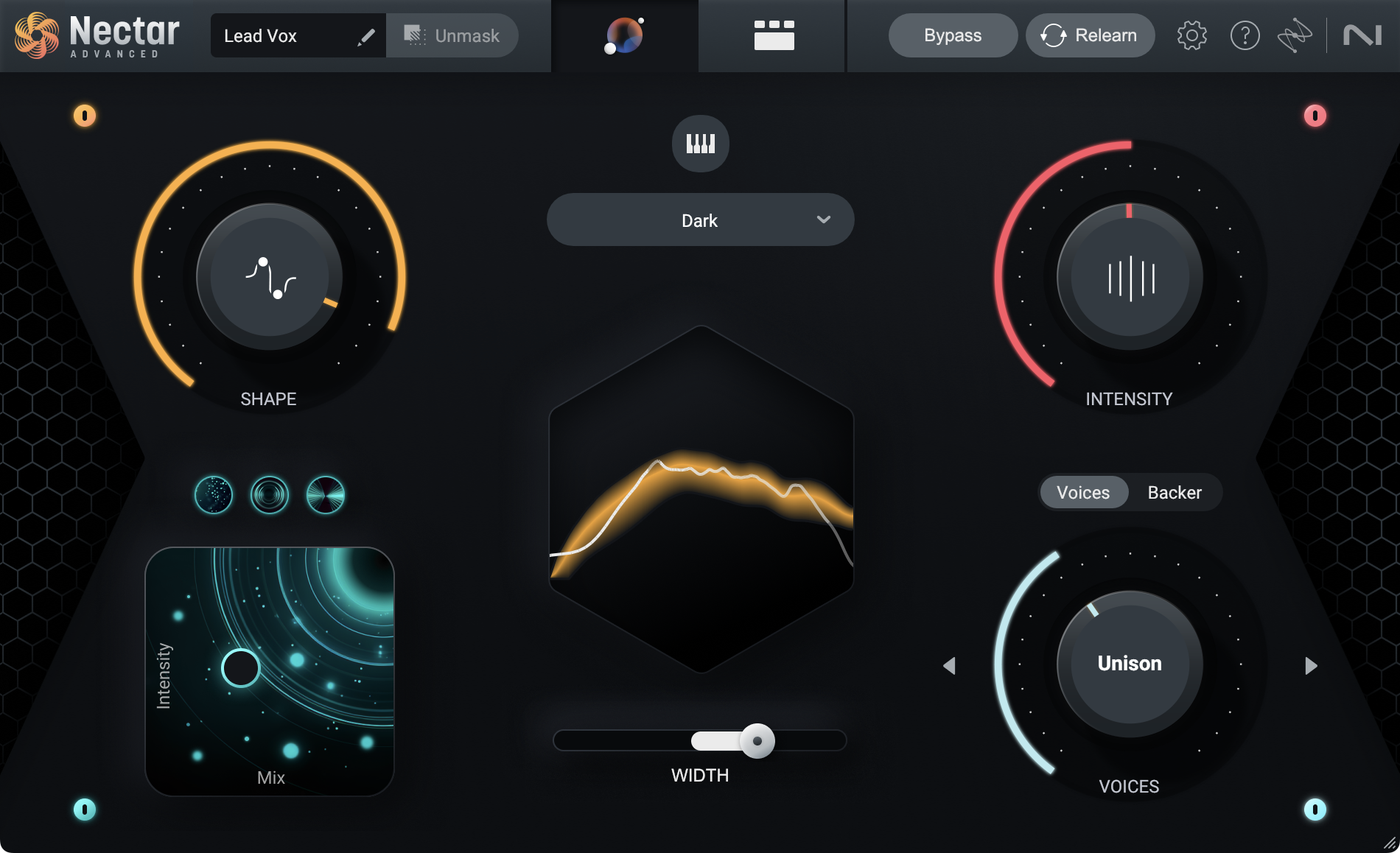
Let Your Vocals Shine
Mix, produce, and design vocals effortlessly with Nectar 4 Advanced. Achieve consistent and well-balanced vocals with the Auto-Level Module, easily create vocal layers with the Voices Module, add artificial background singers with the Backer Module, and make impactful edits through Vocal Assistant’s intuitive interface. Plus, dive into a suite of powerful plugins for complete control over your vocal sound. Take your vocal productions to the next level with Nectar 4 Advanced.
Modules
Auto-Level Module
- Access the Auto-Leveler conveniently through the new mini-Module view, which provides essential vocal controls regardless of your location in Nectar's interface.
- The new Tame Noise feature actively adjusts non-sung vocal elements, ensuring consistent and balanced vocals.
- Fine-tune the Mix, Strength, and Range parameters of Auto-Level for precise control over your vocal signal.
- Employ Sidechain Mode to align the volume level of another track in your mix with your vocals.
Voices Module
- Choose from a selection of 11 auto-harmonies to discover the perfect fit for your desired style.
- Engage MIDI mode to precisely control voices with the specific notes you need.
- Explore the robust editor to customize the number of voices and the chords they sing in your music.
- Adjust the range of your voices using the Direction control, allowing them to sing above or below your main vocal.
- Easily manage and manipulate each voice with the Mixer View, providing intuitive control over the soundstage of your vocal production.
Backer Module
- Shift your vocals to eight different styles to create different backup singers.
- Create your own style with a reference target.
- Blend your backup singers with Tone, Pitch, and Formant features so you can sit your tracks behind your lead vocal.
- Completely control shifting and style selection with automation, allowing you to create movement throughout your track.
Vocal Assistant
- Choose from various targets in your library to instantly achieve the desired sound.
- Import a custom reference track, and Vocal Assistant will match its tone.
- Make impactful decisions regarding EQ, intensity, and width to shape your vocal's sound.
- Seamlessly blend vocal effects like dimension, reverb, and delay.
- Utilize Vocal Assistant's page to layer, shift, and pitch your vocals for added movement and depth.
13 Component Plugins
- Integrate 13 powerful vocal plugins into your vocal chain templates.
- Utilize Pitch Tracking and Dynamic EQ to achieve a balanced vocal that fits seamlessly into your mix.
- Employ Pitch, Backer, and Voices FX to create powerful layers and shifted effects in your vocal chain.
- Enhance your vocal production with Reverb, Delay, Saturation, and Dimension FX, adding character, depth, and movement.
- Take control of your dynamics with the De-esser, Compressor, Gate, Auto-Leveler, and Breath Control plugins, whether it's sung vocals or spoken material.
Audiolens Referencing
- Use Audiolens to reference any audio from any source and kickstart your vocal processing with Nectar's Vocal Assistant.
- Benefit from Audiolens' new separation technology to match the tone of any vocal, providing you with a target to aim for.
- Create a library of custom reference targets within Nectar's Vocal Assistant, making it convenient to access your references in any session.
Celemony Melodyne 5 Essential
Nectar 4 offers an additional advantage with its built-in pitch correction Module by partnering with Celemony to include Melodyne 5 Essential. Melodyne is a GRAMMY-award winning pitch and time correction tool, known for its precise and intuitive capabilities that are widely used in professional studios worldwide.
Perfect Balance
Nectar 4 provides two specialized 24-band Dynamic EQs specifically designed for vocals. These Dynamic EQs offer transparent and clear processing, catering to both corrective and creative tasks. They feature adaptive nodes for precise frequency shaping and pitch tracking. With the Follow EQ mode, the Dynamic EQs dynamically track the pitch, eliminating the manual editing of resonant frequencies and harmonics. This enables active control over the timbre and tone of the vocals.
Features
- Vocal Assistant: Instantly create custom presets using machine learning technology to optimize your vocal's fit in the mix.
- Improved Unmask: Easily prioritize your vocal by reducing competing mix elements directly from the Vocal Assistant's menu screen.
- Dynamic EQ with Follow EQ Mode: Real-time tracking and removal of troublesome resonances, saving time and effort.
- Auto Level Module: Automatically adjusts vocal levels before processing, eliminating the need for corrective dynamics or manual fader adjustments.
- Inter-plugin Communication: Nectar 4 communicates with other iZotope plug-ins in your session to address tonal balance and masking.
- Thirteen Component Plugins: Comprehensive set of vocal-focused production and mixing tools, including dynamic EQs, auto-level, backer, breath control, compression, voices, pitch, de-esser, saturation, reverb, gate, and dimension.
Also Included
- Nectar 4 Breath Control Plugin: Reduces unwanted breaths without compromising audio quality.
- Melodyne 5 Essential: Award-winning time and pitch correction software.
- iZotope Relay: Central hub for intelligent connection between your entire mix and iZotope plug-in collection.
- Hundreds of Professionally-designed presets: Preconfigured settings for music and dialogue applications.
Learn more about Nectar 4 Advanced.
Neutron 5
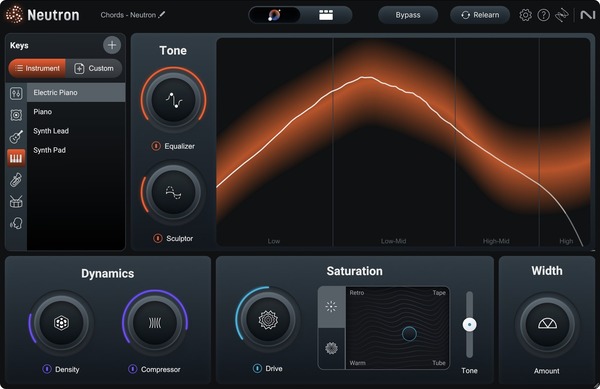
Bring out the best in your mix
A flexible, fully equipped suite of world-class intelligent mixing tools for all workflows and skill levels.
Bring out the best in your mix with Neutron 5, a flexible, fully-equipped suite of 10 intelligent tools. Add power while reclaiming headroom with the multiband Clipper module, give your audio more presence, detail, and fullness with intuitive upward compression in the new Density module, and fix tedious phase issues with the Phase module.
Shape your sound faster with the improved Mix Assistant, precisely target your processing with mid/side and transient/sustain channel modes across the Neutron suite, and make more informed decisions with beautiful, refreshed visualizations. Achieve the mix you’re imagining, whether it’s your first mix or your next big hit.
Features
- New! A suite of 11 plugins | Neutron 5 now comes with 11 plugins, including a mothership and 10 components. Use the component plugins individually or combine them in the mothership plugin chain to sculpt your sound.
- New! Powerful peak control | The new Clipper module adds power and reclaims headroom with intuitive multiband options, oversampling, and channel modes.
- New! Solidify your sound | The new Density module performs intelligent upward compression to give your audio more presence, detail, and fullness.
- New! Unfazed by phase issues | The new Phase module fixes asymmetrical waveforms and out-of-sync signals in seconds, keeping your audio clean and full.
- New! New dimensions | Mid/side and transient/sustain channel modes across the suite let you use Neutron modules on the specific content that needs processing.
- New! Hear the difference | Make more informed decisions with Delta buttons in every module, letting you hear exactly how Neutron is affecting your mix.
- Improved! Shape your tracks in seconds | Refined processing and additional macro knobs in the Assistant View make it even easier to fine-tune your custom signal chain from Mix Assistant.
- Improved! See the difference | Neutron’s updated visualizations are now even clearer, easier to understand, and more customizable, letting you dial-in your settings with confidence.
- Improved! New Neutron, new feel | Neutron 5 feels polished and professional with a new design, featuring updated controls, improvements to the Assistant View, and a refreshed color palette.
- Mix in the moment | Powered by machine learning, Mix Assistant sets a custom signal chain for your specific audio, saving time for creative mixing choices.
- Match references in real time | Dynamically match the tone of your track to a sample or stem using the Target Library with intelligent tone matching technology.
- Neutron 4 fan-favorites | Neutron 5 packs powerful modules from version 4, including Unmask, Sculptor, Transient Shaper, Exciter (with Trash Mode), Gate, Compressor (with Punch Mode and Sidechain metering), and Equalizer.
- Balance Assistant | Automatically set levels before you even touch a fader, using Relay on individual tracks and Visual Mixer on your master channel.
- Visual Mixer & iZotope Relay plugins | Launch Balance Assistant directly from Visual Mixer and position your tracks in a virtual space, tapping into iZotope inter-plugin communication.
- Tonal Balance Control 2 plugin | Meter while you mix to shape balanced levels based on tens-of-thousands of professional mixes.
- 7.1 Surround sound support and zero-latency mode in all 7 modules for professional, lightweight processing for audio post or surround music mixes.
- Beautiful, smooth visualizations and a resizable interface invite you to step in and take control.
- Improved performance | Neutron is compatible with Apple silicon native (M1, M1 Pro, M1 Max) chips for faster processing.
Learn more about Neutron 5.
Neoverb
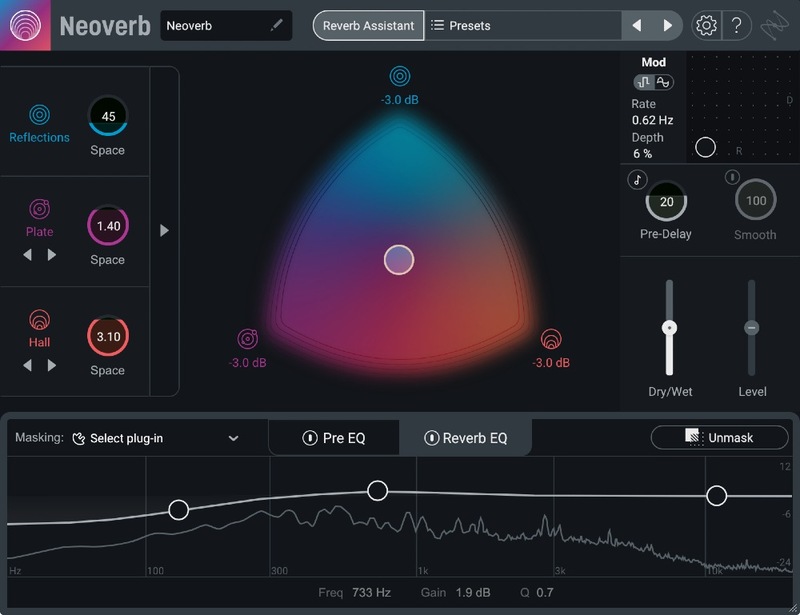
A Reverb that Listens
From the minds behind Ozone and Nectar, and powered by legendary Exponential Audio technology, iZotope Neoverb is the most intelligent reverb plug-in for music producers. Neoverb gets you to an exciting starting point with a new Reverb Assistant that guides you through settings with a simple four-click process. Create exactly the space you want for vocal and instrument tracks using an intuitive Blend Pad to mix rooms, plates, chambers, and more. Shape and tame reverb using intelligent Pre and Post EQs that listen to your audio and make suggestions, helping you add depth while retaining clarity in your mix. Whether you’re a new producer honing your craft, or a veteran on your latest project, with iZotope Neoverb, you can focus on creativity and leave the trial-and-error behind.
Features
Reverb Assistant: Get a great reverb for any track, with an easy four-step Assistant that adjusts iZotope Neoverb’s settings in real-time. Create complex, customized reverbs, without spending time in menus.
- Choose your preferred Size while iZotope Neoverb automatically selects and blends reverb combinations and advanced settings as you move the sliders.
- Add a little vibe with four different Tone selections that further adjust your reverb to give you dark, airy, bright sounds.
- Reverb Assistant listens to your audio and makes further EQ suggestions to get the cleanest possible reverb tone.
Blend Pad: iZotope Neoverb’s innovative Blend Pad gets you further, faster by helping you visualize and mix three different types of reverbs at once, to create a unique reverb tail that fits your track.
- Blend different types of reverb together: Add realistic space with Early Reflections and Room, classic environments with Plate, and height and depth with Chamber and Hall.
- Separate Size controls for each reverb type to let you create epic guitar tones, construct massive drum rooms, or dream up completely exotic spaces to make your mix unique.
EQ Section: Get a great reverb sound without using a long plug-in chain, with a fluid EQ section helps you clean your input signal and keeps your reverb tail from overwhelming your mix.
- Use Unmask to have iZotope Neoverb listen to your reverb settings and make EQ suggestions to help your final result come through clear against the original signal.
- AutoCut listens for areas of your track that might create unwanted resonances in the reverb and automatically suggests cuts in the Pre-EQ.
- Masking Meter: Easily keep track of reverb build-up with an intuitive meter that highlights EQ areas you may want to cut from your reverb. Masking Meter communicates with other iZotope plug-ins to show you where reverb is masking other tracks and is compatible with the following iZotope plugins:
- Neutron 3
- Nectar 3
- VocalSynth 2
- Relay
Advanced Panel: For when you need to tweak a setting or take a closer look at Reverb Assistant’s results, the Advanced Panel lets you dive as deep as you need to find the exact vibe you’re looking for.
- Unique Advanced settings for each reverb unlock even more creative possibilities and exciting new spaces to explore.
- Advanced Controls are set by Reverb Assistant and can be saved as unique presets for later use.
Learn more about Neoverb.
Tonal Balance Control 2
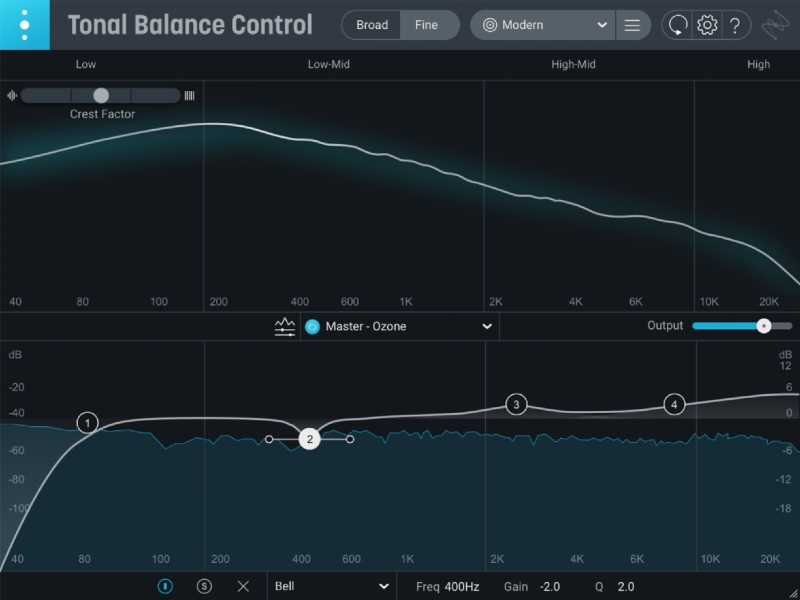
Find Your Balance
Get decades of mastering expertise in your next session with Tonal Balance Control 2, a plug-in that helps you overcome your listening environment and make the best decisions to achieve a balanced mix. See the balance of frequencies in your track and compare it to 12 different genre targets based on thousands of professional masters, or upload your own audio file to compare to a unique custom curve. Control EQ and gain of other compatible iZotope plugins without leaving Tonal Balance Control 2. Whether you need a quick confidence check on a mix or are struggling to perfect your final master, Tonal Balance Control 2 is essential for any project.
Features
- Create with confidence: Tonal Balance Control 2 is your second set of ears in a session, with 12 target curves representing popular music genres that help you stay on target no matter your listening environment. Load your own audio file to create a custom curve for when you’re looking for a specific vibe.
- Fix issues in your session: Tonal Balance Control 2 can open an EQ from an iZotope Neutron or Ozone plugin in your session, so you can fix balance issues from one plug-in window. Tonal Balance Control 2 can also talk to plug-ins like iZotope Nectar 3 or VocalSynth 2, letting you see how your vocal fits into your overall balance.
- Get the complete picture: With improved fluid metering and resizability, it’s even easier to see every detail of your tonal balance. Work in Broad view mode to get a general bird’s eye of your mix, or switch to Fine view to zoom in on tough problem areas. Solo frequencies to hear exactly what’s contributing to your tonal balance, and quickly fix issues on your tracks with improved scaling that makes it easier to work with EQs in Ozone or Neutron.
Learn more about Tonal Balance Control 2.
Awards


.jpg)
(Minimum Supported OS versions)
Mac:
- macOS Ventura (13.7), macOS Sonoma (14.7), macOS Sequoia (15.4) Compatible with Intel or Apple silicon M-series Macs (native & Rosetta)
Win:
- Windows 10 (22H2), Windows 11 (24H2)
Plugin Formats
- AAX, AU, VST3. All plugins are 64-bit only. Note: VST2 format is no longer supported.
Plugin Hosts
- Logic 11, Pro Tools 2025, Ableton Live 12, Studio One 7, FL Studio 25, Cubase 14, Nuendo 14, REAPER 7, Audition CC 2025, Premiere CC 2025
Important note: Serials for all non-iZotope products will be emailed to you once your iZotope license is registered within the iZotope Product Portal
iZotope Mac Registration & Installation Guides
Please click the button below to download your iZotope Product Portal installer:

Please find all of the information you need about installing the iZotope Product Portal and how to use it to register and install the iZotope products included within this bundle, in the Help Centre links below:
How to use the iZotope Product Portal
How to register for an iZotope account
MAC: iZotope Product Portal installation guide
How to register a product using the iZotope Product Portal
How to install a product using the iZotope Product Portal
How to download your Add-On content using the iZotope Product Portal
Windows Registration & Installation Guides
Please click the button below to download your iZotope Product Portal installer:

Please find all of the information you need about installing the iZotope Product Portal and how to use it to register and install the iZotope products included within this bundle, in the Help Centre links below:
How to use the iZotope Product Portal
How to register for an iZotope Account
Windows: iZotope Product Portal installation guide
How to register a product using the iZotope Product Portal
How to install a product using the iZotope Product Portal
How to download your Add-On content using the iZotope Product Portal
Video Tutorial
You can also find information on how to register and install your Melodyne software below:
Melodyne Essential Software Registration & Installation Guide
1. Visit the Celemony website.
2. If you have an EXISTING Celemony account, log in. If not click 'First-time registration'.
3. Go to the bottom of your Celemony account window and register the serial from your Plugin Boutique User Account by inserting the number in the 'Your serial number' field and click the ‘Add license’ button.
4. If you are a NEW customer you can create an account, insert the serial number from your Plugin Boutique User Account into the ‘Your serial number’ box and click 'Register'.
5. The Celemony registration system will then build an Installer for you.
6. You must download this installer and run it to install Melodyne.
Experiencing problems?
If you are experiencing issues with any of the download material on this page, please contact our Customer Care team.


