


Save $198.00 compared to buying products individually
Buy Best Of Baby Audio Bundle (Exclusive), get a free gift with purchase:
The Best Of Baby Audio Bundle (Exclusive) brings together three of the brand’s most celebrated plugins for mixing and production. Smooth Operator Pro is a dynamic spectral balancer that removes mud, harshness, and masking with surgical precision, letting you reshape tonal balance and achieve pro-level clarity.
Crystalline is a next-generation algorithmic reverb, offering pristine, modern reflections with tempo-synced controls and lush creative features that go far beyond classic hardware. Finally, Parallel Aggressor delivers mix-ready punch and warmth through parallel processing, blending compression (“Spank”) and saturation (“Heat”) with your dry signal for maximum impact.
Together, these plugins give you clarity, depth, and power in every track.
Smooth Operator Pro
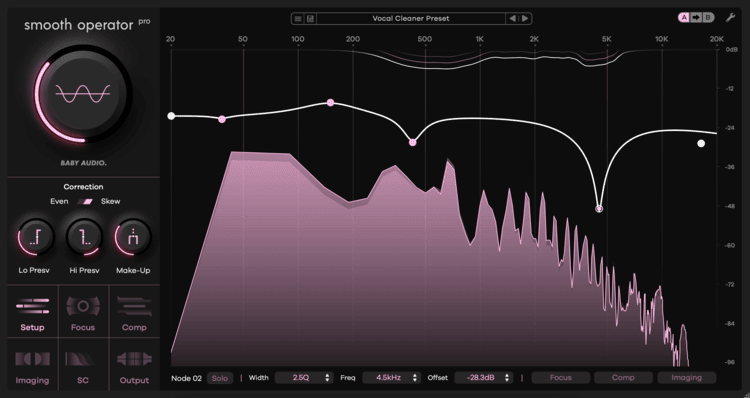
Dynamic Spectral Balancer
The Definitive Clarity Tool
- Smooth Operator Pro removes the bloated frequency energy your tracks don’t need
- Achieve clarity in your mixes by eliminating mud, harsh resonances and masking
- Fix specific problem areas with surgical control – or re-shape the tonal balance entirely
Instant Track Optimizer
Baby Audio have engineered the new Pro version without compromising on the fast workflow that made Smooth Operator 1 so popular.
Set the desired target curve, then turn the global threshold knob until the plugin starts balancing your audio. Dive into deep settings optionally for total control.
Smooth Operator Pro removes fatiguing frequency energy as and where it occurs, improving your audio’s clarity. Dial it in gently and it will feel like lifting a blanket from your speakers.
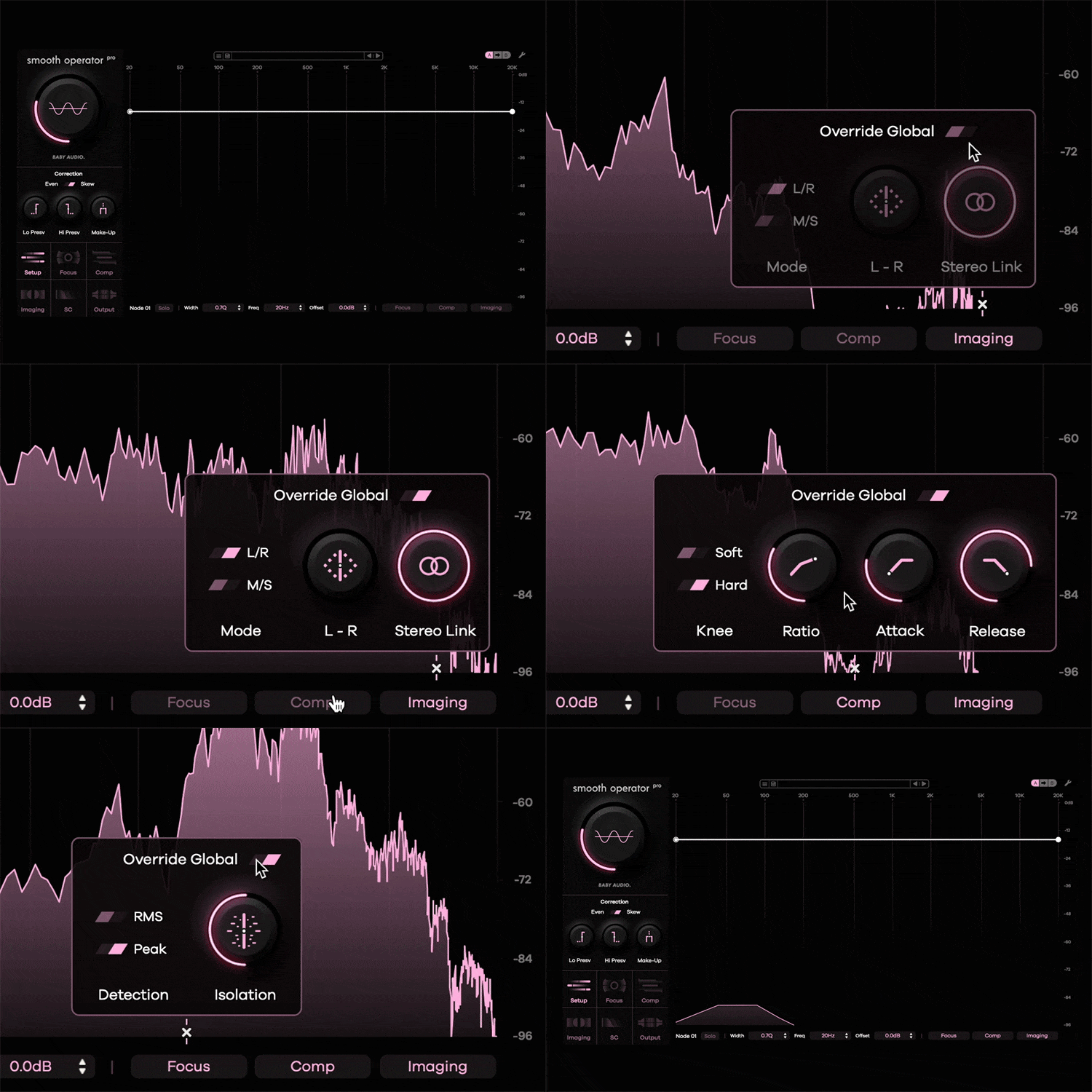
Resonance Suppression 2.0
Where other spectral balancers offer global settings to affect the signal, Smooth Operator Pro brings unprecedented depth: Override the global settings for any frequency node to set individual dynamic profiles across the spectrum.
Examples (within the same plugin instance):
- Target the left side at 7500 hz to fix a harsh cymbal.
- Address only the sides at 150 hz to clean up the bass.
- Tame a vocal at 2.5 khz with a softer compression profile.
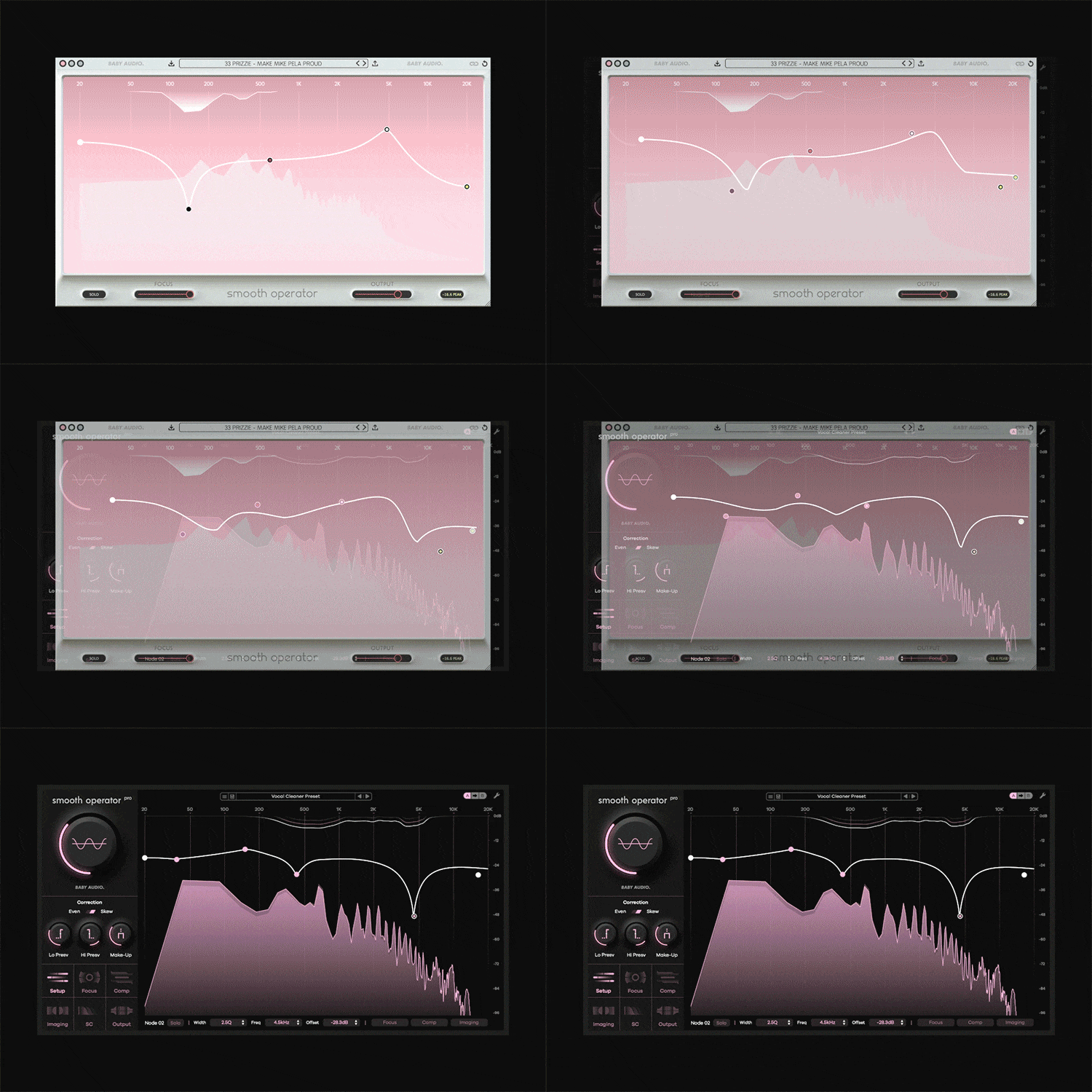
Smooth(er) Operator
Baby Audio have listened and learned. The all-new Pro version incorporates four years of user feedback since V1.
- Enhanced performance and sound quality
- Full control over all dynamic and imaging parameters
- Freely add and remove nodes across the spectrum
- Create individual dynamic processing profiles per node
- Two cutting-edge correction algorithms: Even and Skew
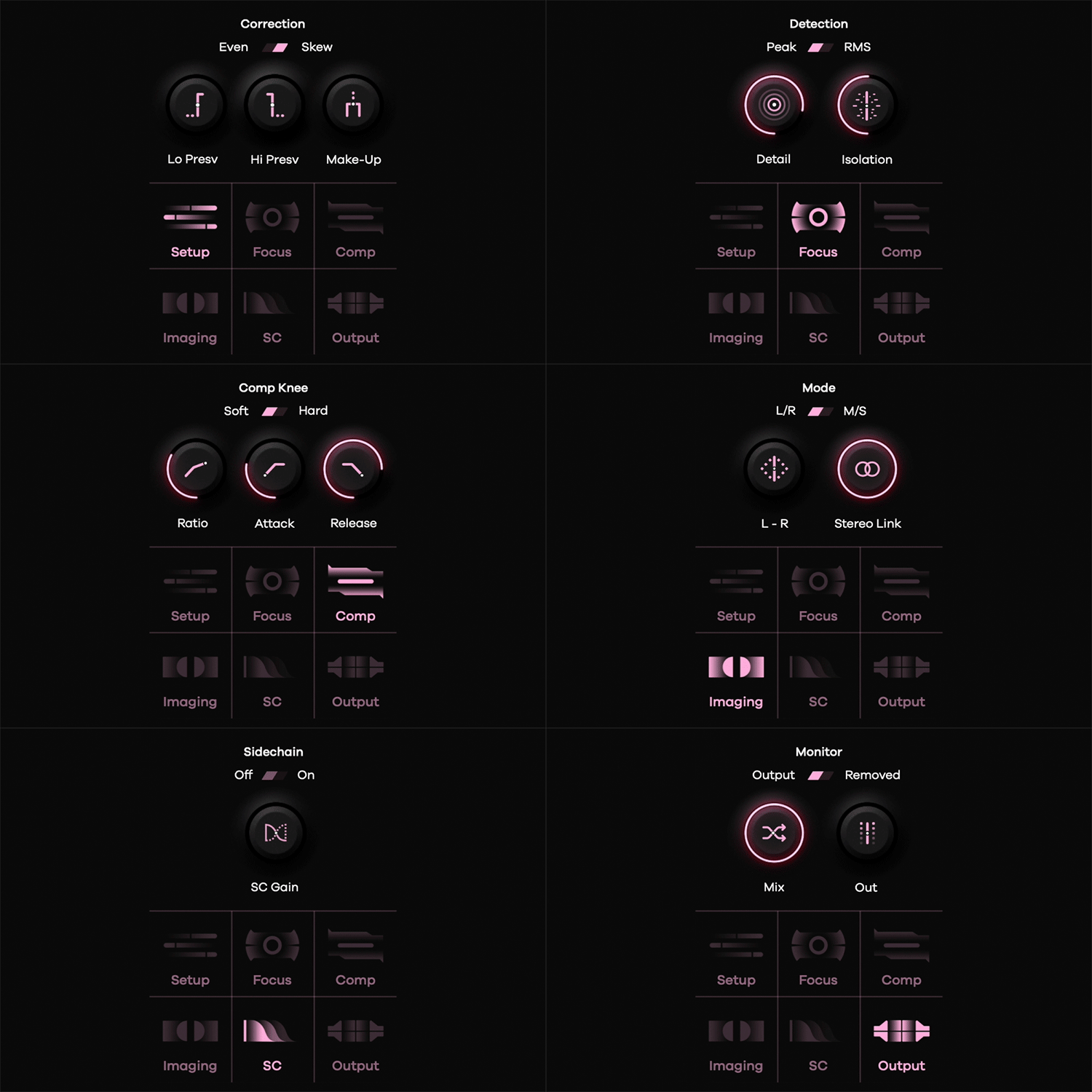
Pro-Level Spectral Workstation
Spectral Processing manipulates the building blocks that make up a digital signal. By splitting a sound into its individual components, the plugin rebalances the harmonic material more effectively than traditional EQ and compression tools.
Smooth Operator Pro brings surgical control over your sound at the ‘DNA level’. Fixing problems is only the beginning: Use the plugin to dramatically re-shape the tonal balance and bring out the best in every track.
Presets by the world’s top engineers
Smooth Operator Pro ships with 184 presets created by some of the world’s most renowned engineers for use in their own sessions.
Preset creators include 30+ Grammy Nominee Craig Bauer, Max Jaeger (Ariana Grande, Drake, Diplo), Preston Reid (Chris Brown, Usher, Muni Long) and Ryan ‘Skinny’ Shanahan (Zedd, Lady Gaga).
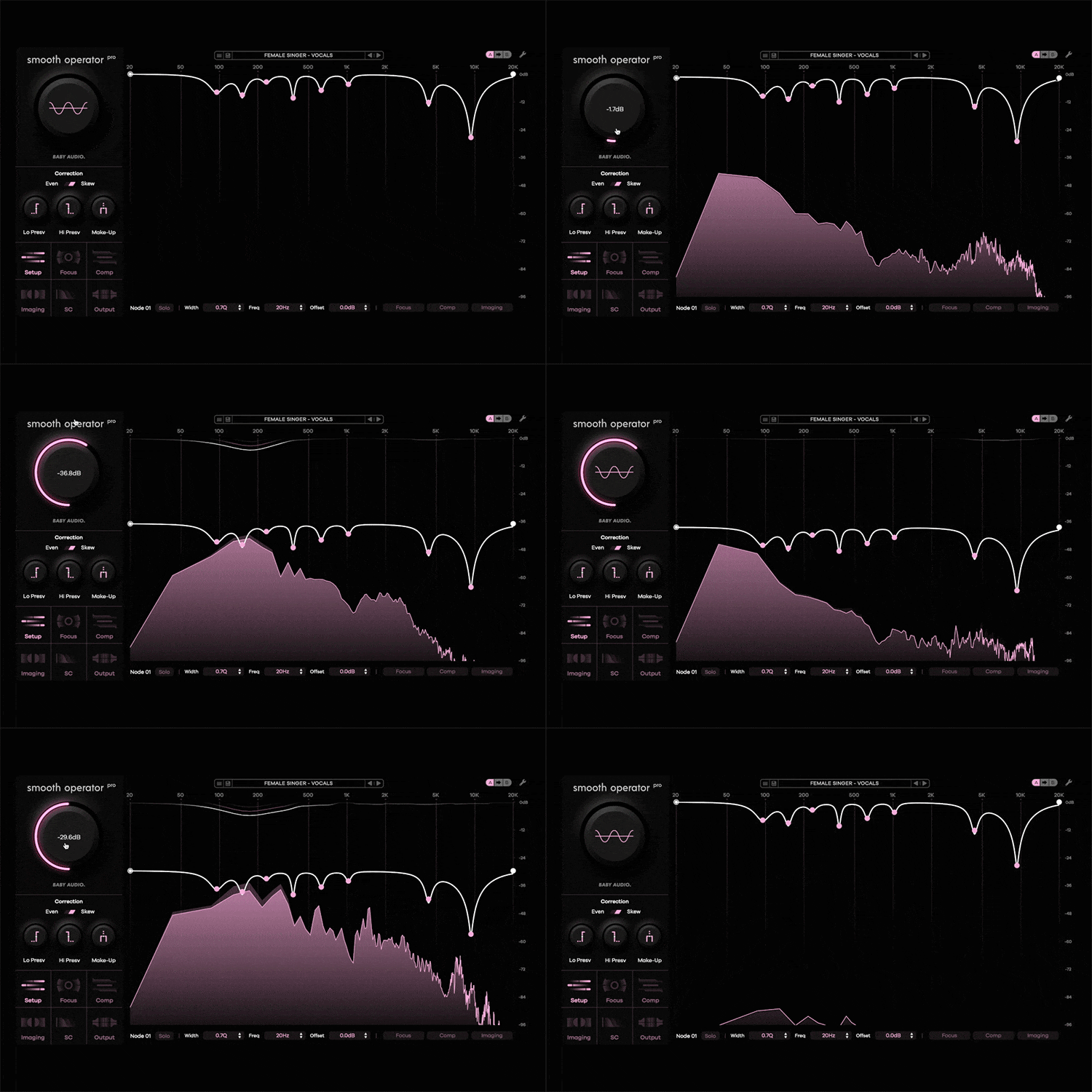
Make space in your mix with sidechain mode
Enable Sidechain mode to use the spectral content of another track in your mix to rebalance the current signal.
Example: Use the lead vocal as the input on a guitar track. The guitar will now be dynamically tamed in the areas where the vocal has the most frequency energy. Both signals can breathe without getting in each others’ way.
Learn more about Smooth Operator Pro.
Crystalline
Next Generation Algorithmic Reverb
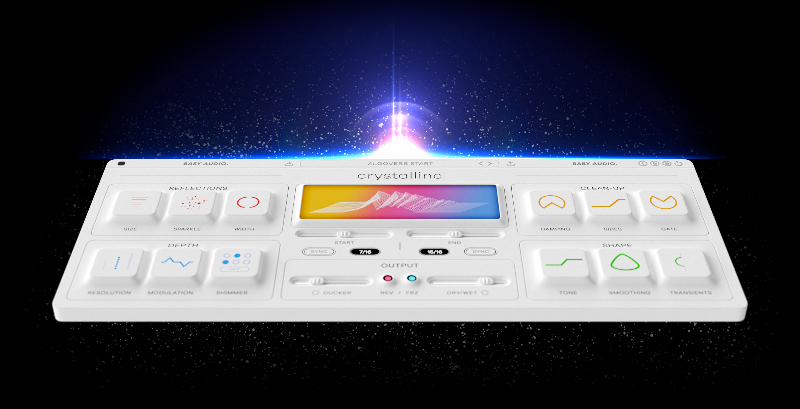
A studio reverb for the current era
A ‘perfect algorithmic reverb’ is often considered the holy grail of digital audio effects. In fact, the idea can be traced all the way back to research papers from the 1960s.
Throughout the 20th century, algorithmic reverbs evolved thanks to companies like EMT and Lexicon. But limited computing power forced manufacturers back then to work within narrow constraints.
Fast forward, and we now have the resources to do things that couldn’t be done during the golden age of studio reverbs. Both in terms of sheer sound quality. But also in terms of adding creative features that weren’t possible in the hardware days.
Crystalline stands on the shoulders of 60 years of chasing ‘the holy grail of DSP’. We’ve asked ourselves what the pioneers of legendary digital reverbs would have done if they had the resources we have today – and then we’ve made exactly that plugin. With all the bells and whistles a modern engineer would need.
Unrealistic expectations allowed
When we’re talking reverbs, there are two fundamental philosophies: One tries to mimic the sound of real physical space – while the other seeks to create an artificial space from an algorithm, free from the constraints of the natural world. The idea of an algorithmic reverb was first conceived in the 1960s – and evolved over the following decades, redefining the sound of modern music with every new technology leap (and improved memory chip!).
Crystalline follows the tradition of the classic algorithmic reverbs but adds new features and higher fidelity thanks to modern computer power. It is meant to sound unreal – in the most positive sense of the word. Its rooms and halls won’t sound anything like those in your house – but closer to those of your dreams!

Make space for Lushness
- Crystalline is a new, state-of-the-art, reverb plugin with a pristine and modern sound
- It gives you unprecedented creative control to shape your reflections
- You can sync reverb start and decay times to your song’s tempo
- An evolution of classic 20th-century studio reverbs – fully upgraded for today
Presets
Crystalline comes loaded with more than 300 presets created by BABY Audio and friends of the house - including:
- Damian Taylor (Bjork, The Prodigy, The Killers, Arcade Fire)
- Michele Canova (John Legend, Alicia Keys, Olly Murs)
- Eric J Dubowsky (Flume, St. Vincent, Chet Faker, Kygo)
- Matt Sim (Nicki Minaj, Big Sean, Gucci Mane)
- M-Phazes (Eminem, Madonna, Demi Lovato)
Features
BPM-Synced Start And End Times
Crystalline lets you hard-sync the reverb attack and decay time to your DAW’s tempo. This will generally result in cleaner mixes where the reflections are naturally in sync with the music. Prefer the classic way? Just hit the “Sync/MS” switch and Crystalline lets you set pre-delay and decay times in milliseconds instead.
Reflections Section
- “Size” lets you set the room size from tiny to large. This control is detached from the “Length” control, meaning you can get any size/length combination you want, including esoteric settings like huge spaces with very short tails or tiny spaces with very long tails.
- “Sparkle” emphasizes high frequencies inside the reverb algorithm. This generates reflections that are naturally brighter, which will help you achieve that extra shine on vocals or snares.
- “Width” lets you set the stereo image of the reverb from mono to wide – and even further to extra wide.
Depth Section
- “Resolution” sets the complexity of the algorithm from ‘basic’ to ‘pristine’. More complex settings will give you an ultra-clean reverb response, free of metallic artefacts – while the ‘Basic’ setting will give you an efficient CPU performance at a normal fidelity.
- “Modulation” creates pitch variations inside the reverb algorithm. This results in a richer sound that works especially well to fatten up synths, guitars and vocals.
- “Shimmer” makes the high frequencies of the reverb tail decay slower than the rest of the spectrum, giving the reflections an ‘angelic halo’ effect. You can set the frequency cutoff point as well as the multiplier effect, which controls how much longer it takes for the higher frequencies to decay. Please note that if Shimmer is active, the high frequencies will decay later than your specified reverb “End Time” (either at 2x, 4x or 6x the length).
Clean-Up Section
- “Damping” is a dual filter control that lets you remove high and low-frequency content from the reverb reflections. This control offers a fast way to get rid of clutter and muddiness in your mixes.
- “Sides” is a high-pass filter that removes stereo information from the low end of the reverb, while keeping the mono information intact. This is especially helpful for creating wide vocal or lead instrument reflections without muddying up your low end.
- “Gate” lets you instantly recreate the classic 1980s gated reverb sound. The gate offers ‘threshold’ and ‘release’ controls and makes it fast and intuitive to make your snares go ‘Phil Collins’.
Shape Section
- “Tone” is a tilt EQ that lets you quickly shift the frequency balance of the reverb to brighter or darker.
- “Smoothing” gradually applies an EQ-curve custom-designed to address the frequency areas that tend to get resonant and sharp. It mellows out the harshness and gives Crystalline a more subtle feel. This allows you to add a little more reverb without drenching your mix.
- “Transients” lets you shift the reverb algorithm’s emphasis to either the attack or sustain part of the incoming signal. Emphasizing the sustain more than the transients will make the reverb feel airy and light while emphasizing the attack stage is a great way to get a splashy and dense sound. The Transients feature works especially well for controlling reflections on percussive material.
Output Section
- “Ducker” lowers the reverb signal when the dry/incoming track is playing. This gives you a cleaner mix, where you can turn up the reverb more without compromising the dry track. “Ducker Gentle” mode offers a slow and natural ducker setting, while the standard ducker mode has a more pumpy feel.
- ”Reverse” reverses the reverb playback, giving you some radical sound design possibilities.
- “Freeze” is another creative effect that takes a granular snapshot of the reverb when clicked and holds this snapshot continuously until the button is un-clicked again. It can be a powerful effect for creating interesting transitions in a mix.
- “Dry/Wet” sets the global mix balance between the dry/incoming signal and the reverb signal. Clicking the “Wet Lock” button lets you browse presets while keeping your preferred wet/dry balance - for easier comparison.
Top Panel
- “Color” lets you change between light and dark background colours.
- “Eco Mode” lets you run Crystalline in a low-CPU mode by setting the resolution to “Basic” and disabling the shimmer effect.
- “Save As Default” lets you save your own default preset that will appear when the plugin initializes or you hit the reset button. That way, you can save your preferred color+size settings.
- “Reset” resets the plugin’s state to your default preset.
- “Tool Tips” gives you help texts explaining each plugin parameter during mouse hover-over.
Resizability
- The plugin window is fully resizable (click+drag bottom right icon).
Learn more about Crystalline.
Parallel Aggressor
Unlock Unparalleled Powers
Parallel processing plays a fundamental part in getting a “big” mix sound. By processing multiple copies of the same track and blending them together, you can add more punch to a mix — in a more natural-sounding way.
It's like teamwork: Multiple copies of the same track - each focused on doing one specific job - can achieve more together than a single copy being processed to death on its own.
Parallel Aggressor is based on this simple concept. The plugin splits your audio into three equal parts:
- Dry - Your original signal
- Spank - A heavily compressed duplicate
- Heat - A heavily saturated duplicate
Work the duplicates hard! Then combine all three signals to squeeze every drop of sonic juice out of your track.
Great Sound - Great Simplicity
You’re probably using parallel processing all over your mixes already. But Parallel Aggressor is designed to give you the maximum sonic impact with the lowest possible track count. No extra busses or mix faders needed.
Like with all Baby Audio's plugins, they have engineered Parallel Aggressor to inject its own sonic flavor into your mix. The plugin is designed to make the small decisions internally, while leaving the big decisions to you.
SPANK
Spank offers an addictively punchy compression algorithm, designed to adapt to your audio signal. It begins where Baby Audio's I Heart NY plugin ended, with improvements in sound quality, signal detection and flexibility.
Style injection buttons: Extra Punch, Extra Smack, Sidechain Filter, Mono.
HEAT
Heat is a warm, analogue-modelled, saturation algorithm with an aggressive bite. It is based on Baby Audio's tape saturator from Super VHS, but has been rewritten and optimized for the Parallel Aggressor release.
Style injection buttons: Extra Hot, Tone, HP Filter, LP Filter.
AUTO GAIN
Auto Gain ensures that the combined output of the plugin’s three signals roughly matches the input/dry level. This allows you to experiment with different internal mix balances while keeping a consistent plugin output.
Workflow
- Balance the three parallel signals from the main level mixer.
- Use the Spank and Heat knobs to dial-up the firepower of the parallel engines.
- The meters help you set the right amount of Spank and Heat for any audio signal. (Dial the main Spank/Heat knobs until the meters peak right before the orange line).
- The style knobs inject desirable sonic flavors into the parallel engines. Engage many at once.
- The solo buttons let you monitor each parallel signal individually for fine-tuning purposes.
- Turn on Auto Gain to get a consistent plugin output, roughly matching the input level.
- Output sets the global output level (post Auto Gain).
- Switch between three different color schemes by clicking the top left icon.

Presets
Parrallel Aggressor comes loaded with 25 presets created by BABY Audio and some friends of the house:
- KurtCurt (Grammy nominated engineer for 2 Chainz, Diamond D, Wiz Khalifa).
- Anthony Saffery (Billboard #1 producer for Portugal. The Man, Dirty Vegas, Cornershop).
New in Version 1.1.0:
- Heat Algorithm improved to offer more warmth and bite at high settings.
- Heat filters improved (new low-end-preservation functionality).
- Improvements to Spank SC Filter, Extra Smack and Extra Punch modes.
- General bug fixes: Mac Dark Mode installer fix, VST3 fix, INIT preset fix, GUI lines fix, Hover-over text fix.
Learn more about Parallel Aggressor.
Smooth Operator Pro
- Plugin formats: VST, VST3, AU, AAX (64-bit).
- Platforms supported: Mac OS 10.11 and up (including Native Apple Silicon M1/M2/M3 Compatibility). PC Windows 10 and newer.
- DAWs supported: All major DAWs, including Ableton Live, Pro Tools, Logic Pro, FL Studio, Cubase, Studio One, Bitwig, Reaper, Reason etc.
Crystalline
Mac
- Mac OS X 10.7 or later (64-bit only)
- Intel or M1 Apple Silicon Processor (Native compatibility)
- Formats: AU, VST, VST3 & AAX
- Compatible DAWS: Ableton Live, Pro Tools, Logic Pro, FL Studio, Cubase, Nuendo, Reaper, Reason and any other major DAW software on the market
Windows
- Windows 7 or later (32 / 64-bit)
- Formats: VST, VST3 & AAX
- Compatible DAWS: Ableton Live, Pro Tools, FL Studio, Cubase, Nuendo, Reaper, Reason and any other major DAW software on the market
Legal Disclaimer: EMT and Lexicon are not associated or affiliated with Baby Audio. The trademarks of other manufacturers are used solely to identify the products whose sounds were studied during our development of Crystalline. None of the aforementioned brands has licensed any intellectual property for use in Crystalline, nor have they endorsed or supported Crystalline
Parallel Aggressor
Mac
- Mac OS X 10.7 or later (64-bit only)
- Intel or M1 Apple Silicon Processor (Native compatibility)
- Formats: AU, VST, VST3 & AAX
- Compatible DAWS: Ableton Live, Pro Tools, Logic Pro, FL Studio, Cubase, Nuendo, Reaper, Reason and any other major DAW software on the market
Windows
- Windows 7 or later (32 / 64-bit)
- Formats: VST, VST3 & AAX
- Compatible DAWS: Ableton Live, Pro Tools, FL Studio, Cubase, Nuendo, Reaper, Reason and any other major DAW software on the market
Please Note: An internet connection is required to authorise this software.
Important note: When accessing this software via a Rent to Own plan or the Beatport Studio membership, it's installed and run through the Beatport Access portal. An internet connection is required every 30 days to validate your license.
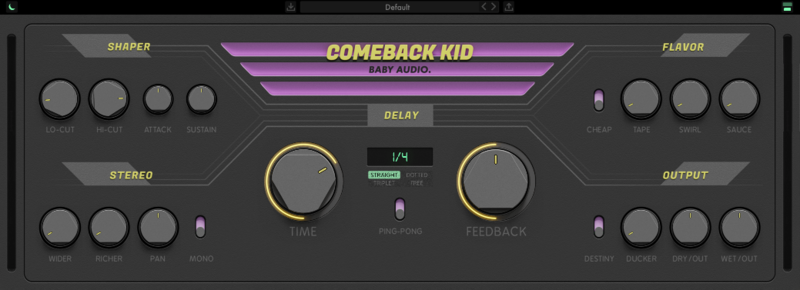
Please Note: Comeback Kid is used as the example.
macOS:
Installation
1. Download the installer from within your Plugin Boutique User Account and open the .pkg file to begin the installation > Click 'Continue'.
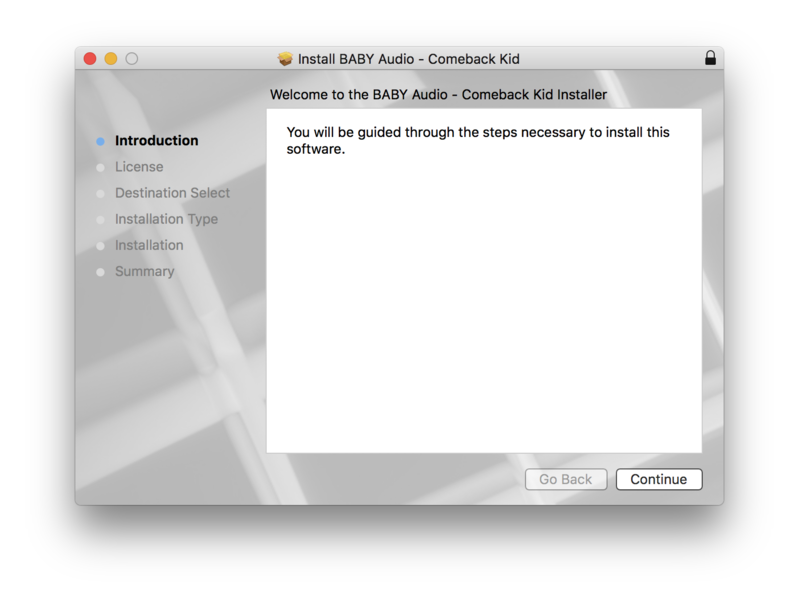
2. Click 'Continue'.
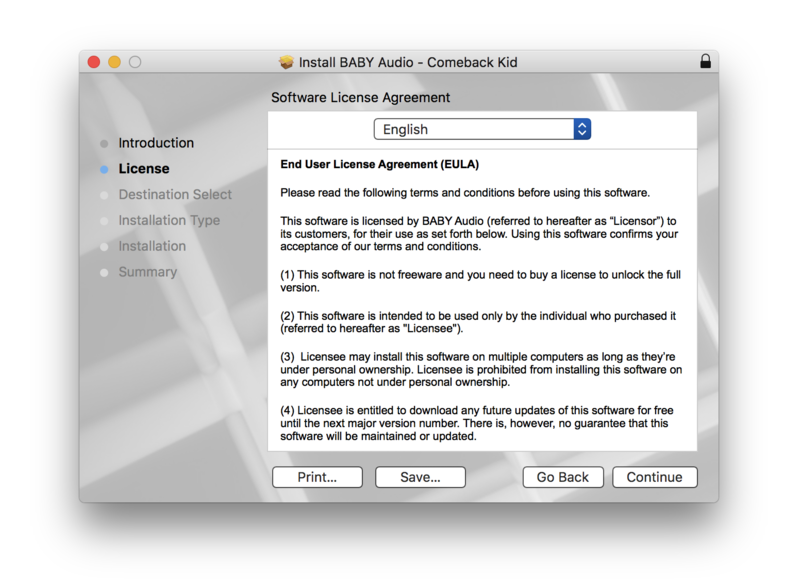
3. Click 'Agree'.
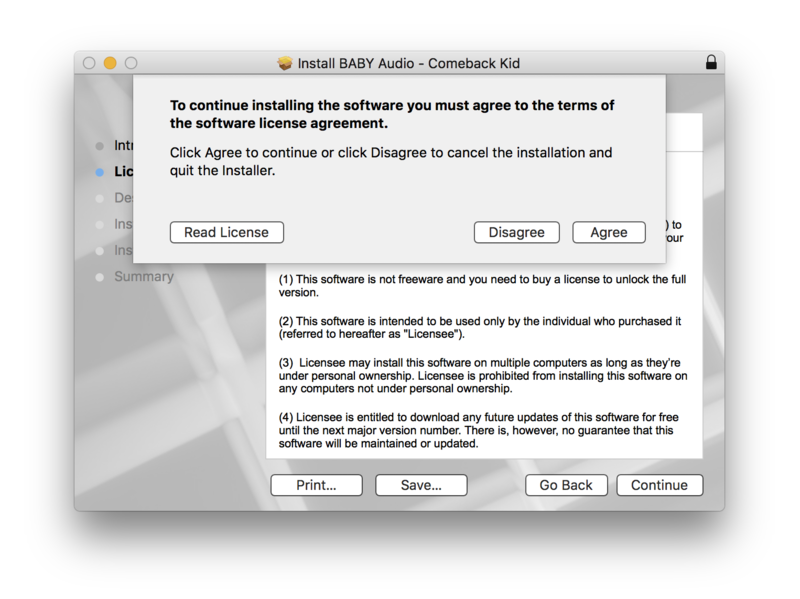
4. Click 'Install'.
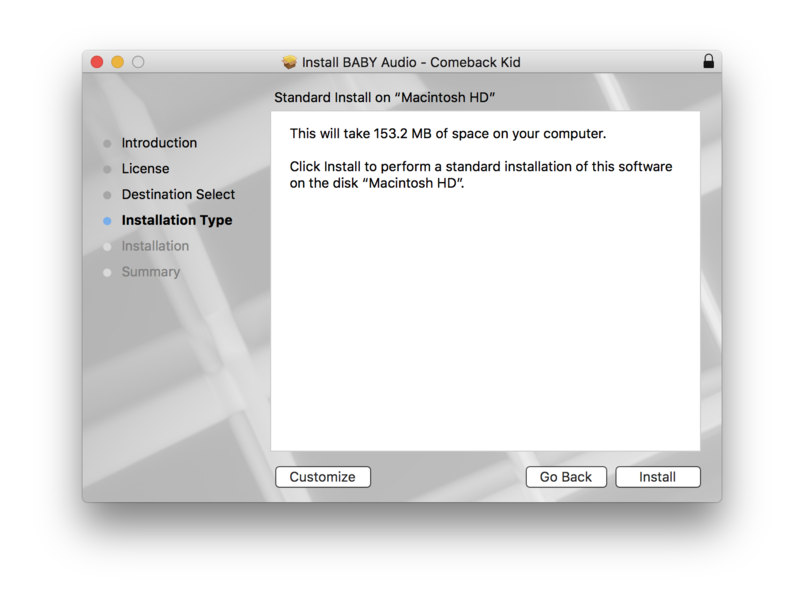
5. Enter your computer Username and Password > Click 'Install Software'.
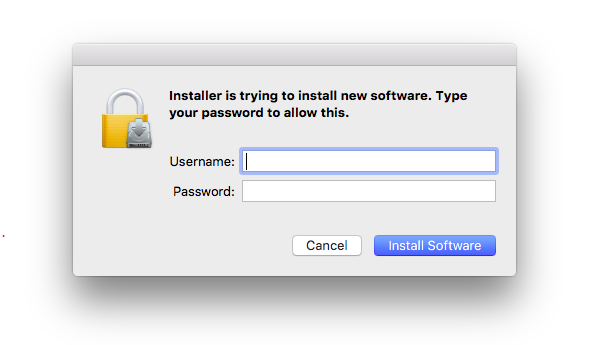
6. Click 'Close'.
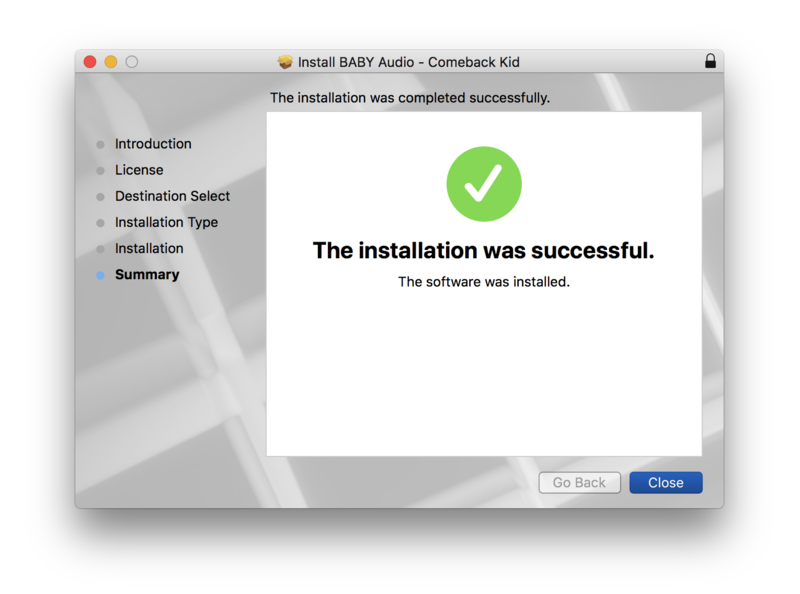
Activation
1. Open the plugin within your DAW.
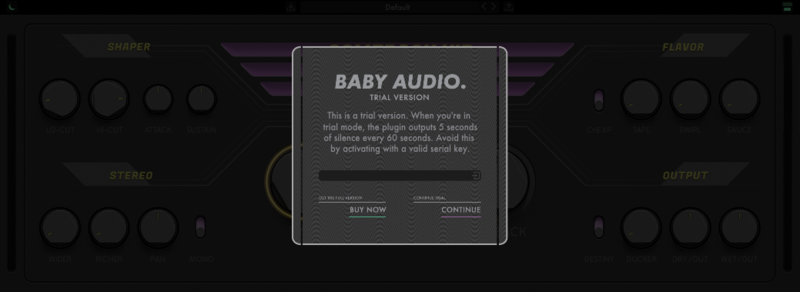
2. Enter the serial number, found within your Plugin Boutique User Account > In order to proceed, click the small green button next to the box containing your serial number.
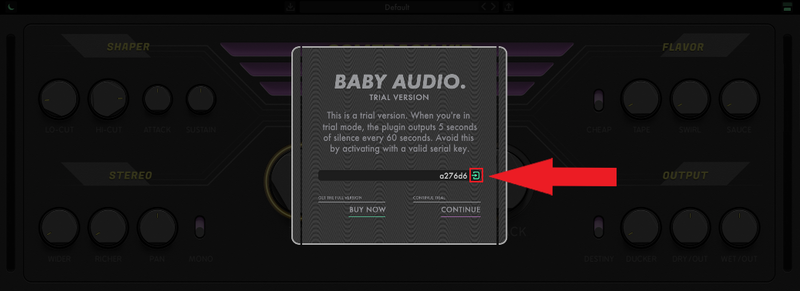
3. Click anywhere on the plugin interface to continue.
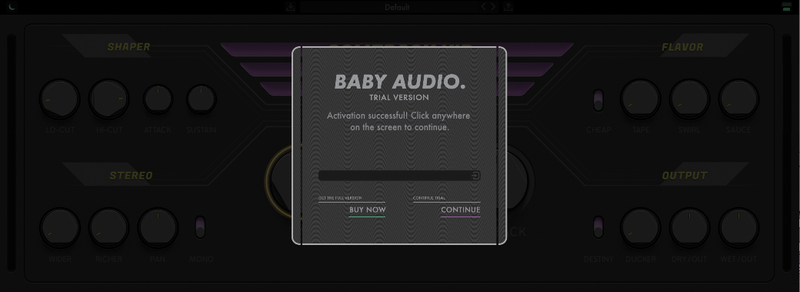
Your software is now installed and ready to use within your DAW.
Windows:
Installation
1. Download the installer from within your Plugin Boutique User Account and double-click it to extract the contents > Open the .exe file to begin the installation.
2. Select 'I accept the agreement' > Click 'Next'.
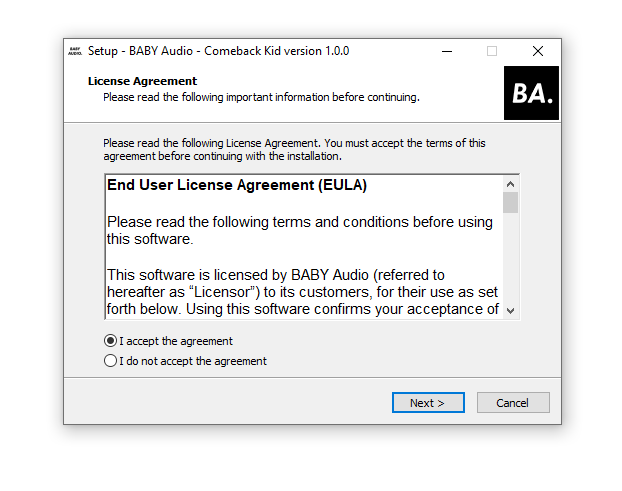
3. Click 'Next'.
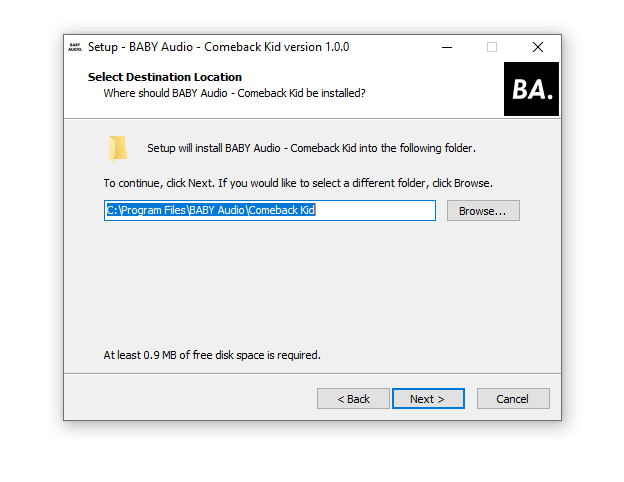
4. Click 'Next'.
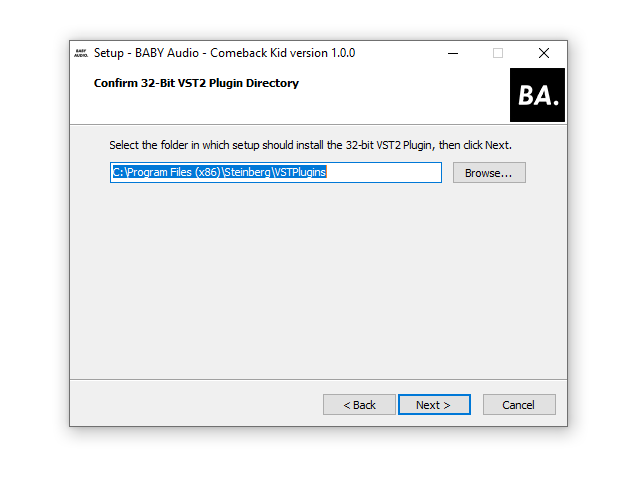
5. Click 'Next'.
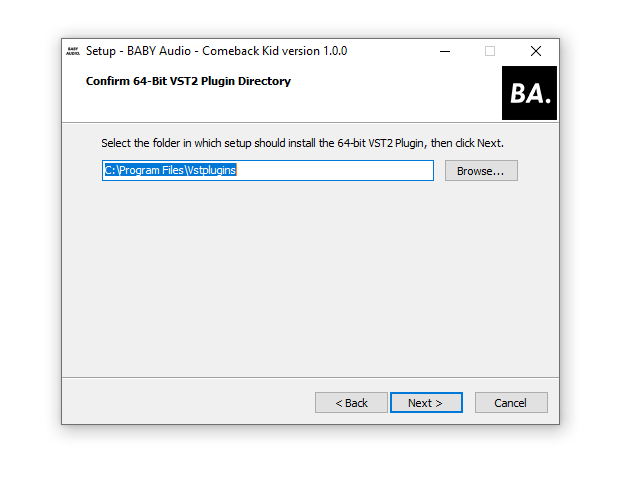
6. Click 'Next'.
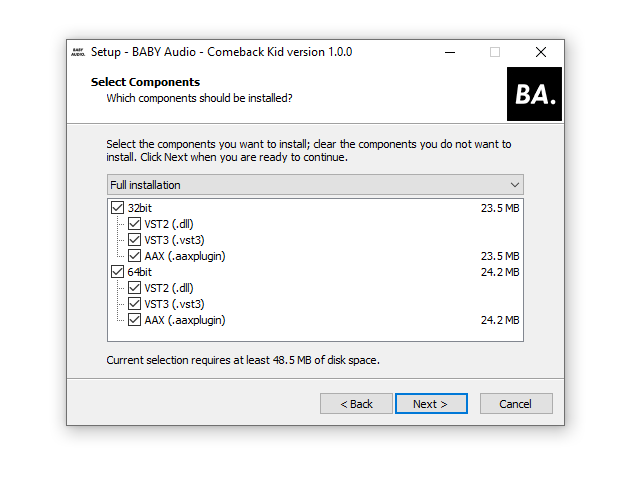
7. Click 'Install'.
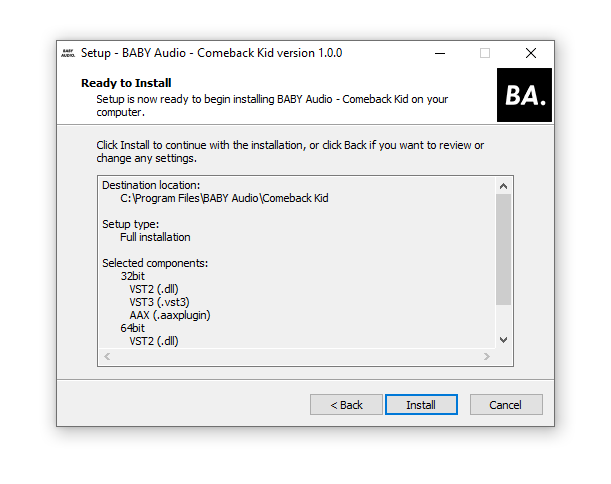
8. Click 'Finish'.
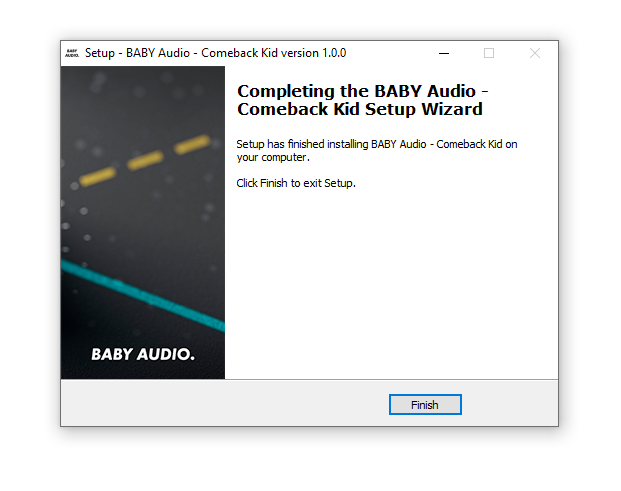
Activation
1. Open the plugin within your DAW.
2. Enter the serial number, found within your Plugin Boutique User Account > In order to proceed, click the small green button next to the box containing your serial number.
3. Click anywhere on the plugin interface to continue.
Your software is now installed and ready to use within your DAW.


