


 Log In

Free gifts available with your purchase
Ozone 12 Standard
Go beyond the limits of mastering with Ozone 12. Unlock the impossible with this complete studio grade mastering suite, including 3 brand-new, best-in-class additions. Plus, make Master Assistant your own with a new customizable flow. With intelligent tech that guides, not decides, you're always in control.
What is Ozone?
Built on two decades of award-winning innovation at the cutting edge of mastering tech, this complete suite helps bring tracks to life - whether it's your first or the latest in a long line of hits.
Way back in 2017, Ozone's Al-powered Master Assistant sparked the shift to faster, smarter, more accessible mastering. Using the analysis of thousands of pro tracks, Master Assistant was the first to create custom presets that match target sounds in seconds. And it's just that, your creative co-pilot, your trusty guide. There to save you precious time, to support your creativity, to take the mystery out of mastering.
Doing the impossible is an Ozone tradition. Best-in-class neural nets unlock new ways to master faster and smarter than ever, with uncharted levels of control and creativity. Need a little magic to fix a squashed mix? Some surgical control over stems? Ozone is the answer.
Whether you're starting your journey or perfecting your craft, there's an Ozone just for you. Take your first steps with Elements, finesse your sound with Standard, or complete your suite with Advanced.
What's New?
Bass Control | Feel the energy anywhere
Lock in your low end in any listening environment. Whether you're fixing a weak mix, tightening a kick, or adding subtle weight, Bass Control lets you easily balance low end energy while enhancing clarity, punch, and impact. No more guesswork and crossed fingers. Make sure your masters hit hard in the car, the club, and the charts.
Custom Assistant flow | Personalized Al power
Call the shots with the new 'Custom' Master Assistant flow. Looking for full transparency? A more aggressive edge? Pick from dozens of genre targets, toggle modules, and set loudness levels to create a module chain that's truly yours. Save time and finalize your track with confidence - all without ever losing creative control.
IRC 5 Maximizer mode | Loudness, uncompromised
Push your masters harder than ever without the usual tradeoffs. Achieve outstanding loudness and stunning clarity with the new IRC 5 limiting mode - the most advanced algorithm yet for Ozone's fan-favorite Maximizer. Effortlessly craft clean, open masters, even at high LUFS. No pumping. No distortion. Just pure pro polish.
Features
- New! Lock in your low end | Bass Control makes it easier than ever to add drive, punch, and balance to your low end, regardless of your listening environment.
- New! Call the shots | The Custom Assistant flow creates a mastering chain to match your creative touch. Direct Master Assistant to target the right genre or reference, use specific modules, hit loudness levels, and more.
- New! Louder, clearer limiting | The IRC 5 Maximizer mode is Ozone's most advanced limiting algorithm yet, maximizing your track's power and clarity without the usual tradeoffs.
- Improved! Cleaner stem splitting | Stem Focus modes introduced in Ozone 11 are now powered with new neural nets to offer better separation with fewer artifacts.
- Improved! New Ozone, new feel | Ozone is even more polished and intuitive, with a new design and refreshed color palette that invite you to step in and take control.
- Improved! Stabilizer module | With 25 new genre targets introduced in Ozone 12, sculpt a balanced sound with an intelligent and adaptive mastering EQ.
- Assistant View | Your Ozone preset, all in one place. The Assistant View makes it simple to pick targets and fine-tune your signal chain from Master Assistant.
- Clarity module | Effortlessly achieve a smoother master and pull the blanket off dull mixes with psychoacoustic clarity processing that never sounds harsh.
- Impact module | Enhance the rhythm and feel of your tracks by intuitively controlling microdynamics with musical envelope times.
- Transient/Sustain | Separately fine-tune Transient and Sustain content with ease, Apply to any Ozone module and achieve greater control, clarity, punch, and depth.
- Assistive Vocal Balance | Never worry about vocal levels again. Master Assistant can place the vocals in the mix, with a helpful guide from the Vocal Checker.
- Ozone fan-favorites | Ozone 12 packs powerful tools from past versions, including Imager, Spectral Shaper, Match EQ, Vintage Compressor / EQ / Tape, and more.
- Efficient performance | Ozone is compatible with Apple silicon native chips for faster processing.
Learn more about Ozone 12 Standard
Neutron 5
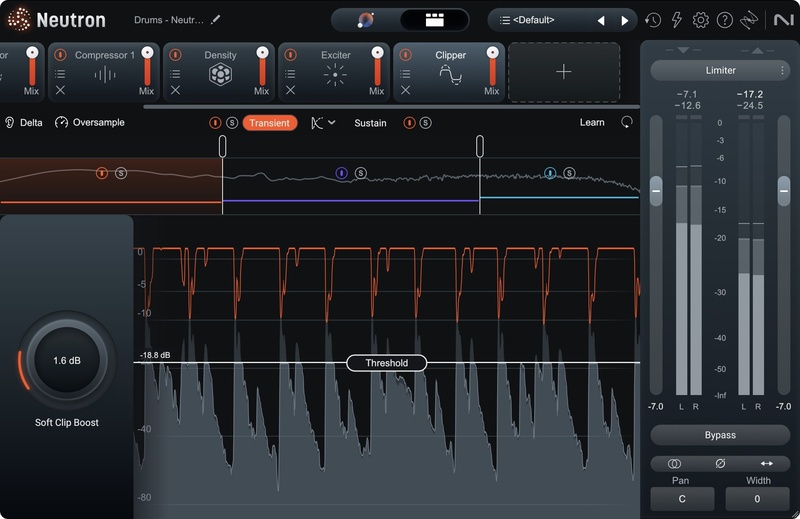
A flexible, fully equipped suite of world-class intelligent mixing tools for all workflows and skill levels.
Bring out the best in your mix with Neutron 5, a flexible, fully-equipped suite of 10 intelligent tools. Add power while reclaiming headroom with the multiband Clipper module, give your audio more presence, detail, and fullness with intuitive upward compression in the new Density module, and fix tedious phase issues with the Phase module.
Shape your sound faster with the improved Mix Assistant, precisely target your processing with mid/side and transient/sustain channel modes across the Neutron suite, and make more informed decisions with beautiful, refreshed visualizations. Achieve the mix you’re imagining, whether it’s your first mix or your next big hit.
What’s new in Neutron 5?
Clipper module | Powerful peak control
Add power while reclaiming headroom. Clipper is feature-packed with unparalleled flexibility for intuitive soft clipping across multiple bands, mid/side channels, and transient/sustain content.
Density module | Solidify your sound
Keep your key elements pinned up-front in the mix. This surgical upward compressor effortlessly smooths out dynamics, giving your audio more presence, detail, and fullness.
Phase module | Unfazed by phase issues
Out-of-sync signals sound weak and empty, and asymmetrical waveforms eat up headroom in your mix. Phase learns and fixes your track’s phase issues in seconds and offers the tools and visualizations to fine-tune as you need.
Features
- New! A suite of 11 plugins | Neutron 5 now comes with 11 plugins, including a mothership and 10 components. Use the component plugins individually or combine them in the mothership plugin chain to sculpt your sound.
- New! Powerful peak control | The new Clipper module adds power and reclaims headroom with intuitive multiband options, oversampling, and channel modes.
- New! Solidify your sound | The new Density module performs intelligent upward compression to give your audio more presence, detail, and fullness.
- New! Unfazed by phase issues | The new Phase module fixes asymmetrical waveforms and out-of-sync signals in seconds, keeping your audio clean and full.
- New! New dimensions | Mid/side and transient/sustain channel modes across the suite let you use Neutron modules on the specific content that needs processing.
- New! Hear the difference | Make more informed decisions with Delta buttons in every module, letting you hear exactly how Neutron is affecting your mix.
- Improved! Shape your tracks in seconds | Refined processing and additional macro knobs in the Assistant View make it even easier to fine-tune your custom signal chain from Mix Assistant.
- Improved! See the difference | Neutron’s updated visualizations are now even clearer, easier to understand, and more customizable, letting you dial-in your settings with confidence.
- Improved! New Neutron, new feel | Neutron 5 feels polished and professional with a new design, featuring updated controls, improvements to the Assistant View, and a refreshed color palette.
- Mix in the moment | Powered by machine learning, Mix Assistant sets a custom signal chain for your specific audio, saving time for creative mixing choices.
- Match references in real time | Dynamically match the tone of your track to a sample or stem using the Target Library with intelligent tone matching technology.
- Neutron 4 fan-favorites | Neutron 5 packs powerful modules from version 4, including Unmask, Sculptor, Transient Shaper, Exciter (with Trash Mode), Gate, Compressor (with Punch Mode and Sidechain metering), and Equalizer.
- Balance Assistant | Automatically set levels before you even touch a fader, using Relay on individual tracks and Visual Mixer on your master channel.
- Visual Mixer & iZotope Relay plugins | Launch Balance Assistant directly from Visual Mixer and position your tracks in a virtual space, tapping into iZotope inter-plugin communication.
- Tonal Balance Control 2 plugin | Meter while you mix to shape balanced levels based on tens-of-thousands of professional mixes.
- 7.1 Surround sound support and zero-latency mode in all 7 modules for professional, lightweight processing for audio post or surround music mixes.
- Beautiful, smooth visualizations and a resizable interface invite you to step in and take control.
- Improved performance | Neutron is compatible with Apple silicon native (M1, M1 Pro, M1 Max) chips for faster processing.
Learn more about Neutron 5
Operating Systems
- Mac: macOS Ventura (13.6) or higher (Apple silicon Macs supported natively) (64-bit only)
- Windows: Windows 10-11 (64-bit only)
Plugin Formats
- AU (Mac only), AAX, VST3 (All formats 64-bit only)
- Please note: VST2 is no longer supported


