


 Log In

Free gifts available with your purchase
8 Iconic Plug-ins
Rewind time with an iconic collection of Eventide studio classics
In 1971, in a New York City basement, Eventide Clockworks revolutionized the audio industry by creating the world’s first studio effects processor--the Instant Phaser and pro audio's first digital device, the Digital Delay Line. Over the course of the following decade, Eventide would release the world's first Harmonizer®, the H910, along with the other industry firsts: Omnipressor®, Instant Flanger, H949, and SP2016.
Now, producers and engineers can evoke the classic effects heard on countless records from the last 50 years with the Clockworks Bundle. Painstakingly modelling every aspect of these hardware units was neither quick nor easy but now the must-have sonic beauty of these classic boxes is available for use with your favourite DAW live or in the studio.
Instant Phaser Mk II
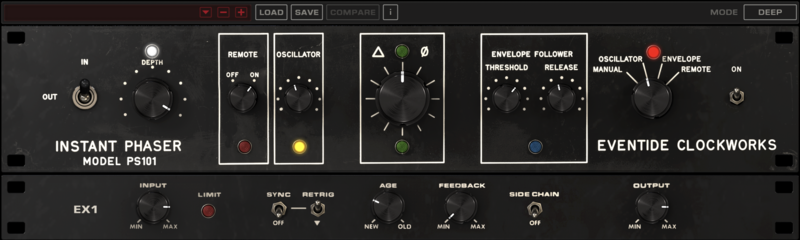
The Instant Phaser was the world's first studio phaser and the first rack mount effects unit, period. Originally intended to make the painstaking task of tape flanging quick and easy, engineers and producers would use it for smooth, transparent modulation and pleasing stereo decorrelation. It used analogue all-pass filters to mimic the effect achieved by time delay resulting in a modulation effect all its own. Experience all of its analogue charm with the Instant Phaser Mk II plugin and add “Age” to taste.
Features
- Add Age for component drift and electrical leakage in your phaser.
- Offers three different flavours of phasing with the Mode switch: Shallow, Deep, and Wide.
- Utilize one of four distinct methods to control the phasing.
- Depth allows you to combine the phased signal with the dry signal.
- Added Side Chain function allows you to trigger the Envelope Follower from a separate source in the mix for inter-track mingling.
- Exercise total control of the Oscillator with Sync and Retrig controls.
- Use Feedback control for a more pronounced sound.
- Includes standard gain input and output.
Learn more about Instant Phaser Mk II.
Instant Flanger Mk II
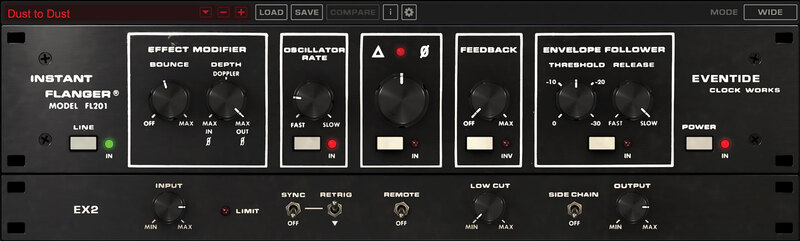
The Instant Flanger utilized newfangled bucket brigade ICs for swept delay resulting in a 'true', time-based, emulation of tape flanging. Whereas the Instant Phaser offered several methods of controlling modulation, the Instant Flanger allowed engineers to combine these controls. The result, more control layers and less predictable sweeps. Explore vintage modulation sweetness with the Instant Flanger Mk II.
Features
- Depth controls the intensity of the effect. 100% adds the delayed signal to the dry signal. -100 % subtracts the dry signal from the delayed signal.
- Three distinct flavours of flanging. Set the Mode switch for Shallow, Deep or Wide.
- Manual control allows you to control the ‘comb’ effect by turning the Big Knob.
- Oscillator drives the flanging at a user-defined rate.
- Envelope Follower drives the flanging based on the signal’s amplitude.
- Remote maps the flanging control to a mod wheel for tactile manipulation.
- Bounce mimics the distinctive effect of the tape machine’s capstan motor “hunting” for its proper speed when the engineer's thumb was lifted from the tape reel flange.
- “Side Chain” allows for triggering the Envelope Follower from any source in the mix for inter-track mingling.
- Exercise total control of the Oscillator with Sync and Retrig.
- Tame the intensity by removing low frequencies from the flanged signal with the Low Cut control.
Learn more about Instant Flanger Mk II.
Omnipressor
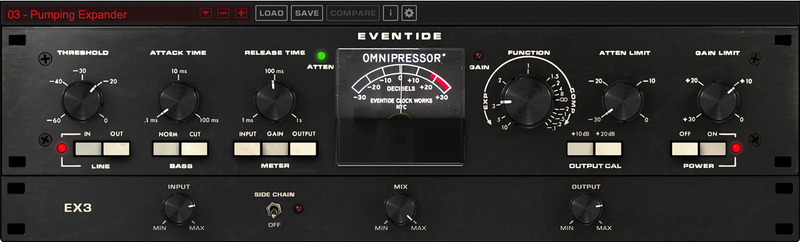
The Omnipressor, released in 1974, set the stage as the first dynamics effects processor, introducing the concepts of infinite compression, dynamic reversal, and side-chaining. The flexible nature makes the Omnipressor plugin a must-have, with options to control all aspects of dynamic modification.
Features
- Dynamics processing for creating otherworldly sounds.
- Gating, expansion, compression, limiting, and Dynamic Reversal.
- An intuitive interface makes it simple to operate with the use of a Function dial.
Learn more about Omnipressor.
H910 Harmonizer
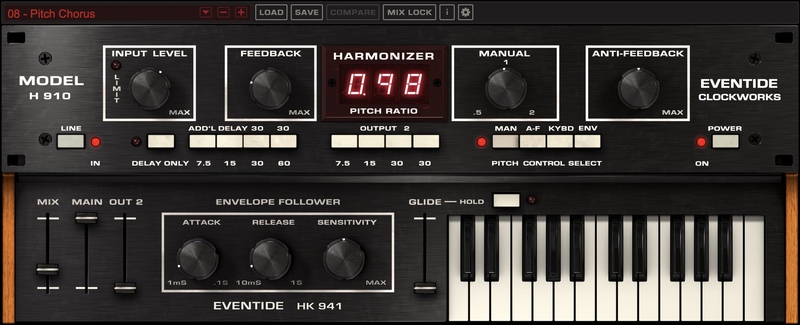
The H910 Harmonizer was the world's first digital effects unit. With its unique combinations of pitch shifting, feedback, modulation and delay, it was a huge hit across studios worldwide. Thickening snares, guitars and vocals are H910’s bread and butter, but robot sounds and gritty octaves are just as easily dialed in. The bundle includes H910 Dual.
Features
- NEW Keyboard and MIDI mapping - The original H910 featured a keyboard remote control which was used live by several artists including Elton John. With the H910 plug-in you can easily use MIDI to control pitch and harmonization in real-time.
- NEW Envelope Follower - An envelope follower has also been implemented in this latest release. Engineers and producers discovered that sending a control voltage to the hardware H910 could be used to slightly (or massively) vary the pitch, creating entirely new sounds. The built-in envelope follower makes exploring these possibilities easy.
- NEW OUT2 Delay Group - adds inspiring attributes to your sound.
- True analogue modelling of highly nonlinear electronics for faithful reproduction of the original H910's juicyness and grit.
- Perform perfect pitch changes controlled manually, via MIDI or with Anti-Feedback.
- Anti-Feedback modulates the pitch around unity for a subtle or wild effect.
- Optional "glitching" of original H910 hardware to create unpredictable sounds as it alters the pitch.
- Modify pitch by musical intervals (diatonic) to harmonize vocals or solo instruments.
- Delay rhythms and melodies to create everything from slap-back echoes to feedback chaos.
- Create colourful, unique sound effects and drones through self-oscillation.
- Individually control delay outputs and dry/wet mix.
- Mix Lock allows for scrolling through presets or settings while keeping the dry/wet mix constant.
BONUS: H910 Dual
- H910 Dual recreates two H910 units running in parallel to create doubling effects and other unique sounds.
- H910 Dual easily fattens and thickens instruments when assigning opposite pitch ratios.
- H910 Dual Stereo (cross-unit) Feedback can cause the incoming signal to shift up and then down continuously.
Learn more about H910 Harmonizer.
SP2016 Reverb
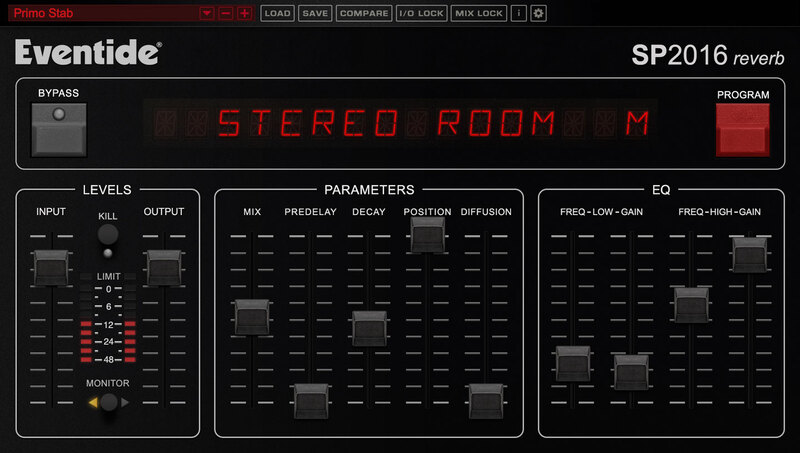
In 1981, the SP2016 was released and was the world's first programmable effects processor featuring ROM chips that “plugged in” under the hood making it possible to add new effects in the field. While it was not a Clockworks effects unit, the SP2016 earned its spot on this roster as it marks the opening chapter of modern Eventide effects processors, with the H9000 its current incarnation. The SP2016 Reverb plug-in includes modern and vintage versions of its signature Stereo Room, Room, and Hi-Density Plate.
Features
- Room - Your basic no-nonsense, no-frills ambient “room.” It’s a mono effect with stereo outputs. The extreme Pre-Delay range makes it possible to use this effect for reverberant doubling and single echoes.
- Stereo Room - Recreates the ambience of a large concert hall, with very clear, natural reverberation. It's characteristically natural and shines on instruments where a natural sound is a desire - like vocals, drums, acoustic guitar, strings, and horns
- Hi-Density Plate - Plate-type reverb with dual pickups simulating the effect of a bigger, heavier plate. This reverb allows you to make vocals, guitars and percussive instruments appear much bigger and brighter than they actually are.
- Control the structure of the reverb by fine-tuning the controls - including PreDelay, Decay, Position and Diffusion. The EQ section allows for simple high and low filtering of the reverb with adjustable filter ranges. The low filter can be used to cut OR boost at the specified frequency.
- Boasts a variety of artist presets including some by Dave Pensado, Richard Devine, Joe Chiccarelli, Sasha, George Massenberg, The Butcher Bros., Buda and Grandz, and more.
Learn more about SP2016 Reverb.
H949 Harmonizer
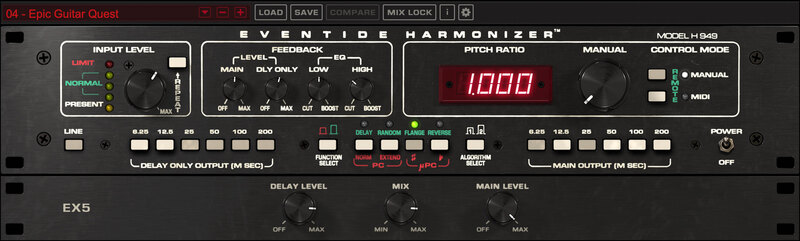
In 1977, Eventide released the H949, standing on the shoulders of the H910 as the second in Eventide's family of Harmonizers. It introduced a formal micro pitch-shifting mode, which is a great sound for lead guitar virtuosos. It also had the first Reverse delays and introduced a Random pitch mode, which works great as an automatic double-track for guitars and vocals. And, the H949 conquered the 'glitch' by using advanced autocorrelation techniques. The bundle includes H949 Dual.
System Requirements
Windows
- Windows 10 and later (Windows 11 supported) (64-bit only)
- AAX, VST2, VST3
Mac
- macOS 10.14 and later (Intel / Apple Silicon supported) (64-bit only)
- AAX, AU, VST2, VST3
Important Notes:
- Eventide tests their desktop plugins in Ableton Live, Cubase, FL Studio, Logic Pro, Pro Tools, and Studio One (However, their plugins should work with any compatible host.)
- No iLok dongle is required to run this software - only a FREE iLok account/Manager is required for authorisation.


