


 Log In

Free gifts available with your purchase
iZotope is proud to present the Exponential Audio 3D Reverb Bundle, a collection of two 3D-centric immersive reverb plugins.
With Stratus 3D, you are able to create immersive surround environments with unrivaled clarity. With Symphony 3D on the other hand, you get a lush, colourful reverb that brings rich modulation and dynamics effects to any surround music or post-production.
Stratus 3D
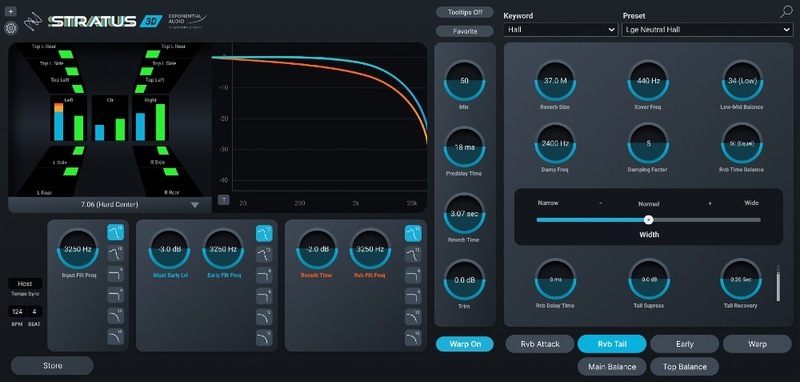
Natural Reverbs for Surround and Immersive Formats
Create immersive surround environments with unrivaled clarity using Stratus 3D. With up to 24-channel support, over 1,700 surround presets, and intelligent multichannel reverb controls, use Stratus 3D to get just the right amount of depth and dimension in any post-production job.
Impeccable Reverb Tone for Ever-Expanding Audio Environments
With the growing prevalence of immersive surround formats like Atmos, Auro, and beyond, there are more sonic possibilities for visual media than ever before. Stratus 3D is the perfect reverb engine for these new production formats. Aside from producing reflections with stunning clarity for up to 24-channel surround, Stratus 3D provides you with precise parameter controls to help you shape and refine the perfect spatial tone, channel by channel.
Uncompromising Surround and 3D Support
With support for up to 24 channels, including Atmos and Auro 3D, Stratus 3D is right at home in any multichannel workflow. Generate a clean, articulate room feel, or capitalize on the 3D height expansion capabilities for wide, cavernous reflections.
Detailed Gain and Filter Parameters
Independent input, early reflection, and reverb tail EQ filters let you decide which parts of the reflections are most present in the mix, so you control the resulting tone of your reverb on every level.
Channel-Specific Delay and Level Controls
By specifying the placement and timing of the separate vertical and horizontal reflections in each channel with the Balance module, Stratus 3D helps you craft the most enthralling, realistic sound environment for your audience.
Features
- Natural reverb support up to 24 channels, including Atmos, Auro 3D, NHK, and more
- Channel-specific Balance controls for top and main signals in Atmos and other immersive formats
- Advanced control of reverb tail and early reflections
- Pre-delay and reverb delay adjustable by tempo
- Warp controls with compression and overdrive
- 3D controls link multiple plug-in instances
- Over 1,700 presets (rooms, plates, halls, chambers, and more)
- EuControl support
Learn more about Stratus 3D.
Symphony 3D
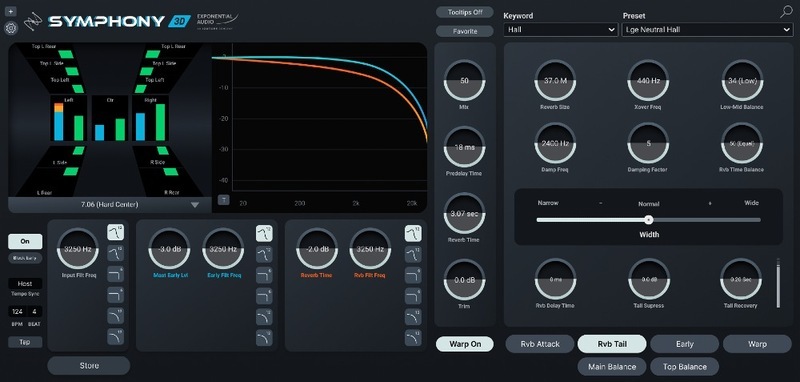
Lush Reverb for Surround and Immersive Formats
A lush, colorful reverb engine gets a 24-channel upgrade in Symphony 3D, bringing rich modulation and dynamics effects to any surround music or post-production. With channel-specific Balance controls and an expanded Warp section with Compression and Overdrive modules, Symphony 3D combines the creative power of R4 and R2 Surround while pushing their capabilities even further.
The Ultimate Tool for Lush, Musical Multi-Channel Reverb
Symphony 3D is Exponential Audio’s flagship reverb offering. The character reverb engine of Symphony receives 24-channel surround support, making it perfect for crafting distinct, captivating spatial effects for any multichannel music or post projects. With independent parameter modules for the Attack, Early Reflections and Tail of your reverb signal, plus channel-specific Balance controls and creative modulation and dynamics effects, no other reverb plug-in gives you this much control over your multichannel reflections.
Stretch Time with Freeze
With the ability to create ambient textures and pads via the Freeze function, Symphony is not your average reverb plug-in. Freeze captures a moment of reverb in time and extends it indefinitely, making it a great tool for generating drones and textural effects.
Overdrive and Compression Modules via Warp
Symphony comes with Warp tools to bring out specific resonances in your music’s reflections and maximize the overall reverb signal. When used in conjunction with Reverb Freeze, you can create nearly limitless original spatial effects for your music.
Expanded Controls for Creative Precision
Tail Suppression and Recovery ensure that Symphony’s reflections won’t overcrowd your mix or obscure any original audio. Use the Balance module for channel-specific delay and level controls to decide when and where your audience hears the reverb in your mix.
Features
- Lush surround reverb algorithm
- Up to 24 channels, including Atmos, Auro 3D, NHK, and more
- Channel-specific Balance controls for top and main signals
- Advanced control of reverb tail and early reflections
- Channel-specific control over reverb delay and gain
- Freeze, chorus, and gate for musical effects
- Over 1,700 presets (rooms, plates, halls, chambers and more)
- EuControl support
Learn more about Symphony 3D.
System Requirements
Operating Systems
- Mac: macOS Catalina (10.15.6) - macOS Monterey (12.5.x) * (Intel / M1 Apple Silicon supported) (64-bit only)
- PC: Windows 10 - Windows 11 (64-bit only)
Plugin Formats
- VST3, AAX, AU
- Note: The 3D option is not available in AU.
- All plug-in formats are 64-bit only.
Hardware Requirements:
- CPU: Multicore processor, 2 GHz or greater
- RAM: 4 GB or greater
- Display: 1440 x 900 or greater
Authorization:
- iLok License Manager required iLok 2, iLok 3, or iLok Machine License
- Exponential Audio products are not available in iZotope's Product Portal
DAWs / NLEs:
- Pro Tools 2022, Live 11, REAPER 6, Cubase 12, Nuendo 12, FL Studio 20, Studio One 5, Audition CC, Digital Performer 11.
Important Note: Symphony 3D and Stratus 3D are NOT compatible with Logic Pro X.


