Buy Action Suite, get a free gift with purchase:
A trio of three cinematic tools from the Action series.
Action Woodwinds
Cinematic woodwind engine
- A stunningly realistic scoring instrument offering full creative freedom
- Effortlessly craft dynamic woodwind sections with both high and low ensembles
- Tailor and blend over 1000 pre-built phrases to design your own custom themes
Learn more about Action Woodwinds
Lights, camera, action
- Creative control and musicality meet stunningly realistic sound
- Compose thrilling string parts with a range of articulations captured from multiple mic positions
- Over 1370 of dynamic phrases that can be tweaked and blended in limitless combinations
Learn more about Action Strings 2
Action Strikes
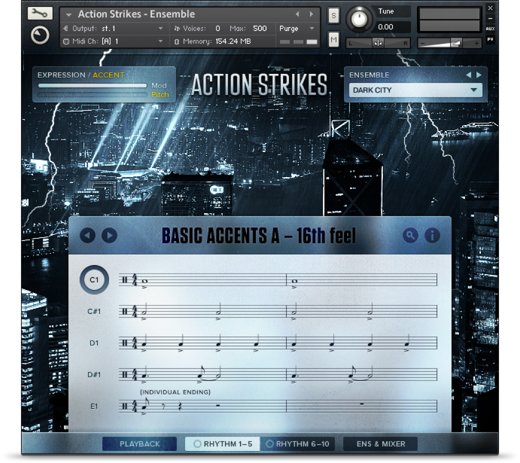
Cinematic orchestral percussion
- Add huge cinematic percussion to your tracks
- Direct the drama with real-time control
- Create full arrangements from time-tested rhythms
- Free KONTAKT PLAYER or KONTAKT is required.
Native Instruments Installation Instructions
Note: Massive is used as an example.
Windows
1. Download the .zip installer file from this Help Centre Area.
2. Double-click the extracted .exe file to begin the installation process > click ‘Run’.
3. Read the welcome message > click 'Next'.

4. Click 'Next' to begin the installation.

5. Native Access has now been installed > Click 'Finish'.

6. Open Native Access > Create a new Native ID if you do not have one already. If you do, skip ahead to step 8.

7. You will then receive an email with a confirmation link > Open the email and click 'CONFIRM EMAIL'.
8. Log in to Native Access with your Native ID.

9. Click 'Add a serial'.

10. Enter your Serial Number found in your Plugin Boutique User Account > Click 'ADD SERIAL'.

11. Once your serial has been registered, click 'VIEW PRODUCTS NOT INSTALLED'.

12. Click the 'Not installed' tab > Locate Massive > Click 'INSTALL'.

Your software is now activated and ready for use within your DAW.

Mac
1. Download the .dmg installer file from this Help Centre Area.
2. Double-click the .dmg file to install Native Access.
3. Open Native Access > Create a new Native ID if you do not have one already. If you do, skip ahead to step 5.

4. You will then receive an email with a confirmation link > Open the email and click 'CONFIRM EMAIL'.
5. Log in to Native Access with your Native ID.

6. Click 'Add a serial'

7. Enter your Serial Number found in your Plugin Boutique User Account > Click 'ADD SERIAL'.

8. Click the 'Not installed' tab > Locate Massive > Click 'INSTALL'.

Your software is now activated and ready for use within your DAW.

Beatport Streaming Advanced Registration Instructions
1. Head to Beatport.com > enter your details > click 'CREATE ACCOUNT' (if you already have an account simply Log in).
2. Click 'SUBSCRIBE'.

3. Under the 'Advanced' plan > click 'TRY FREE FOR 30 DAYS'.
4. Enter your '3-Months Beatport Streaming Advanced' code (found in your Plugin Boutique account) > enter your payment details > Enter your billing details > click 'APPLY'.
Please note: No payment will be taken when you complete this step. Your payment date will be three months after you redeem your free 3 months of Beatport Streaming Advanced.
5. Click 'UNDEFINED 3-MONTH' to begin your free 3-Months Beatport Advanced Streaming membership.
6. Click 'Get Started' to get started with your subscription for Beatport Streaming Advanced.
Beatsource Pro+ Registration Instructions
1. Head to Beatsource > enter your details > click 'Create Account' (if you already have an account simply Log in).

2. Click 'Try Beatsource Free'.

3. Under the 'Beatsource Pro+' plan > click 'Try 30 Days Free'.
4. Enter your '3-Months Beatsource Pro+' code (found in your Plugin Boutique account) > enter your payment details > Enter your billing details > click 'APPLY'.
Please note: No payment will be taken when you complete this step. Your payment date will be three months after you redeem your free 3 months of Beatsource Pro+.
5. Click 'START YOUR 3 MONTH FREE TRIAL' to begin your free 3-Months Beatsource Pro+ membership.
Your subscription is now activated.


