


 Log In

Free gifts available with your purchase
Soul to the Power of Three
Three Iconic Vintage Electric Pianos With Powerful Sound Design Tools.
The warmth and character of a vintage electric piano combined with avant-garde features. Electric R works perfectly in Hip-Hop, House or Pop. Use the powerful sound transformation tools to shape this classic in ways you wouldn't imagine possible.
The retro sound of the 1973 suitcase electric piano with more modern magic than you could imagine. At almost 20 GB in size, Electric S is probably the most detailed sampled stage piano around. As a part of the Session Keys family, it offers the pro features e-instruments users have come to expect; including two distinct sample sets, the Animator, Smart Chord and Pentamorph.
Session Keys Electric W combines authentic sound, flexible operation, and unique controls to make it feel like you’re playing the real thing, producing sounds you wouldn’t imagine were created electronically. To replicate this hit-making electric piano, e-instruments turned every stone for a suitable original, which underwent further specialist restoration to bring it painstakingly back to peak condition.
Features
- Three classic electric pianos from the '70s.
- Each with two separate sound banks: Studio and Live.
- Pentamorph sound control to morph the complete sound with a single knob.
- Animator with more than 440 flexible piano phrases for each library.
- Smart Chord function to create instant piano chords from single keys or pads.
- Native Instruments NKS compatible.
- Session Keys Electric S size: 18.8 GB / 9.9 GB (lossless sample compression)
- Session Keys Electric R size: 10.6 GB / 5.6 GB (lossless sample compression)
- Session Keys Electric W size: 9 GB / 4,5 GB (lossless sample compression)
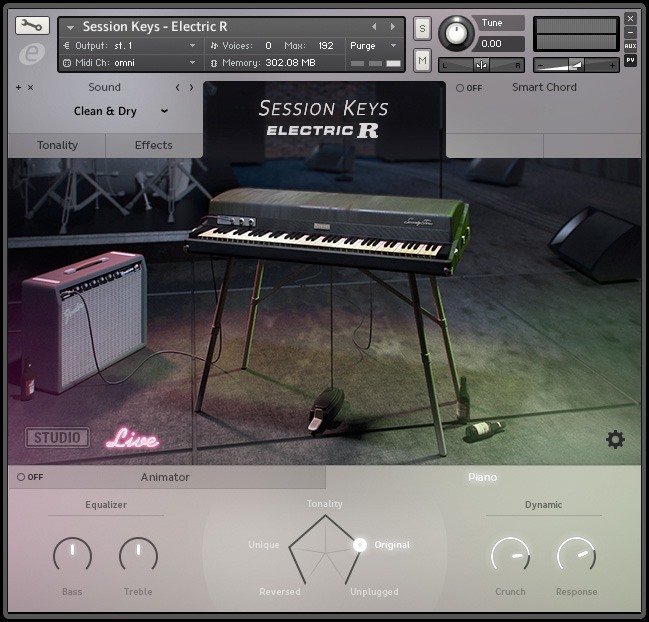
From Lounge to Fusion, from Jazz to Electro - the Mark I electric piano is omnipresent. Its unique sound fits in a variety of genres but remains unmistakably recognizable. Session Keys Electric R is based on a vintage 1976 Mark I Stage Piano, specially modified with eight individual outputs to capture every nuance of its classic sound.
Studio & Live
The Studio mode was recorded directly through high-end pre-amps and A/D converters, reproducing the piano’s clear, bell-like character. Whereas the Live mode uses classic vintage outboard equipment and pre-amps for an edgier, rougher version of the instrument.
Features
- 1976 Stage Piano.
- Two separate sound banks: Studio and Live.
- Pentamorph control to transform the entire sound with a single knob.
- Animator with more than 400 flexible piano phrases.
- Smart Chord function to create instant piano chords from single keys or pads.
- Effects chain with tremolo/auto-pan, chorus, phaser, amp simulator, compressor and convolution reverb.
- Native Instruments NKS compatible.
- 10.6 GB / 5.6 GB download (lossless sample compression) .
- 24-bit/44.1 kHz samples.
Learn more about Session Keys Electric R.

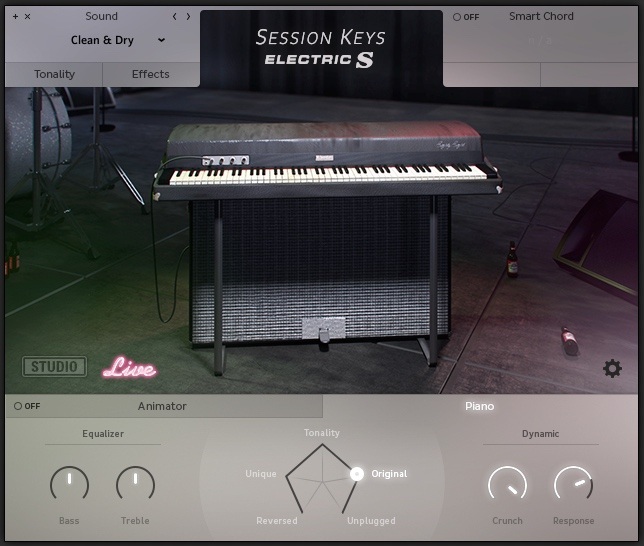
Nothing embodies the evolution of the electric piano better than the 1973 Suitcase: a killer package of keyboard, amp and speakers. To recreate this much-loved electric piano classic e-instruments hunted high and low for a top-quality original. They unearthed a magnificent 1973 suitcase which spent weeks undergoing painstaking specialist restoration. Once back to peak condition e-instruments began detailed recording to capture every nuance of its original sound.
Studio & Live
The Studio mode gives direct unaltered line-out sound, while the Live mode captures the sound of cabinet and speakers through a comprehensive microphone set-up covering all four speakers for an incredibly realistic feel.
Features
- 1974 Electronic Piano.
- Two separate sound banks: Studio and Live.
- Pentamorph control to transform the entire sound with a single knob.
- Animator with more than 400 flexible piano phrases.
- Smart Chord function to create instant piano chords from single keys or pads.
- Effects chain with tremolo / AutoPan, chorus, phaser, amp simulator, compressor and convolution reverb.
- Native Instruments NKS compatible.
- 18.8 GB / 9.9 GB download (lossless sample compression).
- 24-bit/44.1 kHz samples.
Learn more about Session Keys Electric S.
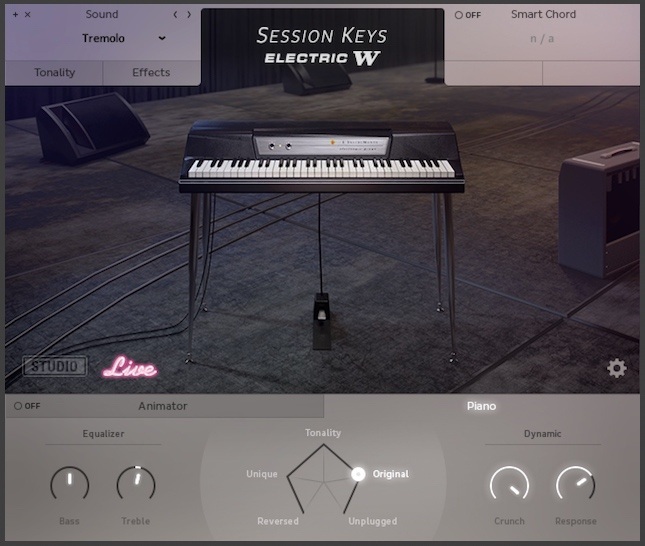
Session Keys Electric W is the sound of some of the most iconic hits over the last few decades. With attention to every detail, the recreation of this classic electric piano offers you all the warmth and dynamic range of the original. The Wurli helped to define the sound characteristics of Fusion, Disco, Funk, and Pop. You'll get tons of inspiration from the various sounds the electric piano produces at different velocity layers – from Vibraphone-like smoothness to ultra-aggressive, distorted sounds.
Studio & Live
"Studio" delivers the direct unaltered line-out sound, while "Live" captures the sound of the speakers through a comprehensive microphone set-up covering the original speakers including cone-cry and break-up.
Features
- 1974 Electronic Piano.
- Two separate sound banks: Studio and Live.
- Pentamorph control to transform the entire sound with a single knob.
- Animator with more than 440 flexible piano phrases.
- Smart Chord function to create instant piano chords from single keys or pads.
- Effects chain with tremolo / AutoPan, chorus, phaser, amp simulator, compressor and convolution reverb.
- Native Instruments NKS compatible.
- 9 GB / 4.5GB download (lossless sample compression).
- 24-bit/44.1 kHz samples.
Learn more about Session Keys Electric W.
System Requirements
PC
- Windows 7/8.1/10 (Latest Service Pack, 32/64-bit).
- VST 2, VST 3 or AAX compatible host application for using as a plug-in.
- Intel Core 2 Duo or AMD Athlon 64.
- 4 GB RAM.
- 40GB available disk space.
- Requires FREE Kontakt 5 Player or Kontakt 5 Version 5.5.1 or higher.
Mac
- OS X 10.9 or later (Latest Update).
- VST, AAX or AU compatible host application for using as a plug-in.
- Intel Core 2 Duo.
- 4 GB RAM.
- 40GB disk space.
- Requires FREE Kontakt 5 Player or Kontakt 5 Version 5.5.1 or higher.

.jpg?t=1792438771)
Stephen Gallagher
World-famous composer - The Hobbit, District 9, King Kong.
“This is the best emulation hands-down that I’ve ever used and I can’t imagine ever being without it. It’s something I will use every day, no exaggeration. I love it.”






















