


 Log In

Free gifts available with your purchase
Hans Zimmer’s Orchestra. Your Music.
Hans Zimmer’s Symphonic Elements offer Hollywood string, brass, drum and percussion ensembles in an easy-to-use, inspiring virtual instrument series. No orchestrating skills required.
World-Famous Hollywood Sound
BRAAASS, CHOOIR, DRUMS, STRIIIINGS & PERRCS pair exceptional orchestral performances with thrilling sound-design options from crisp symphonic sound to sci-fi soundscapes.

CHOOIR offers a variety of vocal styles ranging from stomping, rhythmic shouts to majestic, cinematic swells to menacing, sound-designed atmospheres. These can take the chorus in your cinematic song or the climax in your film score to new heights.
Features
- Male, female, and boys choir ensembles from Hans Zimmer's personal library
- Dedicated voice groups: Bass, Baritone, Tenor, Alto, and Soprano
- Various articulations and consonants from ethereal to percussive
- 70 choir styles like Suspense, Shouts, or Ethereal and over 100 presets
- Use UJAM signature motion, character, and finisher effects to dial in your choir sound
Learn more about CHOOIR
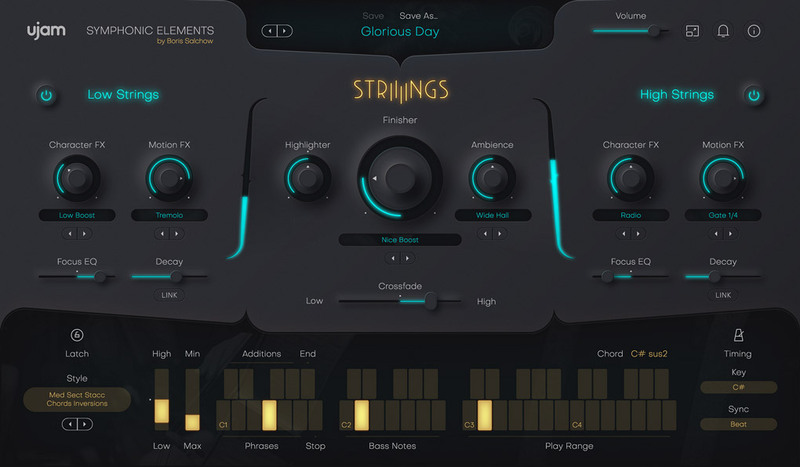
Craft lush, emotional string performances with ease. Based on Hans Zimmer’s legendary library, this plug-in brings cinematic depth to your music without orchestral skills required.
Features
- Play world-class string section phrases, no string arrangement skills required
- Brand-new creative performance and sound design engine by UJAM
- 60 Playing Styles, Sound Designer Presets
- Recorded at Hans Zimmer’s Remote Control Studios, Produced by Boris Salchow
Learn more about STRIIIINGS.

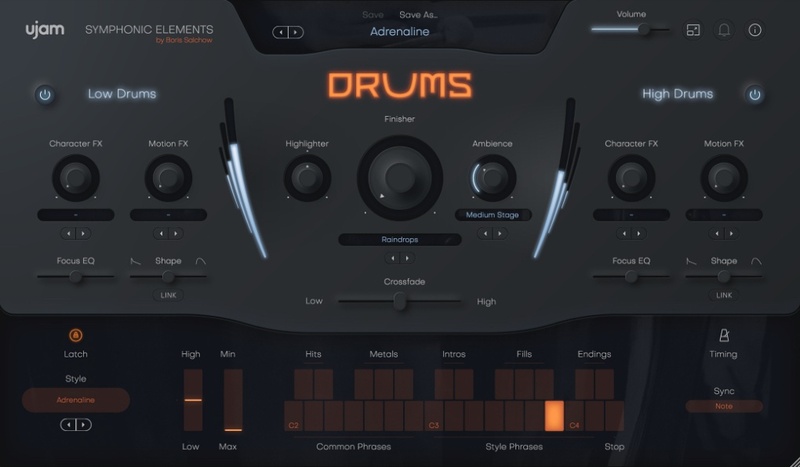
Deliver impact and tension with low-end cinematic percussion. From deep hits to rolling toms, DRUMS transforms simple notes into evolving performances.
Features
- An extensive collection of world-class drum samples and sequences
- Ready to rumble: creative performance and sound design engine
- 53 playing Styles, 300 sound designer presets
- Recorded at Hans Zimmer’s Remote Control Studios, produced by Boris Salchow
Learn more about DRUMS.
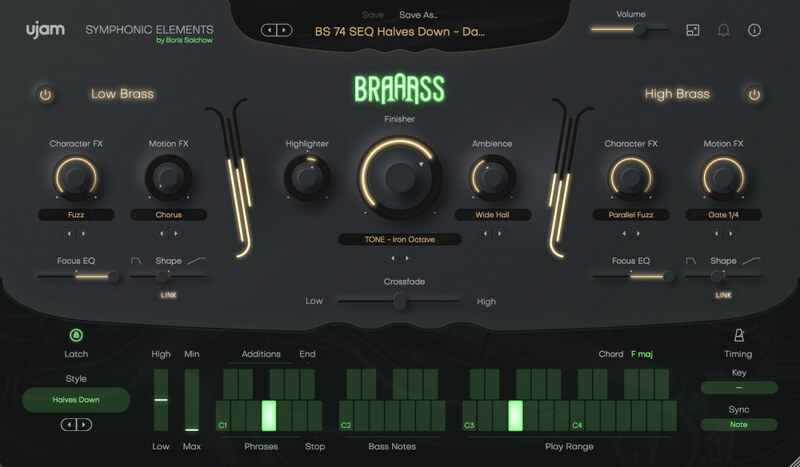
Inject boldness and drama with world-class brass phrases. Designed for instant results, BRAAASS gives you that blockbuster brass sound in a fun and inspiring package.
Features
- BRAAASS features 78 Styles with 6 ready-made phrases each, for a total of 468 unique Phrases. On top of that, each Style includes 4 custom-tailored one-shot Additions so you can further customize the phrasing of the Style in realtime!
- Finisher FX - The custom-made Finisher effect section is a one-knob sound design delight. Transform the character of your BRAAASS track to match any genre or mood.
- Crossfade - Conduct your brass section with the crossfader. BRAAASS is made up from two independent low and high sections. Seamlessly blend between them, or add subtle variations by automating.
- Embark On a Hero's Journey! - Use Hans Zimmer’s BRAAASS in your production today.
Learn more about BRAAASS.
Add sparkle, motion, and dramatic energy with high-end orchestral percussion. Built for scoring and production, it delivers instant rhythm and cinematic detail straight from Hans Zimmer’s vault.
Features
- World-class orchestral percussion - Sticks, shakers, daikos, wood blocks, surdos, drums, triangles, anvils and more, captured from Hans Zimmer’s personal collection.
- Huge creative toolkit - 74 rhythm styles with 17 phrases each, plus intros, fills, endings, hits, 320 presets, 74 Finisher modes and 29 ambient treatments.
- Precision performance control - Split, layer, and shape low and high percussion with Character, Motion FX and EQ for cinematic flexibility.
- Instant inspiration - Built-in styles, tempo-synced phrases, and powerful sound design tools for everything from natural orchestral hits to modern cinematic pulses.
Learn more about Symphonic Elements PERRCS.
System Requirements
Operating Systems
- Windows 8-11 (64-bit only)
- macOS 10.14 - macOS 12 (64-bit only)
- You may have success on earlier versions but UJAM doesn’t support and fully qualify them.
For up-to-date info on UJAM products support for VST3, AAX, and Apple Silicon, please refer to the UJAM website.
Minimum Requirements
- 8 GB of RAM
- 12 GB of Disk Space
- 1280 x 768 px Display
- Internet Connection required for download and authorisation.
Plugin Formats
- VST, AU 2
- AU 2 version is only compatible with Logic Pro X and newer.
Supported Standards
- MIDI
Additional Information
- Comes as downloadable installer files.
- Authorize by email address and password for ujam.com within the plugin.
- If you want to move your .blob files to an external drive, UJAM recommend the use of an SSD to prevent dropouts.


