


 Log In
.jpg)
Save $469.00 compared to buying products individually
Free gifts available with your purchase

Level up your studio with every tool and expansion in the Lunacy universe - yours for one unbeatable price. Craft groundbreaking sounds and textures with CUBE, Lunacy’s award-winning 3D sample morphing engine. Transform your sound design with BEAM, the ultimate interactive effects playground. Layer it all with thousands of expansion sounds and presets, and over a dozen audio effects. Your brush, your canvas, your masterpiece - everything you need in one bundle.
Bundle Contents
-
BEAM 2.0: Modular effects playground filled with a growing collection of cutting-edge effects to transform your sounds. Use any Lunacy effect directly in BEAM to sparkle your keys, spice up your vocals, reshape your drums, and launch your synths into outer space.
- Bismuth Effect Node: Crystallize your sound with Bismuth, a new Lunacy effect designed in collaboration with one of EDM’s most respected and iconic producers, Virtual Riot.
- Grains Effect Node: A real-time granular effect capable of creating shimmering particle clouds, glitchy percussive grooves, and rhythmic soundscapes with up to three parallel grain engines.
- Space Effect Node: A powerful convolution reverb with curated, textural impulse responses designed by Ben Jordan and Venus Theory, crafted to transform audio into immersive soundscapes.
- Filter Effect Node: A powerful collection of lowpass, highpass, bandpass, notch, comb, and formant filters with frequency, resonance, and stereo offset controls.
- Time Effect Node: Timeshaper and buffer shuffler effect with intuitive sequencers and controls for real-time audio manipulation.
- Volt Effect Node: a creative 3-in-1 distortion module combining analog-inspired saturation, multi-band compression, and digital bitshaping with a dynamic feedback delay network.
- Taps & Portals Effect Node: Two effects designed in collaboration with Benn Jordan for creative delay and feedback design.
- Patterns Preset Pack: Dynamic rhythm and motion presets
- Fractals Preset Pack: Glitch and timeshaping presets
- Embers Preset Pack: Drenches your tracks in distortion and cinematic gravity
- 500+ Global Presets: Crafted by leading sound designers from across the world
- 100+ Node Presets: Dedicated presets designed for each effect in BEAM
- 150+ Impulse Responses: A curated collection ranging from otherworldly halls to synthetic textures
-
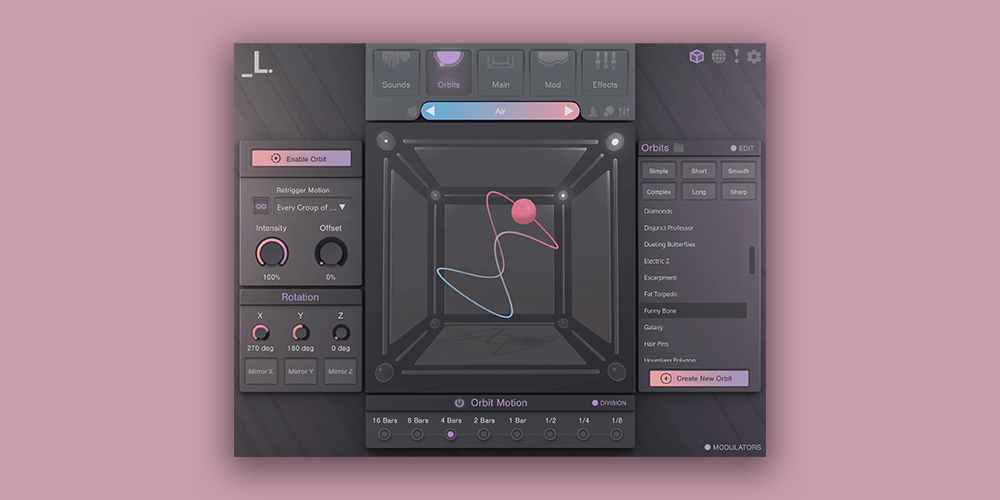
CUBE: Revolutionary sampler and vector synth plugin.
- 7 Premium Expansion Packs: Air, Threads, Rumble, Pastels, Neon, Sky, Astra
- 3 Artist Packs: Botanica by Phritz, Canopies by Benn Jordan, Dust by Venus Theory
- 9 Bonus Preset Packs: Hundreds of presets combining sounds from different expansion packs in unique ways
- 350+ Sampled Instruments: Over 5000 samples with multiple dynamic layers
- 1,000+ Presets: Expertly crafted by experienced composers and producers
System Requirements
Mac
- macOS 10.15 and later (Intel / M1 Apple Silicon supported) (64-bit only)
- AU / VST3 / AAX / Standalone
- Supported by all major DAWs
- At least 4 GB of RAM (8 GB recommended), and 2 GB of free drive space.
- Access to a stable internet connection for downloading and activating the product is required.
Windows
- Windows 7 and later (64-bit only)
- VST3 / AAX / Standalone
- Supported by all major DAWs
- At least 4 GB of RAM (8 GB recommended), and 2 GB of free drive space.
- Access to a stable internet connection for downloading and activating the product is required.
Important note: When purchasing this software via a Rent to Own plan or Beatport Studio membership, it can only be installed and run via the Beatport Access portal. An internet connection is also required at all times.


