/ Various Category / CLA Classic Compressors Bundle
Waves

CLA Classic Compressors Bundle

5.0 (2 Reviews)
$59.99 $299.00

79% off until Dec 07

CLA Classic Compressors Bundle
CLA Tips & Tricks gallery thumbnail
CLA live at Mix LA Part 1/2 gallery thumbnail
Vocal Compression Shootout: CLA Classics Compared gallery thumbnail
Vocal Mixing Tip – Double-Stacked Compression gallery thumbnail
Parallel Compression for Drums with CLA-76 and PuigTec EQ gallery thumbnail
Compressing Rap Vocals with CLA Compressors gallery thumbnail
Buy Now
Product information

CLA Classic Compressors Bundle

Mix with the King of Compression’s Personal Processors

Chris Lord-Alge’s mixes are known for their power and aggression, expertly utilizing compressors to their fullest potential. Whether it's the smoothness of the CLA-2A, the transparency of the CLA-3A, or the lightning-quick response of the CLA-76 (blue or black), these classic processors consistently deliver the superior sound quality he demands.

These plugins, modeled from CLA’s own collection of perfectly preserved "golden" units, give you access to the legendary sound that has shaped hits from Grandmaster Flash to Green Day. Mix with the same tools that have defined countless classics.
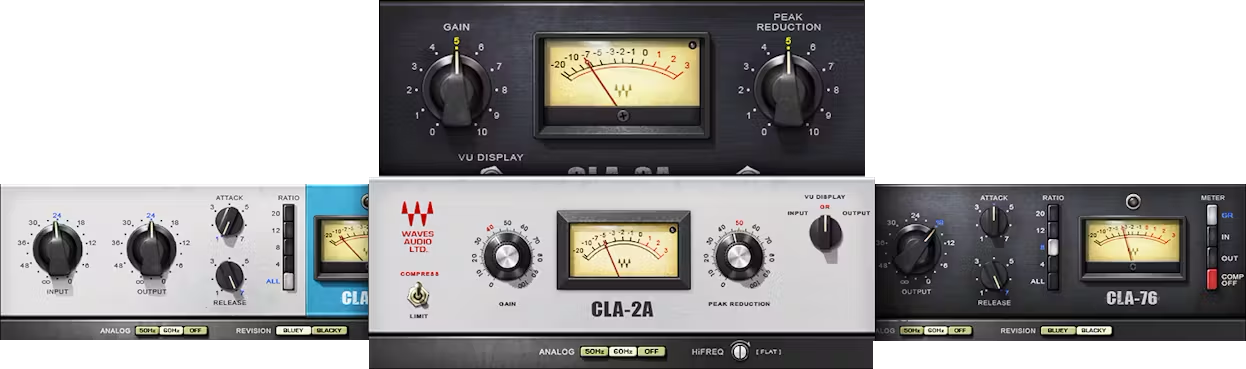
Included plugins:

  • CLA-2A
  • CLA-3A
  • CLA-76 Black and CLA-76 Blue

Features

  • Created in close collaboration with Chris Lord-Alge
  • Each compressor complements different genres and styles
  • Faithfully captures analog sound quality and warmth
  • Optional, subtle hiss and hum for total authenticity
  • Modeled from Chris Lord-Alge’s personal vintage hardware
  • All compressors include many of Chris’s favorite presets

System Requirements

Mac

  • macOS Monterey 12, Ventura 13, Sonoma 14, Sequoia 15
  • VST / AU / AAX

PC

  • Windows 10+
  • VST / AAX
Installation Instructions

1. Head to https://www.waves.com/create-account

2. Enter your email and choose a password to create an account (if you already have a Waves account, choose Log in, enter your details and head to Step 5) > click 'Submit'

3. Open your email inbox > click the activation link in the email from Waves

4. Click 'Log in here' > Log in to your Waves account

5. Click 'Register New Products'

6. Enter the Serial Number found in your Plugin Boutique user account > click 'Submit'

7. Click download in your Plugin Boutique user account or head to https://www.waves.com/downloads/central > download the Waves Central app for your operating system

8. Install Waves Central > Open Waves Central

9. Click 'Log in' > enter your log in details

10. Click the 'Install Products' tab

11. Tick the blue dot on all products you wish to install or click the top dot to install all products > click 'Install & Activate'

12. Click 'OK'

13. Open your DAW > open the Waves plugin

Your Waves plugins are installed and ready to use, enjoy!

Plugin Boutique Rewards

Discover the most rewarding loyalty programme among all plugin retailers.

  • Free Loopmasters Samplepacks
  • Discounts on products and courses
  • Extra Virtual Cash claimed immediately at checkout
Find out more

Follow us:

X (Twitter) Facebook YouTube Instagram
Logo Logo

Plugin Boutique Limited, Part of the Beatport Group LLC.

Copyright © 2011-2025 Plugin Boutique. All rights reserved










