/ Various Category / Inspire Virtual Instruments Collection
Waves

Inspire Virtual Instruments Collection

5.0 (1 Reviews)
$139.99 $699.00

79% off until Dec 07

Waves Inspire Virtual Instruments Collection
Introducing Waves OVox: The Next-Generation Voice-Controlled Synth gallery thumbnail
Andrew Huang: 3 Ways to Use & Abuse Your OVox Vocal Plugin gallery thumbnail
How do YOU sound with Waves OVox? gallery thumbnail
Introducing Waves CR8 Sampler | Create Infinite Instruments. Quicker. gallery thumbnail
5 MUST-KNOW Sampling Tricks | CR8 Creative Sampler gallery thumbnail
Waves COSMOS | AI-Powered Sample Finder gallery thumbnail
How to Find Your Samples with Waves COSMOS gallery thumbnail
FM Synth Made Fun and Easy – Flow Motion Synth gallery thumbnail
1 Bass, 20 Styles: Waves Bass Fingers Virtual Instrument gallery thumbnail
Introducing the Waves Electric 200 Piano Plugin gallery thumbnail
Introducing the Electric 88 Piano by Waves gallery thumbnail
Introducing the Waves Bass Slapper Virtual Instrument gallery thumbnail
Sampling the Waves Grand Rhapsody Piano gallery thumbnail
Introducing the Electric Grand 80 Piano Plugin gallery thumbnail
How to Create Future / Trap Synth Bass gallery thumbnail
How to Create Future Bass Synth w/ LFO Wobble + Free Preset gallery thumbnail
Presenting the Waves Clavinet Virtual Instrument Plugin gallery thumbnail
How to Create Robotic Vocoder Vocal Effects like Daft Punk gallery thumbnail
Buy Now
Product information

Inspire Virtual Instruments Collection

Make Music with Inspiring Sounds


Discover your ideal instrument sound within this comprehensive collection. Whether you seek the timeless elegance of a premium acoustic piano, the warmth of analog synthesis, the nostalgic charm of vintage electric pianos, or cutting-edge high-tech sounds, it’s all here.

Waves combines expert modeling to faithfully capture the essence of the past, digital innovation to explore new frontiers, and intuitive interfaces designed to spark creativity and musical inspiration.
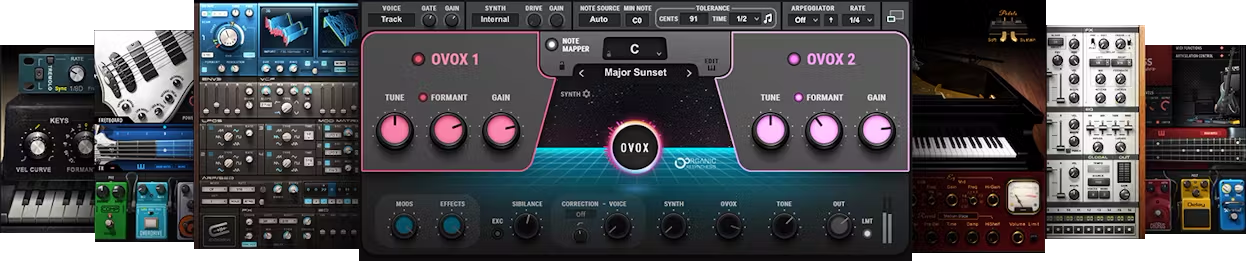
Included plugins:

  • Bass Fingers
  • Bass Slapper
  • Clavinet
  • Codex Wavetable Synth
  • COSMOS Sample Finder
  • CR8 Creative Sampler
  • Electric 200 Piano
  • Electric 88 Piano
  • Electric Grand 80 Piano
  • Element 2.0 Virtual Analog Synth
  • Flow Motion FM Synth
  • Grand Rhapsody Piano
  • Morphoder
  • OVox Vocal ReSynthesis

Features

  • State-of-the-art virtual instruments
  • Includes innovative synths, vintage modeled keyboards, and more
  • Transform vocals into synth sounds with OVox
  • Includes plugin versions plus app versions for live performance
  • Includes the CR8 sampler + COSMOS AI sample finder
  • Over 2500 royalty-free samples included with COSMOS
  • Instruments include additional, high-quality effects
  • Vintage modeled instruments prioritize realism and feel
  • Includes both high-definition and stand sample libraries
  • NKS-ready for NI Komplete Kontrol and Maschine

System Requirements

Mac

  • macOS Monterey 12, Ventura 13, Sonoma 14, Sequoia 15
  • VST / AU / AAX

PC

  • Windows 10+
  • VST / AAX
Installation Instructions

1. Head to https://www.waves.com/create-account

2. Enter your email and choose a password to create an account (if you already have a Waves account, choose Log in, enter your details and head to Step 5) > click 'Submit'

3. Open your email inbox > click the activation link in the email from Waves

4. Click 'Log in here' > Log in to your Waves account

5. Click 'Register New Products'

6. Enter the Serial Number found in your Plugin Boutique user account > click 'Submit'

7. Click download in your Plugin Boutique user account or head to https://www.waves.com/downloads/central > download the Waves Central app for your operating system

8. Install Waves Central > Open Waves Central

9. Click 'Log in' > enter your log in details

10. Click the 'Install Products' tab

11. Tick the blue dot on all products you wish to install or click the top dot to install all products > click 'Install & Activate'

12. Click 'OK'

13. Open your DAW > open the Waves plugin

Your Waves plugins are installed and ready to use, enjoy!

Plugin Boutique Rewards

Discover the most rewarding loyalty programme among all plugin retailers.

  • Free Loopmasters Samplepacks
  • Discounts on products and courses
  • Extra Virtual Cash claimed immediately at checkout
Find out more

Follow us:

X (Twitter) Facebook YouTube Instagram
Logo Logo

Plugin Boutique Limited, Part of the Beatport Group LLC.

Copyright © 2011-2025 Plugin Boutique. All rights reserved










