


 Log In

Free gifts available with your purchase
Product information
V-Series Bundle
Mix with the Vibrant Colors of Vintage EQ and Compression
Based on the legendary 1066/1073/1081 mic pre/EQs and the 2254 compressor, these plugins replicate their distinctive sonic behavior and analog warmth. They capture the unique ability to drive audio transformers hard, contributing to the big, warm, and well-defined sounds that have shaped generations of popular music.
The enduring appeal of these processors is no accident: they were designed with musicality as the top priority. Now, these rich, inviting tones can continue to enhance studios for the next half-century.
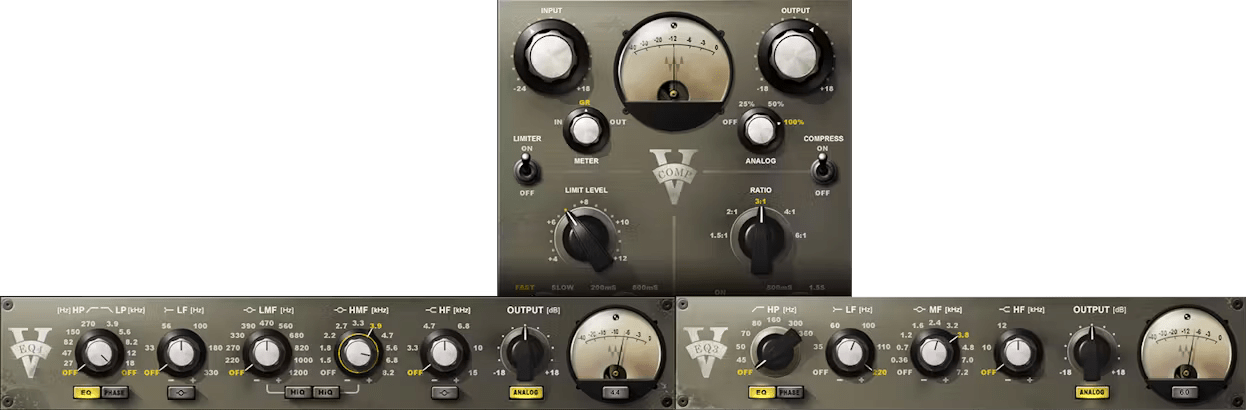
Included plugins:
- V-Comp
- V-EQ3
- V-EQ4
Features
- Delivers the sound of classic 1970s consoles
- Turn authentic harmonic distortion emulation on or off
- Carefully curated EQ curves provide maximum musicality
- Choose general tone-shaping, or more precise EQ
- All processors feature exceptional midrange detail
- Models the sweet characteristics of transformer distortion
System Requirements
Mac
- macOS Monterey 12, Ventura 13, Sonoma 14, Sequoia 15
- VST / AU / AAX
PC
- Windows 10+
- VST / AAX
Installation Instructions














