


 Log In

Free gifts available with your purchase
The Best of W.A. Bundle is an all-in-one producer’s toolkit combining high-powered synthesis, creative sample slicing, and intelligent mixing tools to fix and shape your sound with complete control.
Wavetable Synthesizer
A few years ago, W. A. Production created the original one-page wonder; Babylon. The sound and simplicity of this synth was an instant hit with users and after receiving so much positive feedback, they couldn't wait to dive back into development - adding bigger and better features. Now, after a complete overhaul, Babylon is back, baby!
Babylon 2 offers all of the single-page simplicity as its predecessor, but now with a renewed focus on multi-voice oscillators and morphing wavetables. The W. A. team have added enhanced filters and renewed effects, plus unprecedented control over modulation, arpeggiation, tuning and much more. Babylon 2 has grown from its humble beginnings to become a beast… the multi-purpose power synth you've been waiting for.
What's New In Babylon 2.2?
- Wavetable Editor:
- Doubled the maximum number of tables
- WAV Import: Auto detect number of cycles
- WAV Import: Auto map cycles to tables
- New Option: Auto transition parameters between tables
- New Option: Copy parameters to all tables
- New Option: Shift cycles and trim tables
- UI improvements
- Minor bug fixes and improvements
Features
- Completely rejuvenated one-page synth programming
- NEW Oscillation modes featuring Multi & Quad modes
- NEW Wavetable Editor
- NEW Scale & per-note Microtonal options
- NEW Intelligent Arpeggiator
- NEW Filter Types
- NEW & Reprogrammed FX
- NEW Modulators & Matrix
- 858 Factory Presets
- 200+ high-resolution waveforms
- All the original Babylon features retained
Learn more about Babylon 2.2
ChopBeast 2

Rip & Rebuild
The creature has evolved…
W.A. Production didn’t just add a “2” to the box - they re-engineered the Beast to be smarter, sharper, and far more dangerous. Whilst the original plugin mastered the art of the beautiful mistake, the sequel grants you total mastery over the chaos. From the swing-heavy stutters of 90s legends like Todd Edwards to the hyper-edited precision of Disclosure and Porter Robinson, rhythmic slicing has been the heartbeat of electronic music for decades. ChopBeast 2 takes this legacy further, breathing new life into percussion, melodies, vocals, or entire mixes to create EDM ecstasy and French House flair. By blending surgical per-slice control with intelligent randomization, you're conjuring melodic manipulation like never before.
Rhythmical Revolution
ChopBeast 2 features new innovations inspired by community feedback, and integrated to provide a seamless workflow for creative slicing. Brand new to this version…
- Deeper per-slice control, including Lock option for position and FX - so you can keep the building blocks of your sequence, whilst randomizing around it.
- Volume control for each and every slice, to help balance your sound.
- Pitch randomization to discrete Octaves, Fifth, Third, Major and Minor intervals, for the most melodic transformations. Formant shaping toggle also available.
- MIDI One Shot and Hold options for Daft Punk style per-chop looping.
- Sync playback to your DAW’s tempo to lock your chops to the beat of your track. Half time and Double time options are also available.
- Link playback to DAW so your chopped loop syncs to bar position.
Features
- Audio chop & remix plugin with advanced options
- Up to 32 chops per instance
- Per-chop Volume, Reverse, Pitch, Declick, Formant Shifting
- Multiple Melodic Randomization modes
- MIDI audition (one shot & loop) and DAW export
- DAW Sync with half & double time modes
- Lock position & FX per-slice
- Global transpose
- Resizable interface
- Responsive & CPU friendly
Learn more about ChopBeast 2
Deres
DERES isn't just guessing which frequencies need attention. It's working from the mathematical playbook of sound harmonics; uncovering hidden resonances that would otherwise fly under the radar of even the most eagle-eared producers. With preview functions, you can sneak a peek into annoying interferences before your cleanup operation. Then use the user-friendly interface and streamlined workflow to nix those nasty noises. It's like having X-ray vision for your soundwaves, dynamically adjusting resonant peaks in a musical way. Clarity is king, so make sure you clean house before you even touch that mixdown.
Enhance, Identify & Reduce
The dedicated Listen button should be your first gadget in the DERES toolbag, allowing you to isolate irritating resonances with ease by exaggerating the frequencies. Sweep the 1-8 kHz range with the Find knob to easily identify unusual peaks that sound overly muddy or harsh. Then dial in the Reduce parameter to apply the processing, resulting in a cleaner signal. Tweak the Q value to widen or narrow the factor, catching more or less of the surrounding frequencies.
Dynamic Relativity
A normal surgical EQ will only be effective on one tight frequency slice, whereas DERES can process all the multiple harmonics of your chosen frequency. Use the Octave knob to quickly reduce the relative components of the main frequency so you catch all those problem peaks. Normal static mode will cut resonances in a linear way. Alternatively, you can add in an advanced dynamic mode, for more musical processing that only steps in when you really need it.
Features
- De-Resonance plugin with advanced harmonic processing
- Easy identification of problem harmonics
- Unique parameter functionality
- Static & Dynamic modes
- Compensation parameters to maintain clarity
- Frequency spectrum monitoring
- AB comparison & Undo / Redo
- Resizable interface
- Responsive & CPU friendly
- Flexible factory presets
Learn more about Deres
KickShaper
Pump & Thump
Kick drums form the bedrock of most music, but without a robust foundation, a mix can fall apart. Sometimes you're working with kick samples that just don't cut the mustard. They might be compressed to death, lacking fundamental frequencies, or just sound wimpy and lifeless. That’s where KickShaper swoops in to save the day.
Whether you're producing EDM, hip-hop, rock, or any genre under the sun, KickShaper is here to make your kicks punch harder and sound better than ever before. W.A. have captured the power of cutting-edge algorithms, painstakingly tested on thousands of kick samples by award-winning audio engineer, Emrah Celik. With KickShaper, you're not just using a plugin; you're harnessing the collective knowledge of top-notch sound design wizards.
KickShaper is crafted with YOU in mind, ensuring your kicks reach their maximum potential. The plugin delivers natural-sounding tails, well-defined transients, and depth - all while maximizing the digital realm's full dynamic range. The streamlined interface and intuitive workflow means you'll be creating the perfect kick in seconds, even if you're new to mixing and mastering. It's like having a pro-level studio engineer right alongside you, guiding your mix towards perfection.
Frequency Finder
Your journey starts here. With the simple press of the Finder button KickShaper intelligently identifies the dominant frequency of your kick, instantly determining the perfect way to enhance your kick's tail. Of course, this can be manually adjusted if needed. This ensures that KickShaper’s processing always aligns with your kick's musical key.
Features
- Kick designer plugin with advanced features
- Unique processing modules
- Frequency finder
- Shape sculpting: Tail, Deboom, Thump & Click
- Tone frequency adjustment
- Enhancement features
- AB comparison & Undo / Redo
- Resizable interface
- Responsive & CPU friendly
- Genre-spanning factory presets
Learn more about KickShaper
PsychoPan
Since the invention of stereo sound, music producers have been using rudimentary left / right panning techniques to place sounds around the listener. But why limit yourself to a two-dimensional plane, when you can expand your sonic horizons?
PsychoPan is a revolutionary psychoacoustic sound-styling plugin designed to change how humans perceive sound in a 2D space. Born from the demanding worlds of cinema sound design, game audio, and immersive production, PsychoPan sculpts depth, elevation, front-to-back placement, and distance… magically encoding a universe of 3D audio, within a standard stereo stream.
This groundbreaking tool was created in collaboration with sound designer Pan Athen, a veteran audio professional with more than 30 years of experience in game audio, film sound, immersive audio, and audio technologies. Powered by the innovative HyperSpatial™ framework, PsychoPan bypasses overly complicated acoustic measurements, and instead serves up a tactile interface for ultimate creative control. Manipulate level, timing, and spectral cues to create engaging environments that translate perfectly across headphones, studio monitors, TV and theater systems.
Under the hood, adjusting the distance drives 5 powerful independent micro-engines:
- Level Attenuation (ATN): Mimics standard acoustic volume loss over distance. At zero you’ll retain your original mix levels while keeping all other spatial distance characteristics.
- Proximity Effect (PRX): Simulates intimate, ultra-close "near-field" acoustics. Perfect for ASMR, up-close whispers, or terrifyingly tight projectile fly-bys.
- Width Loss (WID): As objects move away, they naturally lose their wide stereo envelopment. This module handles that narrowing effect automatically to maximize spatial realism.
- Distant Diffusion (DIF): Recreates the environmental diffusion cloud (late reflections and reverb tail) that wraps around distant audio sources.
- Big Freakin Event (BFE): The ultimate tool for cinematic sound designers. It simulates massive, high-energy global phenomena happening miles away by reinforcing the sub-bass frequencies. This gives epic weight to explosions, volcanic rumbles, or even just your kick drum.
Features
- 3D Depth & Positioning plugin designed for truly cinematic sound
- HyperSpatial™ Audio Core
- Intuitive XY Pad
- Elevation and Pan controls
- Cinesafe Visual Guidelines
- Zone Module
- Perceptual Distance Engine
- 5 Distance Sub-Modules
- Zero-Latency Safety Limiter
- Global & Modular Bypass
- Resizable interface
- Responsive & CPU friendly
- Flexible factory presets
Learn more about PsychoPan
Detroubler
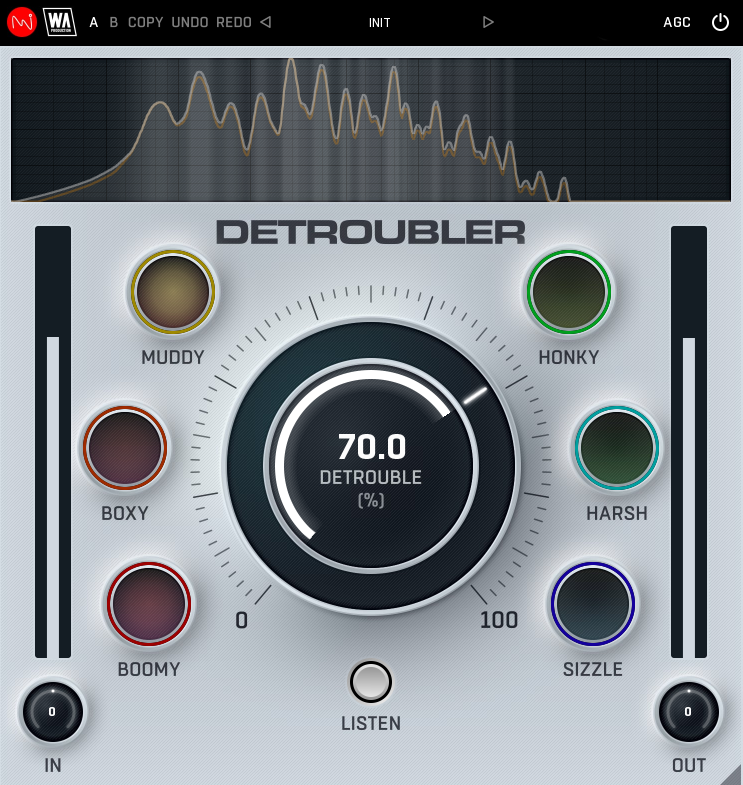
Stress-Free Sound
Whether sculpting silky synths or crafting perfectly-balanced vocals, it’s always a challenge to make audio pop whilst simultaneously reigning in those irksome frequencies. Certain areas often need soothing, especially if your audio sounds overly harsh, boxy or boomy. This is where DETROUBLER comes to the rescue, swooping in to smooth your sounds and tackle the most troublesome areas of audio processing.
Use this plugin as your guide to navigate the tricky path between great sound and tired ears. Those grating frequency areas need eliminating and now you have an all-in-one toolbox to fix your mix.
DETROUBLER isn't just blindly stabbing at frequencies. It's operating from the science of psychoacoustics, pinpointing those sonic irritations that even the most seasoned ears might miss. This plugin uses techniques such as Fletcher-Munson curves and the Bark Scale to decipher the very essence of auditory discomfort. But if you’d rather skip the theory, then it’s easy enough to use DETROUBLER’s six uniquely targeted meters to smooth out the rough edges of your tracks in a way that feels utterly musical.
Areas for Improvement
There are six distinct areas that DETROUBLER focuses on. The plugin uses psychoacoustic principles to make changes, improving the sound of frequency bands and their corresponding masking frequencies according to the Bark Scale.
- Boomy: Excessive low-frequency resonance, often in the 100-250 Hz range, making the sound overpowering or lacking clarity.
- Boxy: A hollow or resonant sound, usually due to excessive energy around 150-250 Hz, making instruments (especially drums and vocals) sound like they’re playing in a small box
- Muddy: Lack of clarity due to overlapping frequencies in the 200-500 Hz region, often causing instruments to blend indistinctly.
- Honky: A nasal, resonant midrange quality, typically around 500-1500 Hz, making vocals or instruments sound somewhat brassy.
- Harsh: Overly aggressive or piercing high-mid frequencies, often in the 2-6 kHz range, causing listener fatigue.
- Sizzle: Excessive, uncontrolled high-frequency energy in the 8-12 kHz range, sometimes making cymbals or vocals sound overly bright or artificial.
Features
- Research-based psychoacoustic processing plugin
- Targeting problem areas of your audio
- Easy identification of ear-fatiguing frequencies
- Six specifically targeted areas
- Listen mode for enhanced monitoring
- Frequency spectrum display
- AB comparison & Undo / Redo
- Resizable interface
- Responsive & CPU friendly
- Flexible factory presets
Learn more about Detroubler
Outlaw
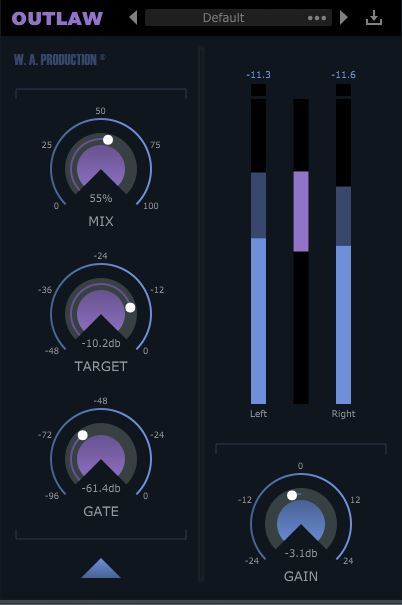
All Gain. No Pain.
Whether you’re mixing live sound, smoothing vocals or balancing solo instruments, Outlaw is the gain-riding plugin you’ve been looking for. Outlaw listens to the incoming audio and compensates for volume changes, mimicking the mixing desk fader movement of a real-life audio engineer. Forget about drawing complex volume automation and let Outlaw do the hard work for you, with smooth gain levelling and a wealth of features.
Mix, Target, Gate & Gain
These 4 main dials give you flexible control over the fundamental parameters of Outlaw, meaning that it’s easy to make broad-stroke adjustments to the performance of the plugin. Adjust the intensity of the effect with the MIX dial and set the RMS target level with the TARGET dial. Use the GATE control to set a relative level so that the gain-rider ignores softer sounds. The master output is controlled by the GAIN dial, very useful for setting accurate levels for precise A/B signal comparison.
Advanced Settings
Fine-tune the gain algorithm with advanced settings, accessible from a secondary panel. Outlaw can perform in band-pass mode with high-pass and low-pass filters and 4 different slope settings. For example, this means you can perform effective gain-riding on audio with a low rumble, high-hat bleed or other problematic frequency information.
The Attack and Release options let you mould the transients and sustains of the processed audio to create a smoother signal. The Direction parameter can be set to control the attack and release direction, operating upwards, downwards or in both directions. Maximum values can be set to adjust the intensity of the gain-riding. A variety of RMS options determine how quickly Outlaw reacts to the incoming signal another way to help smooth or sharpen the response.
Features
- Mix: mixes is the gain riding.
- Target: sets the RMS target of the gain-rider.
- Gate: allows the user to set a gate-level that is relative to the TARGET level, to have the gain-rider ignore softer sounds.
- HPF/LPF/Slope: Let you filter away the highs and lows in the detection signal with variable slopes so you can, for example, ignore the low rumble in a speech or vocal recording, or ignore the high attack and finger noises of a bass recording.
- Attack/Release/Direction: Let you apply additional attack and release to the gain-riding so you can let through the signals peaks or smooth out the signals tails. With the DIRECTION control, you can set the direction of the ATTACK and RELEASE which is helpful depending on if the general gain produced is upwards, downwards or goes in two directions.
- Max Up/Max Down/Instant/Zero/RMS: The MAX UP and MAX DOWN let you set the maximum gain that is applied up and down, which gives you more control over how extreme the gain-riding is allowed to be. Low values sound subtle. High values sound erratic. The RMS control lets you pick between slow, medium or fast RMS-detection, which determines how quickly the plugin reacts to the incoming signal. The INSTANT option is very fast and ZERO has 0ms RMS time.
- Resizable user interface.
Learn more about Outlaw
BassShaper
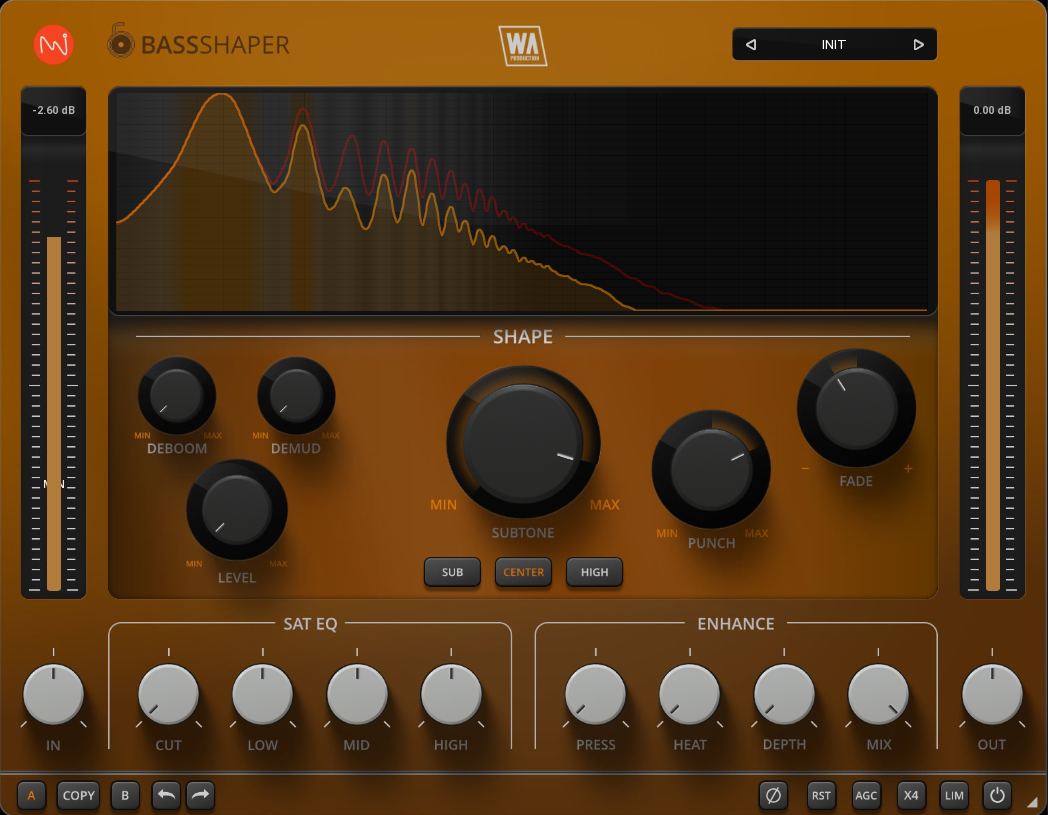
Deep & Defined
The bass line… it's the heartbeat of your music - the foundation stone that supports everything else. But let's be honest, getting that low-end working correctly can be a real struggle. You might be battling muddy frequencies, weak sub-bass, or flabby 808s that leave your mix feeling lifeless.
BassShaper is here to rescue your low-end and cement its place in your track. Developed by seasoned audio engineers who've wrestled (and won) against countless bass lines, this innovative plugin boasts cutting-edge algorithms designed to tame the beast and cut through the busiest mix.
Forget hours spent tweaking EQs and compressors - BassShaper delivers unparalleled control with an intuitive interface. Features include subtone generation, musical saturation, surgical transient shaping, and controls specifically designed to clean and polish your bass sounds. Achieve that elusive blend of warmth and clarity, maximising the impact of your low-end.
The streamlined interface and intuitive workflow means that bass editing has never been simpler. Start with expertly designed presets and tweaking from there. Even if you're new to mixing and mastering, you’ll be producing expertly mixed bass lines in seconds.
Deboom, Demud & Level
Those who are familiar with BassShaper’s sister plugin “Kickshaper” will remember the Deboom dial. Although sharing a name, the algorithm is entirely different and this time designed specifically for bass information. Activated by amplitude, boominess is tamed, resulting in a cleaner tone.
Using a special pitch tracking system, the Demud control dynamically reduces muddiness caused by note transitions and resonances, making individual pitches more pronounced.
Traditional bass-riding plugins crudely alter the volume level of bass lines. BassShaper’s Level control is far more refined, driven by a pink noise signal, specially tuned to tame amplitude fluctuations and produce a consistently audible bass throughout your track.
Features
- Bass designer plugin with advanced features
- Unique processing modules
- Subtone control
- Surgical shaping: Punch, Fade, Deboom, Demud & Level
- Tonal Control with bespoke algorithms
- EQ & Enhancement features
- AB comparison & Undo / Redo
- Resizable interface
- Responsive & CPU friendly
- Genre-spanning factory presets
Learn more about BassShaper
Windows
- Windows 8 and later (64-bit only)
- Formats: VST2, VST3, AAX
Mac
- macOS 10.13 and later (64-bit only)
- Formats: VST2, VST3, AAX, AU
Please Note: AAX compatible with ProTools 11 and higher only.


