/ Hip Hop / Smokers Unite
RawCutz

Smokers Unite

4.7 (28 Reviews)
$59.00
Smokers Unite - Main Image
Smokers Unite: Beat Making with Ableton Push 2 and Moog Synth gallery thumbnail
Buy Now
Product information

Raw Cutz have rolled another fat one! -  this time taking inspiration from some of the classics in our vaults – Smokers Delight, Smokers Relight and Premier Beats

Smokers Unite melts Jazz Fuelled swing , Hip Hop attitude, and Funked out Atmospherics,  with a pinch of Ambient Soul which when left at room temperature for around 30 minutes will create the perfect Beat Recipe each and every time!

Incorporating Lo-Fi Vinyl Jazz chords, Cut up Keys, and Crunchy MPC style Drums and Percussion, Funky Basses, Jazz Guitars, Ambient FX and Slow Slung Breaks  - it’s a masterclass of Golden Era influenced Hip Hop and Funk that producers of Downtempo, Cinematic, Ambient and all Hybrid experimentation will enjoy.

Representing the true sound of the Nu School Old Skool beat-makers, sound manglers and sample addicts worldwide, Smokers Unite is bursting with flavour to bring to your productions every time.

We realised that to make this package complete we needed to add Turf Smoke into the deal – which features  crisp and cutting beats, Enchanting Pads, Smoky Vibes, Crunchy snares, Jazzy Chords andMusical Melodies grouped into 10 projects, with 30 inspirational kits of 16 fresh and original samples.

Turf Smoke Influences range from the heavy beats of Cypress Hill, with the jazzy instruments of Blue Note, Orbesque atmospherics and usky haunting melodies – all with the trademark Raw Cutz “pre-worn” sonic treatments.

If you are making Deep Golden era Hip Hop, House, Warped beats, Progressive Drum and Bass or Ambient music – you will find inspirational sounds within seconds in this fresh  sample pack, which was created by the original Raw Cutz producer - Turf Smoke.

Raw Cutz brings the real sounds and samples from the past into the future with retro acoustic treatments, sonic pairing and tempo and key matching in order to present an immediate resource for demanding producers looking for an authentic inspirational experience – get Raw!

Our packs now feature full Native Instruments Maschine Kits, and Ableton Live Drum Racks – all mixed and mastered in a consistent structure that means you can switch out kits and samples easily to try out different sounds with your song ideas.

For anyone wanting Loops and one shots only, we included these too so you can start experimenting fast with the samples no matter what studio setup you have. Also included are ready to play sampler patches for Halion, Kontakt, NNxt, SFZ and EXs24 compatible soft samplers, as well as 16 Kong patches.

In Detail:

  • Smokers Unite includes over 800 samples in 24Bit, 44.1Khz, featuring 234 Loops in wav and apple loops format, 574 One Shot Samples, plus Rex2 files for all the loops.
  • The Maschine Pack includes 46 Kit Groups of 16 samples per Group, and 26 Projects – all mixed and including demo patterns and projects.
  • The Ableton Live Pack includes 42 Drum Racks, and 26 projects.
  • The 29 soft sampler patches include the 29 kits in a ready to play format, plus additional patches featuring the musical samples only.
  • After purchasing you will be able to download both Maschine and Ableton Live content.

Features

  • 24-Bit Quality 
  • 2.66 GB total worth of content 
  • Over 800 samples 
  • 234 Loops in wav and apple loops format 
  • 574 One Shot Samples 
  • 234 Rex2 files 
  • 16 Kong Kits
  • 29 soft sampler patches for EXS24, Halion, Kontakt, NNXT & SFZ 
  • 46 Kit Groups of 16 samples per Group, and 26 Projects for Maschine 2.2.3+ 
  • 42 Drum Racks, and 26 projects for Ableton Live 9+ 

Important note: NI's Maschine V2.2.3+/Kontakt, Ableton Live 9+, Halion, Reason's NN-XT/Dr.OctoRex, SFZ and EXS24 (Logic) compatible soft samplers are all required to run the full contents of this software package (excluding the contents of the Wav Pack).

Testimonials

Anile

"I have every Rawcutz pack there is to date and each time i'm never disappointed! Pure Organic, textual sounds perfect for any production. Love Love Love!!"

Computer Music Magazine

"The sound and vibe of 'golden era' hip-hop has been captured to a T, with a broad range of 'real' instrumentation covered; and we love the attitude and spirit of both collections."
Bassbin Twins

"Another absolutely killer assortment of vibe-encrusted goodness from Rawcutz. These samples are embedded with rustic warmth/history/texture and are the antidote to clinically clean sound packs."

Installation Instructions

Ableton Live 9+

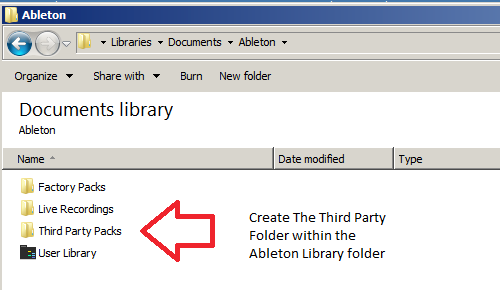
1. Create a folder entitled 'Third Party Packs' within the Ableton Library folder.

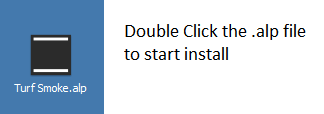
2. Download the .zip folder provided within your User Account > double-click it to extract its contents and then locate the .alp file. 

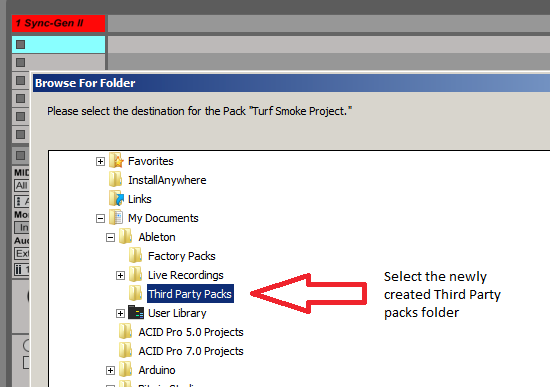
3. When opening Ableton Live, the program will ask where you wish to install the project folder.

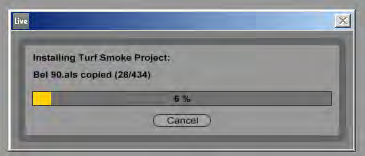
4. Locate the 'Third Party Packs' folder that you created in step 1. of the installation process, and select 'OK' > Live will then begin the unpacking process.

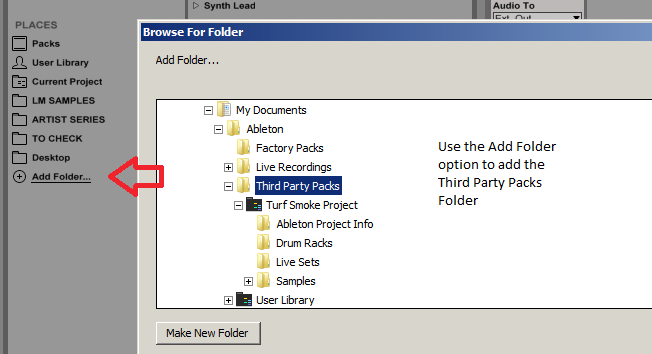
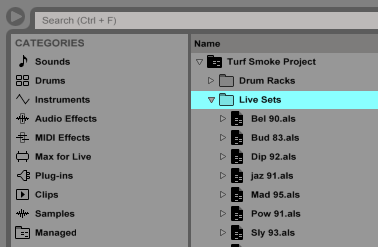
5. Once the unpacking is complete, you now need to inform Ableton Live of where the sample pack is located > from the browser window, select 'Add Folder' and navigate to the project folder where you installed the pack (inside the 'Third Party Packs' folder).

The Pack is now Installed and Ready for Use Within Ableton

Maschine 2.2.3+

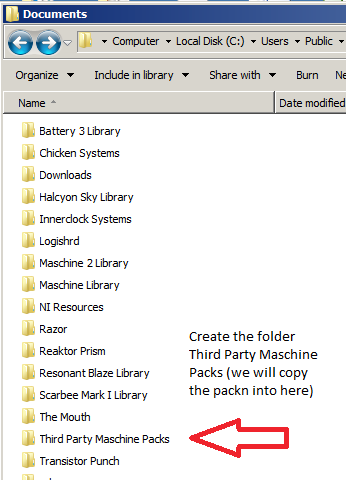
1. Create the folder titled 'Third Party Maschine Packs' > it is advisable to perform this in the same root folder as the Maschine Library, but it can be also be anywhere on your computer.

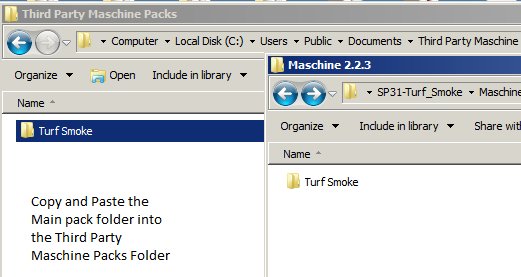
2. Download the .zip folder provided within your User Account, and double-click it to extract the main folder > copy and paste the contents of the Maschine 2.2.3 folder to the 'Third Party Maschine Packs' folder that you created in the previous step (Step 1.).

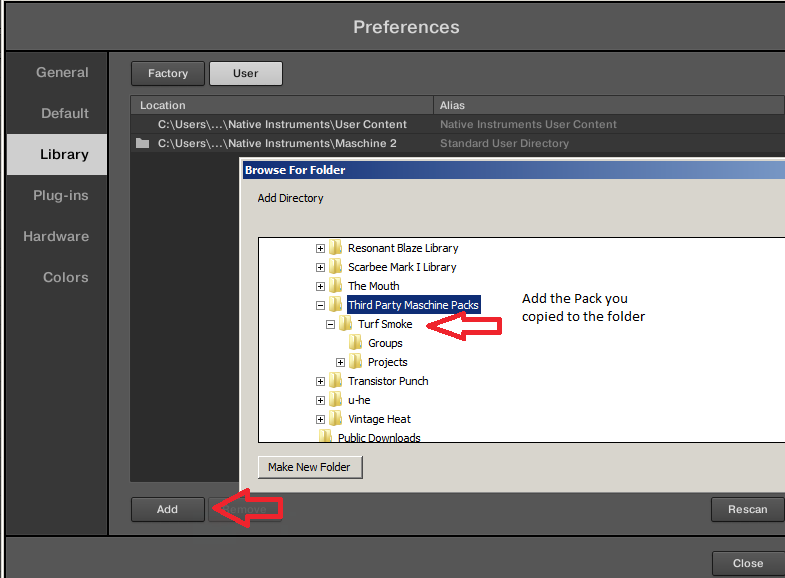
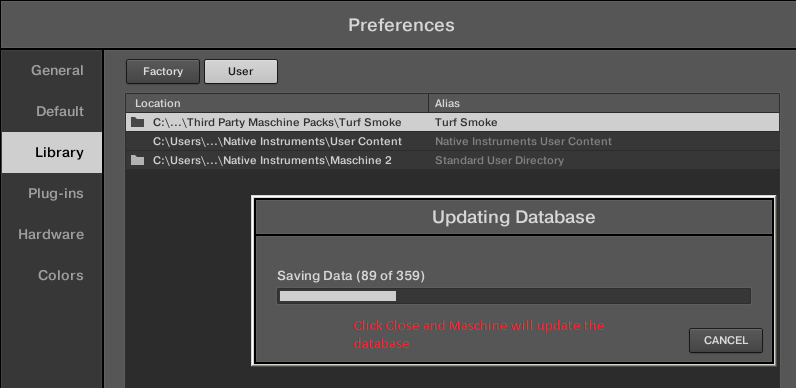
3. Open Maschine 2 and select the 'Preferences' tab from the menu > Select the 'User Paths' tab and then click 'Add'. From the pop up window locate the 'Turf Smoke' folder.

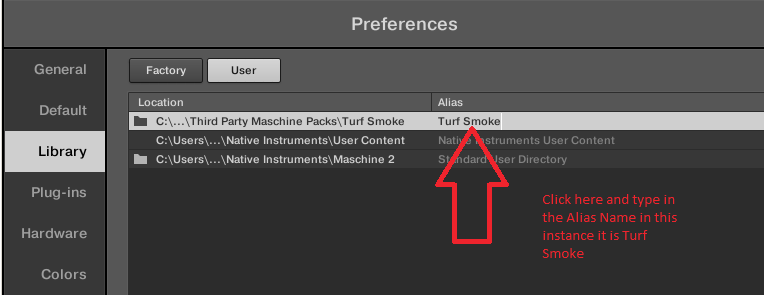
4. Important note: At this stage of the installation process, it is imperative to add an alias - to perform this double-click below the Alias box, and enter/type in the Alias name which will always be the same name as the pack's root folder name.

5. Select 'OK' and Maschine will now scan and add the contents of the pack to its database.

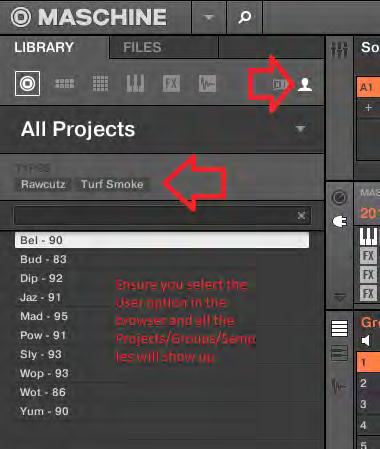
6. To Load content from the pack, go to the 'File Type Selector', ensuring that you have user presets selected first > press the 'Projects/Groups/Samples' icons and your content will now be visible and ready to load.

7. All content from the collection has been appropriately tagged, ready for easy file browsing.

Rex Files 

1. Download the .zip folder provided within your User Account, and double-click it to extract the main folder.

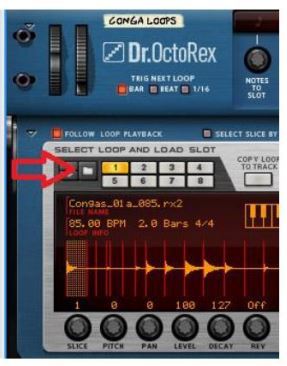
2. Rex files can be loaded in the ‘Dr. OctoRex’ player in Reason. Simply click the ‘Browse Patch’ tab, and locate the file you require. You can load up to 8x Rex files into the available slots.

3. The Rex files are now ready for use within the Dr.OctoRex Player. 

Sampler Patches

Halion

1. Download the .zip folder provided within your User Account, and double-click it to extract the main folder.

2. Copy/save the entire extracted sample pack folder to your computer or hard drive, ensuring that all folder structure remains intact.

3. When loading Halion patches you may need to locate the samples > this is simply done by double-clicking the '.fxp' file (Halion Patch) within the Halion browser window, and when prompted click on the automatic or manual search button > then locate the root folder of the pack  that you have purchased.

4. Halion will now find the samples for the patch. It is advisable to resave the patch, so you will not have to repeat this procedure.

5. The sample pack is now ready for use within Halion.

EXS24

1. Download the .zip folder provided within your User Account, and double-click it to extract the main folder.

2. Copy/save the sample pack folder to the 'Sampler Instruments' folder within Logic > this folder is located via the folder path below:

  • username/Library/Application Support/Logic/Sampler Instruments

3. The sample pack is now ready for use within EXS24.

NN-XT

1. Download the .zip folder provided within your User Account, and double-click it to extract the main folder.

2. Copy/save the entire sample pack folder to your computer or hard drive, whilst ensuring that all folder structure remains intact.

3. Select the 'Load Patch' tab on the NNXT user interface and use Reason’s browser to locate the NNXT folder within the sample pack > you will now be able to load your desired patch.

4. The sample pack is now ready for use within NN-XT.

Kontakt

1. Download the .zip folder provided within your User Account, and double-click it to extract the main folder.

2. Copy/save the entire sample pack folder to your computer or hard drive, whilst ensuring that all folder structure remains intact.

3. Use Kontakt’s browser to locate the 'Kontakt' folder within the sample pack, and then load desired patch.

4. The sample pack is now ready for use within Kontakt.

Reason 4 Refill

1. Download the .zip folder provided within your User Account, and double-click it to extract the main folder.

2. Copy/save the '.rfl' file to the Reason installation folder on your computer's hard drive.

3. Use Reason’s browser to load instruments or effects from the refill pack > this is located by following the folder path below:

  • username/Library/Application Support/Logic/Sampler Instruments

4. Open Refill within Reason, and the new presets will now be available for use within the sampler's browser area.

Plugin Boutique Rewards

Discover the most rewarding loyalty programme among all plugin retailers.

  • Free Loopmasters Samplepacks
  • Discounts on products and courses
  • Extra Virtual Cash claimed immediately at checkout
Find out more

Follow us:

X (Twitter) Facebook YouTube Instagram
Logo Logo

Plugin Boutique Limited, Part of the Beatport Group LLC.

Copyright © 2011-2025 Plugin Boutique. All rights reserved