Log In

Free gifts available with your purchase
Made in conjuction with David Bendeth, +10db is a channel strip plugin meticulously modeled after one David’s personal hardware compressor unit that you’ve heard on some of the hardest hitting albums made. Unless you refuse to listen to any music after Beethoven, you most certainly have heard this unit in action. Best yet, this is the first time this hardware unit has been available in plugin format.
+10db is the first of it’s kind channel strip plugin modelled after David Bendeth’s personal compressor unit. They didn’t just use the hardware unit for inspiration, they dug in deep and made sure that it sounded just like the original. If you’ve ever listened to Breaking Benjamin or Paramore, or any of the other countless other records mixed by David Bendeth, one of the first things you’ll notice is how damn punchy the drums sound. This unit is a critical part of his drum mixing chain, and now it can be a part of yours.
+10db Equaliser V2
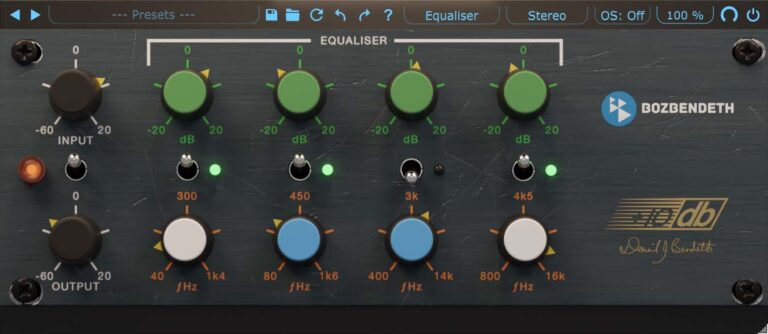
+10db Equaliser is meticulously modeled after the EQ section of a very highly sought after hardware channel strip. The parallel nature and design of this EQ gives you a completely new approach to applying EQ.
+10db Equaliser takes the EQ section from Boz Digital Labs' +10db Channel strip plugin and puts it in a dedicated plugin. This plugin faithfully recreates the curves and subtleties of this hardware equaliser unit.
What Is So Special About This EQ?
This EQ takes a different approach to equalization than your standard digital EQ. Instead of the standard series configuration, this EQ uses a parallel configuration, which makes for some very interesting effects, especially for bands that are close together. You will notice that you can use more extreme boost and cut settings without going into that harsh realm.
And of course, in order to preserve the spectral integrity of analog filters, they do not do any of the digital pre-warping tricks. Instead, each filter has a nice symmetric frequency response all the way up to Nyquist frequency, giving it a much more natural and musical response in the high frequencies.
The layout of this EQ makes you work with a different part of your brain than the standard parametric EQ. Don’t get them wrong, they love parametric EQs too, but working with this EQ definitely opens up the creative side of their brain, which can open up entirely new creative possibilities.
Learn more about +10db Equaliser V2.
+10db Compressor V2
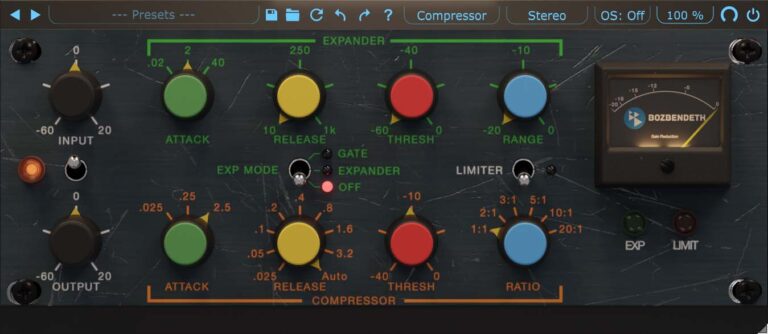
+10db Compressor is the first of it’s kind channel strip plugin. This plugin is modeled after a very highly sought after compressor hardware unit. They didn’t just use the hardware unit for inspiration, they dug in deep and made sure that it sounded just like the original.
Why Did They Model This Unit?
Here’s the deal. It seems like everybody is modelling hardware these days, but Boz Digital Labs wanted to do something a little different. They didn’t want to model any hardware units that have been done a million times. They wanted to do something that had never been done before but has been an icon in the recording industry, and the only way to do that was to team up with producer/mixer David Bendeth. He just happened to have a few of these in his rack, so he sent them one to pour over.
Unless you stopped listening to music after “Johnny B Goode” then you have most definitely heard this hardware unit many many times. Think of Led Zeppelin drums.
In order to get this same compressor in hardware, not only would you have to pay over $2,000 to get one, but you’d have to deal with all the other drawbacks of using analog hardware. For a very small fraction of the price, you can get that same sound in the much more convenient software format. There are really no downsides (unless you live in Alaska and need a room heater)
A Few Extra Features
Since they weren’t bound by the limits of the analog hardware, they took the liberty of adding a couple features that make this even more powerful than the original hardware. For one, they added a “Dry Passthrough” knob that makes parallel compression super easy, without having to set up extra buses.
Learn more about +10db Compressor V2.
System Requirements
Mac
- MacOS 10.13 or greater (Intel or M1)
- VST2, VST3, AU, AAX
PC
- Windows 7 or greater (64-bit only)
- VST2, VST3, AAX Native
Neal Avron
Mixing Engineer/Producer (Linkin Park, Sara Bareilles, Switchfoot)
“The +10db recreates a piece of gear that may not be as ubiquitous as other well known counterparts, however the original’s sonic signature has made it a well kept (until now) secret weapon for me and countless other engineers.”
Bob Ezrin
Record Producer (Pink Floyd, Peter Gabriel, Kiss)
“Like DB, this thing is pure rock’n’roll! We’re loving the way it sounds on drums here.”
Ted Jensen
Sterling Sound Mastering (Billy Joel, Green Day, Talking Heads, Norah Jones, Mastodon)
“It’s what I had hoped it would be. Big, open, punchy and versatile. Very happy to have it in my arsenal. Thanks DB!”