Log In

Free gifts available with your purchase
Please Note: HALO FX is also a part of the HALO-2 package and can be purchased together.
The HALO FX plug-in brings the pristine filters, customisable distortions, EQs, fx and modulations from the HALO virtual instrument directly into your plug-in effect chain.
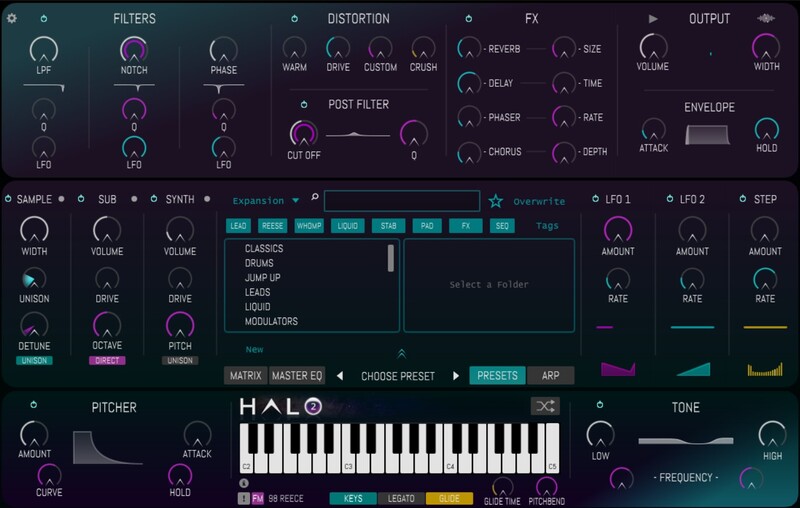
With a signal flow comprising of a triple multi filter complete with individual LFOs, four distortions including a customisable waveshaper and bit-crusher, a post distortion filter with LFO, a reverb, delay, phaser, chorus, limiter and a choice of two EQs HALO FX is the fastest way of dialling in experimental FX ever created. Within only a few clicks you can add any or all of the processing available in HALO FX. The Random Preset Generator will create totally new, useable, interesting settings to shape your sounds in ways you never would otherwise.
Via the extensive Preset collection you can easily access a range of fine tuned settings, from intense distortions, huge reverbs, cavernous delays, rhythmic modulations and glitchy effects.
Filters Galore
Featuring a total of 4 filters, each with multiple filter modes, and each with their own LFO there is a world of creative possibilities at your fingertips in HALO FX. Creating movement in your sounds couldn't be easier. Select between Low-Pass, High-Pass, Notch, Peak, BandPass and finally an all-pass Phase filter. With a further choice on a Tone EQ and Master parametric EQ the sonic shaping abilities in HALO FX are unparalleled in a single plugin. The Filter LFO clock will sync with your DAW enabling the LFO movements to be consistent when scrolling and rendering audio.
Push, Warm, Mangle, Crush or Destroy!
With 4 distortion modes HALO FX provides an endless sonic palette to play with. Experiment with a choice of Warm Saturation, Amp style Drive, Customisable Waveshaping distortion, and Bitcrushing. The versatile Waveshaper allows complete control over the Waveshape, Bias, Gain and Rate Reduction, whilst also featuring a preset browser of it's own to instantly select pre-made shapes from the HALO library or quickly saving your own for recall later and in other sessions.
Features
- 50 Fine Tuned Presets
- Custom Waveshaping Distortion
- Parametric Master EQ
- 3 Multi-mode Filters with Modulation
- Post Distortion Multi Filter + LFO
- Reverb, Delay, Phaser & Chorus FX
- Tone EQ for Easy EQ Shaping
- Master Peak Limiter
- Precision Analysers
- Random Preset Generation
System Requirements
PC
- Windows 7 or later (64-bit only)
- 1GB RAM minimum
- 1GB storage space
- VST3
Mac
- MacOS 10.8 or later (Apple Silicon Compatible)
- 1GB RAM minimum
- 1GB storage space
- AU/VST3