


 Log In

Free gifts available with your purchase

Tectonic Compressor
A compressor beyond the ordinary
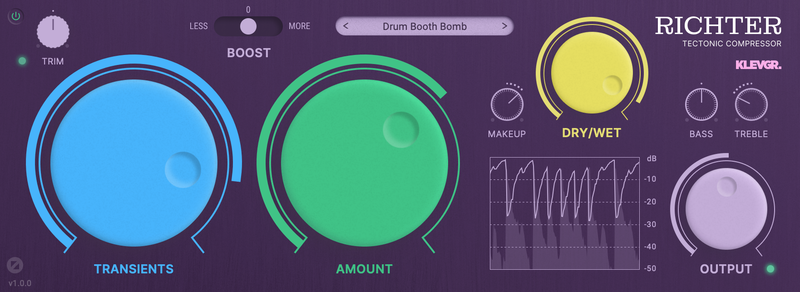
Richter is a tectonic compressor, designed to achieve heavy compression with a minimal amount of artifacts. It is the result of many years of experimenting in the Klevgrand labs. Normally a heavily compressed audio signal gets distorted, often with a nasty "zipper noise" artifact because of how the internal envelope followers are engineered. The experiments led to a brand new approach resulting in a compressor that empowers you to squeeze every bit of sonic perfection out of your tracks. Use it for meaty mixes, punchy drums or smooth, transparent vocal tracks.
Due to how the algorithm is designed, there are a few unconventional controls to tame Richter. First of all: one single parameter controls how much compression will get applied. The other (important) parameter controls how the internal envelope follower will react to transients vs continuous/lasting sounds. These two parameters make Richter a highly intuitive compressor where the user quickly will be able to dial in the wanted sound. On top of that there’s a boost switch that literally makes the amount span go to eleven. And, as the name suggests, earthquake levels are possible.
Features
- Superheavy compression with minimal unwanted artifacts
- Intuitive Transients and Amount dials
- Real time graph visualization
- Tonal control
- Three-step boost switch
- Input trim control
- Makeup gain, Dry/Wet mix and Output control
System Requirements
- macOS 10.10 or later (optimized for the M1-processor)
- Windows 7 (SP1) or later
- AU, VST or AAX compatible 64-bit host

























Reviews Summary
While it aims to provide a helpful overview, it may not capture every perspective or detail. We encourage you to read individual reviews to make an informed decision.
The compressor receives mostly positive feedback, with users praising its ease of use, distinct character, and ability to heavily shape sound, particularly for electronic music and sound design. While a few reviewers found it average or noted it needs work, most appreciate its versatility in delivering both subtle and aggressive results, making it a go-to tool for adding vibe and modern feel to tracks.


