


 Log In

Free gifts available with your purchase


Effortless Vocals
Bloom Vocal Aether combines vocal loops, one-shots and phrases into a playable instrument that has been engineered and curated to provide a stunning sonic experience out of the box. Phrases can be triggered, transformed and rearranged to add a unique emotional element to your music — all in key and in time with your project.

What Can Bloom Vocal Aether Do?
- Instantly add vocals to bring your tracks alive
- Produce ear-catching phrases and motifs
- Create beautiful breathy textures
- Edit together energetic, chopped-up hooks
- (New!) Allow you to import your own samples and personalise the instrument.
Watch Bloom Vocal Aether in Action
No more searching through vocal samples, with Bloom Vocal Aether, you can switch between phrases to create unique hooks, build huge FX modulation to pull your listeners in and transform it all with a chain of vocal-specific processors.
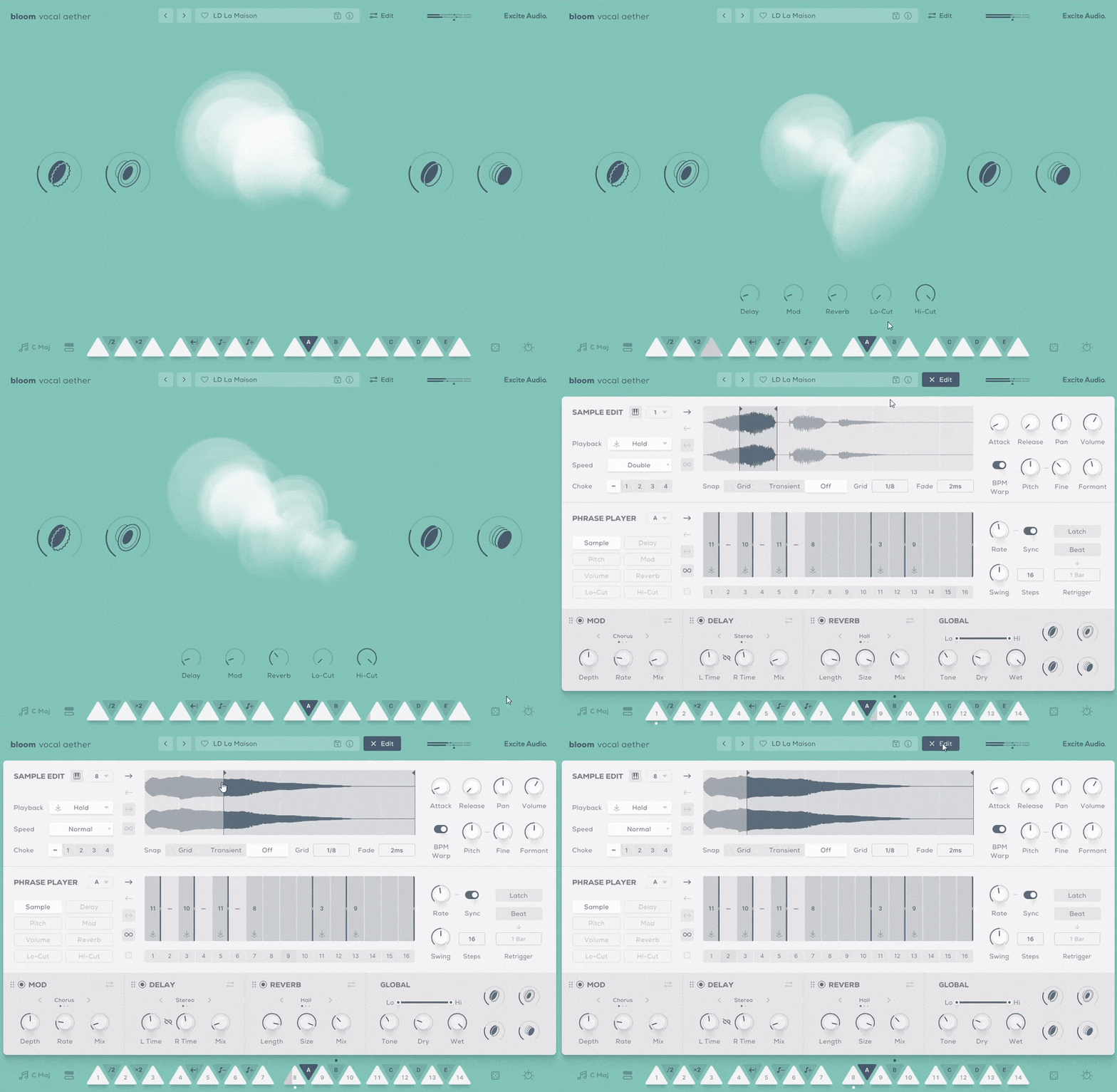
Choosing the perfect vocals for your project is now a playable and spontaneous experience, with easy keyboard control over triggering sounds and modifying their properties. Four macro controls handle immediate processing, while the Edit page opens up in-depth possibilities, with precise control over sample editing, phrase performance, and effects across 250 presets.
How it Works
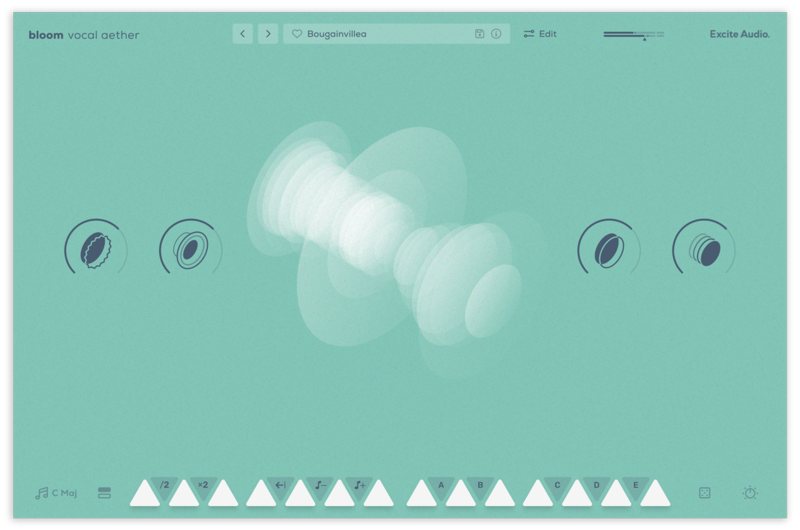
Choose your key signature, select a bank of samples or a preset and trigger one of 14 bpm-synced phrases spread across 2 octaves. White notes trigger samples and loops, while black notes change properties like playback speed and tuning as well as trigger custom-made sequences and effect modulation. Four macro controls command a curated chain of effects, their settings expertly tuned to samples that form the instrument.
The Main Page
There are eight banks of sounds to choose from, and the sounds in each bank can be mapped to any of the 14 white notes. Each sound in each bank, triggered by a MIDI white note, plays a sample that can also be incorporated into a sequence by the Phrase Player. As well as triggering samples, this Phrase Player also has the ability to control and modulate effects properties, making each bank capable of an enormous range of sounds.

Audition and Load Samples & Banks
The Edit Page: Create Something Unique
Bloom Vocal Aether’s Edit page also lets you take ultimate control over its sample material, allowing you to tweak any of the existing sounds and make them your own.
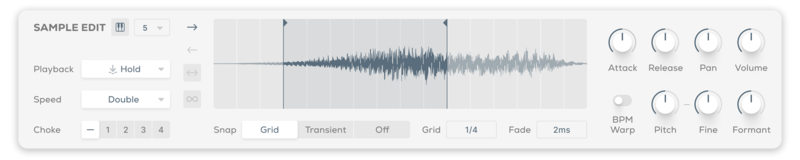
In the Sample Edit panel, you can change how the 14 source samples in a bank behave. Set sample start and end points, trigger type, playback direction and speed. Sample properties like pitch and fine-tuning, formant control, and attack and release are all available, alongside choke grouping.
Sample Edit Section
Import Your Own Samples
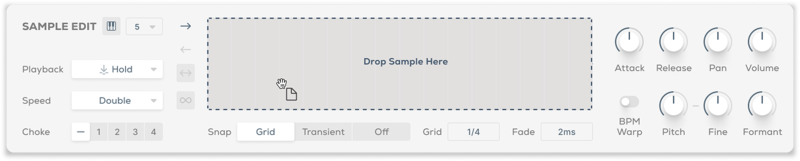
Make the Bloom instrument your own with the ability to drag and drop audio files into it. You can do this via the waveform view on the edit page or any empty slot on the banks page. Set the key and BPM of your samples to make them integrate seamlessly with the Bloom engine.
Sample Import
Sequencing Reimagined
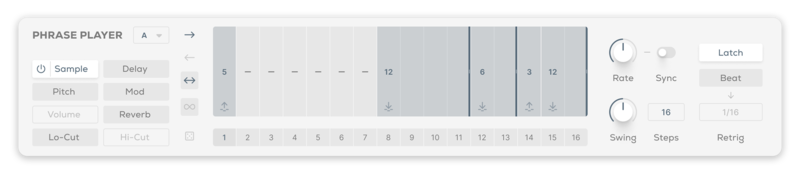
The Phrase Player sequences sample playback, and has multiple modes of operation. Assign one of the five black keys to trigger a pattern of samples and create curves for pitch, velocity, hi- and lo-cut filters, and all three effects.
Complex setups are straightforward, letting you trigger various samples and evolve their properties over the length of each sequence. Traditional arpeggiator functions like Rate, Latching and Swing mean you’ll be in familiar territory.
Phrase Player Section
Bloom Vocal Aether’s effects include Excite Audio’s proprietary Delay, Reverb and Modulation algorithms as well as global Filters, Tone, Dry and Wet parameters. These rearrangeable effects modules let you refine and transform your vocal phrases in a completely new direction. Each effect puts its main controls upfront but is expandable for deeper programming.

Effects Section
Features
- 14 Sample Keys
- 5 Factory Modifiers: Half-time, Double-Time, Reverse, Octave Down, Octave Up
- 5 Custom Modifiers
- 8 Sample Banks / 112 Vocal Phrases
- Samples Synced to Host BPM
- Key Selection
- Sample Randomise
- 4 Macros: Warmer, Speaker, Doubler, Ethereal
- 5 Main FX Parameters: Reverb, Delay, Modulation, Lo-Cut, Hi-Cut
- Global Bypass
- 250 presets
- All samples that come with Bloom Vocal Aether are royalty-free
- Import up to 112 of your own samples (these can be swapped at any time)
Edit Page - Sample Edit
- Waveform Display
- Playback Direction: Forwards, Backwards, Pendulum, Loop
- Playback Modes: Hold, Latch, Relative
- Playback Speed: Normal, Double, Half
- 4 Choke Groups
- Start/End Markers with Snap to Grid, Snap to Transient
- Sample Crossfade, Attack, Release, Pan, Volume
- Sample Pitch, Fine, Formant, BPM Warp
Edit Page - Phrase Player
- Sample Mode for triggering sequences
- FX Modulation: Delay, Reverb, Modulation, Lo-Cut, Hi-Cut, Pitch, Volume
- Playback Direction: Forwards, Backwards, Pendulum, Loop
- Sample/Modulation Randomise
- Phrase Rate, Sync, Swing, Steps, Latch, Beat Retrigger controls
Edit Page - FX
- 3 Rearrangable Effects: Reverb, Delay, Modulation
- Reverb Mode: Plate, Hall, Spring
- Reverb Length, Size, Mix, Pre-Delay, Duck, Lo-Cut, Hi-Cut, Input, Output
- Delay Mode: Stereo, Ping Pong
- Delay R/L Time, Sync Time, R/L Link, Mix, Feedback, Duck, Lo-Cut, Hi-Cut, Input, Output
- Modulation Mode: Chorus, Vibrato, Flanger
- Modulation Depth, Rate, Sync Rate, Mix, Shape, Feedback, Input, Output
- Modulation Shape: Sine, Triangle, Inverted Triangle, Random
- Global Lo-Cut, Hi-Cut, Tone, Dry, Wet
Learn More About Bloom Vocal Aether
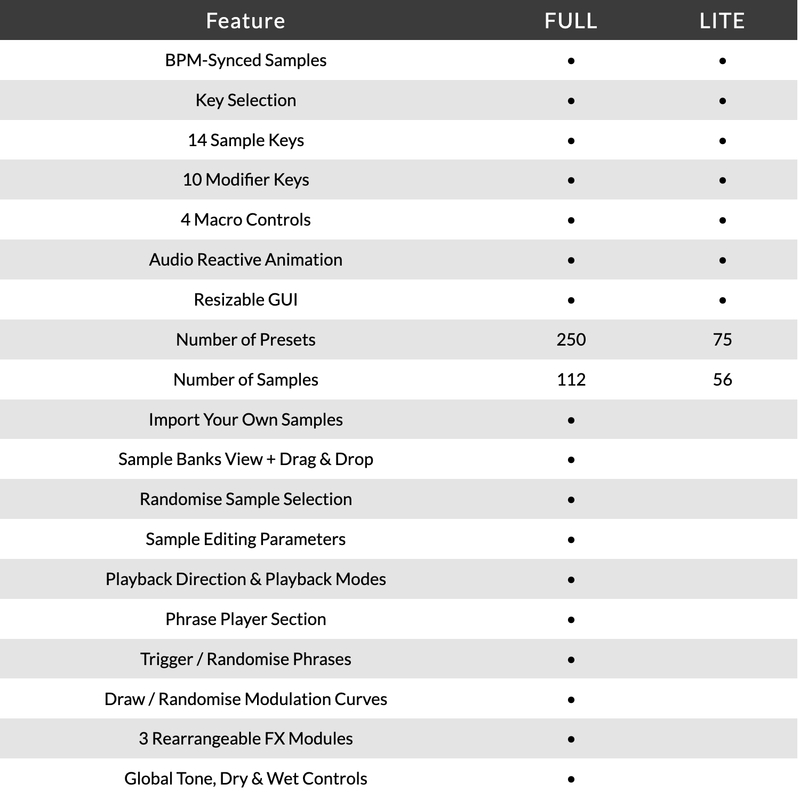
Version Comparison
System Requirements
macOS
- macOS 10.15 or higher (Intel / Native Apple Silicon supported).
- Plugin Formats: VST, VST3, AU, AAX, Standalone
- DAW's Supported: Ableton Live, Pro Tools, Logic Pro, FL Studio, Cubase, Nuendo, Reaper, Reason + more.
- Compatibility: 64-bit compatible only.
Windows
- Windows 7 or higher
- Plugin formats: VST, VST3, AAX, Standalone
- DAWs supported: Ableton Live, Pro Tools, FL Studio, Cubase, Nuendo, Reaper, Reason + more.
- Compatibility: 64-bit compatible only.
Please Note:
- An internet connection is required to authorise this software.
- When accessing this software via a Rent to Own plan or the Beatport Studio membership, it's installed and run through the Beatport Access portal. An internet connection is required every 30 days to validate your license.
.jpg?t=1792403455)
KLAX
Drum & Bass production trio with releases on Warner Bros, Critical, Shogun Audio and more.
"When we're in search of exciting new ideas, we can always trust the Bloom instruments to spark some inspiration."

Attack Magazine
A magazine dedicated to dance music production and culture.
"The Bloom series will help your music blossom. It's a great addition to your setup when looking for that extra spark."
Rekkerd.org
Rekkerd.org is a music production blog featuring the latest news in audio plugins, samples, sound libraries, presets, reviews, contests, downloads and more.
"The Bloom instruments are great for jamming, writing, producing, or for a sprinkle of sounds to add to any track."
Reviews Summary
While it aims to provide a helpful overview, it may not capture every perspective or detail. We encourage you to read individual reviews to make an informed decision.
Users highly praise the plugin for its fun, intuitive workflow and its ability to quickly add depth, emotion, and atmospheric vocal textures to tracks. Key highlights include the standout user sample import feature, solid macro controls, and great sound quality, making it especially effective for accents, hip-hop, and trap production. While a few reviewers noted some limitations regarding sound variation and the need to sift through presets to find the right fit, the overall sentiment is overwhelmingly positive.


