Log In

Free gifts available with your purchase
Please Note: This is an upgrade product for owners of Bass XL. The full version of Bass XXL is also available.
Supersize Your Low End
If you’re looking for a more effective way to get that thick and consistent low end that defines modern mixes, Bass XXL comes to the rescue. The plugin makes it easier to achieve a fat and smooth bass sound that can be felt even through earbuds and small speakers.
Bass XXL makes use of a proprietary algorithm that generates additional harmonics that are actually above the bass frequency you want to enhance. This feature takes advantage of a psychoacoustic phenomenon that causes the human brain to interpret sub bass audio largely based on its harmonics more so than the lowest sounds being produced. So, even in the absence of sub bass frequencies, our brains will fill in the blanks and still perceive the low end as long as the proper harmonics are present.
With Bass XXL you can easily add impact and presence to anemic drum recordings, dynamically control inconsistent bass performances, or use the plugin to elevate and refine the low end of an entire mix with surgical precision.
Good bass always starts at the sound source. But Bass XXL is the perfect effect plugin for taking it further.
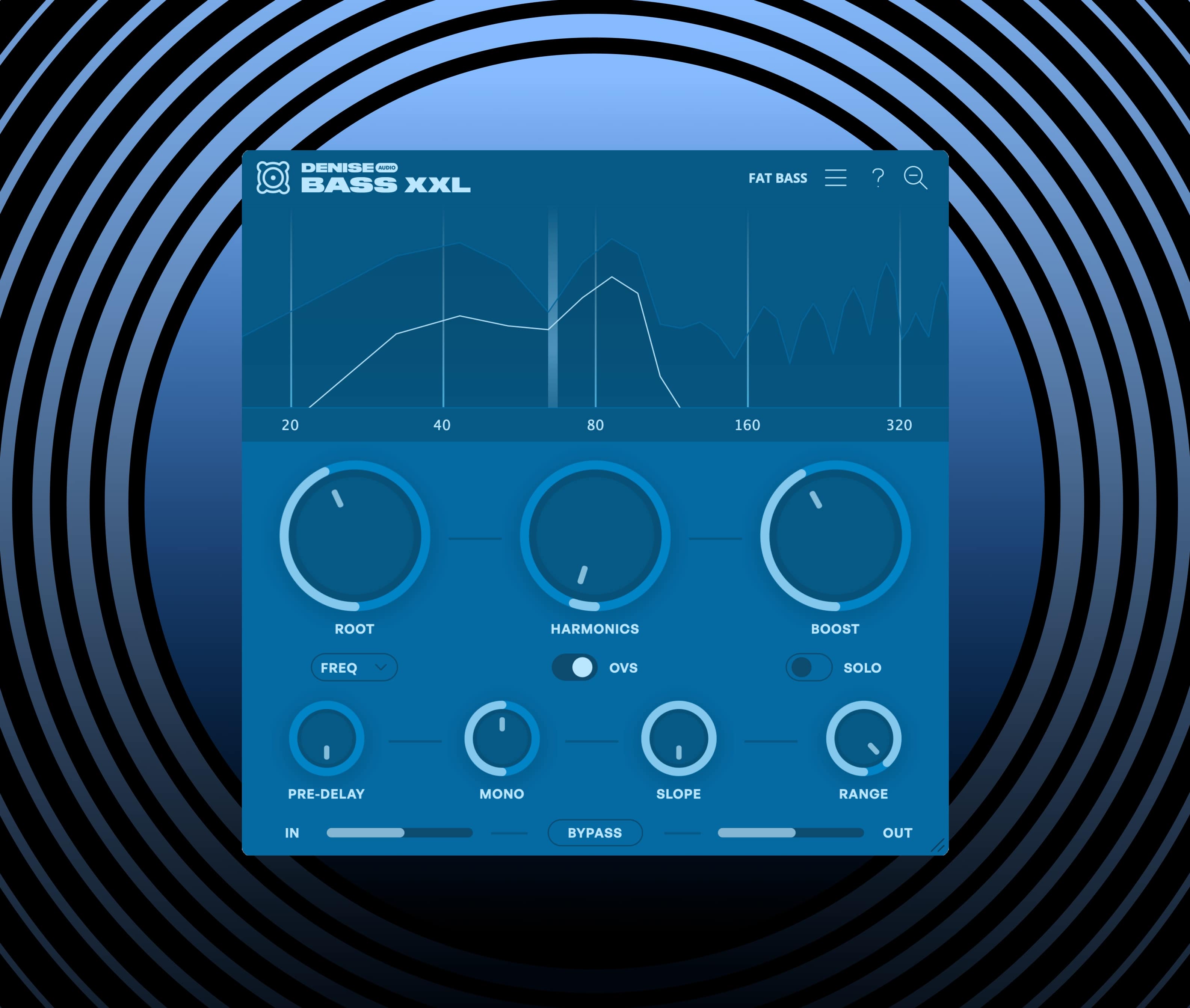
Dominate The Deep End
Managing and improving low end frequencies is a challenging ordeal that has historically resulted in an engineering black hole of unsatisfying compressors and ineffective equalization that sucks the time out of your day and the life out of your mix.
Denise Audio’s Bass XXL gives you the ability to refine, expand, and enhance the low end of your audio through a single superpowered plugin. Its purpose-focused parameters and proprietary algorithm let you sculpt your bass with meticulous attention to detail via intuitive, responsive parameters and a dynamic visualizer that lets you immediately assess how the plugin is reacting to your sound.
Whereas many tools marketed as “bass boosters” operate as little more than blunt force, destructive EQ adjustments or sine generators, Bass XXL creates a parallel signal of higher harmonics that compliment your targeted frequency while leaving your dry signal untouched. This is achieved without introducing any of the phasing issues that tend to plague plugins of this type.
Taking advantage of a psychoacoustic phenomenon that causes the human brain to perceive sub bass audio largely through its harmonics as opposed to the lowest frequencies being produced, Bass XXL lets you craft mixes with a defined bass even through earbuds and small speakers. We’re sure you’ll find it to be an invaluable tool on your journey towards the perfect low end.
Features
- Root: Sets the frequency from which harmonics are generated. You can set the frequency in either hz, as a root-note, or via midi follow.
- Harmonics: Dials-in the harmonics and lets you set how intensely you want to saturate the signal. Engage oversampling for the highest sound quality.
- Boost: Mixes-in the harmonic signal in parallel, without touching the dry signal. Use the Output knob for setting the global volume. Engage Solo to hear just the harmonic signal.
- Pre-Delay: Allows you to separate the harmonics from the transient of your dry signal by adding a delay to the generation of harmonics. This will help preserve the original attack of the dry signal.
- Mono: Forces the harmonic signal into mono (at 100%) or preserves the dry signal’s stereo image even in the harmonics generated (at 0%).
- Slope: Sets how smoothly - or surgically - the harmonic signal is filtered in and out.
- Range: Lets you set the range of the harmonic signal from being contained to the lower frequencies only to expanding into the mid frequencies for a more audible effect.
- View Selector: Switch between a zoomed-in spectrogram showing the low-end only or a view of the full spectrum. (The dry signal is represented by the blue line and the harmonics by the white line).
- Tool Tips: Engage the tooltips for feature descriptions during hover-over.
- Presets: Browse 48 professionally crafted presets (or create and save your own).
System Requirements
Mac
- OSX 10.11 or newer (64-bit only) (Apple Silicon Native)
- VST, VST3, AU, AAX
PC
- Windows 7 or newer (64-bit only)
- VST, VST3, AAX