


 Log In

Free gifts available with your purchase
Beyond equalization
Imagine an EQ that can not only boost and cut frequencies but also change the overall dynamics of the track and give it additional space. That's FireEQ - the equalizer which will change the way you mix your tracks.
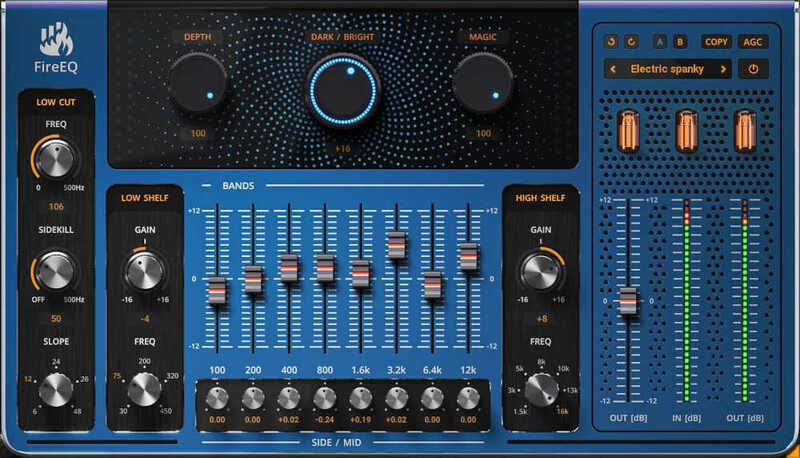
Not an ordinary EQ
There's no reason for another usual equalizer. FireEQ combines several EQ techniques that will ease your life no matter if you mix or master.
Add analogue touch
Low and high-shelf filters are modelled after the most favoured vintage-style analogue equalizers. That gives the resulting signal warm analogue feel.
Dark/Bright balance
With a single knob, FireEQ controls the overall colour of the mix. In a fragment of a second, you may change the mood of your track, making it brighter or darker as you wish.
Pump it up
The Magic knob implements a complex dynamic processing, which flattens the sound making things more even. Essentially, it amplifies what is silent and attenuates what is loud, just like a multiband compressor.
Treat the low end right
Unlike other EQs, FireEQ's low-cut filter contains a side kill function. That specifies the frequency of a filter, which only affects the "side" signal of the stereo image. This helps remove all stereo content for low frequencies, which could otherwise cause problems on bigger playback systems.
Control stereo image
Each of the eight FireEQ's core frequencies has an extra Side/Mid knob. This defines the gain of the filters affecting neighbouring frequencies, with opposite gain for mid and side signals. You gain control over the ratio between mid and side in that area and the stereo image.
Hassle-free software protection
No iLok, no dongle nor internet access is required for activation. Our software uses licence files to activate your software. You can freely use the purchased software on all your computers as long as you are the user.
Automatic Gain Compensation
Automatic gain compensation quickly adapts to current settings and ensures the output sounds as loud as the input. This even protects you from thinking that something sounds better in cases it is just louder.
Realistic 3D yet flexible GUI
The photorealistic graphic user interface of the plugin gives you the feeling you are touching the real hardware. But it easily adapts to your needs. You can always drag the arrow in the bottom right corner to change its size - make it smaller to save valuable screen space, or enlarge it to make it easier to use.
FREE 15-Day unlimited trial
All the descriptions are nothing compared to putting your hands on the plugin. No saving limits. No noises. No boundaries. Engage the plugin in your project for real and fully exploit its powers for two weeks.
64-bit audio quality at ANY sampling rate
The plugin provides the maximum audio quality you can get. It uses internal 64-bit audio processing and can handle any sampling rate. 192 kHz or even higher.
Smart bypass
The intelligent way UnitedPlugins units manage bypassing ensures that you don't get any clicks or harmful noises when automating the parameter. It also compensates for latency ensuring that the bypass states are perfectly in sync with each other.
Intelligent sleep on silence
This plugin intelligently detects whether it makes sense to perform processing at all. And if not, it temporarily turns on sleep mode. In such a state, it requires virtually no CPU at all to save the computing sources for other processes.
Free-for-life updates
UnitedPlugins software never gets obsolete. They keep track of the current operating systems and DAWs. And you may always update to the most recent version for free. Without paying a cent, a penny, or whatever currency you prefer.
System Requirements
Mac
- macOS 10.10 and later (M1 Silicon Mac and macOS 11 Big Sur supported)
- 64bit only
- Intel/AMD/Apple Silicon processor with SSE2 support
- VST2, VST3, AAX or AU compatible host
Windows
- Windows 8 - 11
- 64bit only
- Intel/AMD processor with SSE2 support
- VST2, VST3 or AAX compatible host
Reviews Summary
While it aims to provide a helpful overview, it may not capture every perspective or detail. We encourage you to read individual reviews to make an informed decision.
FireEQ is widely praised by users for its unique approach to tone shaping, dynamic processing, and mid/side stereo control. Reviewers frequently highlight features like the Magic knob, analog warmth, and side-kill function as effective tools for fast mixing, buses, and sound design. While most find it intuitive and powerful, some consider it redundant compared to stock or surgical EQs, and a few noted high CPU usage, interface clutter, or stability issues. Overall, it is seen as a versatile, character-rich plugin and an excellent value, particularly when acquired on sale or for free.


