Log In

Free gifts available with your purchase
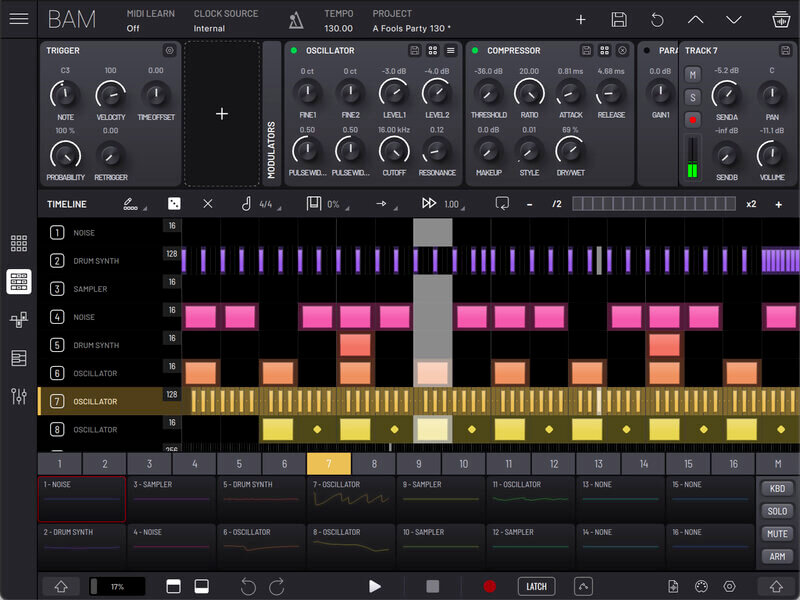
BAM - Beat Maker & Music Maker gives you everything you need to bring your musical ideas to life. Whether you want to sketch beats or make fully fledged tracks, BAM is perfect for beginners and masters alike. If you are new to beat making, BAM is the ideal way to learn how to make beats and create music; the easy-to-use interface means you can become a beat maker in minutes!
Step-by-step Beat Making
This powerful tool allows you to transform ideas into loops in seconds and make a full song on a dime. With a user-friendly interface supporting up to 256 steps per clip, you can easily visualize and manage multiple tracks simultaneously, providing a seamless and synchronized experience for your beat-making journey.
Discovering BAM's Diverse Sample Collection
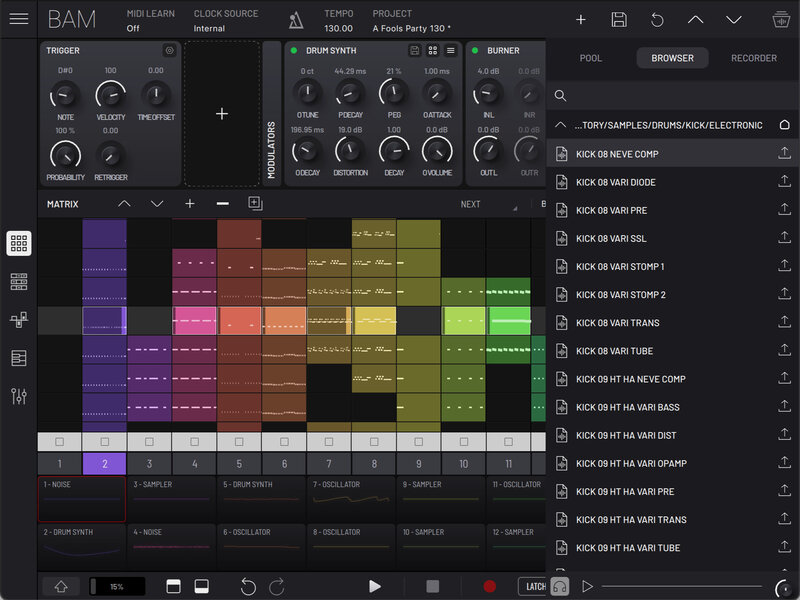
BAM’s factory material features over 1000 original samples, including a huge variety of recorded acoustic percussion, electronic drum sounds processed by classic hardware, and an eclectic selection of melodic samples. Curate your own selection of samples with aid from BAM’s sample browser and internal recorder. Every Sampler has instant access to any item in your sample pool with the turn of an automatable knob, allowing you to play and swap between them on the fly for sample madness.
Crafting Your Sonic Palette with BAM's Synth Engines
Explore a range of synth engines and its diverse sound options. Delve into classic drum machine emulation to recreate the iconic sounds that shaped the history of electronic music. Ignite your passion for acid house with an authentic acid synth that delivers the signature squelchy basslines you know and love. Immerse yourself in the warmth of an analog oscillator, perfect for crafting rich and organic tones. Additionally, the built-in sampler empowers you to import, manipulate, and integrate your own sounds, making BAM a versatile and comprehensive tool for music production. With these powerful synth engines at your disposal, the possibilities are endless.
BAM's FX Toolbox: Unleash Your Inner Sound Designer
Elevate your music production with BAM's impressive array of FX engines, designed to add depth, character, and professional polish to your tracks:
- Multimode filter
- Two equalizers
- Tape style delay
- Analog style chorus
- Phaser
- Compressor capable of FET-like distortion or VCA style compression
- Reverb
- Distortion with 4 modes (saturation, clipping, fuzz and sinusoidal folding)
- Bit Reduction
- Stereo Enhancer
By chaining up to five FX per track, you can create unique and complex soundscapes tailored to your vision. Easily drag and rearrange the FX in the chain, giving you ultimate control over your sound design and music production experience.
Use Your Favorite AUv3 Plugins Too
You can load your favorite AUv3 instruments, effects and plugins alongside BAM’s built-in selection, and mix it up however you want (iOS/MacOS versions only). Each track has a dedicated AUv3 MIDI Effect plugin slot in addition to five audio processing effects slots.
Transform Your Tracks with BAM's Automation and Modulation
Dive into the world of dynamic beat creation with BAM's intuitive automation features, designed to bring movement and versatility to your tracks. Effortlessly implement parameter lock-style, step-based automation, allowing you to choose any parameter and manipulate it on the fly for real-time, hands-on control over the beat-making process. Each track in BAM comes equipped with trigger options and two modulator slots for Envelope Generator and LFO-based modulators, enabling you to add complex modulations and shape your soundscapes with ease.
Compose with Confidence
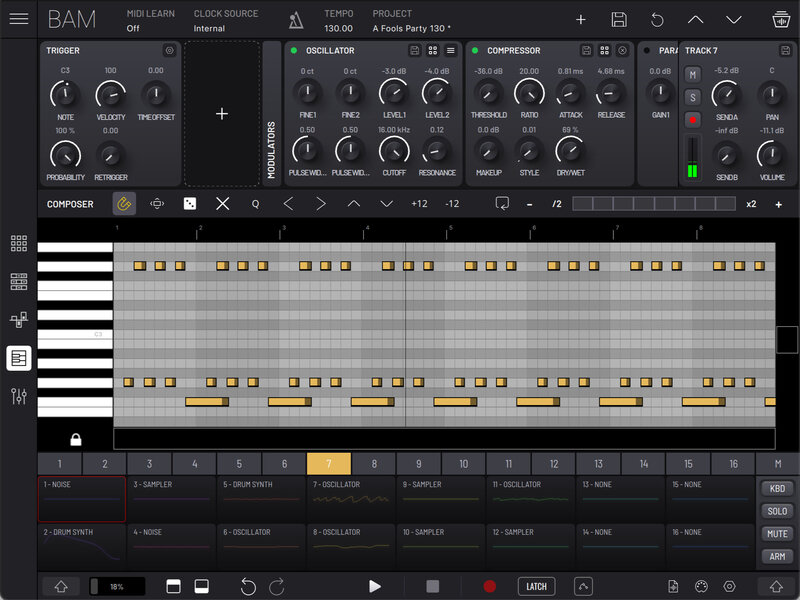
Featuring a familiar piano roll interface, BAM’s composer panel is designed to accommodate both desktop and touch interactions, providing a seamless experience for all users. Effortlessly write and edit notes, from crafting intricate beats to composing elaborate melodies, bringing your musical vision to life anywhere.
From Beat Maker to Live Performer with the Matrix View
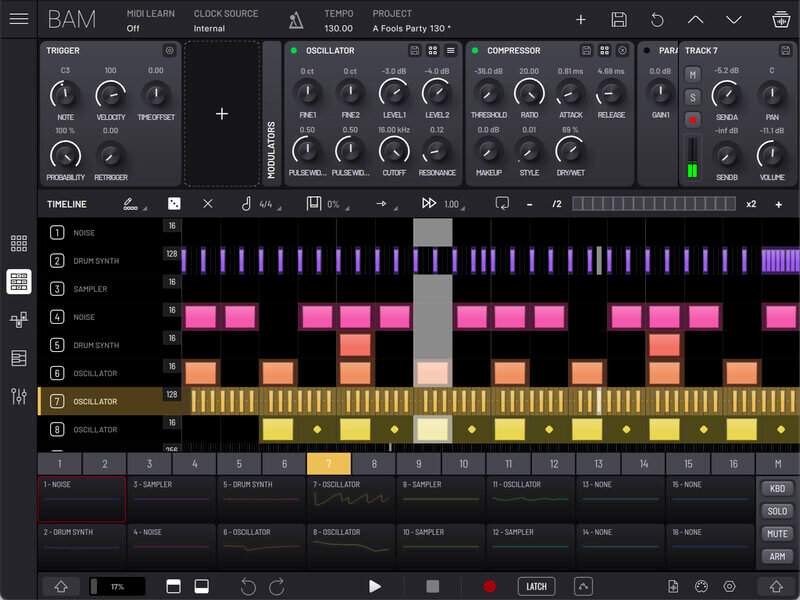
Transform your role from beat maker to live performer seamlessly with BAM's versatile matrix view. The scrollable grid offers a comprehensive view of clips for all 16 tracks, empowering you to build loops, create intricate arrangements, and remix your music with ease.
Add, duplicate, and edit scenes to craft unique loops, and explore extensive follow action functionality to arrange full tracks with precision. With individual clip and scene launching, you can take control of your performance and create dynamic, engaging live sets.
BAM's clip launching features provide the flexibility and control needed to adapt to any performance scenario, making it the perfect tool for both studio production and live performances.
Exporting Your Creations
Easily export your full song arrangements, individual tracks, scenes, or clips, along with their associated MIDI data. This level of detail ensures seamless integration with other production tools and workflows, enabling you to collaborate and create without boundaries or quickly export your ideas to other environments.
BAM's audio export options are designed to cater to your unique workflow, providing the versatility you need to bring your musical ideas to life.
Always Improving
With regular updates and an ever-expanding feature list, BAM is committed to providing you with the latest tools and innovations to fuel your creativity.
Looking ahead, BAM's development roadmap includes highly anticipated features such as VST/AU hosting and audio clip support. These powerful additions will transform BAM into an all-in-one music production powerhouse.
VST/AU hosting support will empower you to integrate your favorite virtual instruments and effects plugins seamlessly and, with audio clip support, you'll be able to import, manipulate, and arrange audio clips directly within BAM, further enhancing its versatility as a comprehensive production tool.
Built-in support of popular MIDI controllers
- AKAI APC Mini
- AKAI APC Key 25
- AKAI APC Key 25 MK2
- AKAI APC40 MK2
- Novation Launchpad X
- Novation Launchpad MK2
- Novation Launchpad Pro MK3
- Novation Launchpad Mini
- Novation Launchpad Mini MK3
- Novation Launchkey MK3
- Novation Launch Control XL
- KORG nanoKONTROL Studio
Features
- Sample library including over 1000 drum and percussive samples, plus melodic timbres
- 16 rack-style tracks plus Master and 2 send channels
- AUv3 plugin support, including MIDI effects
- Full mixer with volume, pan, mute, solo, arm controls
- Built-in synthesis engines: Oscillator synth, Drum synth, sampler, classic acid bass synth
- Built in effects: Filter, 3-band EQ, parametric EQ, delay, chorus, compressor, reverb, phaser, saturator, bit reduction, stereo enhancer
- MIDI clip piano roll editor
- Step sequencer with up to 256 steps per clip
- Clip based parameter automation editor
- Track level trigger options plus LFO and EG modulators
- Matrix MIDI clip and scene launcher with extensive follow action options
System Requirements
Mac
- Mac OS 12 or higher
- Compatible 64 bit host DAW which supports VST, VST3 and(or) AU plugin format
- 650 Mb of free disk space to install
- Product license activation requires internet connection.
PC
- Windows 10 or higher
- Compatible 64 bit host DAW which supports VST or VST3 plugin format
- 650 Mb of free disk space to install
- Product license activation requires internet connection.

Sound On Sound
The world's premier music technology publication
“...a collection of built-in synthesis engines, effects, modulation capabilities and more, making it possible to create everything from drum loops to complete tracks, all within a single, self-contained environment.”

Amazona.De
All things music and music tech
“It's really amazing how intuitive Imaginando BAM's user interface is.”

Audio News Room
Music technology blog with news, reviews and exclusive interviews
"BAM strikes a beautiful balance between depth of features and broad sketching techniques that aid in free-flowing creativity!"