


 Log In

Free gifts available with your purchase
Note: This is a crossgrade from any paid-for UJAM product and excludes Usynth DRIVE and Finisher MICRO. Please ensure you are eligible before purchasing. The full purchase path can be found here.

The Drums on the Radio
Fire Drums for Famous Hits
Straight Up Gold
When it comes to popular music, the standards are quite high. World-class recording engineers track the most talented drummers in the shiniest of studios. Yet today’s top charts all have two things in common: infectious drum grooves and punchy drums, processed to perfection.
Keep It Fresh
- 30 Styles, 690 playable Phrases and 100+ Global Presets
- 5 Drum Kits, 6 Mix Presets, 6 Reverb Modes
- MIDI Drag & Drop, Resizable User Interface
- Special ‘Juice’ FX Control
Platinum Potential
The majority of today’s charting tracks use electronic drum samples or highly processed combinations of sample layers. However, these samples must undergo extensive engineering to sit properly in a radio-ready mix, as they are often stale, lifeless and difficult to manipulate.
Virtual Drummer HOT provides real drum performances with punchy drum machine-like processing to replace your sample library with more lively and energizing drum grooves.
Spice It Up!
30 different Styles allow you to manipulate hundreds of rhythms from the most popular genres of music ranging from Hip Hop and Rap to Indie and Electronic.
Features at a Glance
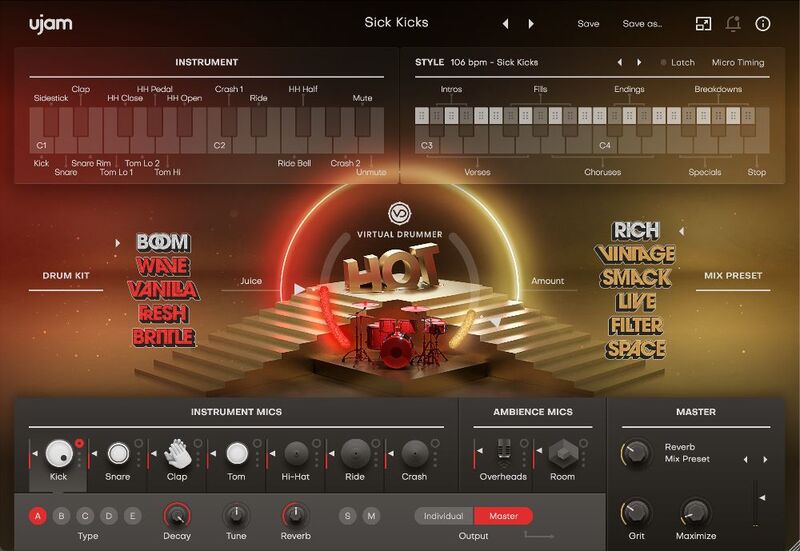
- 5 Full Drum Kits
- 6 Mix Presets and 30 Styles (each with 23 ready-made patterns for a total of 690 playable Phrases).
Juice Control
The ‘Juice’ fader offers a seamless transition from a completely natural drum variant to the archetypical sample aesthetic, much like that of the most popular drum machines.
Mix Presets
Each Mix Preset shapes the overall sound by swapping out an entire multi-bus effect chain for every channel under the hood, offering you completely different sound aesthetics without the hassle of wrestling with the bus system of your DAW.
System Requirements
Operating Systems
- macOS 10.15 or later (64-bit only)
- Windows 10 or later (64-bit only)
- You may have success on earlier versions but UJAM doesn’t support and fully qualify them.
For up-to-date info on UJAM products support for VST3, AAX, and Apple Silicon, please refer to the UJAM website.
Minimum Requirements
- 8 GB of RAM
- 6.11 GB of free disk space
- 1280 x 768px display
- Internet connection
- If you want to move your .blob file to an external drive, we recommend the use of a SSD to prevent dropouts.
Plugin Formats
- VST 2, AU 2
- AU 2 version is only compatible with Logic Pro X and newer.
Delivery Format
- Downloadable Installer File
- E-mail and Password Within the Plugin
Supported Standards
- MIDI


