


 Log In

Free gifts available with your purchase
Note: This is a crossgrade from any paid-for UJAM product and excludes Usynth DRIVE and Finisher MICRO. Please ensure you are eligible before purchasing. The full purchase path can be found here.

Soulful Drums With a Big Heart
Contemporary drummer with a 60s & 70s vibe
These beats run deep. If that’s a quality you’re looking to elicit in your music, Virtual Drummer is here to help. And we mean deep as in soulful, deep as in complex and intricate.
Deepness is a measure of emotions. DEEP is UJAM’s most spirited drummer, standing on the shoulders of traditional genres like Soul and Funk, with its gaze firmly set on contemporary styles and timeless future classics.
Features
- 30 styles with 690 drum patterns
- 70 sound designer presets
- 5 drum kits, 6 mix presets
- Drag-and-drop phrases to DAW for detailed note editing
- Retro morph control called “Grit”
Sweet Soul Music
Soul and funk dominated the music biz during the 1960s and 1970s. And for good reason! These styles were pioneered and popularised by musicians like Stevie Wonder, James Brown, and Marvin Gaye. Soul music took the stages, record players and musical hearts of the world by storm, driven by iconic rhythm sections like the Funk Brothers and Booker T. & The M.G.’s.
Band Members...
DEEP plays perfectly along with Virtual Bassist DANDY. While you may use DEEP on its own, the included Styles are made-to-match with the bass phrases in DANDY. To make joining the two easy for you, the available Styles have got matching names. Just pick the same style name in DANDY and DEEP and create perfectly aligned bass and drum backings in a breeze.
Incredible Detail
- Up to 60 velocity layers per instrument
- Hyperrealism by UJAM’s dynamic round-robin algorithm
- Superb tone - recorded with a selection of both vintage and modern direct microphones
- Absolute mix freedom: Stereo pairs of overhead and room Microphones available
From Retro to Metro
Soul music emphasizes lyrics, vocal melodies, and vocal harmonies. You could see the roots as gospel music without the religious factor. Typical songs emphasize melody and vocals. Soul music is much less complex than funk music and was more commercially successful. This means soul drumming features more basic patterns with fewer embellishments.
Edgy and Energetic
DEEP covers not only soulful and groovy genres but feels also right at home with pop, rock and alternative vibes. Make your production dazzling, with real-world drumming performances, that breathe artistic life into your track.
Features at a Glance
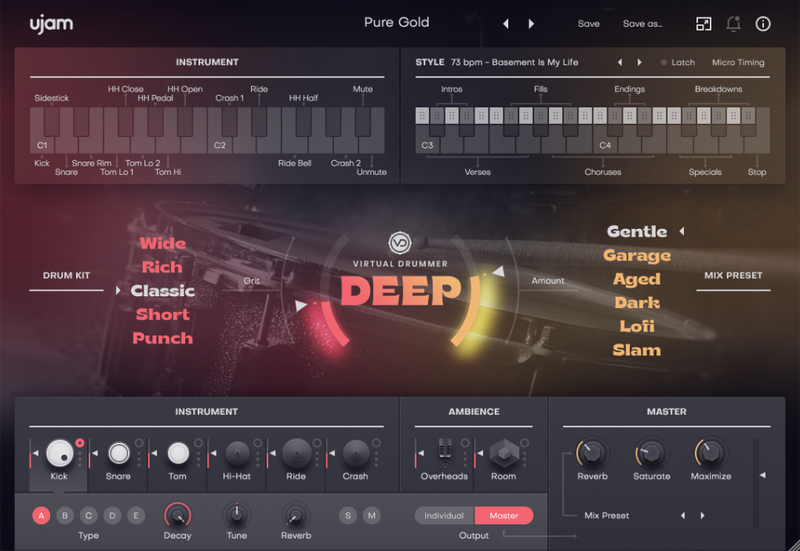
Quickly customize the sound of each of the five drum kits: Dial-in some extra dirt and energy with the Grit control or by using one of our six Mix Presets – from gentle and sophisticated to fierce and powerful!
Mix Presets
Use the Mix Presets to shape the overall sound. Each Mix Preset swaps out an entire multi-bus effect chain for every instrument channel and saves you time and nerves.
Mix Section
Finalize and finetune your drum mix by individually adjusting the volume of each component of the kit including separate controls for overhead & room mics before adding a touch of reverb.
Go Deeper!
Treat yourself to the next best thing to a real world-class studio drummer. Go DEEP and far today.
System Requirements
Operating Systems
- Windows 8 or later (64-bit only)
- macOS 10.15 - macOS 12 (64-bit only)
- You may run them on earlier versions but UJAM doesn’t support them.
For up-to-date info on UJAM products support for VST3, AAX, and Apple Silicon, please refer to the UJAM website.
Minimum Requirements
- 4 GB of RAM
- 3.7 GB of Disk Space
- 1280x768px Display
- Internet Connection required for download and authorisation.
Plugin Formats
- VST, AU 2
- AU 2 version is only compatible with Logic Pro X and newer.
Supported Standards
- MIDI
Additional Information
- Comes as downloadable installer files.
- Authorize by email address and password for ujam.com within the plugin.
- If you want to move your .blob files to an external drive, UJAM recommend the use of an SSD to prevent dropouts.


