


 Log In

Free gifts available with your purchase
Note: This is a crossgrade from any paid-for UJAM product and excludes Usynth DRIVE and Finisher MICRO. Please ensure you are eligible before purchasing. The full purchase path can be found here.

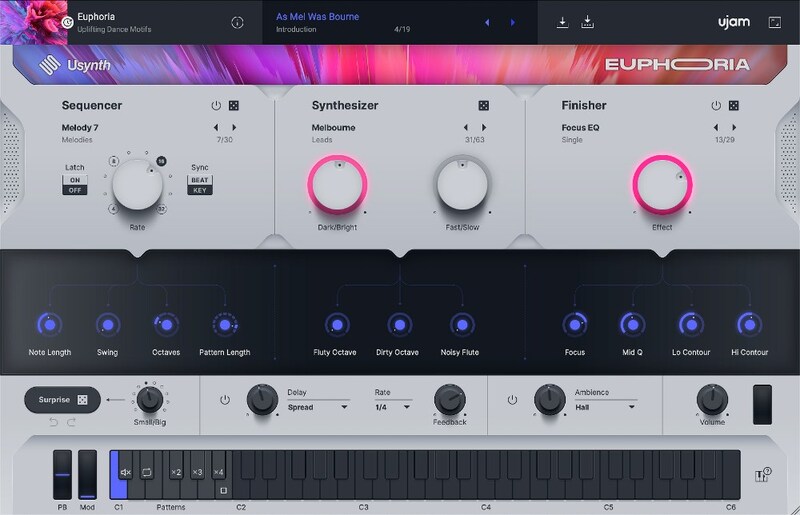
Electronic Dance Staples
Usynth Euphoria makes it faster than ever to create raging and lyrical EDM lead synths alike, without filtering through tons of context menus, waveforms and shaping tools that are far too complicated for you to fully use. Melodic dubstep, electro, chill-hop, anything is fair game!
Features
- 100 Synth presets
- 100 Finisher presets
- 30 Sequencer presets
- 100 Global presets
What You Get
Quality
Under the hood, Usynth is a very complex synthesizer. Each instance consists of 2 individual layers per voice, with Virtual Analog, Wavetable, FM and Multisample Synthesis, Multi-mode Filter, 5-stage envelopes, LFOs, 12-way modulation matrix and much much more. But why would you care!
Simplicity
Usynth doesn’t require you to know how a synthesizer works in order to find and create inspiring new sounds. Intuitively tweak to your heart’s content. Think Instagram filters, or think steering wheel and two pedals – that’s how you operate Usynth.
Endless Sonic Expressions
Pick and choose global presets in the UJAM App and send them into your instance of Usynth in your DAW. Get inspired for your next song by Usynth presets you don’t own yet, or experience genre fluidity by jumping through presets of all Usynths you own. The UJAM App is at the heart of your sound, offering a new way of making music.
System Requirements
UJAM App
- Usynth requires the latest version of the UJAM App to run on your computer
- The OS requirements below apply to the App
Operating Systems
- Windows 10 or later (64-bit only)
- macOS 10.14 or later (64-bit only)
- You may have success on earlier versions but UJAM doesn’t support and fully qualify them
For up-to-date info on UJAM products support for VST3, AAX, and Apple Silicon, please refer to the UJAM website.
Minimum Requirements
- 8 GB of RAM
- 260 MB of free Disk Space
- 1280 x 768px Display
- Internet Connection
Plug-in Formats
- VST 2, AU 2
- AU 2 version only compatible with Logic Pro X and newer
Delivery Format
- Downloadable Installer File
- Usynth requires the latest version of the UJAM App to run on your computer
- With your first Usynth title, the UJAM App will also stealthily install the Usynth plugin which hosts all titles
Authorization
- E-mail and Password Within the Plug-in
Supported Standards
- MIDI


