


 Log In

Free gifts available with your purchase
Note: This is a crossgrade from any paid-for UJAM product and excludes Usynth DRIVE and Finisher MICRO. Please ensure you are eligible before purchasing. The full purchase path can be found here.


Black Magic Soundscapes
Creative guitar effects like no other
The Finisher effect series is designed to combine the power and flexibility of a full rack of audio processors with the instant gratification that UJAM products are famous for. VOODOO is custom-designed for all sorts of guitar sounds, real or virtual, electric or acoustic, direct or amped.
It also works phenomenally well with keyboards, synths, even vocals and other signals. Add VOODOO to anything for organic warmth, magical textures or just a dash of inspiration.
What’s in There?
- 50 Modes configuring up to 40 effect modules.
- Finisher knob and 4 Variation knobs – each macro-programmed into the effect configuration.
- From multiband compression and distortion, convolution, modulation effects, Filters, EQs to envelope following and granular Effects – all combined and meticulously sound-designed into 50 complex Modes that you can easily tweak.
- Automation and MIDI Learn to connect pedals and add extra articulation to your performances.
- More than 150 signature sound designer presets.
A Magical Mystery Tour
VOODOO creates a world of organic, distorted, spicy, colourful, often magical and dark textures, often with an element of surprise, adding limitless possibilities to your guitar. From High gain lead to strummed acoustic or bluesy crunch tone – there are plenty of sound designs to enhance every style. Your source for inspiration for live guitar playing, virtual instruments like the Virtual Guitarist series – or whatever you dare to try. Make your sound float, rumble, glow and scream. With just a sprinkle of magic.
Pinch the Doll
If you’re already using guitar tools like amplifiers and stompbox emulations, VOODOO is a perfect companion. Instant inspiration dialled in and customized within seconds. You focus on your music. VOODOO takes care of the magic.
Virtual Guitarist’s Best Friend
Do you own a Virtual Guitarist? Add VOODOO to the family and you won’t believe your ears – promised. Whether AMBERs acoustic strumming, IRONs power chords, SILKs silky arpeggios, SPARKLEs electric riffs and even CARBONs high-gain chugs – it’s a different world with VOODOO.
Features at a Glance
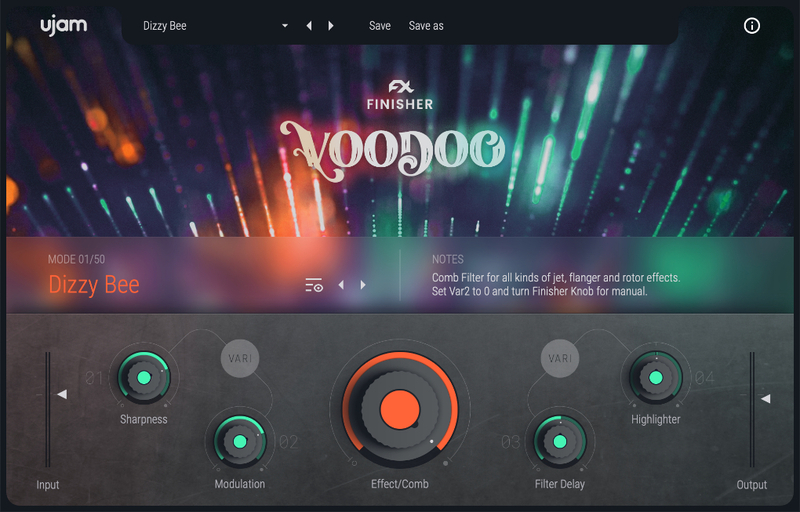
Finisher VOODOO features 50 carefully sound-designed effect configurations and more than 150 presets combining 40 distinct algorithms – everything from convolution and modulation to dynamics, distortion and EQs – even multiband – to granular and twisted effects. Five macro knobs give you full sonic control. Direct, live and intuitive. Play with pedals or knobs and automate to your heart’s content. Create musically stunning dynamic shifts and make every effect your own.
Variety
With VOODOO’s Variation controls you adjust musically useful changes to the current Mode – switch delay times, set EQ characteristics, change distortion curves and much more, often at the same time.
Highlighter
All VOODOO Modes come with UJAM's proprietary Highlighter. A combination of low and high pass filters to place your track exactly where it belongs in the mix.
Can You Cope With Magic?
Potions, spells and spices… if terms like that describe what you like for a guitar sound, now is the time to play with VOODOO. The magic is in the sound, not in the words. Cast a spell on your guitars today.
System Requirements
Operating Systems
- Windows 8 or later (64-bit only)
- macOS 10.12 - macOS 12 (64-bit only)
- You may run them on earlier versions but UJAM doesn’t support them.
For up-to-date info on UJAM products support for VST3, AAX, and Apple Silicon, please refer to the UJAM website.
Minimum Requirements
- 4 GB of RAM
- 0.07 GB of Disk Space
- 1280 x 768 px Display
- Internet Connection required for download and authorisation.
Plugin Formats
- VST, AU 2
- AU 2 version is only compatible with Logic Pro X and newer.
Supported Standards
- MIDI
Additional Information
- Comes as downloadable installer files.
- Authorize by email address and password for ujam.com within the plugin.
- If you want to move your .blob files to an external drive, UJAM recommends the use of an SSD to prevent dropouts.


