


 Log In

Free gifts available with your purchase
Note: This is a crossgrade from any paid-for UJAM product and excludes Usynth DRIVE and Finisher MICRO. Please ensure you are eligible before purchasing. The full purchase path can be found here.

The Magical Movement Machine
Animate, morph and re-groove your sounds
Surreal Transformations
With Finisher DYNAMO you embark on a journey through animated soundscapes and surreal vibes beyond the realm of the ordinary. Every Finisher FX plug-in is designed to deliver the power and flexibility of a full rack of audio processors and effects with the instant gratification that UJAM products are famous for.
Animate any sound!
- 50 versatile multi-effect modes
- 290+ presets pre-categorized to maximize workflow and productivity
- 5-pattern rhythm selector, tone control and 2 variable FX controls
Worlds of Sound
Finisher DYNAMO comes with 50 carefully designed audio effect configurations built from 27 different algorithms – from Step Filters to Multiband Distortion, from simple Delays to Convolution Reverb and many more!
The five categories of Modes in DYNAMO were programmed with specific use-cases in mind. Just pick a preset from a category and fine-tune to your delight...
- Remix - Designed to be used on full tracks and mixes for immediate remixing potential
- Solo - Optimized for use on basses and other single-voiced sounds
- Rhythm - Optimized for use on drums and percussion
- Sustain - Optimized for use on pads and sounds that are rhythmically static
- Vocal - Generate vocal chops and glitches from your own vocal tracks
The happy accident machine
There’s so much going on under the hood that it’s often hard to predict what will happen when you turn a knob in DYNAMO. A huge part of its appeal!
Pattern
DYNAMO is all about moving sounds – here you can select a rhythmical pattern that best suits your production.
Vari Knobs
The Variation Knobs adjust musically useful aspects of the current Mode – e.g. switch modulation rates, set EQ characteristics, change distortion curves and much more, often at the same time!
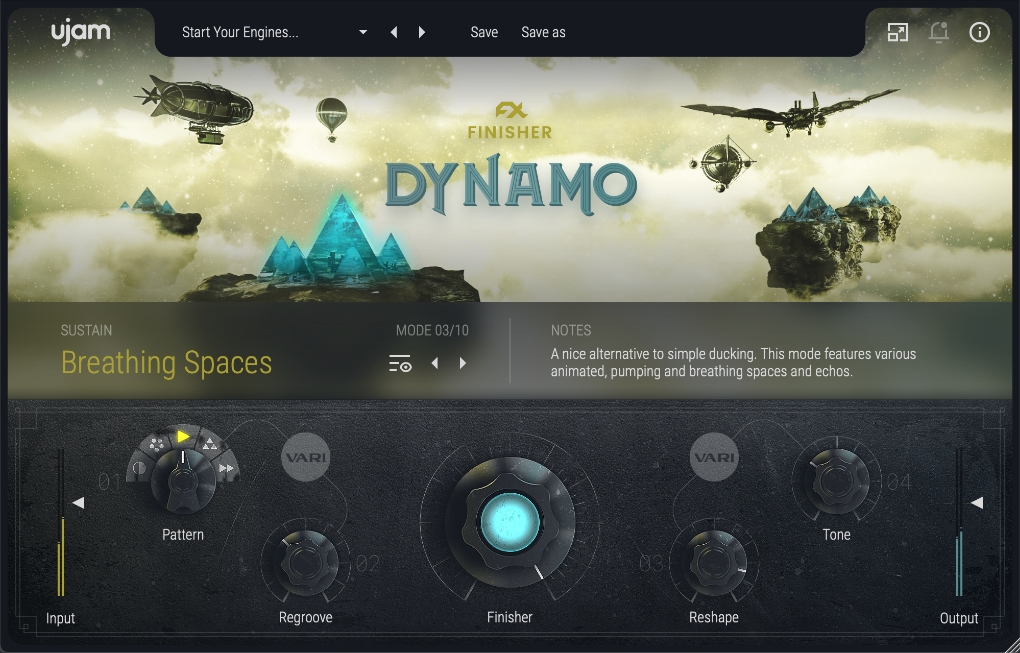
Features
- Super-Simple User Interface: Create your music without overthinking! Pick any inspiring preset and get to work instantly.
- UJAM's infamous FINISHER knob: Presets have dozens of processors under the hood, but it’s all controlled with one glorious knob.
- Tweak to perfection: In addition to the FINISHER knob, you have four VARI knobs to tweak your sounds to perfection.
System Requirements
Operating Systems
- Windows 7 or later (64-bit only)
- macOS 10.14 or later (64-bit only)
- You may run them on earlier versions but UJAM doesn’t guarantee support for them.
For up-to-date info on UJAM products support for VST3, AAX, and Apple Silicon, please refer to the UJAM website.
Minimum Requirements
- 8GB of RAM
- 0.9 GB of Disk Space
- 1280 x 768 px Display
- Internet Connection required for download and authorisation.
Plugin Formats
- VST 2, AU 2
- AU 2 version is only compatible with Logic Pro X and newer.
Supported Standards
- MIDI
Additional Information
- Comes as downloadable installer files.
- Authorize by email address and password for ujam.com within the plugin.
- If you want to move your .blob files to an external drive, UJAM recommends the use of an SSD to prevent dropouts.


