


 Log In

Free gifts available with your purchase
Primavera
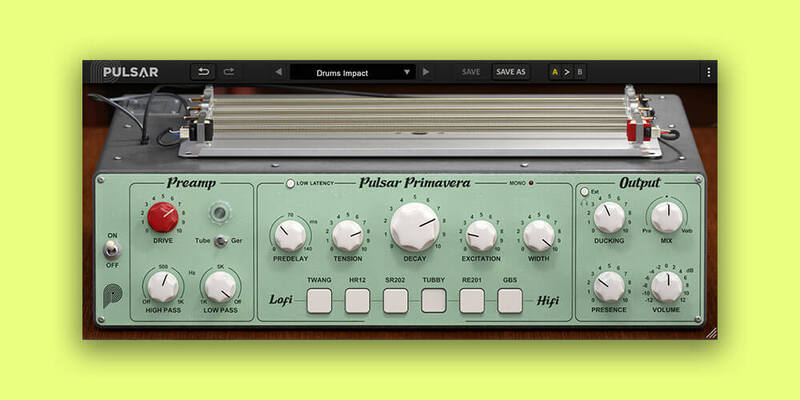
Timeless Organic and Vintage Reverb
Spring reverbs are highly sought-after vintage audio equipment, but their rarity and high cost can make them inaccessible to many. Known for their unique, warm, characterful and organic tone, these reverbs have forged a sonic identity that spanned from the ‘50s to the ‘70s, and is back in vogue today.
Pulsar Primavera is a 6-in-1 reverberation plugin that includes devices heard on countless hits throughout the ages. From lo-fi to hi-fi, each tank precisely emulates the original units' electronic and mechanical behavior. Furthermore, exclusive spring tension and excitation controls offer a wider sound palette than typical convolution models.
The software is a complete reverb chain plugin with integrated saturation, filters, presence, and ducking controls. Get the signature “twang” tone that shaped music history, packed with next-gen features and a user-friendly interface.
Realistic Spring Reverb Emulation
Most digital spring reverbs sound flat and are poorly configurable because they sample real units rather than modeling them. With real-time physical modeling, Pulsar Primavera breaks free from these limits and allows manipulation of physical reverberation parameters, like spring tension or excitation, for unique and creative sound design possibilities.
Hit and Shake the Springs! The ringing behavior of the springs can be influenced either by hand or via modulation (and automation), and used as a creative sound design effect. More than just a fun and interactive way to play with reverb springs, this feature allows the potential for some really interesting effects.
Learn more about Primavera.
Echorec
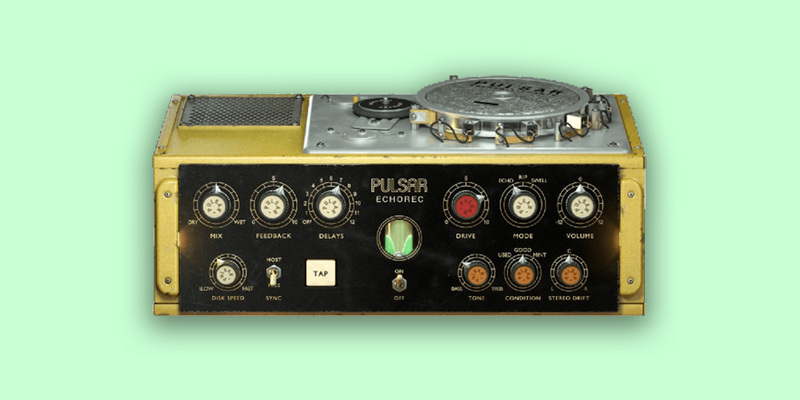
The Best Software Emulation of the Binson Echorec 2
The Pulsar Echorec is a software emulation of the iconic echo/delay unit of the same name produced by the Italian brand Binson in the 1960s.
The sound of this magnetic disk delay differs from the tape delays used at the time and has largely contributed to the audio signature of many 70s bands: Pink Floyd, The Shadows, Jimmy Page etc.

Vintage Echorec devices are known for their saturation, self-oscillation, and over-sound, all shaping the music produced in the 70s. They are also, however, known to be fragile and difficult to maintain.
The Pulsar Echorec plugin gives you a faithful emulation of this legendary echo unit; furthermore, many workflow improvements have been added to the original, such as the ability to change the motor speed (and so the delay time) in real-time or to sync it to any tempo, including a tapped tempo.
Three different units, in different conditions, have also been precisely modelled, to have all sounds from the cleanest magnetic delay, to the most grunge.
These additions and the signature sound of the Binson Echorec 2 make this echo a must-have tool for any mixer who wants to add the subtle analogue life, which is sorely lacking in digital delay plugins.
Learn more about Echorec.
System Requirements
Mac
- MacOS 10.9 and higher (M1 Apple Silicon supported) (64-bit only)
- CPU: Intel Core i3 / i5 / i7 / Xeon / Apple Silicon (M1)
- Memory: 4 GB RAM
- GPU: OpengGL 2.0 compatible GPU
- Monitor: Resolution: minimum 1024×768, recommended 1920×1080 / Refresh rate: 60 Hz
Windows
- Windows 7 with SP1 64 bit / Windows 8.1 64 bit / Windows 10 64 bit
- CPU: Intel Core i3 / i5 / i7 / i9 / Xeon or AMD Quad-Core minimum
- Memory: 4 GB RAM
- GPU: OpengGL 2.0 compatible GPU
- Monitor: Resolution: minimum 1024×768, recommended 1920×1080 / Refresh rate: 60 Hz
Compatible plugin formats
- AAX Native
- Audio Unit (AU)
- VST 2.4
- VST 3
Reviews Summary
While it aims to provide a helpful overview, it may not capture every perspective or detail. We encourage you to read individual reviews to make an informed decision.
Users highly praise these plugins for their authentic, detailed analog sound and faithful recreation of vintage hardware effects. They work exceptionally well on snares, guitars, synths, and vocals, though they are noted to run slightly CPU-heavy.


